






SCCM SQL Query IBM or Oracle Custom Query Along with Location Country Details Configuration Manager
Let’s discuss the SCCM SQL Query IBM or Oracle Custom Query Along with Location Country Details Configuration Manager. SCCM Custom report/SQL query IBM and Oracle application.
SCCM Custom report/SQL query to find out the details of machines/workstations with Oracle or IBM-related applications installed in your organization, including Site code and country details. I know it’s helpful to create an SCCM custom report for the same, but I didn’t get time to create one.
Also, I’m not an expert in SQL queries (as mentioned in the previous posts :)). I used SQL “LEFT join” to join the different views of SCCM 2007 and 2012. Ensure you replace the site code and Country names (which I used in the CASE statement) as per your requirement.
In this post, you will get all the details of the SCCM SQL Query IBM or Oracle Custom Query Along with Location Country Details Configuration Manager.

Table of Contents

- FIX SCCM SQL Replication Issues using Replication Link Analyzer
- Troubleshoot and FIX SCCM SQL Backlog Issues using SSMS
- FIX SCCM SQL-Based Database Replication Failure Between CAS Primary
SCCM SQL Query IBM or Oracle Custom Query Along with Location Country Details Configuration Manager
One of our posts shows how to FIX SCCM SQL Replication Issues using Replication Link Analyzer. SCCM Database replication issues are common in an SCCM hierarchy with CAS, primary, or secondary servers.
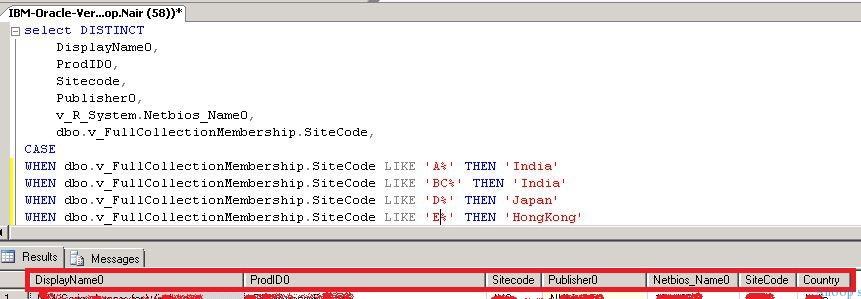
SQL Query – SCCM SQL Query IBM or Oracle Custom Query
Following is the SQL query you can use to find the machine name, Location, and country based on application installation (Oracle and IBM) in this scenario. You can use this query to find application installation details from the Add Remove Programs view.
select DISTINCT
    DisplayName0,
    ProdID0,
    Sitecode,
    Publisher0,
    v_R_System.Netbios_Name0,
    dbo.v_FullCollectionMembership.SiteCode,
CASE
WHEN dbo.v_FullCollectionMembership.SiteCode LIKE 'A%' THEN 'India'
WHEN dbo.v_FullCollectionMembership.SiteCode LIKE 'B%' THEN 'India'
WHEN dbo.v_FullCollectionMembership.SiteCode LIKE 'C%' THEN 'Japan'
WHEN dbo.v_FullCollectionMembership.SiteCode LIKE 'D%' THEN 'HongKong'
WHEN dbo.v_FullCollectionMembership.SiteCode LIKE 'E%' THEN 'HongKong'
WHEN dbo.v_FullCollectionMembership.SiteCode LIKE 'F%' THEN 'US'
WHEN dbo.v_FullCollectionMembership.SiteCode LIKE 'G%' THEN 'US'
WHEN dbo.v_FullCollectionMembership.SiteCode LIKE 'H%' THEN 'Belgium'
WHEN dbo.v_FullCollectionMembership.SiteCode LIKE 'I%' THEN 'Germany'
WHEN dbo.v_FullCollectionMembership.SiteCode LIKE 'J%' THEN 'France'
WHEN dbo.v_FullCollectionMembership.SiteCode LIKE 'K%' THEN 'Italy'
WHEN dbo.v_FullCollectionMembership.SiteCode LIKE 'L%' THEN 'PORTUGAL'
WHEN dbo.v_FullCollectionMembership.SiteCode LIKE 'M%' THEN 'SPAIN'
WHEN dbo.v_FullCollectionMembership.SiteCode LIKE 'N%' THEN 'UK'
WHEN dbo.v_FullCollectionMembership.SiteCode LIKE 'O%' THEN 'UK'
ELSE 'Unidentified' END AS 'Country'
From
   v_R_System
  JOIN v_GS_ADD_REMOVE_PROGRAMS ARP on v_R_System.ResourceID = ARP.ResourceID
  JOIN v_FullCollectionMembership on v_R_System.ResourceID = v_FullCollectionMembership.ResourceID
  LEFT JOIN v_GS_WORKSTATION_STATUS HWSCAN on v_R_System.ResourceID = HWSCAN.ResourceID
Where
   ((DisplayName0 like '%IBM%' or DisplayName0 like '%Oracle%'
    ))
Group by
    v_R_System.Netbios_Name0,
    DisplayName0,
    ProdID0,
    Publisher0,
    Sitecode
Resources
SCCM Related Posts Real World Experiences Of SCCM Admins (anoopcnair.com)
SCCM Video Tutorials For IT Pros – HTMD Blog #2 (howtomanagedevices.com)
We are on WhatsApp now. To get the latest step-by-step guides, news, and updates, Join our Channel. Click here. HTMD WhatsApp.
Author
Anoop C Nair is Microsoft MVP! He is a Device Management Admin with more than 20 years of experience (calculation done in 2021) in IT. He is a Blogger, Speaker, and Local User Group HTMD Community leader. His main focus is on Device Management technologies like SCCM 2012, Current Branch, and Intune. He writes about ConfigMgr, Windows 11, Windows 10, Azure AD, Microsoft Intune, Windows 365, AVD, etc.




Discussion