






SCCM SQL Query to Find Collections Used for App Deployment | ConfigMgr
Let’s discuss SCCM SQL Query to Find Collections Used for App Deployment | ConfigMgr. In this post, I will explain the ConfigMgr Application, Packages, and collections used to deploy using the SQL query.
We shared many other SQL queries and custom reports with the HTMD Forum community. The following sections provide more details about the SCCM SQL Query to Find Collections Used for App Deployment.
In this post, we will see two different SQL queries that provide Information on Applications and Packages in your environment, including their deployed collection and Content source path.
The first query in this post will give you Information related to Packages and their relation to Collection and Advertisement. The second query will provide Information on the applications and to which collection it is deployed.

Table of Contents
SQL Query – Find Collections Used for App Deployment
This SQL Query will help you use the‘ when’ and ‘then ‘syntax. Follow the steps below to get the SCCM package or application collection details.
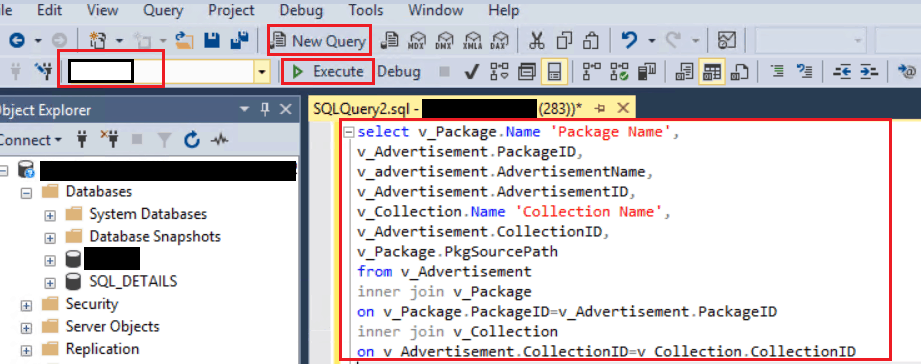
- Open the SQL Management Studio.
- Connect your Database Engine.
- Right-click on your database CM_XXX and click on ‘New Query.’
- Copy the following SQL query to find the application deployment report with collection details.
- Click on the Execute button.
- The Best Way to Find Collection ID in SCCM | ConfigMgr
- SCCM Collections – How To Build Static Collection SCCM
- How do you create dynamic collections? Create Collection Folders
- Create AD Group-Based SCCM Collection
- SCCM Collections How to Create Direct Membership Collection ConfigMgr
- SCCM Collection Create AD Group Based – Part 3 | ConfigMgr
Package Advertisement and Collection
The SQL query below lets you check the package advertisement and collection details. You can use SQL Server Management Studio to get the reports.
select v_Package.Name 'Package Name',
v_Advertisement.PackageID,
v_advertisement.AdvertisementName,
v_Advertisement.AdvertisementID,
v_Collection.Name 'Collection Name',
v_Advertisement.CollectionID,
v_Package.PkgSourcePath
from v_Advertisement
inner join v_Package
on v_Package.PackageID=v_Advertisement.PackageID
inner join v_Collection
on v_Advertisement.CollectionID=v_Collection.CollectionID
Application and its Collection
Here is the query to get the reports of applications and their collection.
SELECT DISTINCT app.DisplayName AS 'Application Name',
aa.CollectionName AS 'Deployed to Collection',
aa.CollectionID,v_ContentInfo.ContentSource
FROM dbo.fn_ListDeploymentTypeCIs(1033) AS dt
inner join dbo.fn_ListLatestApplicationCIs(1033) AS app ON dt.AppModelName = app.ModelName
left outer join v_AppDeploymentSummary ads on app.CI_ID = ads.CI_ID
left outer join v_ApplicationAssignment aa on ads.AssignmentID = aa.AssignmentID
left outer join v_ContentInfo on DT.CONTENTID = V_CONTENTINFO.CONTENT_UNIQUEID
where aa.CollectionName not like '%NULL%'
Order by [Application Name];
Result of SQL Query
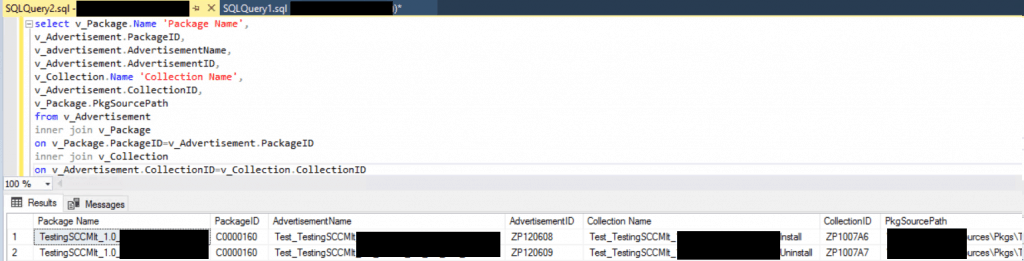
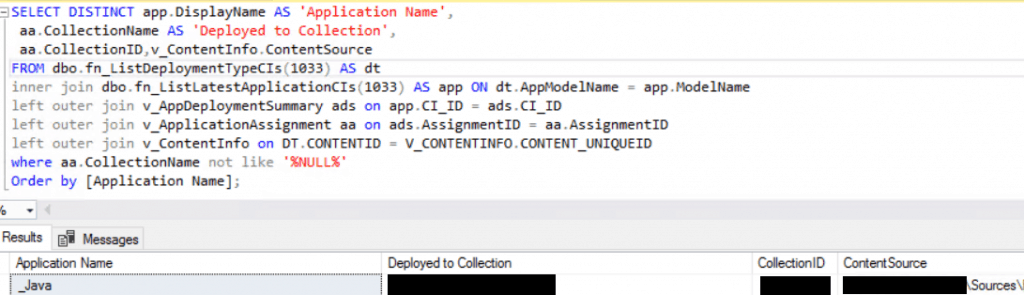
The two different SQL queries above will give you the result below.
- Result of Package and Collection Query
Result of Application and Collection Query
References
- Creating custom report models for Configuration Manager in SQL Server Reporting Services
- https://www.anoopcnair.com/sccm-report-include-membership-collection-rule-configmgr-query/
- https://www.anoopcnair.com/report-for-sccm-package-size/
- https://www.anoopcnair.com/sql-query-all-sccm-applications-with-no-deploy/
We are on WhatsApp. To get the latest step-by-step guides and news updates, Join our Channel. Click here –HTMD WhatsApp.
Author
Ankit Shukla, an IT professional with over seven years of experience, has worked on SCCM/MECM since 2012. During this time, he has extensively dealt with various aspects of the tool, such as migration, infrastructure designing, OSD, custom SQL reporting, and client-side troubleshooting. Ankit’s blog posts reflect his hands-on experience addressing issues and providing practical solutions. The primary aim of his posts is to cater to




Discussion