






SCCM Task Sequence App Failure with Error 0x87d00267 after 2107 Update
Let’s check the SCCM task sequence app failure issue with error code 0x87d00267. This is reported only after the update or upgrade to the 2107 version of Configuration Manager. I have highlighted this issue in different community forums but have not seen any Microsoft documentation on this issue with error 0x87d00267.
There is another known issue with the 2107 version, and that is documented in the known issues and the Microsoft release notes. After the 2107 update, if you change app X, task sequence A will fail to run on clients that receive the deployment policy after the site update. The SCCM client can’t get all of the policies for the task sequence and referenced applications.
This post will see the workaround for this SCCM Task Sequence App Failure with Error 0x87d00267. I’m sure Microsoft is going to fix this issue with the latest hotfix for SCCM 2107 soon. Until that time, you might need to use the workaround provided in the below section.
Task Sequence App Failure with Error 0x87d00267
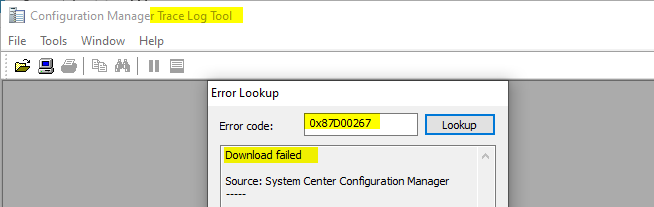
First of all, you will need to understand what is the meaning of the error code 0x87D00267. You can try to use the method to translate SCCM Error Codes To Error Messages. The error 0x87D00267 translates to Download failed.

In normal scenarios, you will need to check the ContentTransferManager.log, CAS.log, LocationServices.log, etc., on your SCCM client to see whether you can get any related error or not? But I don’t think this approach is very relevant for the known issues with SCCM 2107 scenario here.
I think you would see a similar error in the DataTransferService.log on the client log folder C:\Windows\CCM\Logs. I have not tested this scenario; let me know in the comments if you see this error or not. These snippets are taken from the previous version (2006) known issue.
DTS::AddTransportSecurityOptionsToBITSJob - Failed to attach certificate context to DTS job '{C429F9F4-4C28-458F-AF21-C5CCB5B14780}', error 0x80070002.
smsts.log
Policy Evaluation failed, hr=0x87d00267
...
Install application action failed: '{application name}'. Error Code 0x87d00267
Fix Task Sequence App Failure with Error 0x87d00267
We have the same issue with SCCM 2107 because 2006 known issue calls about App install and Software Update policies.
I don’t think the following suggestion to resolve this issue is not a fix; rather, I would say a dirty workaround. As per the previous KB article for a similar problem with version 2006, this issue occurs when the task sequence runs after the initial client installation process in environments where the management point is configured to use HTTPS.
If you have this issue in your environment, you can raise a ticket with Microsoft support, and since this is a known issue with the product, they won’t charge you anything. I don’t believe this issue with SCCM 2107 is a similar issue. I want to wait and see Microsoft’s recommendation and finding on this issue.
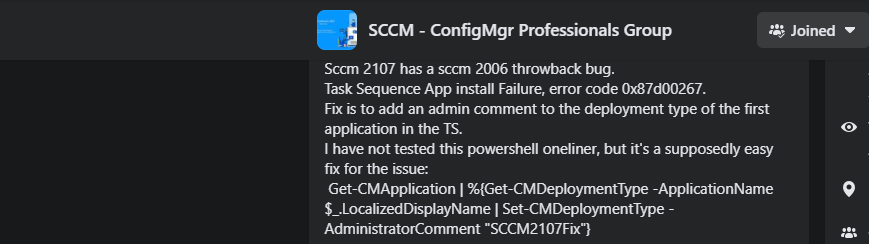
Workaround
I have not tested any of these workarounds. I would recommend trying this in a staging environment before implementing it in production. I prefer the manual method mention below to test this in a staging environment.
The manual method is explained neatly by MVP colleague Jörgen Nilsson.
- Create a new app revision to resolve this issue – by updating the comment of application deployment type.
Automated method – Another workaround shared in the community forum is to use the following PowerShell command to resolve this issue.
Get-CMApplication | %{Get-CMDeploymentType -ApplicationName $_.LocalizedDisplayName | Set-CMDeploymentType -AdministratorComment "SCCMBugFix"}



I’m on 2111 latest hotfix rollup and still getting this error, I’m about to lose my mind.
Same here, did you get around it?
Staffwithout SMSTS.log details it is very difficult to troubleshoot.
Forgot to mention – The manual workaround fixed it
Where do you run the powershell command, server, client, in the task sequence?
Get-CMApplication | %{Get-CMDeploymentType -ApplicationName $_.LocalizedDisplayName | Set-CMDeploymentType -AdministratorComment “SCCMBugFix”}
I was also getting this issue after installing the CMG…. on CM 2309. I need to add the new CMG as fallback for MP on the Boudary Groups….
I’m also getting this issue. Applications are not installing while imaging the device, but it is for only 1 location. Remaining all are working fine. As per smsts logs, it is picking the application and adding to task sequence but getting some http error. And Image completed without installation of apps. Currently we are using 2403 version. Please suggest the solution