






FIX: SCCM Task Sequence Error 0x80004005 Failed to Run
Let’s see how you can FIX SCCM Task Sequence Error 0x80004005. You might encounter a prompt message An error occurred while retrieving policy for this computer during Operating System Deployment with SCCM Task Sequence.
The Task Sequence Error 0x80004005 is generic, and the solution could differ based on the details you get into the logs.
In this scenario, we onboarded a new hardware model with a MAC address directly to the Configuration Manager. We added a newly imported computer to a collection for deploying operating systems to the computer. After initiating the deployment, it failed with the task sequence Error 0x80004005 at the initial stage.
It’s always recommended to examine the SMSTS log for task sequence failure issues to help you understand the failure prompt and troubleshoot task sequence error 0x80004005. We have extensive coverage related to OSD troubleshooting within HTMD community posts.

Table of Contents
Issue Summary
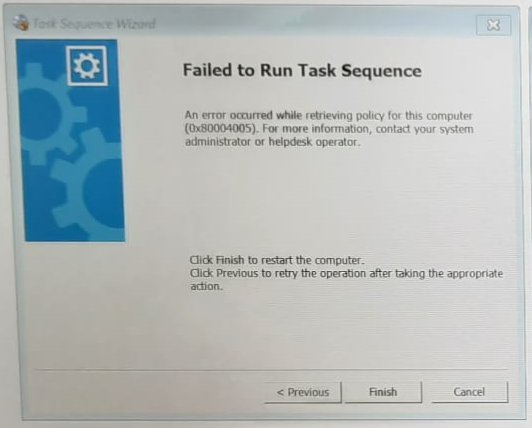
This error appears at the initial stage when you have started the deployment. Task Sequence fails with the following error message –
An error occurred while retrieving policy for this computer (0x80004005). For more information, contact your system administrator or helpdesk operator.
- FIX: SCCM Task sequence has failed with the error code 0x80070057
- Easily FIX SCCM Task Sequence Unable to find a volume Error Code 0x80070490
- Deploy Microsoft Edge WebView2 Using SCCM ConfigMgr
In this scenario, Task Sequence terminated at the beginning. You will collect the logs at WinPE x:\windows\temp\smstslog\smsts.log. To get the command prompt window, you have to press F8 key.
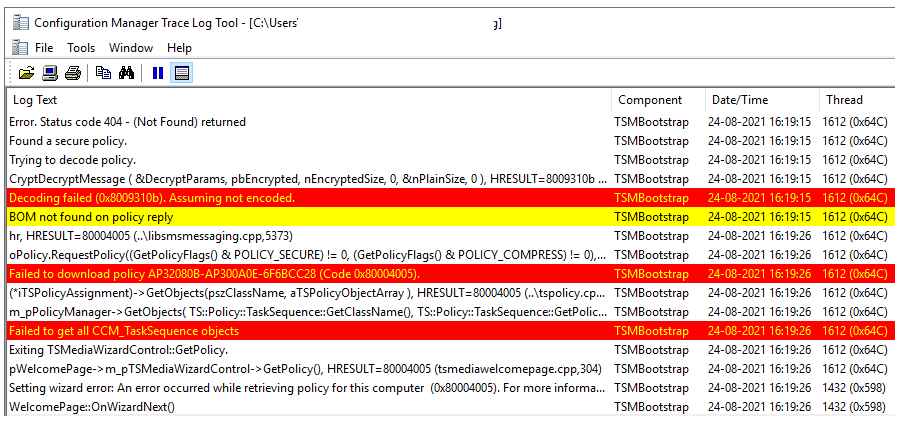
More you can explore SCCM OSD Task Sequence Troubleshooting Steps by Step Ultimate Guide SMSTS.log. Here’s the highlight from the SMSTS.log –
- Error. Status code 404 – (Not Found)
- Decoding failed (0x8009310b). Assuming not encoded.
- BOM not found on policy reply
- Failed to download policy AP32080B-AP300A0E-6F6BCC28 (Code 0x80004005).
<![LOG[Error. Status code 404 - (Not Found) returned]LOG]!><time="16:19:15.950-480" date="08-24-2021" component="TSMBootstrap" context="" type="0" thread="1612" file="libsmsmessaging.cpp:10121">
<![LOG[Found a secure policy.]LOG]!><time="16:19:15.950-480" date="08-24-2021" component="TSMBootstrap" context="" type="1" thread="1612" file="libsmsmessaging.cpp:5186">
<![LOG[Trying to decode policy.]LOG]!><time="16:19:15.950-480" date="08-24-2021" component="TSMBootstrap" context="" type="1" thread="1612" file="libsmsmessaging.cpp:5188">
<![LOG[CryptDecryptMessage ( &DecryptParams, pbEncrypted, nEncryptedSize, 0, &nPlainSize, 0 ), HRESULT=8009310b (..\windes.cpp,451)]LOG]!><time="16:19:15.950-480" date="08-24-2021" component="TSMBootstrap" context="" type="0" thread="1612" file="windes.cpp:451">
<![LOG[Decoding failed (0x8009310b). Assuming not encoded.]LOG]!><time="16:19:15.950-480" date="08-24-2021" component="TSMBootstrap" context="" type="1" thread="1612" file="libsmsmessaging.cpp:5208">
<![LOG[BOM not found on policy reply]LOG]!><time="16:19:15.950-480" date="08-24-2021" component="TSMBootstrap" context="" type="2" thread="1612" file="libsmsmessaging.cpp:5351">
<![LOG[hr, HRESULT=80004005 (..\libsmsmessaging.cpp,5373)]LOG]!><time="16:19:26.970-480" date="08-24-2021" component="TSMBootstrap" context="" type="0" thread="1612" file="libsmsmessaging.cpp:5373">
<![LOG[oPolicy.RequestPolicy((GetPolicyFlags() & POLICY_SECURE) != 0, (GetPolicyFlags() & POLICY_COMPRESS) != 0), HRESULT=80004005 (..\tspolicy.cpp,2577)]LOG]!><time="16:19:26.970-480" date="08-24-2021" component="TSMBootstrap" context="" type="0" thread="1612" file="tspolicy.cpp:2577">
<![LOG[Failed to download policy AP32080B-AP300A0E-6F6BCC28 (Code 0x80004005).]LOG]!><time="16:19:26.970-480" date="08-24-2021" component="TSMBootstrap" context="" type="3" thread="1612" file="tspolicy.cpp:2577">
<![LOG[(*iTSPolicyAssignment)->GetObjects(pszClassName, aTSPolicyObjectArray ), HRESULT=80004005 (..\tspolicy.cpp,1574)]LOG]!><time="16:19:26.970-480" date="08-24-2021" component="TSMBootstrap" context="" type="0" thread="1612" file="tspolicy.cpp:1574">
<![LOG[m_pPolicyManager->GetObjects( TS::Policy::TaskSequence::GetClassName(), TS::Policy::TaskSequence::GetPolicyCategory(), TS::Policy::TSPolicyAssignment::POLICY_TS_FOR_CD_AND_PXE, aTSPolicyObjectArray ), HRESULT=80004005 (tsmediawizardcontrol.cpp,1196)]LOG]!><time="16:19:26.970-480" date="08-24-2021" component="TSMBootstrap" context="" type="0" thread="1612" file="tsmediawizardcontrol.cpp:1196">
<![LOG[Failed to get all CCM_TaskSequence objects]LOG]!><time="16:19:26.970-480" date="08-24-2021" component="TSMBootstrap" context="" type="3" thread="1612" file="tsmediawizardcontrol.cpp:1196">
<![LOG[Exiting TSMediaWizardControl::GetPolicy.]LOG]!><time="16:19:26.970-480" date="08-24-2021" component="TSMBootstrap" context="" type="0" thread="1612" file="tsmediawizardcontrol.cpp:1455">
<![LOG[pWelcomePage->m_pTSMediaWizardControl->GetPolicy(), HRESULT=80004005 (tsmediawelcomepage.cpp,304)]LOG]!><time="16:19:26.970-480" date="08-24-2021" component="TSMBootstrap" context="" type="0" thread="1612" file="tsmediawelcomepage.cpp:304">
<![LOG[Setting wizard error: An error occurred while retrieving policy for this computer  (0x80004005). For more information, contact your system administrator or helpdesk operator.]LOG]!><time="16:19:26.970-480" date="08-24-2021" component="TSMBootstrap" context="" type="0" thread="1432" file="tsmediawizardcontrol.cpp:1646">
FIX – SCCM Task Sequence Error 0x80004005 Failed to run while retrieving policy
Let’s check the solution to fix this task sequence error 0x80004005 –
- Launch SCCM Console, Navigate to Assets and Compliance > Devices.
- Look for the device, Remove the device entry from the SCCM Console.
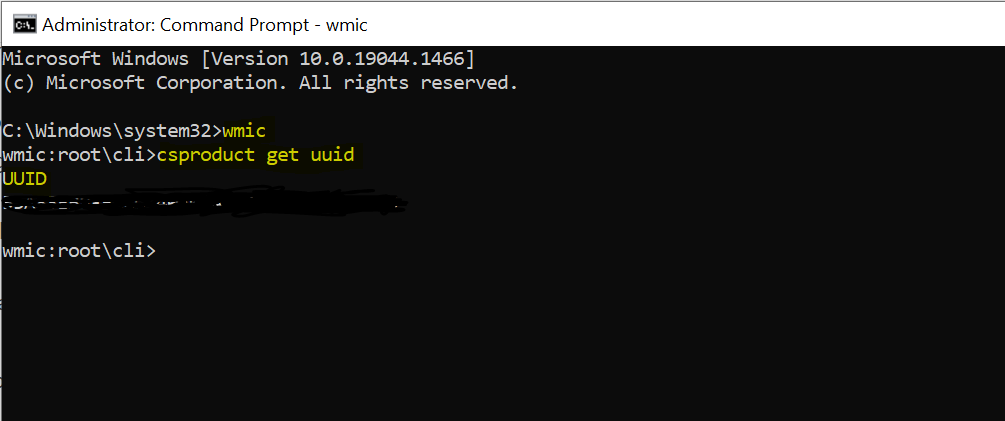
Note – Collect the SMBIOS GUID for a device under the Summary tab in SCCM Console. To get SMBIOS GUID in a machine, Open the command prompt, Run command: wmic csproduct get uuid
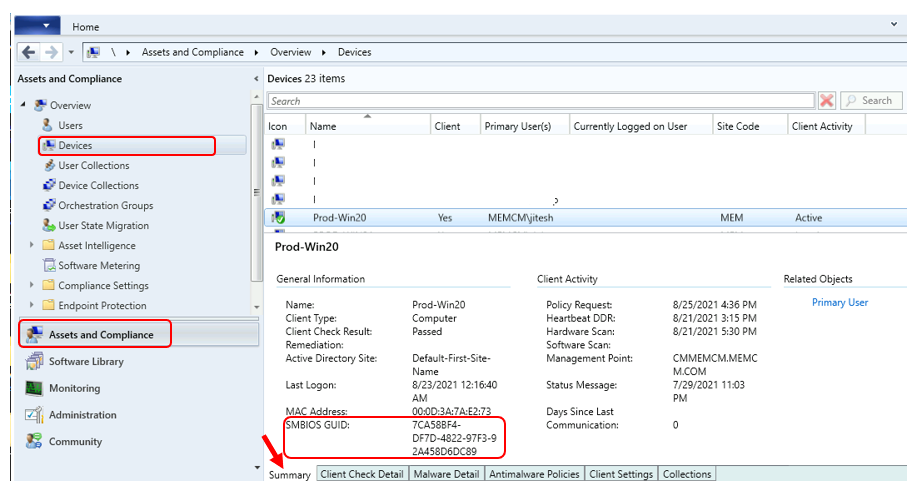
SMBIOS is the GUID stored in the device BIOS or UEFI. It’s unique to the device, and SCCM uses it to recognize imported computers. Collect the information as stated above. This time add a computer with the SMBIOS GUID information, import the computer with SMSBIOS GUID, and complete the wizard.
You should add a newly imported computer to a collection. This allows you to create advertisements for deploying operating systems to the computer immediately.
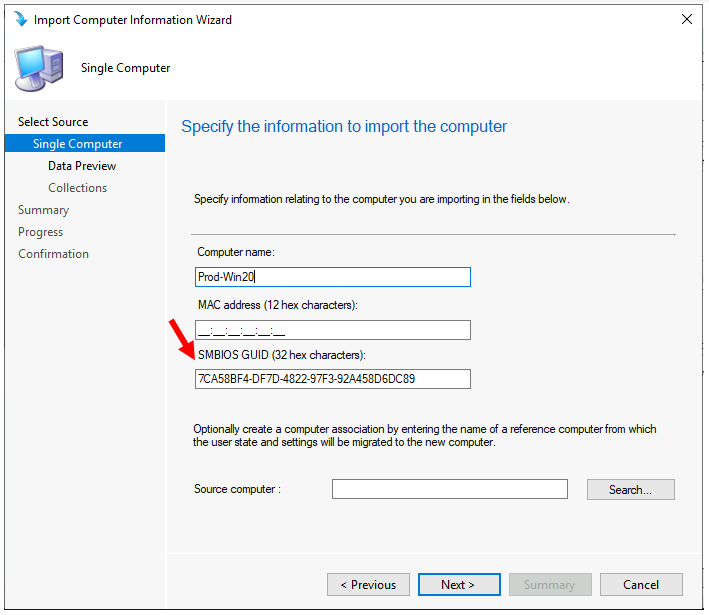
Once you are done with the above steps, Please wait to advertise the computer information. Restart the target machine and reinitiate the task sequence deployment. It should continue without any errors.
For PCs that do not successfully boot from PXE, the SMSPXE.log on the server hosting the PXE Service Point can be examined for the PC’s SMBIOS GUID. The line that contains this information will be something as follows:
MAC=<Mac_Address> SMBIOS GUID=<SMBIOS_GUID> > Device found in the database. MacCount=x GuidCount=y
To obtain the SMBIOS GUID from a PC having the problem, use one of the below methods:
At a command prompt, run the command:
wmic
When the promptwmic:root\cli>appears, type in the command:
csproduct get uuid
The SMBIOS GUID for the PC should be displayed. For Example – 4C4C4544-0032-5610-8037-C8C04P604A63
Let us know your experience with the error code and how you were able to fix it in the comment section.
Resources
- OSD Known Issues Troubleshooting Guide |SCCM |ConfigMgr
- ConfigMgr OSD Troubleshooting Known Issues Guide Part 2 | SCCM
- FIX: SCCM Task Sequence Failed to load class properties 0x80041002 (2147749890)
- FIX: SCCM Task sequence has failed with the error code 0x800700A1
We are on WhatsApp. To get the latest step-by-step guides and news updates, Join our Channel. Click here –HTMD WhatsApp.
Jitesh Kumar, Microsoft MVP, has over six years of working experience in the IT Industry. He writes and shares his experiences related to Microsoft device management technologies and IT Infrastructure management. His primary focus is Windows 10/11 Deployment solution with Configuration Manager, Microsoft Deployment Toolkit (MDT), and Microsoft Intune.




Great post !
One Problem…. the computer getting this error is NOT in the devices list
StaffHello Rolf, Can you please add more details and post them to HTMDForum.com We’ll try to check and help you!
We were looking at failed TS logs at a site and we saw the same “Decoding failed (0x8009310b). Assuming not encoded.” entry but with no other entries in red. A google search lead us to this article, but the issue was not the SMC Bios guid, as all computers we were trying to image were failing but were not in SCCM. Our issues was good old SCCM boundaries. The office had added a bunch of subnets and then split some off. We updated the SCCM boundaries, and all was well. Hurray!