






SCCM Technical Preview 2311 New Features Improvements
Let’s check SCCM Technical Preview 2311 new features and improvements. This is the first Technical Preview version after the announcement of the latest production version of SCCM 2309.
The technical preview branch of Configuration Manager is not designed or supported for use in a production environment, as it is intended solely for use in lab environments and is licensed accordingly.
Technical Previews are pre-release builds that are made available early. While features from previous versions of the technical preview may remain in later versions, a technical preview installation does not offer the option to upgrade to a current branch installation, nor does it receive updates from the current branch release.
Microsoft plans to release updates for SCCM current branch, and technical preview version based on it SCCM CB production release has changed 2 versions per year in March (xx03) and September (xx09). SCCM Technical Preview version cadence will also get changed from 12 releases to 4 versions per year.

If you run the previously released SCCM technical preview 2307, you can directly upgrade to the latest version 2311. When you install a new technical preview site, this release is also available as a baseline version.
Download SCCM Technical Preview 2311 Baseline Version
When you install a new technical preview site, use the latest baseline version 2311. After installing a baseline version, you can use in-console updates to update your installation with the most recent SCCM Technical preview version.
There will be four Technical Preview releases per year. Two will be released before each production current branch release, and one of the Technical Preview releases will be a baseline release.
Technical Preview Baseline is 180 days evaluation. For new installations, the 2311 baseline version of the Microsoft Configuration Manager Technical Preview Branch is available on the link: CM2311TP-Baseline or from the Eval center.
Here’s how you can build SCCM Technical Preview LAB by following the guide, How to Build Configuration Manager Technical Preview LAB | SCCM.
SCCM Technical Preview 2311 New Features
Let’s check the new features to try out in SCCM 2311 technical preview version. Starting with Microsoft Configuration Manager version 2311, You will experience the addition of new features and improvements.
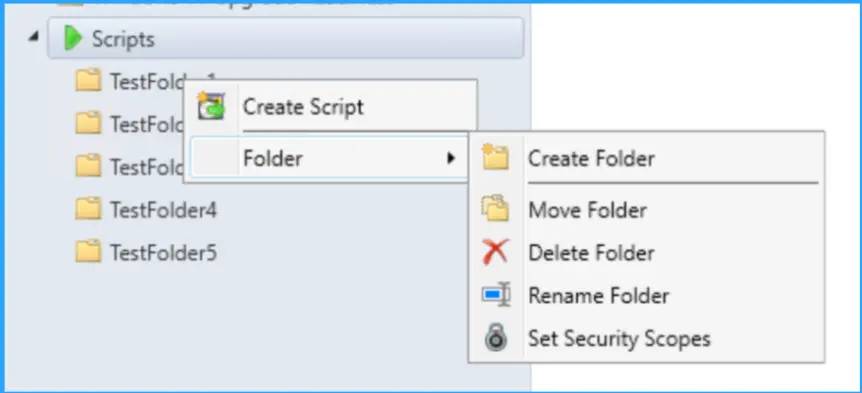
Folder Support for Scripts Node in Software Library
Starting with SCCM Technical preview 2311 release, You can now organize scripts by using folders. This change allows for better categorization and management of scripts. Full Administrator and Operations Administrator roles can manage the folders.
Support for ARM64 Operating System Deployment
Configuration Manager operating system deployment support is now added on Windows 11 ARM64 devices. Currently Importing and customizing Arm64 boot images, Wipe and load Task Sequence, Media creation Task sequence and WDS PXE for Arm64 is supported.
Resource Access Profiles and Deployments Block Configuration Manager Upgrade
Any configured Resource access profiles and associated deployments will block the Configuration Manager upgrade. Please consider deleting them and moving the co-management workload for Resource Access (if co-managed) to Intune.
WildCard Support added in Defender Exploit Guard Policy for Controlled Folders
Defender Exploit Guards policy for Controlled Folder now accepts Regex in the file path for apps.
E.g. [C:\Folder\Subfolder\app?.exe] [C:\Folder1\Sub*Name]New Parameter SoftwareUpdateO365Language is added to Save-CMSoftwareUpdate cmdlet
A new parameter SoftwareUpdateO365Language is now added to PowerShell Save-CMSoftwareUpdate cmdlet. Customers now don’t have to check a specific language in the SUP Properties (causing a metadata download for that language for all updates). Languages need to be in O365 format to be consistent with Admin Console.
PowerShell Commandlet: Save-CMSoftwareUpdate – SoftwareUpdateO365Language <language name> (<region name>)"We are on WhatsApp. To get the latest step-by-step guides and news updates, Join our Channel. Click here –HTMD WhatsApp.
Author
About Author – Jitesh, Microsoft MVP, has over six years of working experience in the IT Industry. He writes and shares his experiences related to Microsoft device management technologies and IT Infrastructure management. His primary focus is Windows 10/11 Deployment solution with Configuration Manager, Microsoft Deployment Toolkit (MDT), and Microsoft Intune.




Discussion