






SCCM Third-Party Patching Round Table Discussions
Hello, Today we will discuss about SCCM Third-Party Patching Round Table Discussions. I have many step-by-step guides about SCCM third-party patching, and I will share more details in the webinar round table discussions.
| Index |
|---|
| SCCM Third-Party Patching Catalog Version Update |
| SCCM Third-Party Patching Guides |
| SCCM Third-Party Patching through Video Tutorial |
| Register for Webinar |
Check out the Webinar Recording and Download the slides
SCCM Third-Party Patching Catalog Version Update
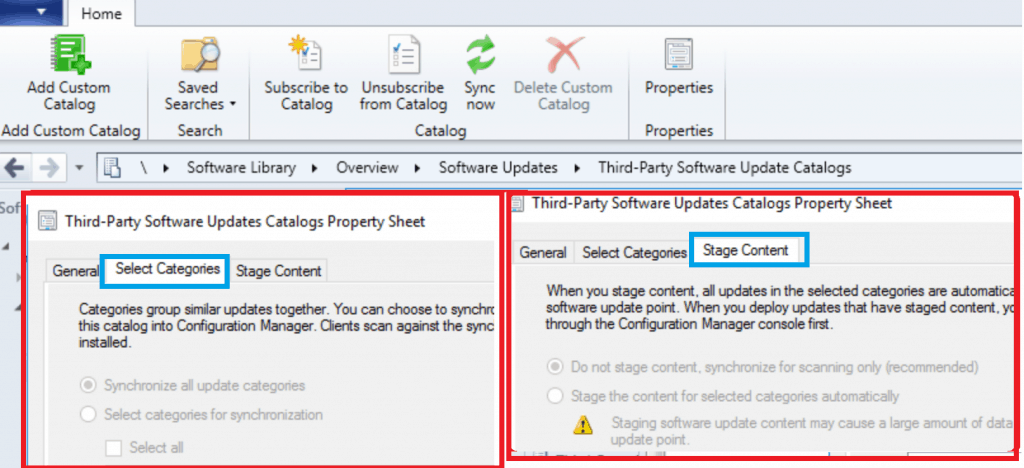
I recently learned about an exciting update to SCCM 1906 TP version that includes a new catalog version (V3) with some fantastic features. One of the most significant improvements is the ability to choose and sync only the categories of products you need, saving a lot of time and making the process more efficient.
Additionally, you now have the option to select the content of all updates in the chosen categories, giving you greater control over your updates. These new features offer greater customization options and flexibility, which can help us better manage and maintain our systems. It’s excellent that SCCM is continually improving and adding features to make our work more accessible and more efficient.

The Microsoft SCCM product team works with hardware, OEM, and Software vendors, such as DELL, HP, Lenovo, and PatchMyPC, to integrate their updates with the new partner catalog version (V3) in SCCM.
- Select Categories
- Select Stage Content
SCCM Third-Party Patching Guides
I have already published three (3) in-depth guides and a Facebook Live to help the IT community and SCCM admins start testing new SCCM third-party patching options.
- Third-Party Software Updates Setup Step-by-Step Guide
- Troubleshooting Process Guide
- List of Free SCCM Catalogs for Third-Party Software Updates
SCCM Third-Party Patching through Video Tutorial
Learn how to efficiently manage third-party patching in SCCM by watching our step-by-step video tutorial on selecting categories and staging content.
Register for Webinar
Here are more details about the Webinar titled ConfigMgr Third-Party Patching Roundtable. Don’t forget to join and catch me in action.
NOTE! In this round-table webinar, you’ll gain insight into the root of the problem and the modern tools and solutions experts use to solve it.
- Webinar Title: ConfigMgr Third-Party Patching Roundtable
- Presenters:
- Paul Winstanley, Microsoft Enterprise Mobility MVP
- Andy Malone, Microsoft MVP, consultant, speaker, and author
- Bob Kelly, Director, Flexera
- Anoop Nair, Microsoft Enterprise Mobility MVP
- Harjit Dhaliwal, Microsoft MVP
- Date: Tuesday, June 25th 2019 – 9am PDT / 12pm EDT / 5pm GMT
Register here – Webinar: ConfigMgr Third-Party Patching Roundtable

Resources
- SCCM 1906 TP New Feature Sneak Peak
- Third-Party Software Updates Setup Step-by-Step Guide
- Troubleshooting Process Guide
- List of Free SCCM Catalogs for Third-Party Software Updates
We are on WhatsApp. To get the latest step-by-step guides and news updates, Join our Channel. Click here –HTMD WhatsApp.
Author
Anoop C Nair is Microsoft MVP! He is a Device Management Admin with more than 20 years of experience (calculation done in 2021) in IT. He is a Blogger, Speaker, and Local User Group HTMD Community leader. His primary focus is Device Management technologies like SCCM 2012, Current Branch, and Intune. He writes about ConfigMgr, Windows 11, Windows 10, Azure AD, Microsoft Intune, Windows 365, AVD, etc




Discussion