






SCCM Uninstall Remove CAS Primary Secondary Server ConfigMgr
SCCM Uninstall Remove CAS Primary Secondary Server ConfigMgr. This post provides useful details about removing, uninstalling, or deleting Site server (s) rather than Decommissioning sites and Hierarchies.
Also, we will discuss the difference between the options Uninstall and Delete (Secondary site/s). This blog post teaches us how to uninstall and delete secondary site servers.
We must follow a bottom-up approach when we want to remove the entire SCCM/ConfigMgr hierarchy with many site servers (primary and secondary etc.).
That means, Removing secondary sites attached to primary sites, primary sites from the central administration site (CAS), and then the central administration site (CAS) itself.

- ConfigMgr Secondary Server Upgrade Step by Best Step Guide | SCCM
- Recover Secondary Site Fix SCCM Secondary Server Recovery Failed Issue | ConfigMgr
- Check SCCM Secondary Server Hotfix Installation Status
Table of Contents
SCCM Uninstall Remove CAS Primary Secondary Server ConfigMgr

Another way to uninstall /remove SCCM 2012 CAS server from hierarchy https://configmgrblog.com/2013/07/24/want-to-get-rid-of-your-configmgr-2012-central-administration-site/
We can REUSE the site code of the secondary server/s if it is no longer used in your Configuration Manager hierarchy or the Active Directory forest.
However, Site codes cannot be used more than once in a ConfigMgr hierarchy for a CAS or primary sites. If you reuse a site code, you risk having object ID conflicts in your ConfigMgr hierarchy.
When we want to remove the entire SCCM/ConfigMgr hierarchy with many site servers (primary and secondary, etc.), we’ve got to follow a bottom-up approach. That means Removing secondary sites attached to primary sites, primary sites from the central administration site (CAS), and then the central administration site (CAS) itself.
More Details on decommissioning of sites and Hierarchies through TechNet.
Uninstall/Remove/Decommission Secondary Site
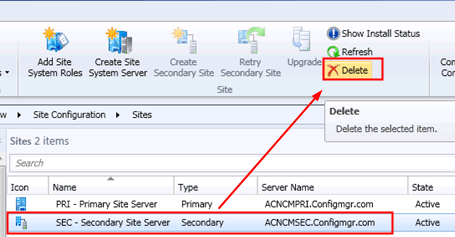
Go To Administration—> Site Configuration –> Sites, click on the secondary site you want to delete, and select the Delete option in the ribbon.
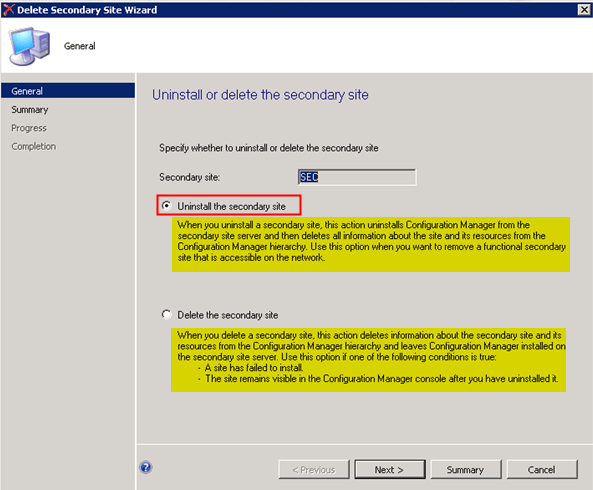
There are two options in the uninstallation wizard.
a) Uninstall the Secondary Site
Use the first option, Uninstall the secondary Site, when you want to remove a functional secondary site accessible on the network.
When you uninstall a secondary site, ConfigMgr is removed from the secondary site server, and all information about the site and its resources is deleted from the ConfigMgr hierarchy.
b) Delete the Secondary Site
Use the Delete the Secondary Site option if one of the following conditions is true:
– A site has failed to install
– The site remains visible in the ConfigMgr console after uninstalling it.
When you delete a secondary site, this action deletes information about the secondary site and its resources from the ConfigMgr hierarchy and leaves ConfigMgr installed on the secondary site server.
- How to Expand SCCM CB Standalone Primary Server with CAS Server Configuration Manager ConfigMgr
- How to Recover SCCM CB Primary Server Using SQL Database Backup Configuration Manager ConfigMgr
- New ConfigMgr Primary Server Installation Step-by-Step Guide | SCCM
Uninstall/Remove/Decommission Primary or CAS Site
You must follow the same steps to remove the standalone/CAS attached to the primary server. The same applies to CAS server removal. But the approach should always be BOTTOM UP.
What does Bottom-Up mean? – You need to remove in the following order
- Remote Site Roles (MP, SUP etc)
- Secondary servers
- Primary servers
- CAS
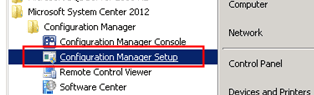
1. Log in to the primary or CAS server and Click Configuration Manager Setup from the Start menu
2. Select the Uninstall a Configuration Manager Site option.
When a secondary site is attached to the primary site, we must remove the secondary site before you can uninstall the primary site. Otherwise, it won’t allow you to proceed with the uninstallation.
When a primary site is attached to the central administration site (CAS), we must uninstall the primary site before we can uninstall the central administration site.
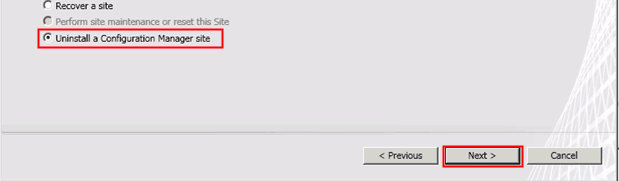
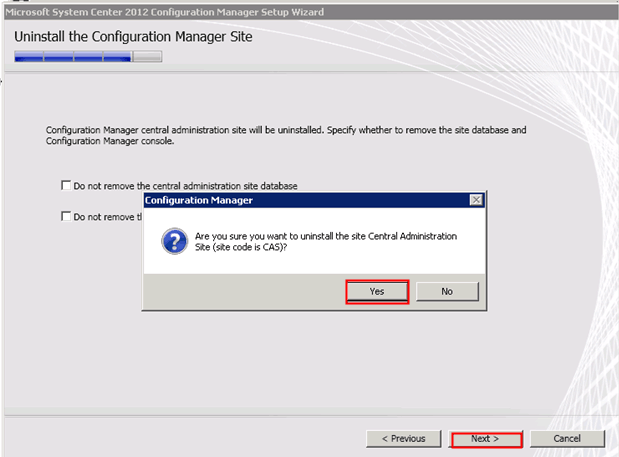
3. Click Yes and Next
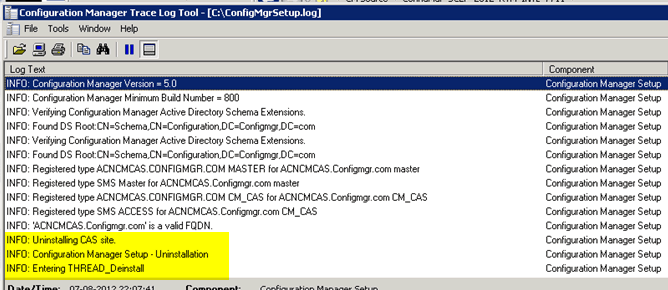
4. We can verify the ConfigMgrSetup.log file for more details about the uninstallation of the site.
INFO: Uninstallation the CAS site
INFO: Configuration Manager Setup - Uninstallation
INFO: Entering THREAD_Deinstall
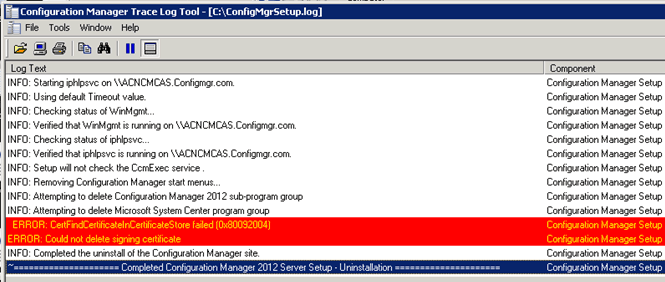
5. Review the ConfigMgrSetup.log file to check whether Uninstallation has been completed successfully or not.
INFO: Completed the uninstall of the Configuration Manager Site
We are on WhatsApp. To get the latest step-by-step guides and news updates, Join our Channel. Click here –HTMD WhatsApp.
Author
Anoop C Nair has been Microsoft MVP from 2015 onwards for 10 consecutive years! He is a Workplace Solution Architect with more than 22+ years of experience in Workplace technologies. He is also a Blogger, Speaker, and leader of the Local User Group Community. His main focus is on Device Management technologies like SCCM and Intune. He writes about technologies like Intune, SCCM, Windows, Cloud PC, Windows, Entra, Microsoft Security, Career, etc..




Very good and informative article…
Hi Anoop,
This was such an informative article. However I am facing a problem where I am unable to remove the primary configuration site, I am being shown an error that says “Attempted to perform an unauthorized operation”. I have all the admin rights and still am seeing this error. Kindly help me out.
Regards,
Lohith
StaffHi ! – Have you removed all the secondary sites (if you’ve any) under this primary site? That would be the first step you must try.
Anoop
Hi Anoop, There is a google ad which hides the top portion of the blog content. i couldn’t read the first para.
StaffHI Peer ! – Hope, it’s better now.
What about the roles installed on the Secondary Site servers ? Is it required to remove the roles (eg. SUP, MP, DP etc) prior to Uninstall of secondary site?
Thank you
StaffIs this the Abhay Patil whom I know 🙂
Hi Anoop!
I have a disconnected network withsome primary site and secondary sites with a CAS on top. the CAS has developed some issues( SMS Executive is getting switched of every minute and the component manager is not available. Kindly suggest how to recover or reinstall CAS
Thanks and Regards
Kshitij
StaffTry this link. Could be SCCM expired https://www.anoopcnair.com/sccm-is-expired/
I’m facing a challenge since the beginning After installation of CAS and Primary server I found there’s a replication process going for long long time even more than 48hrs Primary to CAS replication wasn’t happened, also updating to 1706 was also stuck so I decided to delete Primary site and instead of 1606 I will install 1802 in both the sites. Now I’ve uninstalled Primary site successfully but whenever I’m trying to uninstall CAS it’s showing “There are sites attached to this site. You must uninstall the attached sites before you can uninstall this site”
I had only one Primary server and uninstalled successfully but CAS isn’t uninstalling.
Please help I can share my PC if you need to see it in person.
StaffI will try – check the log files to get more details or check the registry/SQL DB to confirm whether there is any trace of primary server. I will give a restart as well