






How to Setup SCCM CB Intune Co-Management Configuration Manager ConfigMgr
How to Setup SCCM CB Intune Co-Management Configuration Manager ConfigMgr. Many organizations are looking for more simplified management options for Windows devices.
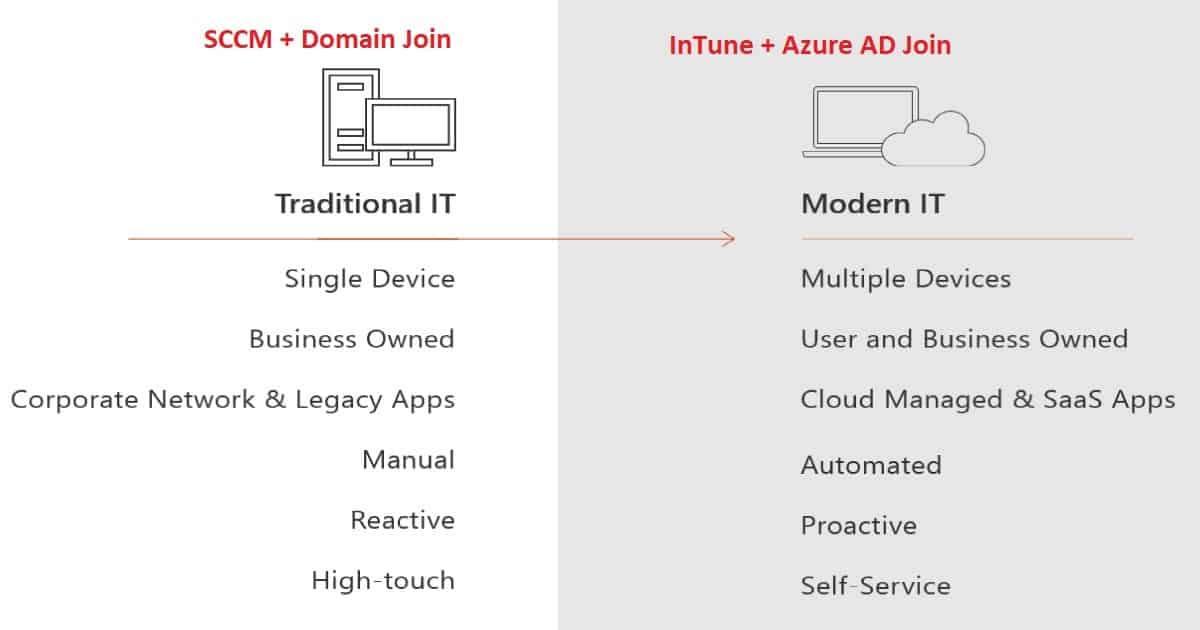
There are two ways of managing: the traditional way of control and the Modern way of governance. Both are explained in detail below.
They also want an easier transition from SCCM and Domain Join devices (Traditional) to a modern management approach with Intune and Azure AD Join devices (Modern). This post will show How to set up SCCM CB and InTune Co-Management.
Another post covers more “Management strategic” details about co mgmt – Overview Windows 10 Co-Management with Intune and SCCM.

Table of Contents
- SCCM CB Release has Changed 2 Versions per Year | March and September
- SCCM CB 1803 Review of Upgrade and Features Configuration Manager ConfigMgr
- Video Review of SCCM CB 1802 New Features
- Reset SCCM CB Critical Site Component Status Summarizer Counter ConfigMgr
How to Set SCCM CB Intune Co-Management
In this video, you will learn all the details about setting up SCCM CB Intune Co-Management. Below is more information about the SCCM CB 1709 upgrade and Co-Management setup via Video Tutorial.
How to Setup SCCM CB Intune Co-Management Configuration Manager ConfigMgr
The co-management option is available only on a Preview release of SCCM CB 1709. I don’t know whether it will make it to the SCCM CB 1710 Production release in a few months. However, Co-Management will be available in the SCCM CB 1710 production release.
| Modern IT |
|---|
| Multiple Devices |
| User and Business Owned |
| Cloud Managed & SaaS Apps |
| Automated |
| Proactive |
| Self Service |
What is Co-Management?
In simple terms, SCCM CB co-management is a dual management capability offered for Windows 10 1709 (Fall Creators Update) devices. InTune and SCCM can manage Windows 10 1709 devices simultaneously.
For example, eligible Windows 10 devices will be managed via the SCCM client, and the Intune MDM channel will handle other workloads. The section below this post provides more details about the Workloads.
This co-management is only available for the Intune subscriptions; set INTUNE as MDM authority.
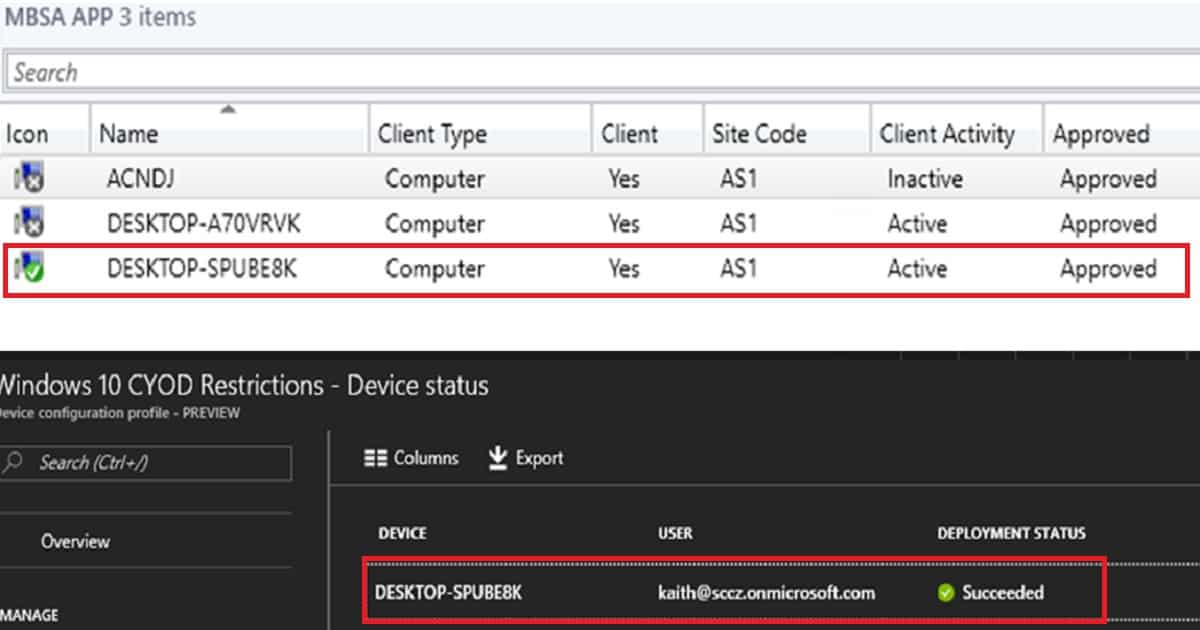
You might wonder how we can handle policy conflicts in the SCCM Co-Management scenario. Yeah, disputes regarding configuration/compliance policies will be controlled via Co-Management Configuration policies in SCCM CB.
You can select which workloads can be managed via Intune. All other SCCM workloads will be handled through the SCCM management method.
Where Can We Set up SCCM Co-Management Policies?
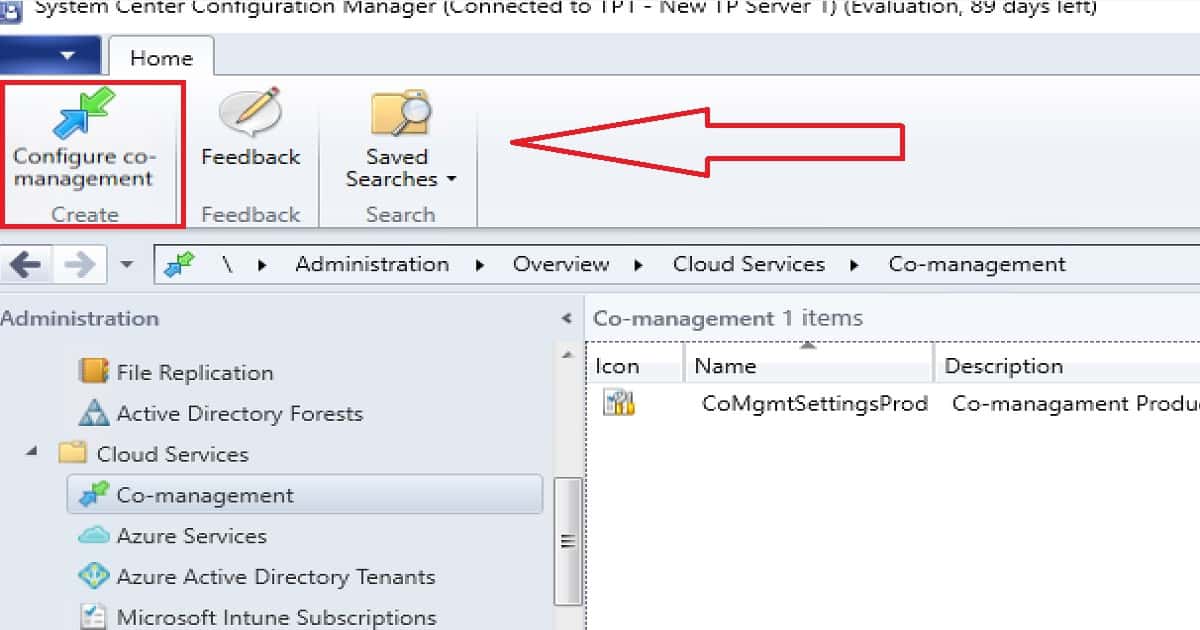
Install or Upgrade SCCM CB 1709 or a later version of SCCM. Navigate the SCCM CB 1709 (or later) console via \Administration\ Overview\ Cloud Services\Co-management. Click on the button “Configure Co-Management” to create Co-management Production or Co-Management Pilot policies.
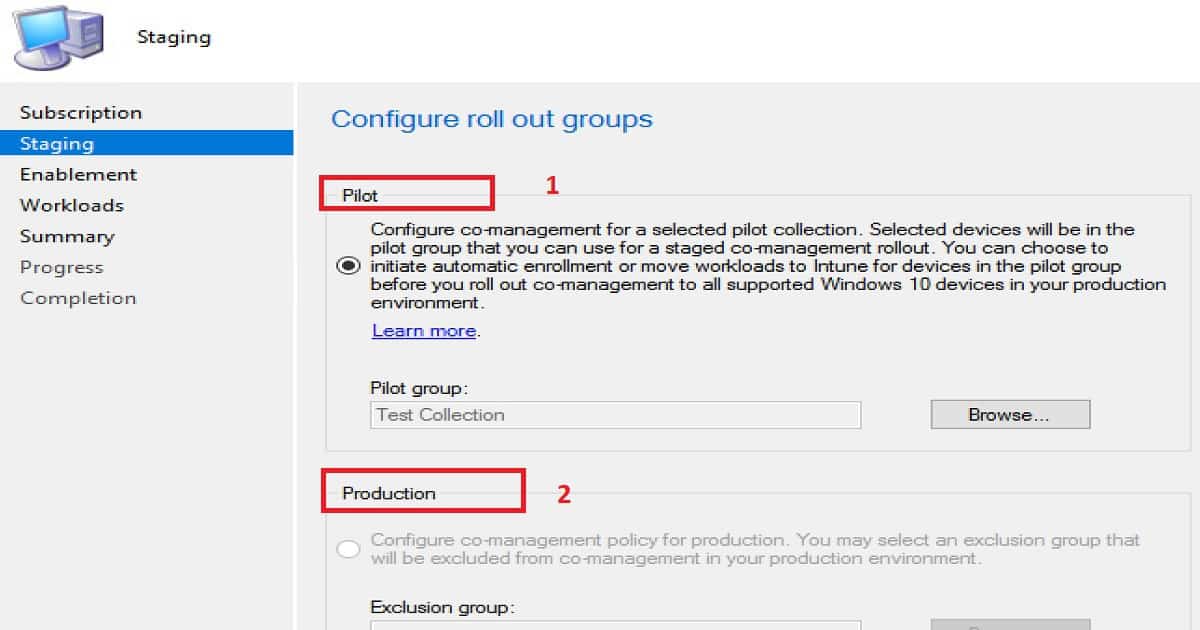
SCCM CB Co-Management Configuration Wizard – STAGING Options?
There are 2 staging options available in SCCM CB co-management. Following are the 2 options:-
- Co-Management Production Policies (CoMgmtSettingsProd)
- Co-Management Pilot Policies (CoMgmtSettingsPilot)
Configure Roll-out Groups – Pilot Collection
Configuring co-management will only be enabled for a selected pilot collection. Selected Window 10 1709 or later devices will be in the pilot group for Co-Management. This pilot group of this collection can be used for a staged co-management roll-out.
We can initiate automatic enrollment or move workloads to InTune for devices in the pilot group before you roll out co-management to all supported Windows 10 devices in your production environment.
Configure Co-management for Production Collection with Exclusion Collection
Configure co-management policy for production. You may select an exclusion group that will be excluded from co-management in your production environment. Exclusion groups can be any collection of Windows 10 devices.
How Can SCCM Co-Management for SCCM Clients and Intune Managed Devices be Enabled?
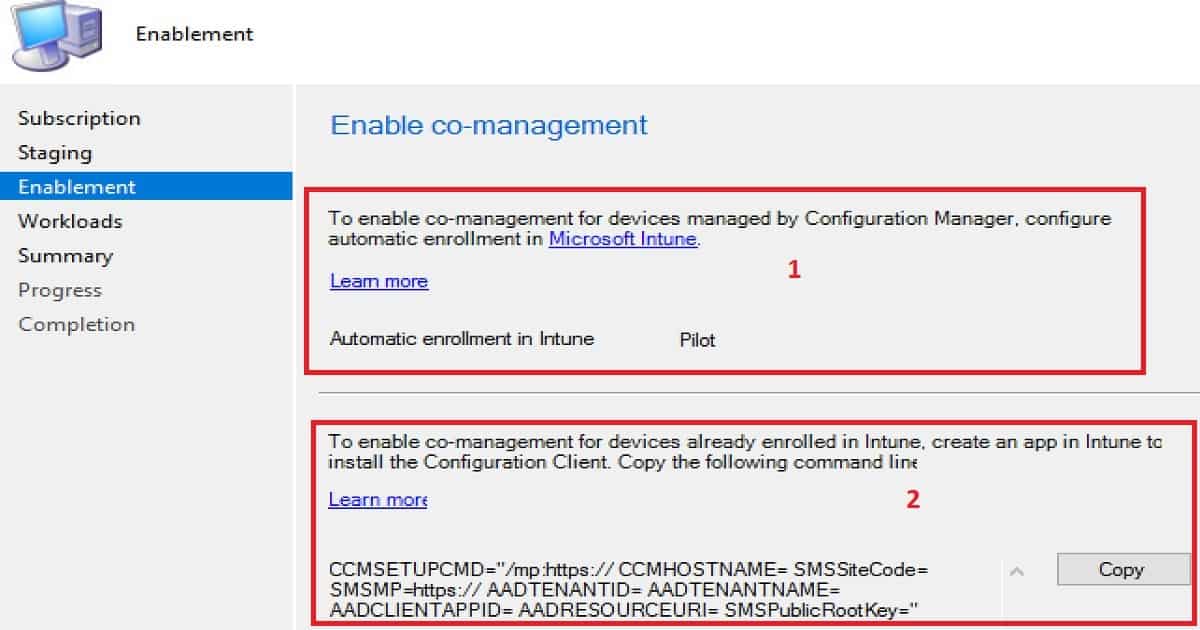
There are two ways to enable SCCM co-management for Windows 10 1709 devices.
- Enable Co-management for SCCM Clients
- Enable Co-management for Intune-managed devices
Enable Co-management for SCCM Clients
You must select the following option to enable co-management for SCCM-managed devices with Intune: To enable co-management for devices managed by SCCM and configured, select ALL or Pilot from the drop-down menu to manage all/pilot SCCM clients via Intune.
Enable Co-management for Intune Managed Devices
You must create an Intune application to enable co-management for Intune-managed devices with SCCM. This application will install the SCCM client onto Intune-managed devices.
The SCCM team provided a sample command line to install the SCCM client. Following is the sample command line provided in the wizard
- CCMSETUPCMD=”/mp:https:// CCMHOSTNAME= SMSSiteCode= SMSMP=https:// AADTENANTID= AADTENANTNAME= AADCLIENTAPPID= AADRESOURCEURI= SMSPublicRootKey=”
What are SCCM Co-Management Workloads?
SCCM Co-Management workloads are functionalities/features of device management. For example, the Compliance policies, Configuration Policies, Software Updates, Resource Access policies (WiFi Profiles/VPN Profiles, etc..), Application deployment, etc., are co-management workloads.
How Do You Configure/Select Workloads for Co-management?
SCCM continues to manage all device management workload functionalities even after enabling the co-management option. When you decide you are ready for co-management, you can use Intune to manage available workloads.
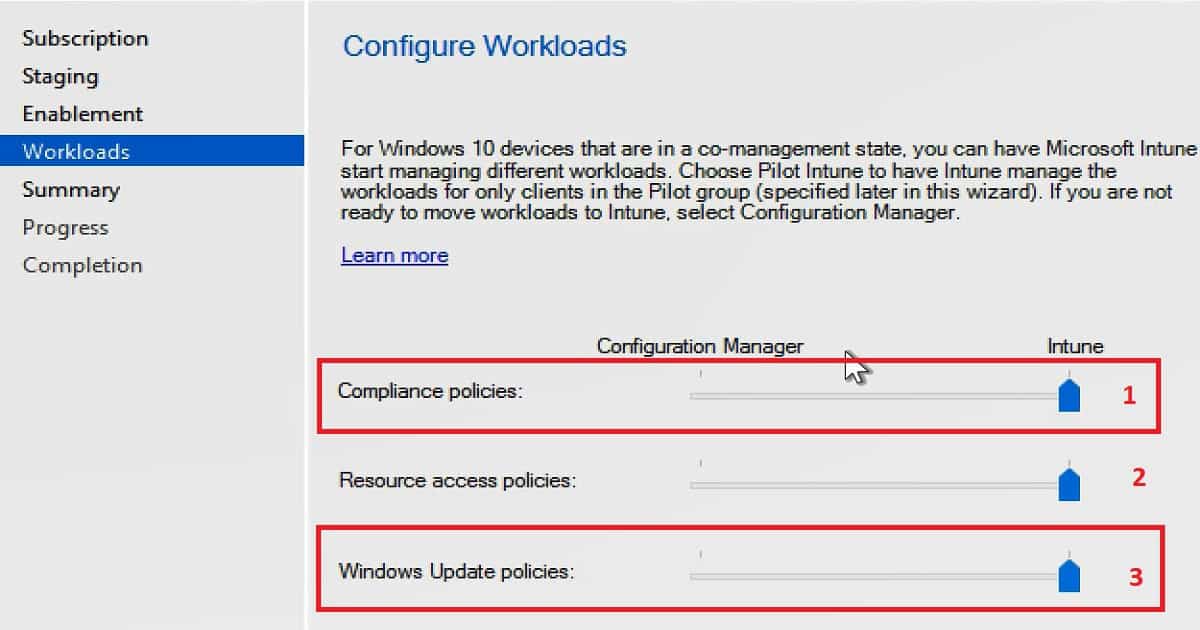
Co-Management Configuration Wizard provides the ability to select these functionalities /features. Following are the 3 features enabled for co-management
- Compliance Policies (this will work with Conditional Access)
- Resource Access Policies (WiFi, SCEP, etc..Anything comes under the SCCM console Company Resource Access node)
- Windows Update Policies (Patching without on-prem WSUS/SUP)
For Windows 10 devices that are in a co-management state. You can have Microsoft Intune start managing different workloads/features. Choose pilot Intune to have Microsoft Intune start managing different workloads.
Choose Pilot Intune to have Intune manage the workloads for only clients in the pilot groups. If you want to manage these workloads with SCCM, select ConfigMgr/SCCM. If you’re going to manage these workloads with Intune, select Intune.
Resources
- Co-management for Windows 10 devices – SCCM 1709 Preview – here
- Migrate hybrid MDM users and devices to Intune standalone – here
- Microsoft 365 and SCCM Windows 10 Co-Management – here
We are on WhatsApp now. To get the latest step-by-step guides, news, and updates, Join our Channel. Click here. HTMD WhatsApp.
Author
Anoop C Nair is Microsoft MVP! He is a Device Management Admin with more than 20 years of experience (calculation done in 2021) in IT. He is a Blogger, Speaker, and Local User Group HTMD Community leader. His main focus is Device Management technologies like SCCM 2012, Current Branch, and Intune. He writes about ConfigMgr, Windows 11, Windows 10, Azure AD, Microsoft Intune, Windows 365, AVD, etc.




Awesome. I cannot wait to manage this feature as well as AutoPilot.
how do you get the intune managed clients to install the configuration manager client if they are only azure AD joined? How do you get intune clients to also be domain joined automatically?
There are more steps than just enabling in SCCM.
StaffSure thing.And this was a preview of Co MGMT which I tested. BTW, I tested co management before Microsoft released that feature with SCCM because the CO-MGMT with Windows 10 was available well before that. So if you have proper connectivity to your SCCM and Intune infra then, you can do co mgmt 🙂
I see there 2 things related to WUfB,
1) “Diagnostic & usage data” is set to “Basic”. (https://docs.microsoft.com/en-us/intune/windows-update-for-business-configure)
2) Deploy policy to stop clients using WSUS/SUP (https://docs.microsoft.com/en-us/sccm/sum/deploy-use/integrate-windows-update-for-business-windows-10#configure-windows-update-for-business-deferral-policies)
When we change the workload in Co-management for “Windows Update Policy” from SCCM to Intune should we take care of above items.
StaffThank you Paddy for the insights! This is great information. I shall test it soon