






How to Setup WSUS Cleanup Task from SCCM Console Configuration Manager
How to Setup WSUS Cleanup Task from SCCM console Configuration Manager ConfigMgr MEMCM. There is a practice to run the WSUS clean-up task from the WSUS console. Is that the best practice from the SCCM perspective when WSUS is part of SUP?
However, cleaning up WSUS is important for SCCM admins to have a healthy SUP and SCCM environment. There are two options for setting up WSUS cleanup maintenance scheduled tasks from the SCCM console. In this post, we will see how to set up the WSUS Cleanup Task from the SCCM console.
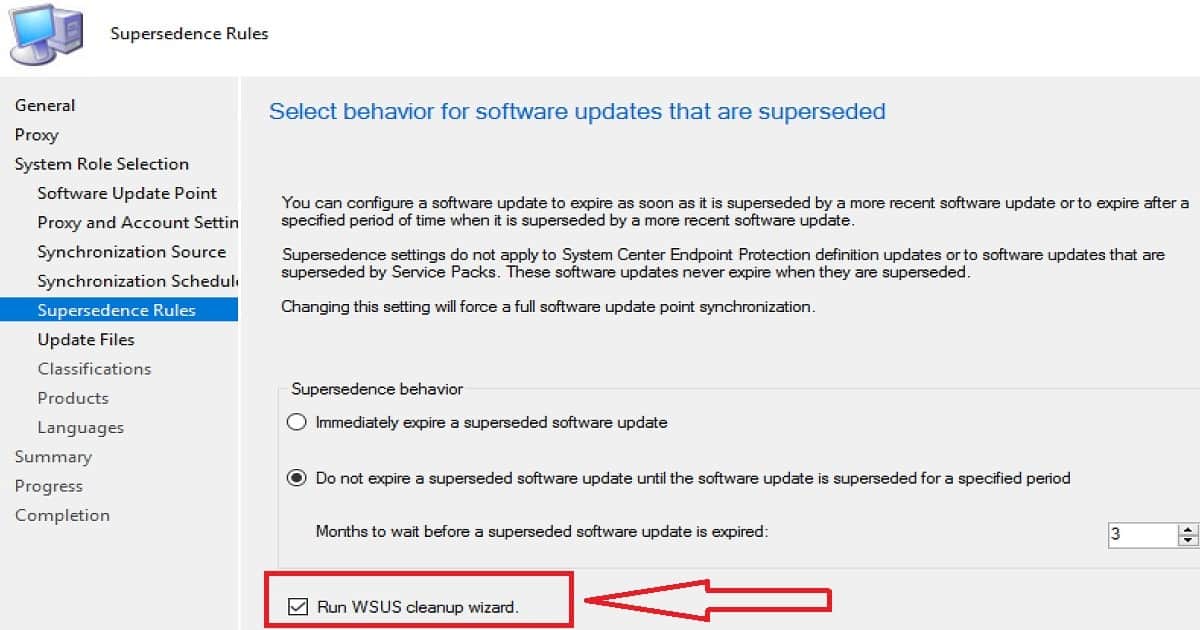
In SCCM CB, there is an option to schedule the WSUS cleanup while setting up the SUP site system role. This option is part of the SUP setup wizard on the Supersedence Rules page.
This is a good initiative, as running the WSUS clean-up wizard from the WSUS console was against the best SCCM practices. The SCCM best practice is NOT to open the WSUS console and perform any changes from it when you are using SUP.

- 10 SCCM Proactive Monitoring Tasks
- Get SCCM WSUS Obsolete Updates Deletion Alerts using Status Message Queries
- How to Manually Import Patches to WSUS and Deploy using SCCM
- Install WSUS for ConfigMgr Software Update Point Role | SUP | SCCM
The First Option is to Set Up WSUS Cleanup Maintenance Activity from the SCCM Console.
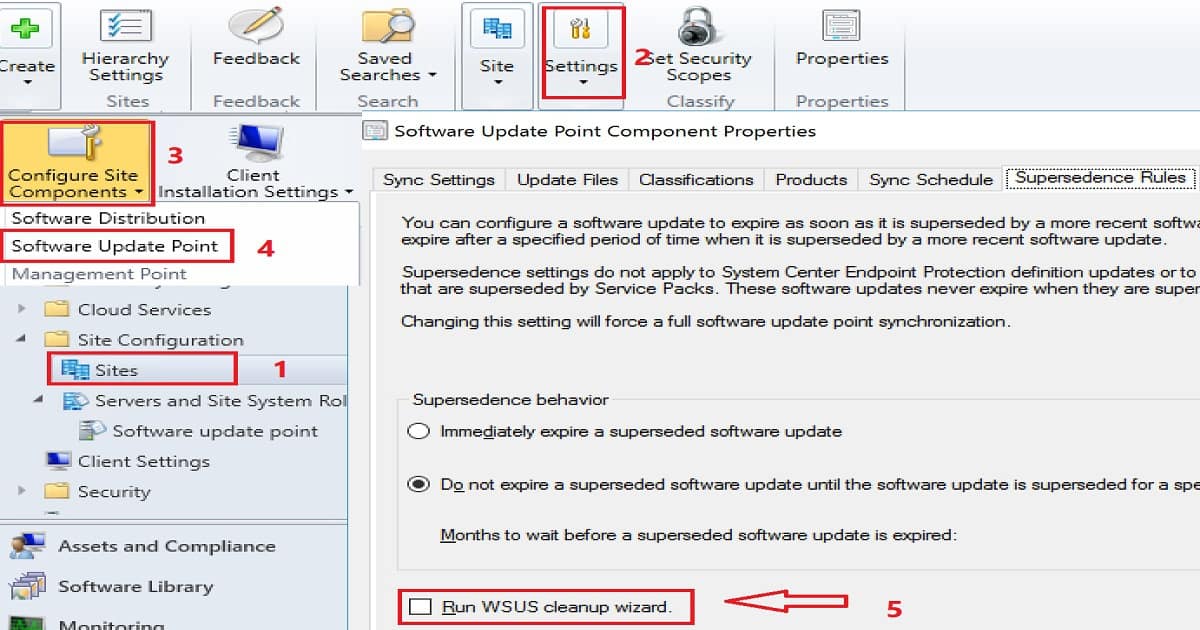
The second option to schedule the WSUS cleanup for your SCCM environment is under settings – Configure Site Components – Software Update Point (SUP) Component properties – Supersedence Rules TAB. This option is useful when you forget to enable the WSUS Cleanup task during the installation of SUP on your SCCM CB server.
| Select Behavior for Software Updates that are Superseded |
|---|
| Run the WSUS Cleanup wizard |
Second Option to Setup – How to Setup WSUS Cleanup Task from SCCM Console Configuration Manager ConfigMgr MEMCM
When you select to run the WSUS clean-up task from the SCCM console, it will run at the next software update synchronization. The expired software updates are set to a declined status on the WSUS server, and the Windows Update Agent on computers will no longer scan them. More details are available here.
Will the WSUS Cleanup Task from the SCCM Console be Applicable for Multiple SUPs and Secondary Site SUPs?
I have not tested this for secondary site SUPs and multiple SUPs on the same site with Windows Internal Database. But I think it’s the same when you have numerous secondary site SUPs and multiple SUPS on the same site.
If the WSUS cleanup task configured in the SCCM CB console is not working as expected, it’s better to raise a support case with Microsoft or run the WSUS clean-up wizard from the WSUS console.
References
- Software updates maintenance Task Details – here
- The complete guide to Microsoft WSUS and SCCM SUP maintenance – here
We are on WhatsApp now. To get the latest step-by-step guides, news, and updates, Join our Channel. Click here. HTMD WhatsApp.
Author
Anoop C Nair is Microsoft MVP! He is a Device Management Admin with more than 20 years of experience (calculation done in 2021) in IT. He is a Blogger, Speaker, and Local User Group HTMD Community leader. His main focus is on Device Management technologies like SCCM 2012, Current Branch, and Intune. He writes about ConfigMgr, Windows 11, Windows 10, Azure AD, Microsoft Intune, Windows 365, AVD, etc.




Hello Sir ;
what is sponsor post price ; https://www.anoopcnair.com
waiting for you
Thanks
StaffWhat does that mean ?