






SQL Query All SCCM Applications with no Deployments | ConfigMgr
In this post, we will learn more about SCCM Apps. SQL Query All SCCM Applications with no Deployments. SCCM provides a management insights feature that delivers these types of information in the console itself.
You can confidently pinpoint SCCM applications without deployments or references in the Configuration Manager console. This empowers you to identify applications that require attention effectively.
Access to management insights can streamline the process by providing the necessary data without running time-consuming and complex SQL queries. You can read more about management insights from SCCM Management Insights – A Deep Dive Experience For IT Admins.
Hello, this is my first post here. I have more than 13 years of experience in ConfigMgr. I will start a series of posts related to SQL and WQL queries (SQL Query) to help SCCM admins.

| Index |
|---|
| SQL Query All SCCM Applications with no Deployments |
| Scope |
| SQL Query – SQL Query All SCCM Applications with no Deployments |
Related post – SCCM Management Insights – Healthy SCCM Infra
SQL Query All SCCM Applications with no Deployments
Regarding your SCCM Infrastructure cleanup, we all try to push the task to the next available engineer because of the manual efforts involved and too many steps. Also, human error can occur during manual cleanup/deletion.
Scope
Scope: This work instruction applies to the ConfigMgr Delivery Team. It doesn’t cover other team tasks.
We will try to cover all those steps that involve incomplete infrastructure cleanup, starting with Application Cleanup as 1st task.
Follow the thread to get regular updates. Query Written by Karthikeyan A.
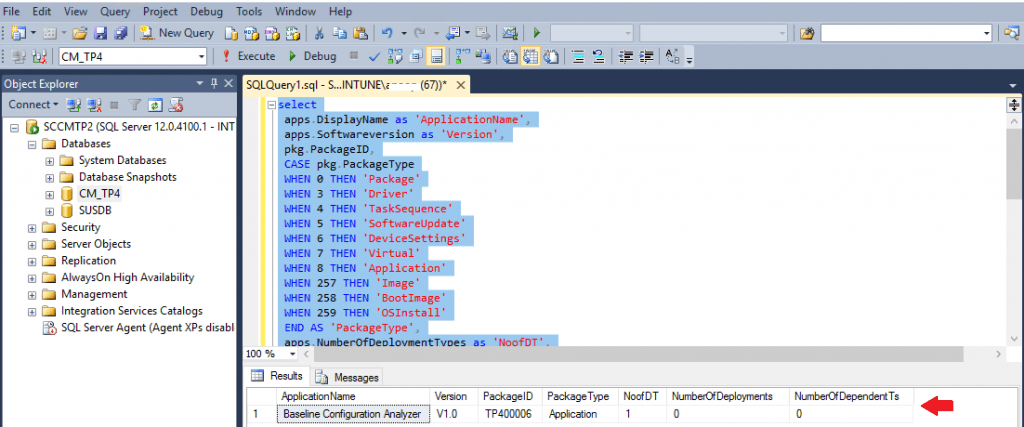
Application Cleanup All Applications with no deployments or task sequences Linked status.
SQL Query – SQL Query All SCCM Applications with no Deployments
Use the SSMS to run the following SQL Query to find All SCCM Applications with no Deployments (ConfigMgr).
select
 apps.DisplayName as 'ApplicationName',
 apps.Softwareversion as 'Version',
 pkg.PackageID,
 CASE pkg.PackageType
 WHEN 0 THEN 'Package'
 WHEN 3 THEN 'Driver'
 WHEN 4 THEN 'TaskSequence'
 WHEN 5 THEN 'SoftwareUpdate'
 WHEN 6 THEN 'DeviceSettings'
 WHEN 7 THEN 'Virtual'
 WHEN 8 THEN 'Application'
 WHEN 257 THEN 'Image'
 WHEN 258 THEN 'BootImage'
 WHEN 259 THEN 'OSInstall'
 END AS 'PackageType',
 apps.NumberOfDeploymentTypes as 'NoofDT',
 apps.NumberOfDeployments,
 apps.NumberOfDependentTs
 from fn_ListLatestApplicationCIs(1033) apps
 left join v_TaskSequencePackageReferences tspr on tspr.ObjectID = apps.ModelName
 left join vSMS_ApplicationAssignment ass on ass.AssignedCI_UniqueID = apps.CI_UniqueID
 left join v_Package pkg on pkg.SecurityKey = apps.ModelName
 where
 PackageType = 8
 and apps.IsLatest=1
 and ass.AssignmentName IS NULL
 and tspr.PackageID IS NULL
 and apps.NumberOfDeployments = 0
 and apps.NumberOfDependentTs = 0
 and apps.IsLatest=1
 order by apps.DisplayName
Resources
We are on WhatsApp. To get the latest step-by-step guides and news updates, Join our Channel. Click here –HTMD WhatsApp.
Author
Deepak Rai is a Technical Lead with over 14 years of experience in IT. He specializes in SCCM, Intune, and Azure. Throughout his career, he has worked on various platforms such as Active Directory, Exchange, Veritas NETBACKUP, Symantec Backup Exec, NDMP devices like Netapp, EMC Data Domain, Quantum using Backup Exec 2010 and 2012, and HP StorageWorks 4048 MSL G3. He also has experience in data deduplication-related troubleshooting. Ultimately, he returned to his roots as an IT Engineer focusing on SCCM technology.




It is very much helpful
StaffThank you.
In which way that query would help an SCCM admin?
StaffWhat you think ? Just to check the apps with out any deployment … what you think would be useful pls
I agree that this query is helpful in identifying “empty” (for lack of a better term) applications that are just taking up space in your ConfigMgr (EndpointMgr) environment… but there is a scenario where you do not want to delete an application that you’re no longer deploying — if you have a newer application that you have supersedence configured for to ensure that the ConfigMgr client removes the previous app and installs the latest one.
In those cases, you just simply need to monitor compliance for the previous application and as soon as you have no instances of it in your environment, you can remove the supersedence configuration on the newer application and delete the older application with no deployments.
Hi All,
Would like to know how we can get the total number of PC’s with a particular application and version
StaffTry our site https://forum.howtomanagedevices.com/.
v_Package pkg on pkg.SecurityKey = apps.ModelName
this information shows information only for applications as apps.model name contains only scope*** and no id’s contains, which is not available for other packages, drivers etc…
Hi Deepak,
I’m fairly new to MCM, Is it possible to create a sql script that will provide a detailed deployment status broken down by site and application? I have a script to pull deployment status per application but unable to tie that back to a site.
Thank you in advance