






SCCM SQL Query Windows 10 Version Count Dashboard
Let’s see how to find out SCCM SQL Query Windows 10 Version Count | Dashboard | SCCM. The different versions of Windows 10 use SQL queries and the total number of Windows 10 versions is calculated using the SQL query.
Since most environments are moving towards Windows 10 or have moved to it, tracking down different versions in your environment is essential. No registration or email ID is required to access this query.
If we manage a large environment, keeping it on the same version of Windows 10 is always good. How do we do that? There are two options: the Enablement package or the Windows 10 Upgrade task sequence. Both are entirely different topics, for which you can visit Upgrade Windows 10.
How do you track down different Windows 10 versions in your environment, and how is it progressing? So here it is: I am sharing an SQL query to fetch these details and subscribing to your mailbox to track the progress.

- Windows 10 Version Numbers & Build Numbers Major Minor Build Rev
- SCCM Report for Windows 11 Version Count Dashboard
- Convert WQL Queries to SQL Queries using SCCM Trick
| Index |
|---|
| SQL Query to Find Windows 10 Version Count |
| Raw Data – SCCM SQL Query Windows 10 Version Count Dashboard |
| Windows 10 Version Dashboard |
| Results Windows 10 Version Count and Dashboard |
SQL Query to Find Windows 10 Version Count
This SQL Query will help you use the ‘when’ statement and declare it according to your environment. I have taken all the Windows 10 versions released to date. In this query, you can add others for future releases.
- Open the SQL Management Studio.
- Connect your Database Engine.
- Right-click on your database CM_XXX and click on ‘New Query.’
- Copy the following SQL query to find the details of the Windows 10 version report.
- Click on the Execute button.
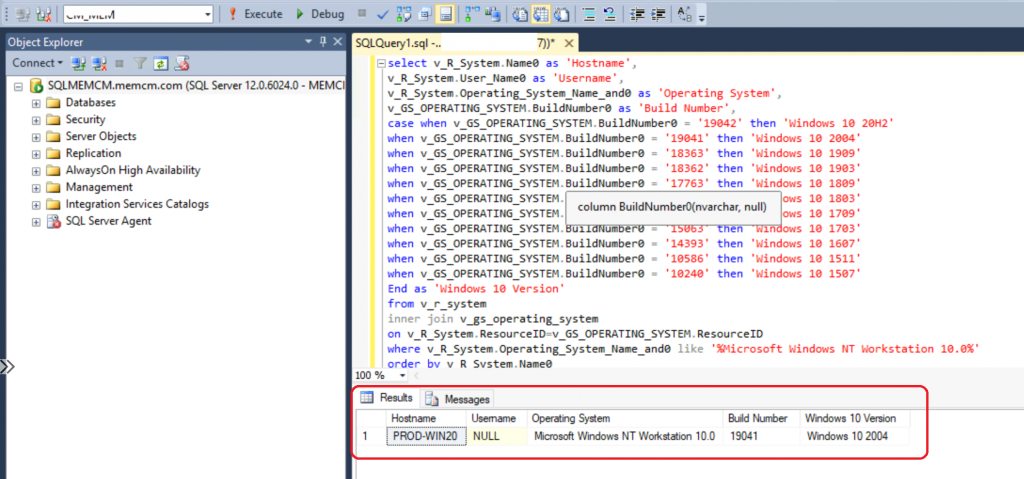
Note: To check Windows 10 release notes Windows 10 Release notes
Raw Data – SCCM SQL Query Windows 10 Version Count Dashboard
Let’s find the SQL query for the total number of Windows 10 Versions available in your environment. The SCCM SQL Query Windows 10 Version Count Dashboard.
select v_R_System.Name0 as 'Hostname',
v_R_System.User_Name0 as 'Username',
v_R_System.Operating_System_Name_and0 as 'Operating System',
v_GS_OPERATING_SYSTEM.BuildNumber0 as 'Build Number',
case when v_GS_OPERATING_SYSTEM.BuildNumber0 = '19044' then 'Windows 10 21H2'
when v_GS_OPERATING_SYSTEM.BuildNumber0 = '19043' then 'Windows 10 21H1'
when v_GS_OPERATING_SYSTEM.BuildNumber0 = '19042' then 'Windows 10 20H1'
when v_GS_OPERATING_SYSTEM.BuildNumber0 = '19041' then 'Windows 10 2004'
when v_GS_OPERATING_SYSTEM.BuildNumber0 = '18363' then 'Windows 10 1909'
when v_GS_OPERATING_SYSTEM.BuildNumber0 = '18362' then 'Windows 10 1903'
when v_GS_OPERATING_SYSTEM.BuildNumber0 = '17763' then 'Windows 10 1809'
when v_GS_OPERATING_SYSTEM.BuildNumber0 = '17134' then 'Windows 10 1803'
when v_GS_OPERATING_SYSTEM.BuildNumber0 = '16299' then 'Windows 10 1709'
when v_GS_OPERATING_SYSTEM.BuildNumber0 = '15063' then 'Windows 10 1703'
when v_GS_OPERATING_SYSTEM.BuildNumber0 = '14393' then 'Windows 10 1607'
when v_GS_OPERATING_SYSTEM.BuildNumber0 = '10586' then 'Windows 10 1511'
when v_GS_OPERATING_SYSTEM.BuildNumber0 = '10240' then 'Windows 10 1507'
End as 'Windows 10 Version'
from v_r_system
inner join v_gs_operating_system
on v_R_System.ResourceID=v_GS_OPERATING_SYSTEM.ResourceID
where v_R_System.Operating_System_Name_and0 like '%Microsoft Windows NT Workstation 10.0%'
order by v_R_System.Name0
Windows 10 Version Dashboard
Let’s create the dashboard to check the Windows 10 version count details from the following query.
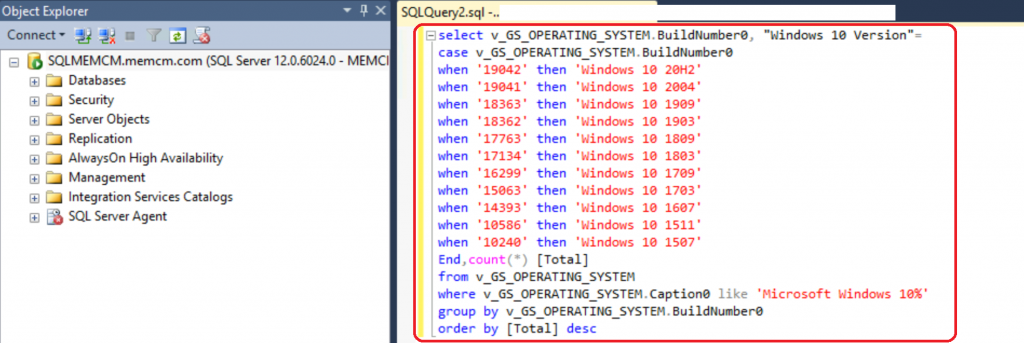
You must copy the following SQL query to get the Windows 10 Dashboard and count the versions.
select v_GS_OPERATING_SYSTEM.BuildNumber0, "Windows 10 Version"=
case v_GS_OPERATING_SYSTEM.BuildNumber0
when '19042' then 'Windows 10 20H2'
when '19041' then 'Windows 10 2004'
when '18363' then 'Windows 10 1909'
when '18362' then 'Windows 10 1903'
when '17763' then 'Windows 10 1809'
when '17134' then 'Windows 10 1803'
when '16299' then 'Windows 10 1709'
when '15063' then 'Windows 10 1703'
when '14393' then 'Windows 10 1607'
when '10586' then 'Windows 10 1511'
when '10240' then 'Windows 10 1507'
End,count(*) [Total]
from v_GS_OPERATING_SYSTEM
where v_GS_OPERATING_SYSTEM.Caption0 like 'Microsoft Windows 10%'
group by v_GS_OPERATING_SYSTEM.BuildNumber0
order by [Total] desc
Results Windows 10 Version Count and Dashboard
Let’s check the following results of the Windows 10 version count as a dashboard: SCCM SQL Query Windows 10 Version Count Dashboard.

How to create the same report in Report Builder follow SQL query in Report builder
Resources
We are on WhatsApp. To get the latest step-by-step guides and news updates, Join our Channel. Click here –HTMD WhatsApp.
Author
Ankit Shukla, an IT professional with over seven years of experience, has worked on SCCM/MECM since 2012. During this time, he has extensively dealt with various aspects of the tool, such as migration, infrastructure designing, OSD, custom SQL reporting, and client-side troubleshooting. Ankit’s blog posts reflect his hands-on experience addressing issues and providing practical solutions. The primary aim of his posts is to cater to the audience, which is comprised of support team members and SCCM admins in organizations.




Surely cm pivot is a better option?
StaffYes CM PIVOT is also an option, to achieve a result there are many options its what you prefer.
It depends on you Infrastructure,number of clients what do you prefer.
StaffChris – Yes assuming you have all the devices ONLINE