






How to Restart SMS Executive Threads Cloud User Sync from Registry ConfigMgr Configuration Manager
Let’s discuss how to Restart SMS Executive Threads Cloud User Sync from Registry ConfigMgr Configuration Manager.
Do you know how to restart the SMS execute threads like “SMS_DMP_DOWNLOADER” and “SMS_CLOUD_USERSYNC” of SCCM / ConfigMgr Current Branch (CB)? Yes, this can be done via the SCCM Service manager.
It’s pretty straightforward. The post here provides more details about the SCCM service manager. How do the SCCM executive threads restart from the registry? Yes, that will be covered in this post.
One of our posts explains using SCCM Configuration Item (CI) and Configuration Baseline (CB) to detect and revert registry changes. With SCCM Console, you can easily set up these tools to monitor your system’s registry changes.

Table of Contents
- ConfigMgr Client Component Status | Installed | Enabled | Disabled
- SCCM Shortcut Commands Windows Shortcut Commands
- Quickly Check Registry Values using SCCM CMPivot Query
- SCCM ConfigMgr Remote Site System Installation Error Cannot Open Registry | Configuration Manager
How to Restart SMS Executive Threads Cloud User Sync from Registry ConfigMgr Configuration Manager
Open the registry editor (regedit.exe) and browse through the following key path. “HKEY_LOCAL_MACHINE\SOFTWARE\Microsoft\SMS\COMPONENTS\SMS_EXECUTIVE\Threads“. Once you are there, find the SCCM thread you want to restart. It can be any of these SCCM threads SMS_DESPOOLER, SMS_DISTRIBUTION_MANAGER, SMS_CLOUD_USERSYNC, etc.
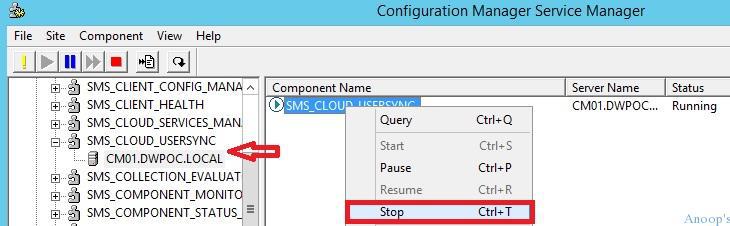
Locate the string value called “Requested Operation.” As you can see in the screenshot below, this is set to “None” by default.
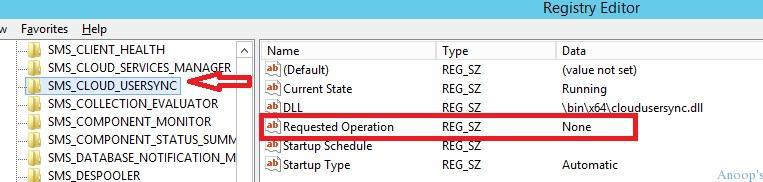
Open the string value of the “Requested Operation” key and change it from “None” to “Stop.” This action will stop the SCCM executive thread called SMS_CLOUD_USERSYNC in this scenario.
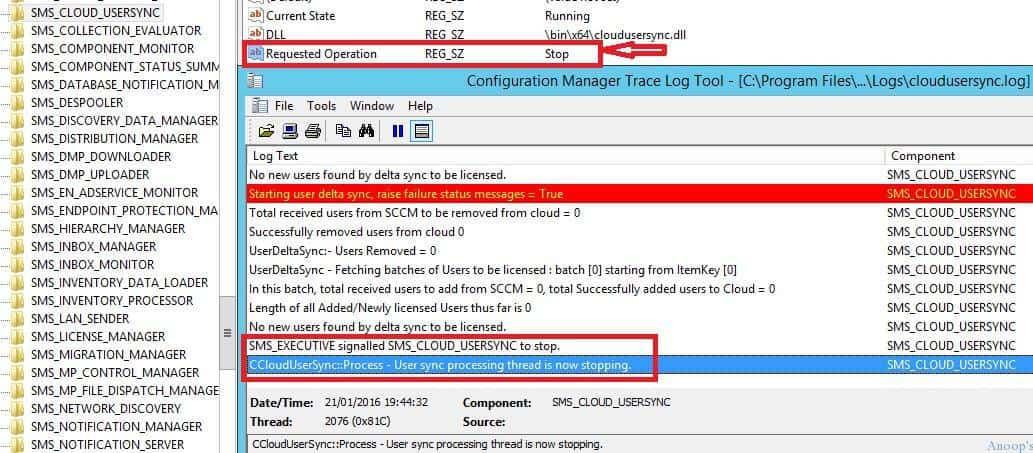
Once you change it to stop, the cloudusersync.log file will contain the following log file entries: More details are in the screenshot below.
SMS_EXECUTIVE signalled SMS_CLOUD_USERSYNC to stop.
CCloudUserSync::Process - User sync processing thread is now stopping.
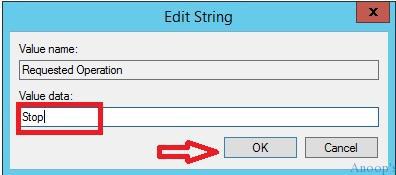
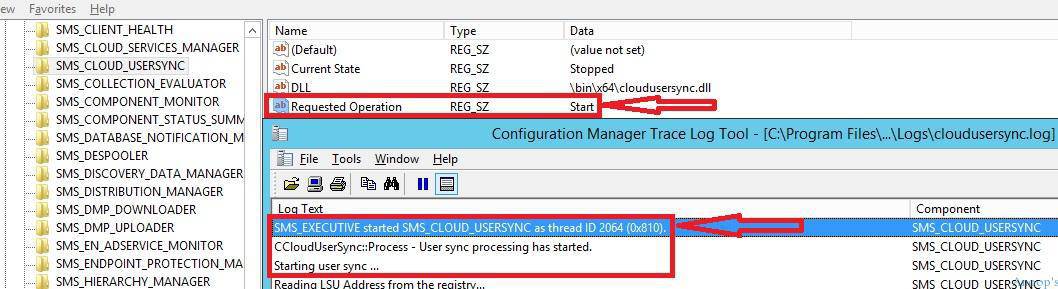
Once the SCCM executive thread called “SMS_CLOUD_USERSYNC” is stopped, the registry value “Requested Operation” key will automatically flip back to “None”. Now, to start the SCCM executive thread again, change the registry string value of “Requested Operation” from “None” to “Start“.
This will start the SCCM thread “SMS_CLOUD_USERSYNC.” Once the thread is started, you can see the following entries in cloudusersync.log. The registry string value of the key “Requested Operation” will automatically flip back to “None.”
SMS_EXECUTIVE started SMS_CLOUD_USERSYNC as thread ID 2064 (0x810).
CCloudUserSync::Process - User sync processing has started.
Starting user sync ...
| Requested Operations |
|---|
| SMS_EXECUTIVE started SMS_CLOUD_USERSYNC as thread ID 2064 (0x810). |
| CCloudUserSync::Process – User sync processing has started. |
| Starting user sync … |
What could be the used case for this registry entry edit? I can think of scripting that can be done using this if we want to automate the SCCM executive thread restart process.
Resources
SCCM Related Posts Real World Experiences Of SCCM Admins
SCCM Video Tutorials For IT Pros – HTMD Blog #2
We are on WhatsApp now. To get the latest step-by-step guides, news, and updates, Join our Channel. Click here. HTMD WhatsApp.
Author
Anoop C Nair is Microsoft MVP! He is a Device Management Admin with more than 20 years of experience (calculation done in 2021) in IT. He is a Blogger, Speaker, and Local User Group HTMD Community leader. His main focus is on Device Management technologies like SCCM 2012, Current Branch, and Intune. He writes about ConfigMgr, Windows 11, Windows 10, Azure AD, Microsoft Intune, Windows 365, AVD, etc.




Hi Anoop,
I have problem with my SMS_EXECUTIVE service stopping unexpectedly after migration from SCCM2012 R2 to 1606. Secondly updates and servicing branch node is blank. Any recommendations could have been great help
Thanks,
Sundar
StaffSCCM expired try https://www.anoopcnair.com/sccm-is-expired/