





Top 10 Intune Features Admins are Looking for in 2026
Key Takeaways
- Admins looking forward that Intune to be easier and faster, not more complex.
- Linux support is important, especially for shared computers.
- Enrollment and migration issues create the biggest support load. iOS and macOS enrollment problems directly increase IT workload.
- Allowing users and support teams to fix issues quickly reduces downtime. Slow sync equals slow IT operations
Let’s discuss, Top 10 Intune Features Admins are Looking for in 2026. According to Microsoft feedback portal, many admins rise a concern towards the MS. The admins open up about what is not working well in Intune that, they want it to be faster, easier, not just add new features every time but look at the top 10 features admins want in 2026, like better Linux support, easier device setup, faster syncing, and more control over apps and remote help.
Table of Contents
Top 10 Intune Features Admins are Looking for in 2026
Admins are now more concerned and looking forward that many common tasks are still slow, hard, or limited. In 2026, admins want Intune to be faster, easier, and more reliable, not just get new features. The top things admins want include better Linux support (shared PCs and DEM accounts), smoother iOS and Mac enrollment, faster syncing, and more control over apps and updates.
They also want users to fix some problems themselves, remote help without waiting for users, and the ability to control notifications. So, let’s look into those 10 features the admins want to more flexible in 2026.
- Blocking User Access to Spotlight Personalization Features using Intune Policy
- Troubleshoot and Fix Company Portal Enrollment Your Device Is Already Connected Error
- Fix a Stuck Legacy Jamf Connector to Restore New Jamf Intune Integration and Mac Device Sync
1. Better Linux Support
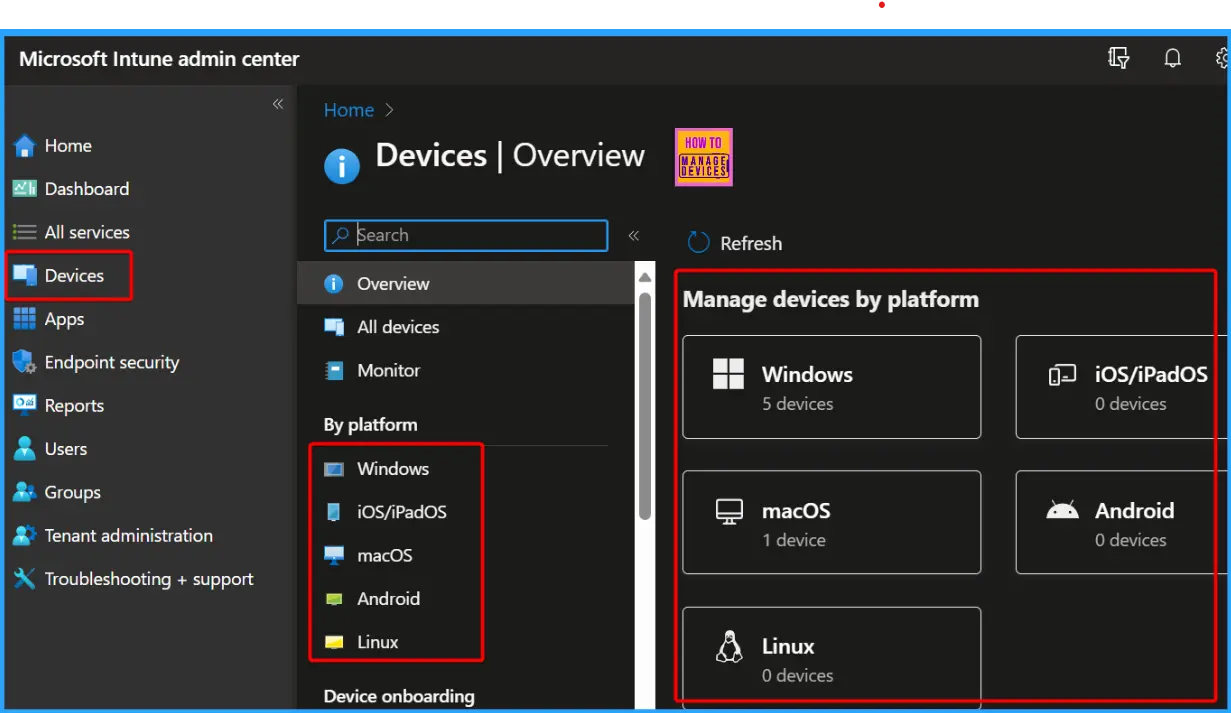
Many organisations use Linux devices in schools as well, but Intune currently doesn’t manage Linux the way it manages Windows. Now, admins are requesting Intune support to enable shared-PC mode and Device Enrollment Manager (DEM) accounts on Linux clients. Admins want shared-PC mode, which allows multiple users on one device, and DEM accounts for easier bulk enrollment. This would make Intune a single platform for managing all devices, without extra tools or manual work.

- The below screenshot from Intune admin center, in this screenshot used from our post Total Number of Setting Catalog Policies for Windows Apple and Linux
2. Admins want Smoother iOS/macOS Enrollment
The next feature admins are talks about the admins want Smoother iOS/macOS Enrollment. Here in this topic admins mentioning how iOS/iPadOS affects device enrollment and backup/restore workflows. Admins reported delays and issues when enrolling Apple devices, particularly during backup restores or when migrating to new hardware.
- With each new release of iOS/iPadOS and macOS, admins want Intune to provide smooth compatibility so that enrollment doesn’t break or require manual fixes.
- Admins want enrollment, and migration to be so fast, reliable, and hassle-free, reducing the burden on IT teams and avoiding repetitive troubleshooting.
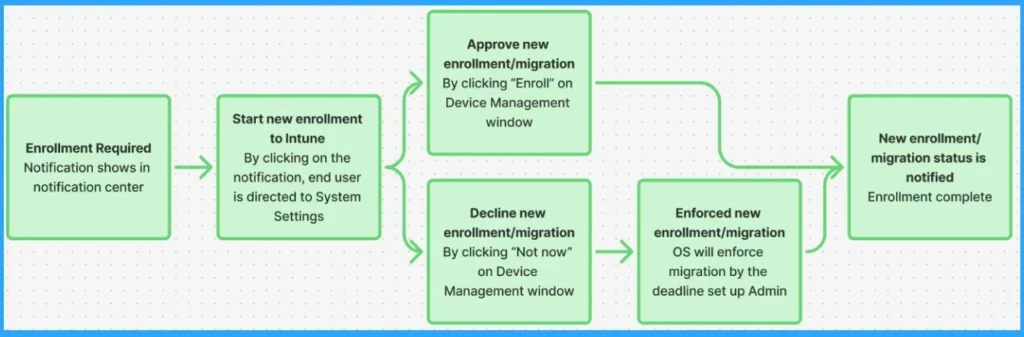
The below screenshot is from our blog post, No Wipe No Reenrollment Needed for MacOS iOS iPad OS Devices Migration to Intune from other MDM Solutions, here it is showing the steps users follow during Intune enrollment/migration on Apple devices.
3. Run Admin Scripts Directly from Company Portal
Admins are looking for a feature that lets users run admin-approved PowerShell scripts directly from the Intune Company Portal on Windows devices, with full System privileges. This feature would let users fix simple problems on their own, like reinstalling apps or resetting settings, without waiting for IT. Right now, Intune scripts only run on a schedule and don’t always work when needed.
Allowing self-service scripts would save time, reduce support calls, and make Intune work more like JAMF Self Service on Mac.
| Why these matters | How it could work |
|---|---|
| It would enable faster deployment of bug fixes and configuration changes. | Admins upload and configure scripts in the Intune portal. |
| It empowers users to self-remediate issues without waiting for IT intervention. | Scripts appear in the Company Portal as optional actions for users. |
| It reduces packaging overhead for IT admins. | When triggered, the script runs in the background with elevated (System) privileges. |
| It brings Intune closer to feature parity with JAMF in terms of macOS and self-service capabilities. | Optional: Logging, approval workflows, or conditional access policies. |
4. Allow Non-Primary Users to Install Available Apps in Company Portal
Admins need a way to make app installs and removals in Intune’s Company Portal more flexible. Right now, only the Primary User of a device can do this, which slows down IT support. some of them suggesting that A toggle or setting in Intune Admin Center that allows any user logged into the device to install or uninstall apps.
5. Intune Remote Help – Unattended Access Request
Admins are suggests adding unattended access to Intune Remote Help for Windows clients. Admins want Intune Remote Help to work even when the user is away or the PC is locked. This would let support team fix issues without waiting for the user, making Intune Remote Help more useful and similar to other remote access tools.
6. Manage or Block Microsoft Teams Pop-Up Notifications
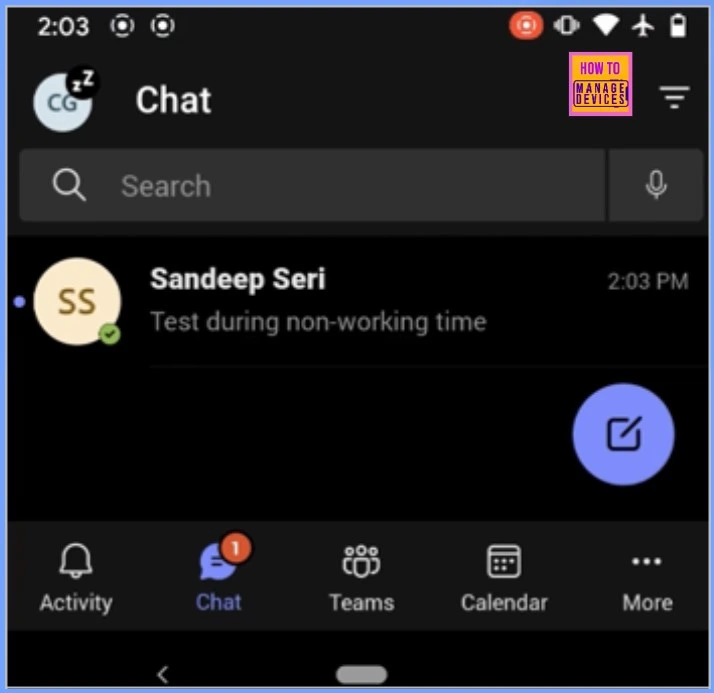
The next concern of Japan Support Team wants a way in Intune to block or control Microsoft Teams pop-up notifications on managed devices. This would reduce distractions for users, lower support requests, and make devices easier to manage. Admins are requesting a centralized setting in Intune to either disable or control Teams notifications across all devices.
- This would allow IT to reduce distractions, lower support calls, and ensure a smoother user experience.
- The below screenshot is from this related topic of Intune Configure Notification Muting and Block Teams Access for Shift Workers Based on Working Time Status
7. Rework Auto-Update for Available Apps behaviour
Admins are concerned about the current auto-update for available apps in Intune doesn’t work reliably. Sometimes updates don’t happen even when the old app is installed, which causes extra work and confusion. They want Intune to check if the old app is on the device and automatically update it to the new version, just like it does for required apps. This would make updates more predictable, easier.
8. Issue with Limited Username Options for macOS Devices
The admin is concerned because Microsoft Intune allows only one username format when enrolling macOS devices. So, they are requesting More flexible handling of username variables during macOS device enrollment.
9. Faster Device Sync
Another concern from an admin that he is unhappy with Intune because device sync is slow and unreliable. The 8-hour sync time is too long and should be shorter or configurable. The Sync button often doesn’t work properly. Policy and app reporting is also slow and needs to be faster and clearer
| Concern |
|---|
| Reduce to 1 hour or allow admins to configure custom intervals |
| The Intune portal “Sync” button often fails |
| Improve reporting speed and accuracy for policies |
10. Allow Enterprise Users to Set Minimum password Length in Entra ID
The admin is requesting a feature in Entra ID to allow changing the minimum password length for user accounts. While this can already be configured for local accounts using Intune policies, Entra ID only allows a fixed minimum of 8 characters. This makes it difficult for organizations that must follow stricter security standards requiring longer passwords.
Need Further Assistance or Have Technical Questions?
Join the LinkedIn Page and Telegram group to get the step-by-step guides and news updates. Join our Meetup Page to participate in User group meetings. Also, Join the WhatsApp Community and WhatsApp Channel to get the latest news on Microsoft Technologies. We are there on Reddit as well.
Author
Anoop C Nair has been Microsoft MVP for 10 consecutive years from 2015 onwards. He is a Workplace Solution Architect with more than 22+ years of experience in Workplace technologies. He is a Blogger, Speaker, and Local User Group Community leader. His primary focus is on Device Management technologies like SCCM and Intune. He writes about technologies like Intune, SCCM, Windows, Cloud PC, Windows, Entra, Microsoft Security, Career, etc.


These are all great, but we’re unlikely to get any…ever. I would like a sync button that works and the ability to define a ‘check-in’ frequency. This exists in most if not all MDMs.