






TPM 2.0 Transition to Windows 11 For Better Security
Let’s discuss some security issues today. We’ll also learn how to check our TPM 2.0 status and how to prepare for Windows 11. Over the past year, PCs have connected us with family and friends and allowed us to continue doing business. This new hybrid work model makes us think about how we will continue to provide the best possible quality, experience, and security to the more than 1 billion people who use Windows.
Cybersecurity issues, including phishing, ransomware, supply chain problems, and potential IoT vulnerabilities, are being widely discussed. Hackers are constantly creating online threats. Microsoft has a proper vision to safeguard our customer base, both now and in the future. Therefore, we operate in a manner that aligns with this vision.
Here is the role of TPM and its importance for those who have switched to Windows 11. As we know, Windows 10 is approaching the end of support. In Windows 11, TPM 2.0 brings better encryption and key management than TPM 1.2. This is a significant move to deal more effectively with today’s security issues.
All certified Windows 11 systems will have a TPM 2.0 chip. This chip helps protect user credentials and other sensitive data behind a hardware barrier. Now, we can learn about the role of TPM and its value for those who have changed from Windows 10 to Windows 11. We can also learn how to check your TPM status and prepare for Windows 11.

Table of Contents

What is TPM in a PC?
How Do I Check Whether My PC Already Have TPM?
TPM 2.0 Transition to Windows 11 For Better Security
The TPM is a cryptographic module that enhances computer security and privacy. Protecting data through encryption and decryption, protecting authentication credentials, and proving which software is running on a system are basic functionalities associated with computer security. The TPM helps with all these and more. The table shows an overview of the technologies that support the TPM.
| Technologies That Support a TPM |
|---|
| Measured Boot with support for attestation |
| TPM-based Virtual Smart Card |
| TPM-based certificate storage |
| TPM Cmdlets |
| Physical presence interface |
| TPM 1.2 states and initialization |
| Endorsement keys |
| TPM Key Attestation |
| Anti-hammering |
Know More About Trusted Platform Module
The Trusted Platform Module (TPM) is an integrated chip into your PC’s motherboard or added separately into the CPU. Its purpose is to help protect encryption keys, user credentials, and other sensitive data behind a hardware barrier so that malware and attackers can’t access that data. The TPM 2.0 standard allows manufacturers like Intel or AMD to build the TPM capability into their chipsets rather than needing a separate chip.

- Adoption Of Quantum Safe Algorithms And Hybrid Cryptography In Windows
- Ensuring Data Protection through Windows Recall with New Security Architecture TPM Windows Hello
- How to Run TPM Troubleshooter in Windows 11
- 4 Ways to Check TPM Version in Windows 11
TPM’S Enhanced industry-standard cryptography
A significant enhancement is that TPM 2.0 aligns with the ISO standard. It can accommodate a massive array of cryptographic algorithms, certificates and encryption keys that a wide range of industries need. TPM 2.0 helps us to ensure that only trusted software launches in our device.
Expanded Isolation in TPM
TPM 2.0 keeps cryptographic tasks separate from the main CPU, like storing and using keys. In this way, TPM helps create a secure area for critical operations and less the risk of infringing and manipulation. This will help us to ensure that essential information remains protected from threats.
Seamless Integration With Windows Security Abilities
- Encryption Key Storage.
- Secure Boot.
- Multifactor authentication (MFA).
Value Of TPM 2.0 on Windows 11 This Day and The Next Day
This day-TPM 2.0 is essential to restrain today’s cyber risks, from supporting more sophisticated encryption algorithms to adding cryptographic functionality. Therefore, in Windows 11, TPM checks should not be disabled in endpoints. For hardware-bound endpoint security, organizations utilize TPM operations and secure boot to mitigate security risks, data breaches, and violations.
The next day-TPM 2.0 helps future-proof Windows 11. It helps to secure sensitive information by enhancing artificial intelligence capabilities for physical, cloud, and server architectures. By establishing TPM 2.0 as a negotiable standard for the future of Windows, we elevate the security benchmark.It allows us better align with the growing need.
TPM 2.0 and Transition to Windows 11
Here is how we can Transit TPM in Windows 11 upgrade. To protect sensitive information is one way to achieve long-term security gains. It also prepares you to adapt to regulatory standards.
- Assess current hardware for TPM 2.0 compatibility.
- Make a detailed plan and budget for upgrading non-compliant hardware to TPM 2.0.
- Upgrade the security policies and procedures.
Check the TPM Status in Microsoft Intune
TPM provides encryption and authentication abilities that help to protect our data and devices from unauthorized access. If we are unsure whether and which devices in our organization already meet this hardware requirement, Follow these steps in the tables to find out.
| If You Are Using Microsoft Intune |
|---|
| Open the Intune Portal. |
| Navigate to Devices > All devices. |
| Select a device from the list. |
| In the device Properties, navigate to Hardware. |
| Locate the Security section to find TPM information, including the version and status. |
If You Are Using Microsoft Configuration Manager
Let’s discuss the SCCM method. The below table helps you to show more details.
| If You Are Using Microsoft Configuration Manager |
|---|
| Open the Configuration Manager console. |
| Navigate to Assets and Compliance > Overview > Device Collections. |
| Select the desired device collection. |
| Select a device and select Start > Resource Explorer. |
| In the Resource Explorer, expand Hardware > Security > TPM. |
| Check the version information and status from the TPM resource. |
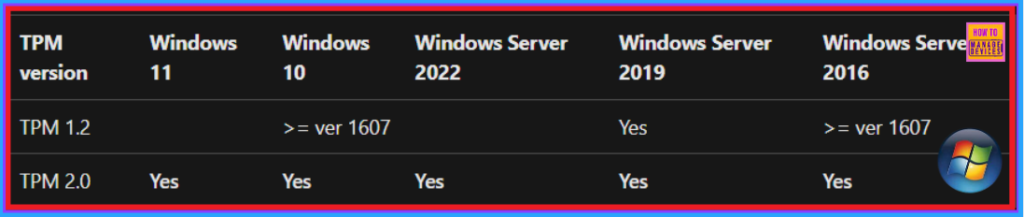
Device Health Attestation – Supported versions
Device Health Attestation is a health assessment of the device’s boot-time properties. We can configure an MDM server to inquire about a health attestation service that permits or denies a managed device access to a secured resource.
Resources
Need Further Assistance or Have Technical Questions?
Join the LinkedIn Page and Telegram group to get the latest step-by-step guides and news updates. Join our Meetup Page to participate in User group meetings. Also, Join the WhatsApp Community to get the latest news on Microsoft Technologies. We are there on Reddit as well.
Author
Anoop C Nair has been Microsoft MVP from 2015 onwards for 10 consecutive years! He is a Workplace Solution Architect with more than 22+ years of experience in Workplace technologies. He is also a Blogger, Speaker, and Local User Group Community leader. His primary focus is on Device Management technologies like SCCM and Intune. He writes about technologies like Intune, SCCM, Windows, Cloud PC, Windows, Entra, Microsoft Security, Career, etc.




Discussion