






Fix Upgrade Issues in Specific Microsoft Intune Tunnel Versions using mstunnel-patch-2602 Script
Key Takeaways
- Microsoft Tunnel version 20260129.1 has a confirmed upgrade issue
- Affected servers may appear healthy even when upgrades fail
- Microsoft fixed the issue in version 20260330.1
- A new remediation script simplifies recovery for impacted servers
In this post, we are discussing Fix Upgrade Issues in Specific Microsoft Intune Tunnel Versions using mstunnel-patch-2602 Script. Microsoft has shared details about a known upgrade problem affecting some Microsoft Tunnel servers running version 20260129.1. Due to this issue, certain servers may fail to complete updates and remain stuck on the older release.
Table of Contents
Fix Upgrade Issues in Specific Microsoft Intune Tunnel Versions using mstunnel-patch-2602 Script
Microsoft also shared some administrators might still see the server status as healthy inside the Microsoft Intune admin center, even when the upgrade process does not finish correctly. In some environments, the server may also return to the previous version automatically after the failed update.
- Preview New Device View in MS Intune Simplifies Device Actions with Better Layout and Reporting Access
- Microsoft Now Allows Up to 25 Apps in Intune Autopilot Deployment Profile Policy Including Windows 365
- Intune Win32 App Supersedence and Auto App Update Explained
- Best Guide to Deploy New Intune Company Portal App on Windows using Intune
What Is the Issue?
Microsoft has identified an upgrade issue affecting Microsoft Tunnel deployments running version 20260129.1. Due to this problem, some Tunnel servers may get stuck during the upgrade process and fail to install newer builds successfully. Even though the server health status may continue to appear normal in the Microsoft Intune admin center, the upgrade itself may not complete correctly.
| Symptoms Reported by Administrators |
|---|
| Servers remain on version 20260129.1 |
| Upgrade banners display errors in Intune |
| Server health still appears as healthy despite failed upgrades |
| Tunnel servers roll back to the older version because of configuration mismatches |
| Automatic upgrades fail to complete successfully |
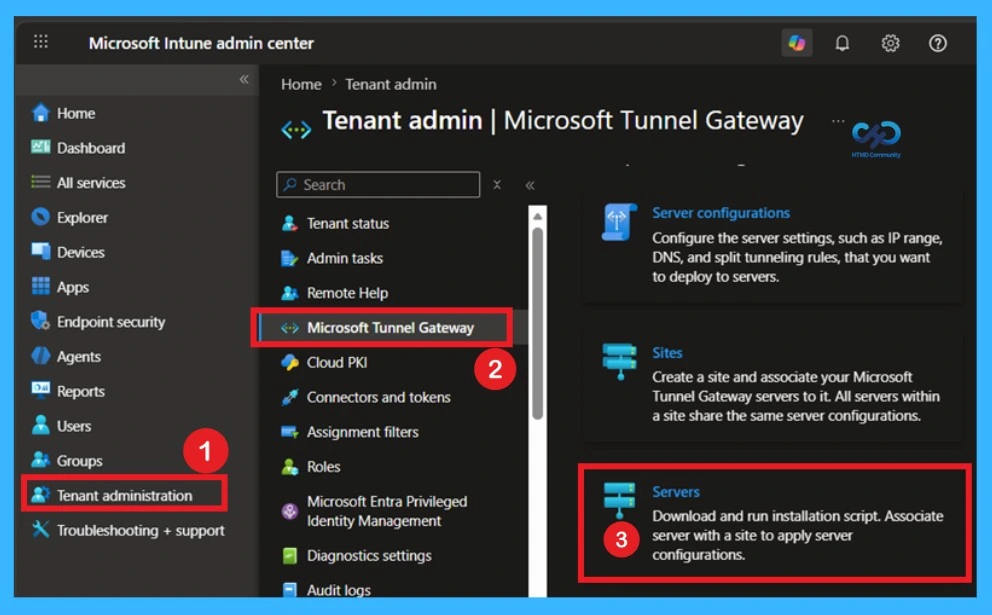
Workaround
Microsoft recommends updating affected Microsoft Tunnel servers to version 20260330.1 or later to resolve the upgrade problem. For administrators facing failed or stuck upgrades, Microsoft has provided a new remediation script named mstunnel-patch-2602.sh that can repair impacted servers without requiring a complete reinstall. Before using the script, administrators should have access to the Linux virtual machine hosting the Tunnel server, sudo permissions, and the downloaded patch script available on the server.

Use the following hash to identify whether your deployment is on this version:
Agent: sha256:abbdcd854aa5ac376aed32c828e4c84917e776a701855cd1e3febed18a3e4dae
Server: sha256:ad57d6a7ffe21f64fc1577713063ae9b180914cf65bc70b4e49be21299cfc1d3
When to Use the Script
Microsoft recommends using the remediation script for Microsoft Tunnel environments experiencing upgrade-related problems with version 20260129.1. Administrators may need the script if the Tunnel server stays on the affected build, fails to update to newer releases, or repeatedly rolls back after upgrade attempts. In some cases, the Microsoft Intune admin center may still display the server status as healthy even though upgrade errors continue to appear because of version mismatches.
Running the Patch Script
After downloading the remediation script, administrators may first need to enable execution permissions before running it with elevated privileges. Once started, the script automatically checks affected build versions, creates backup configurations, stops Tunnel services, updates configuration hashes, downloads the corrected release, and installs the updated Tunnel version using mst-cli.
- After the process completes successfully, affected Tunnel servers should upgrade properly to version 20260330.1 and no longer experience rollback or upgrade failure issues.
| Run the script | Info |
|---|---|
| Step 1: Enable execution permissions | chmod +x mstunnel-patch-2602.sh |
| Step 2: Run the script | sudo ./mstunnel-patch-2602.sh |
Need Further Assistance or Have Technical Questions?
Join the LinkedIn Page and Telegram group to get the latest step-by-step guides and news updates. Join our Meetup Page to participate in User group meetings. Also, join the WhatsApp Community and the WhatsApp channel to get the latest news on Microsoft Technologies. We are there on Reddit as well.
Author
Anoop C Nair is a Workplace Technology solution architect with 25+ years of experience. Microsoft Certified Trainer. Microsoft MVP from 2015 onwards for consecutive 11+ years! He is a blogger, Speaker, and Founder of HTMD Community and HTMD Conference. His main focus is on Device Management technologies like Intune, Windows, and Cloud PC. He writes about technologies like Intune, SCCM, Windows, Cloud PC, Entra, and Microsoft Security.


Discussion