






Turn off Intune Company Portal Usage Data on Windows Devices
This post is about how to prevent Microsoft from data collection for Intune Company Portal usage. Collected data is used to identify areas where Company portal improvements can be made, leading to better functionality and more effective device management.
Keep in mind turning off data usage will limit Microsoft’s ability to provide updates and improvements based on device usage data, so it’s important to weigh the pros and cons before making this change.
Intune collects, processes, and shares some personal data to support business operations, conduct business with the customer, and support the service when users enroll their personal or corporate devices with the platform.
The data collected does not contain any customer information, device names, phone numbers, or the contents of user files and photos.

Intune gathers a range of optional diagnostic data through various client apps to identify, diagnose, and resolve user issues. This data assists in the proactive detection of potential problems in your organization, allowing them to be addressed before they escalate into major issues.
- Enable Windows Diagnostic Data And Licensing Usage From Intune
- Endpoint Analytics Intune Data Collection Policy Issue Workaround
Turn off Intune Company Portal Usage Data on Windows Devices
If you want to turn off Intune Company Portal Usage data on Windows devices, there are a few steps you can follow to do so. Microsoft collects Intune company portal usage data from Windows devices to improve its services, but some organizations may prefer to limit the amount of data collected or disable it altogether.
- Open the Intune Company Portal app on your Windows device.
- Click on Settings in the lower left-hand corner of the screen to access the settings.
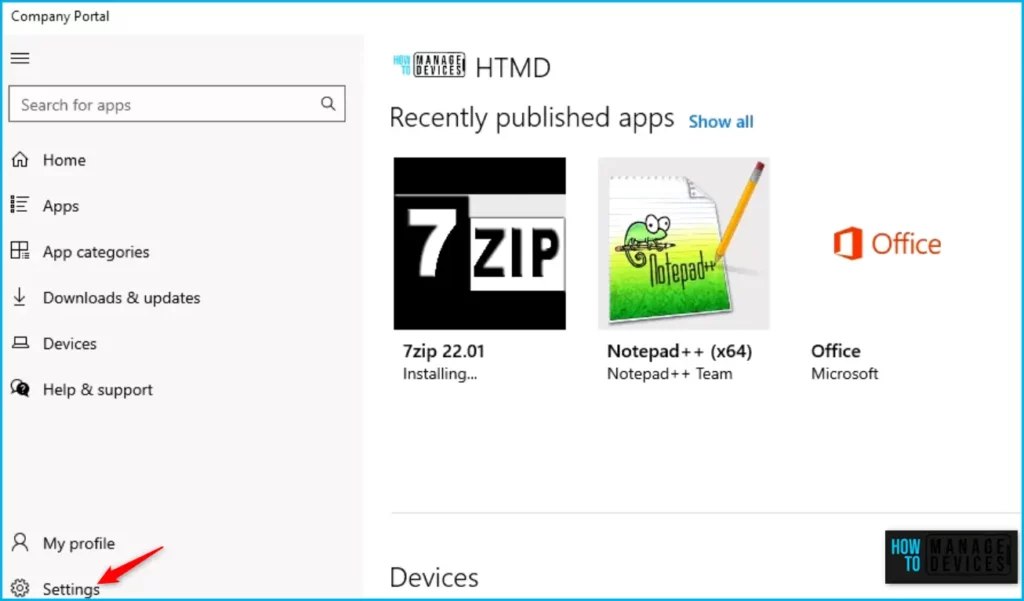
To disable usage data collection, toggle the switch to “No”. Enabling the in-app performance and usage data collection allows Microsoft to automatically collect and share data for the purpose of improving the reliability and performance of their products.
If you choose to disable this data collection, your organization will not be able to modify your preferences. You will not be allowing Microsoft to collect performance and usage data to help improve services.
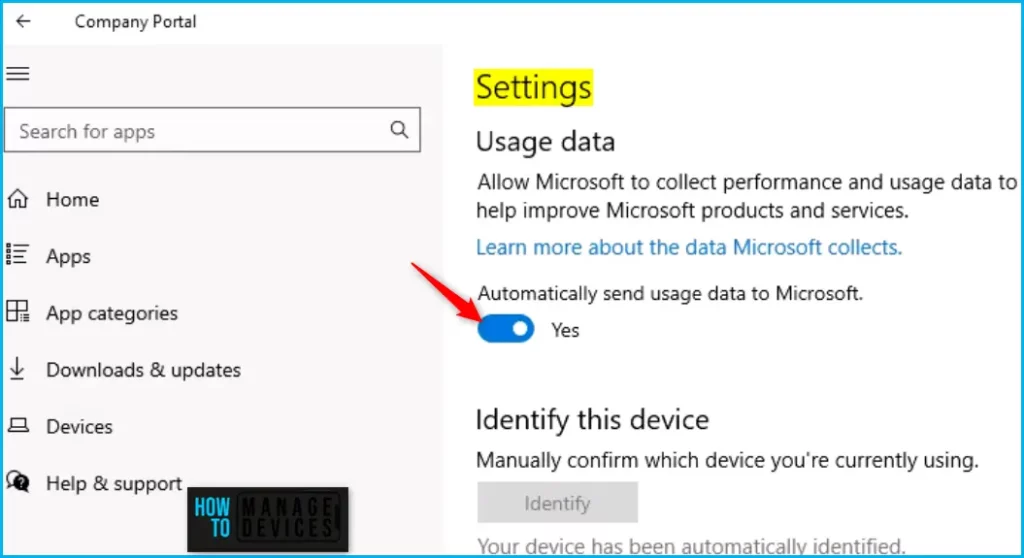
When set to Yes, your in-app performance and usage data is automatically collected and shared with Microsoft. This type of data helps us improve the reliability and performance of Microsoft products.
The optional data collected from clients aren’t required to run Intune services successfully. The data collected helps:
- Provides enhanced information to help us proactively detect, diagnose, and fix issues.
- Makes product and service improvements.
| Category | Data | Required data is collected using only MAM. |
|---|---|---|
| User information | Owner name/user display (the Azure-registered name of the user as identified by AzureUserID) | Yes |
| Phone number | No | |
| Third-party user identifies (like AppleID) | No | |
| User Principal Name or email address | Yes |
Intune collects various optional data to detect, diagnose, and fix problems from users through various Intune client apps. By providing a range of Intune client apps, Microsoft aims to make device management more flexible and accessible for IT teams, regardless of the devices and operating systems used.
Intune client apps encompass a variety of software tools, including iOS/iPadOS Company Portal, macOS Company Portal, Windows Company Portal, Android Company Portal, Android Intune app, Microsoft Intune Management Agent for macOS, Microsoft Intune Management Extension, and Android Mobile App Management (MAM).
These apps are designed to help IT administrators manage and secure devices across different operating systems and platforms, enabling them to enforce policies, push updates, and protect corporate data on employee-owned or company-owned devices.
Author
About Author – Jitesh, Microsoft MVP, has over six years of working experience in the IT Industry. He writes and shares his experiences related to Microsoft device management technologies and IT Infrastructure management. His primary focus is Windows 10/11 Deployment solution with Configuration Manager, Microsoft Deployment Toolkit (MDT), and Microsoft Intune.


Hi Jitesh,
thx for your article. I’m finding it hard to believe though, that providing an opt-out for this kind of usage data as the default and on top of that, only on user level without the possibility to manage this setting in a centralized manner (via Intune, for example) fits any production environments.
At least in our own organization, we would greatly appreciate if there was a way to adjust this for all our devices at once. Unfortunately, according to a support case at MS, this isn’t either implemented nor planned ATM. Please correct me if I’m wrong.