






How to Handle Unexpected Domains in Intune URL Script Output Cortana iTunes and LinkedIn in Default Category
Let’s discuss how to handle unexpected Domains in Intune URL Script Output Cortana iTunes and LinkedIn in Default Category. IT admins have noticed that PowerShell scripts designed to collect Intune URLs and IP ranges sometimes include unexpected domains like Cortana.ai, itunes.apple.com, virtualearth.net, and platform.linkedin.com.
These domains are not related to Intune’s core functionality and can cause confusion when configuring network settings. These domains show up under the Default category, even though they are not directly related to Intune.
This has caused confusion and concerns about whether the scripts are accurate and if firewall rules are too broad. In this post, you’ll find all the details about an issue where the Intune URLs list, specifically the Default category, includes non-applicable domains.
IT admins have observed that PowerShell scripts meant to gather the necessary URLs and IP ranges for Intune often return unexpected domains like Cortana.ai, itunes.apple.com, and platform.linkedin.com. These domains are not directly related to Intune’s core functionality.


Table of Contents
How to Handle Unexpected Domains in Intune URL Script Output
The below PowerShell command is used to retrieve a list of network endpoints related to Microsoft Intune. It makes a request to Microsoft’s public API, specifically asking for the “WorldWide” endpoints that belong to the Intune service.
- Sign in to the Microsoft Intune admin center.
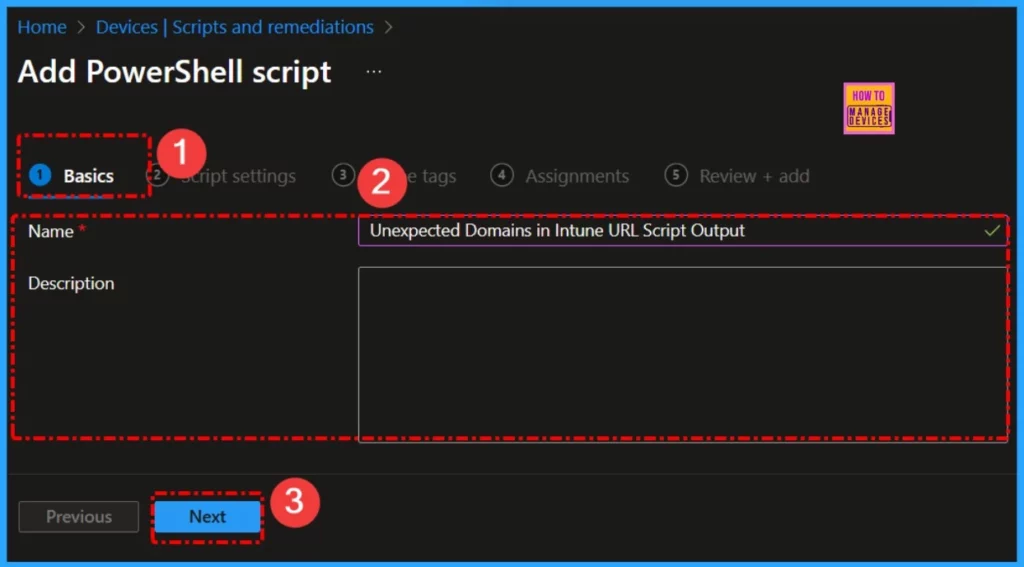
- Select Devices > Scripts and remediations > Platform scripts > Add > Windows 10 and later.
(invoke-restmethod -Uri ("https://endpoints.office.com/endpoints/WorldWide?ServiceAreas=MEM`&`clientrequestid=" + ([GUID]::NewGuid()).Guid)) | ?{$_.ServiceArea -eq "MEM" -and $_.urls}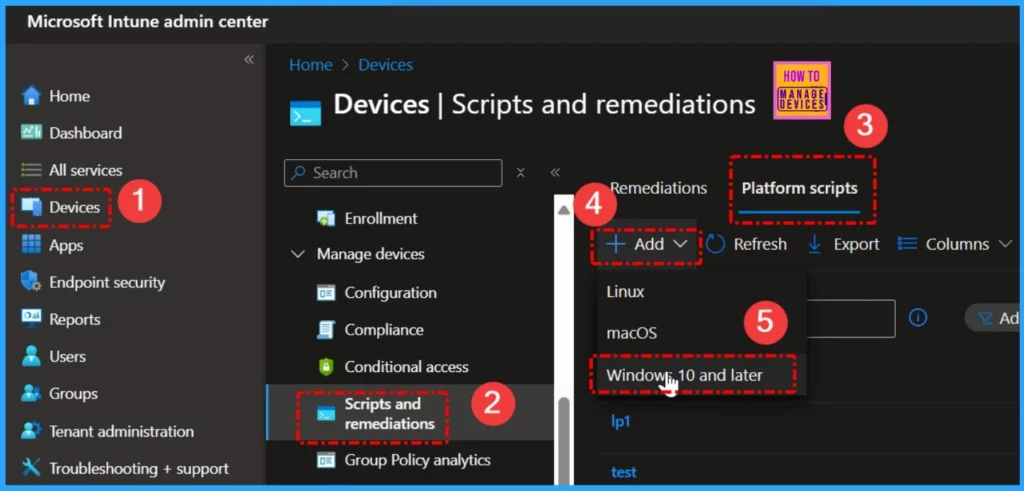
- Intune Proactive Remediation Scripts Vs PowerShell Scripts
- Easy way to Enable Fast Startup using Intune PowerShell Script
- Quick Fix to your Windows OS Issues with Detection and Remediation Scripts with Intune
- Easy Way to Install a Language Pack using Intune PowerShell Script
- Quick and Easy Way to Turn on PowerShell Audit using Intune Policy
Monitoring IP Changes Not URLs
The main concern when configuring network settings for Intune is the frequent change of IP addresses associated with the service URLs, rather than the URLs themselves. While the URLs for Intune services remain stable, the IP ranges can change more regularly, which is what impacts your firewall and network configurations.
To manage this, it’s important to focus on monitoring the IP ranges rather than the URLs. Since the Microsoft endpoint list includes both URLs and IP ranges, you can track the IP ranges over time to ensure your network settings remain accurate.
Automating IP Range Updates with Scripts
To manage the frequent changes in IP addresses, automate the process of fetching the most up-to-date list of IP ranges associated with Intune endpoints. By using a script, you can regularly pull updated IP ranges from the published Microsoft Intune endpoints API or the official list.
To implement this, modify the existing PowerShell script to focus on updating IP ranges rather than tracking URL changes. This will help ensure that your firewall and network configurations stay accurate and up-to-date, eliminating the need for manual checks every time the IP ranges change.
Using the Official Published List
The official Microsoft Intune endpoints list, available in the documentation, generally covers all the network requirements for setting up firewalls and network configurations. Since URLs rarely change, you can primarily rely on this list for your network setup, while periodically checking for updates to the IP ranges.
Read more – Network endpoints for Microsoft Intune | Microsoft Learn
Practical Approach
To manage your network more easily, use dynamic filtering by IP range and rely on the official Microsoft IP range data for Intune, Exchange, and O365. This lets you focus on monitoring IP changes instead of worrying about URL updates.
Set up a recurring task to automatically fetch and update the IP ranges for these services, ensuring your firewall or network perimeter stays current without needing manual changes when URLs change.
Need Further Assistance or Have Technical Questions?
Join the LinkedIn Page and Telegram group to get the latest step-by-step guides and news updates. Join our Meetup Page to participate in User group meetings. Also, Join the WhatsApp Community to get the latest news on Microsoft Technologies. We are there on Reddit as well.
Resources
Intune URLs – Default Category Seems to Include Non-Applicable URLs | Microsoft Community Hub
Author
Anoop C Nair has been Microsoft MVP from 2015 onwards for 10 consecutive years! He is a Workplace Solution Architect with more than 22+ years of experience in Workplace technologies. He is also a Blogger, Speaker, and Local User Group Community leader. His primary focus is on Device Management technologies like SCCM and Intune. He writes about technologies like Intune, SCCM, Windows, Cloud PC, Windows, Entra, Microsoft Security, Career, etc.


Discussion