






Update Intune Company Portal App for macOS Device
Let’s check about the Minimum Supported Intune Company Portal version changes for macOS. Microsoft recently added a plan for change coming soon, which is required using an updated Company Portal for macOS (v5.2312.0).
Updating the Intune Company Portal App on macOS devices is crucial to ensure that users have access to the latest features, improvements, and security updates. The Company Portal App is a key component of Intune, enabling users to enroll macOS devices, view compliance status, install apps and access company resources securely.
It is always recommend to use the latest version of the Company Portal app on your device because it contains the latest bug fixes and security updates. You might be required to update the app on your work or school device when a newer version of Company Portal becomes available or running version no longer supported.
This post shows you, how you can get the latest version of the Microsoft Intune Company Portal app on your macOS device, Company Portal sends notifications to your device when an update is required.


- Intune Minimum Supported IOS IPadOS Version Changes
- New Windows App Available In IOS MacOS IPadOS Android Devices
Update Intune Company Portal App for macOS Device
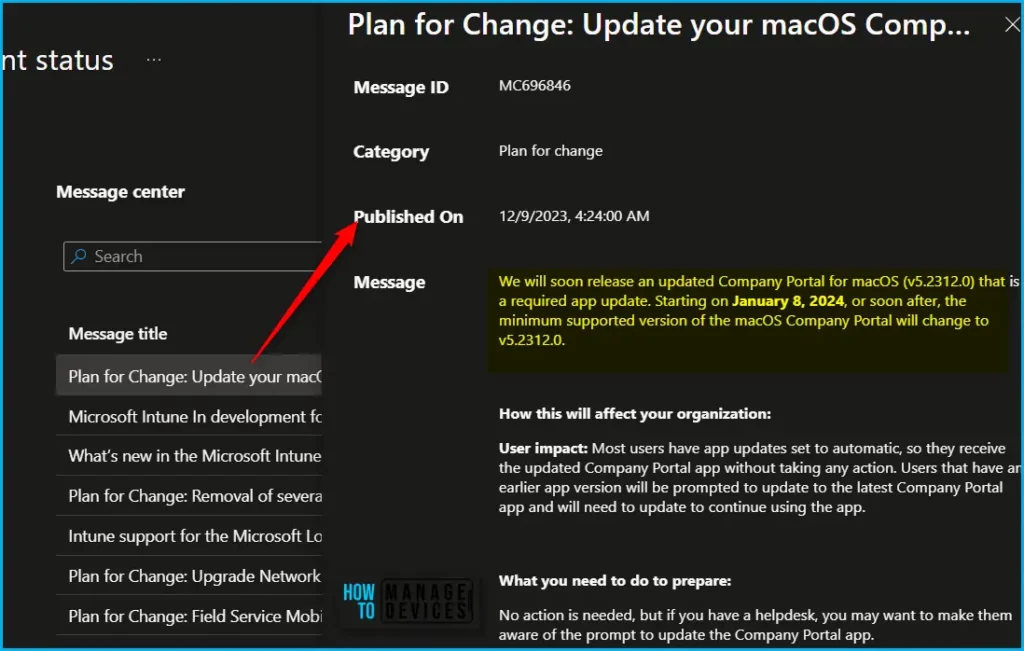
Microsoft recently added MC696846 Plan for change, On December 9, 2023, Microsoft soon release an updated Company Portal for macOS (v5.2312.0), which is a required app update. Starting on January 8, 2024, or soon after, the minimum supported version of the macOS Company Portal will change to v5.2312.0.
In Intune Admin Center, Tenant Administration > Tenant status. Navigate to the Service health and message center tab, On the Service health dashboard, you can view details for Service incidents that affect your tenant, and Intune news in Message Center, which provides information about updates and planned changes.
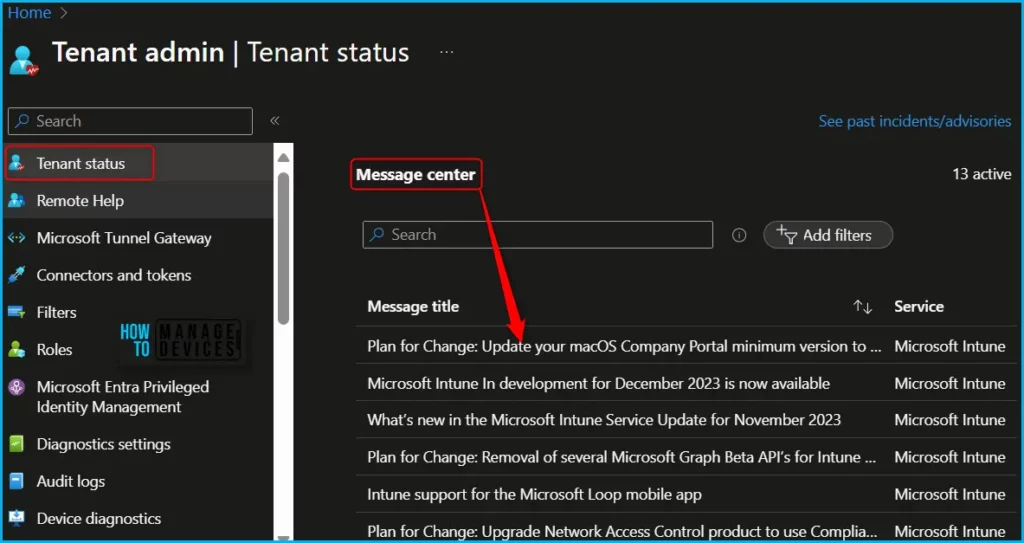
| Message | Service | Category | Published | Message ID |
|---|---|---|---|---|
| Plan for Change: Update your macOS Company Portal minimum version to v5.2312.0 | Microsoft Intune | Plan for change | 12/09/2023 | MC696846 |
How this will affect your organization
User impact: Most users have app updates set to automatic, so they receive the updated Company Portal app without taking any action. Users that have an earlier app version will be prompted to update to the latest Company Portal app and will need to update to continue using the app.
What you need to do to prepare
No action is needed, but if you have a helpdesk, you may want to make them aware of the prompt to update the Company Portal app.
Update Company Portal App on macOS Device
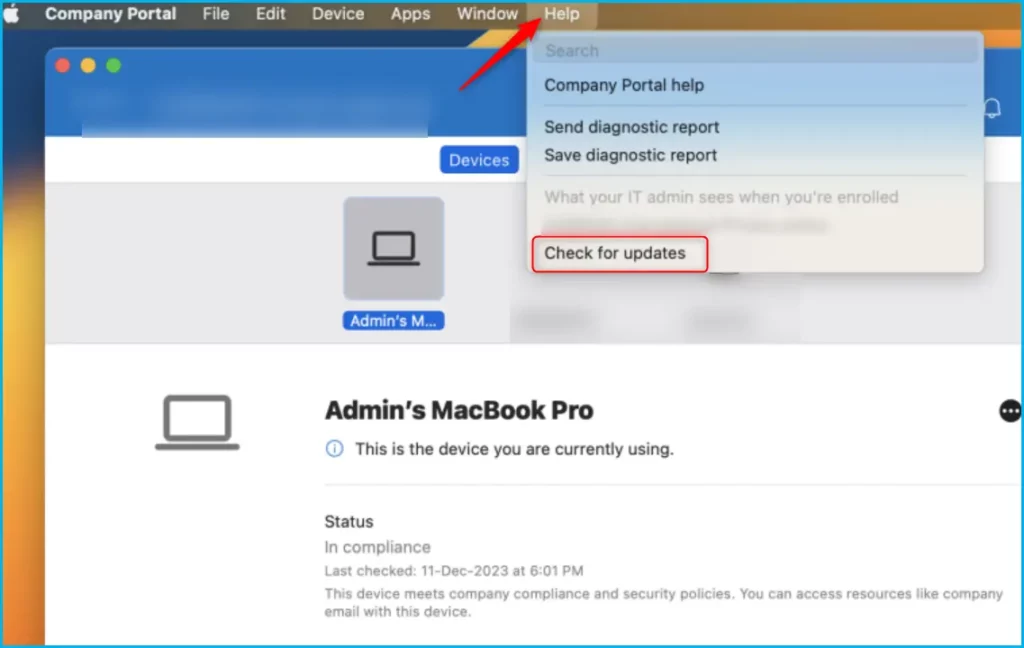
To view and install available updates on a macOS device, here’s how you can check and check for updates for the macOS Company Portal app.
- Open Company Portal and go to Help.
- Select Check for updates, and then select the available update to begin installation.
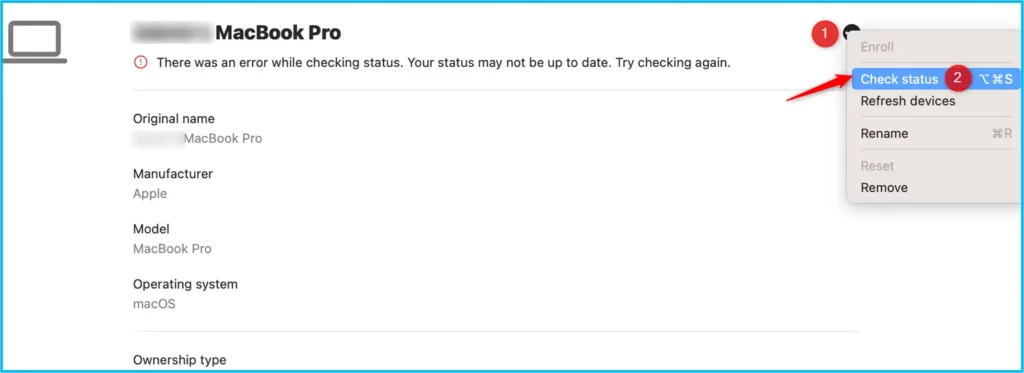
When the update is complete, return to Company Portal > Devices. Select the device that you are currently using. Select More […] and then choose Check Status to sync your mac device.
We are on WhatsApp. To get the latest step-by-step guides and news updates, Join our Channel. Click here –HTMD WhatsApp.
Author
About Author – Jitesh, Microsoft MVP, has over six years of working experience in the IT Industry. He writes and shares his experiences related to Microsoft device management technologies and IT Infrastructure management. His primary focus is Windows 10/11 Deployment solution with Configuration Manager, Microsoft Deployment Toolkit (MDT), and Microsoft Intune.


Discussion