






UserRights Policy Deployment Using Intune | Group Policy Replacement
In this post, you will learn how to deploy UserRights policies successfully. I am grateful to my colleague Mark Thomas for helping me fix the issue.
You can use Intune to deploy security policies using out-of-box templates or Windows 10 custom policy CSP (UserRights Policy).
I checked Intune Administrative templates, Security baselines, and box Device restriction policies to find options to deploy Windows 10 UserRights settings. I couldn’t see any out-of-box policies related to UserRights settings.
- Manage Zoom Settings Using Intune Administrative Templates HTMD Blog (anoopcnair.com)
- Import Custom ADMX Administrative Templates In Intune MEM Portal HTMD Blog (anoopcnair.com)
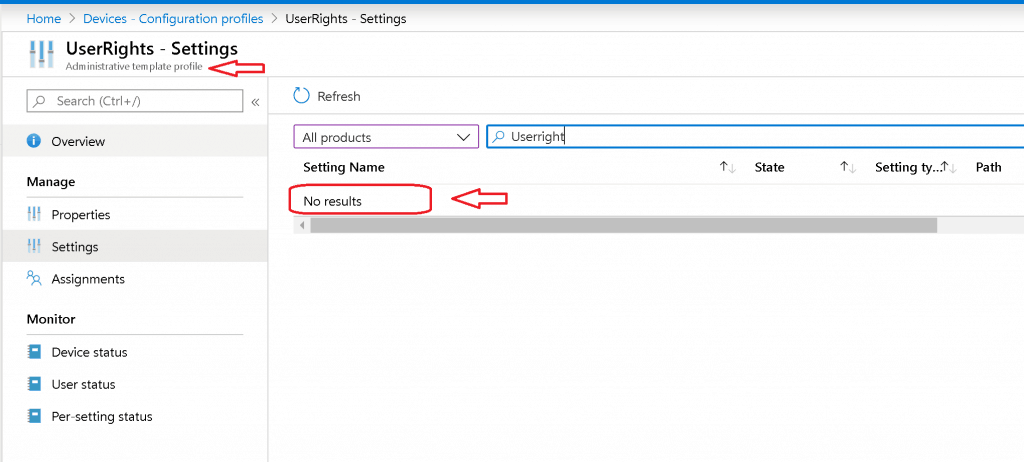
I have two options to deploy UserRights settings:

- Group Policy if the device is domain joined or Hybrid Azure AD Joined
- Computer Configuration\Windows Settings\Security Settings\Local Policies\User Rights Assignment.
- Custom Windows 10 policy CSP using Intune for Azure AD joined devices.
Custom Windows 10 Policy CSP
In this post, you shall take an example of the specific policy CSP called:
“./Device/Vendor/MSFT/Policy/Config/UserRights/AccessFromNetwork“
I’m trying to provide “access from network” access to two user groups called “Administrators” and “Remote Desktop Users.”
XML Format – First Try
I tried custom policy CSP using the Microsoft document recommendation here.
- Created custom Intune policy CSP using – Data Type -> String (XML File)
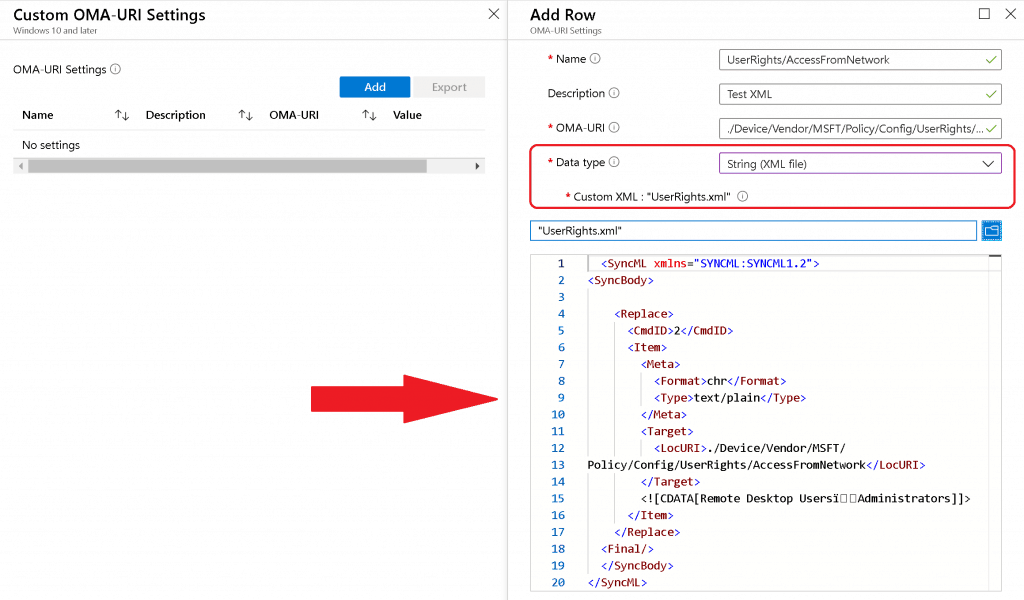
Sample XML for UserRights/AccessFromNetwork settings to add Remote Desktop UsersAdministrators ( note this symbol) groups
<SyncML xmlns="SYNCML:SYNCML1.2"> <SyncBody> <Replace> <CmdID>2</CmdID> <Item> <Meta> <Format>chr</Format> <Type>text/plain</Type> </Meta> <Target> <LocURI>./Device/Vendor/MSFT/ Policy/Config/UserRights/AccessFromNetwork</LocURI> </Target> <![CDATA[Remote Desktop UsersAdministrators]]> </Item> </Replace> <Final/> </SyncBody> </SyncML>
The Data Type string (xml file) policy CSP settings failed with following error:
Error Code - 0x87d101f4
Syncml(500). The recipient encountered an unexpected condition which prevented it from fulfilling the request
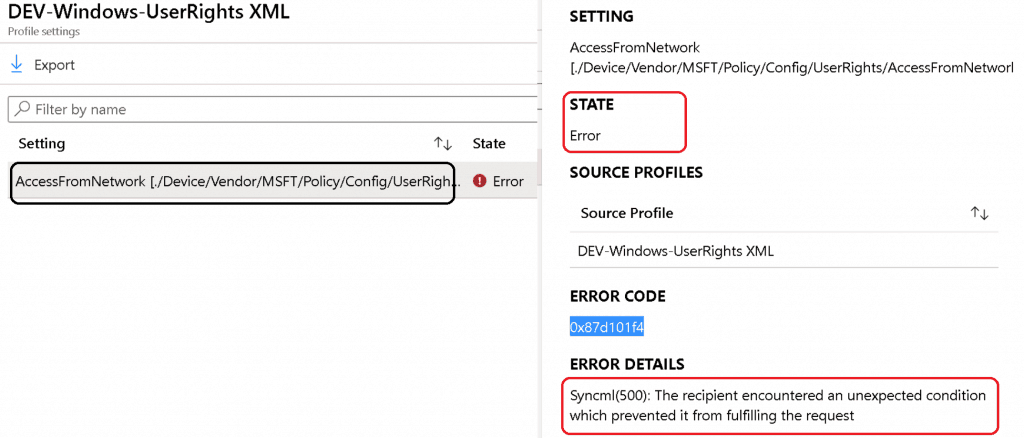
String Option – UserRight/AccessFromNetwork
As you saw above, the string XML file option to deploy policy CSP failed. Next, try Data Type -> String with Windows 10 policy CSP.
I tried to look at the GitHub thread and use the following settings to deploy the UserRight/ AccessFromNetwork policy CSP.
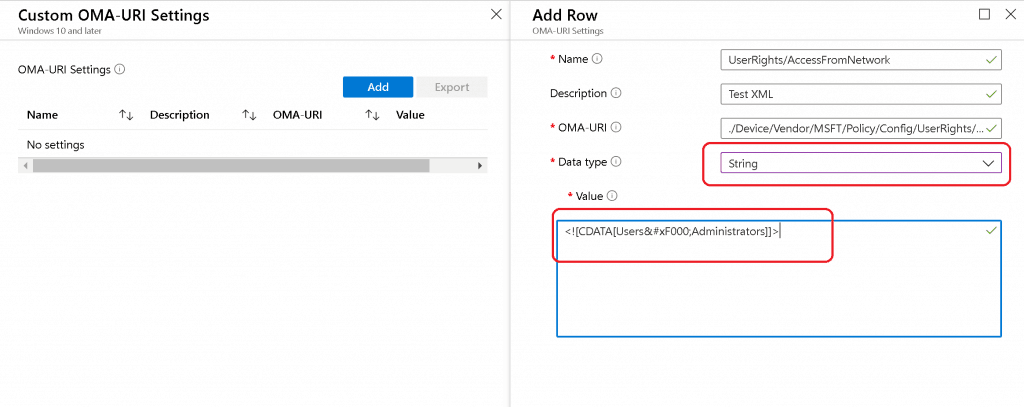
The above setting was successfully applied on the Windows 10 device, but Intune shows an error -2016281112 (Remediation failed). These error details are also explained in the above GitHub thread.
ASCII Value ( ) Issues with UserRights CSP
This is the option where my colleague Mark Thomas came to the rescue. Mark helped me FIX the Windows 10 custom policy CSP ASCII character-related issue.
NOTE – This ASCII value ( ) mismatch is also discussed in the GitHub thread.
String Value to provide “UserRight/AccessFromNetwork” access to the following groups:
- Administrators
- Remote Desktop Users
The following are the third and final options that were successful.
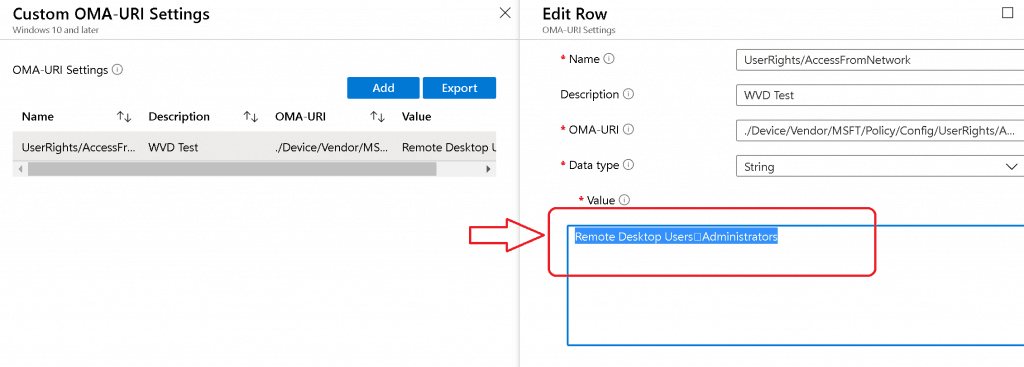
Policy CSP Settings Intune:
Name - UserRights/AccessFromNetwork Description - User Rights OMA-URI - ./Device/Vendor/MSFT/Policy/Config/UserRights/AccessFromNetwork Data Type - String Value - Remote Desktop UsersAdministrators
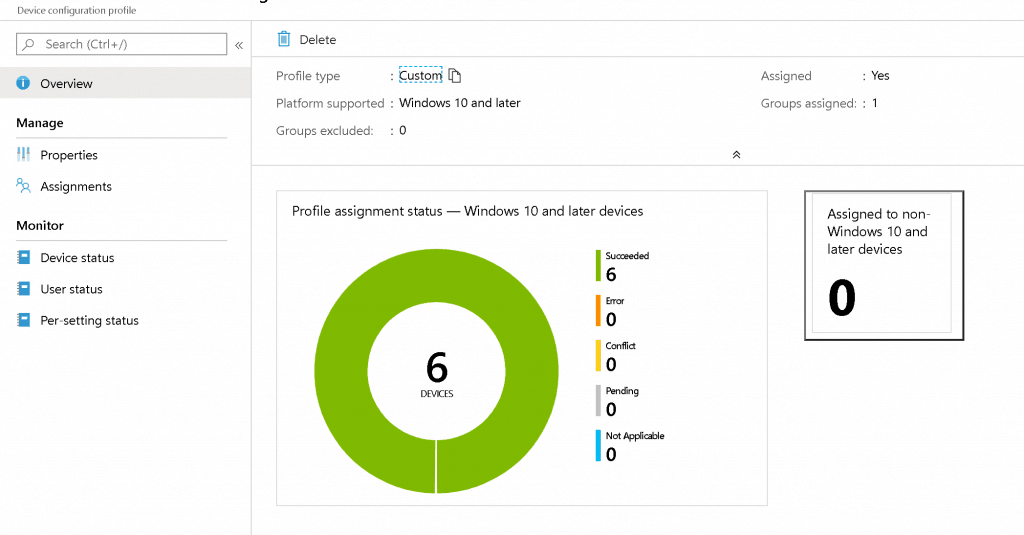
Results – UserRights Policy Deployment Using Intune | Group Policy Replacement
The Windows 10 custom policy CSP was successfully deployed without group policy settings. Happy modern management!
We are on WhatsApp. To get the latest step-by-step guides and news updates, Join our Channel. Click here –HTMD WhatsApp.
Author
Anoop C Nair is Microsoft MVP! He is a Device Management Admin with more than 20 years of experience (calculation done in 2021) in IT. He is a Blogger, Speaker, and Local User Group HTMD Community leader. His main focus is on Device Management technologies like SCCM 2012, Current Branch, and Intune. He writes about ConfigMgr, Windows 11, Windows 10, Azure AD, Microsoft Intune, Windows 365, AVD, etc.


Works like a charm, thanks for going through all the pain for us. 🙂
StaffGreat to know … thank you for the feedback
Hi,
where and how do I find the endpoint settings defined from Intune?
For GPO, were the tools gpresults and rsop? Is there something similar for Intune?
Thanks
David
Diagreport from the client might help you
Hi Anoop,
I am trying to restrict few user groups from interactive login to AzureAd joined devices and was exploring UserRights/DenyLocalLogOn. I did give the objectID of the azure ad group in the string but it didn’t work. Have you tried this? Also, is there any other better way to handle this?
Did you ever find a way to deny a local login using a CSP? I was trying to limit anyone in the local Guests group on the machine from logging in. This was my final setting that applied successfully after reading this article.
Name: DenyInteractiveLogonRight
OMA-URI: ./Device/Vendor/MSFT/Policy/Config/UserRights/DenyLocalLogOn
Data type: String
Value: Guests
Hi Guys,
Do you know if there is a way to include multiple domain users in this userrights CSP?
I tried with the separators included in this article but it is not working.
Thanks a lot
How do I add an Azure AD group to this list? I have tried just about everything, and cannot figure out how to do it.
Same for me, I was able to add specific AAD user but not an AAD group.. Tried with SID but does not work
It doesn’t appear to be possible to use a AAD group in the assignment which is terrible really. This should be a standard function
Hi, unfortunately neither the option with the ASCII value ( ) nor with the CDATA works for us… what else can we do? we want to add citrix server.