






What is SCCM Cloud Attach Tenant Attach Client Attach Vs Co-Management
What is SCCM Cloud Attach Tenant Attach Client Attach Vs. Co-Management? I hope you have already heard about SCCM Cloud Attach (MECM Cloud Attach) many times before.
Let me tell you, cloud Attachment is a bit different now! All the details are taken from Jason Githens & Rob York’s session in MS Ignite 2019. More information about the Ignite session is below.
Co-management is the bridge between traditional management and modern management. Microsoft renamed the co-management node in the SCCM admin console to Cloud Attach.
Windows 10 or Windows 11 co-management is a dual management (with SCCM and Intune) capability available with Windows 10 1709 version (Fall Creators Update).

- Co-managed device = SCCM agent + Intune enrolled
- Tenant attach device = SCCM agent synced to MEM (Not Intune enrolled)
Related Post
- Tenant Attach Guide for SCCM Logs Data Flow Troubleshooting Intune
- SCCM Tenant Attach Troubleshooting Issues via Logs | ConfigMgr
- Fix ConfigMgr Tenant Attach Error 401 403 | Missing Config| SCCM
SCCM Cloud through Co-Management
Yes, you are correct! SCCM cloud attachment is not new here. Microsoft mentioned the SCCM cloud-connected features in the last MS Ignite. The following was the offering from Microsoft.
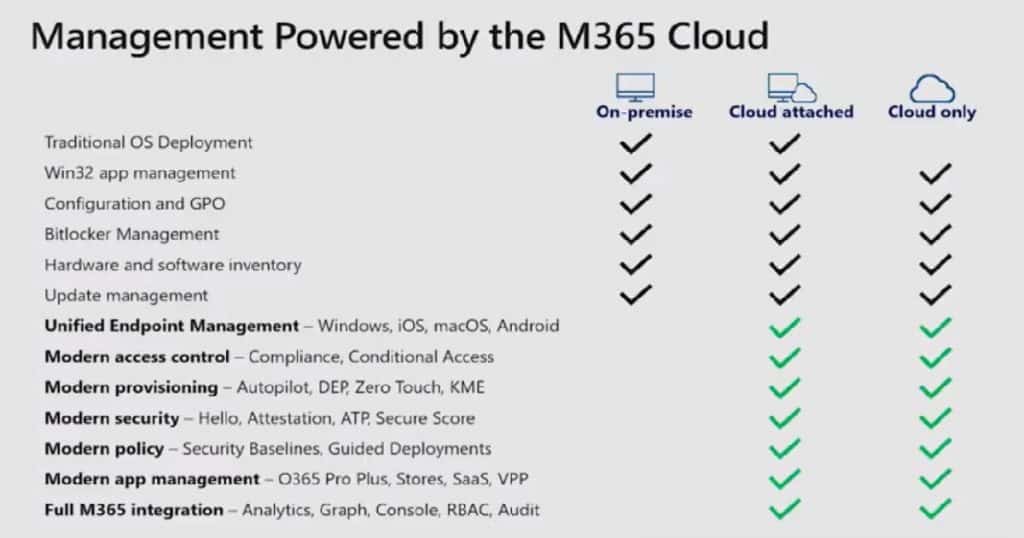
Microsoft did a great job of evolving to the new vision of cloud attach with the following options. With the Microsoft Endpoint Manager announcement, Microsoft is trying to help organizations reduce friction in the Modern Management strategies.
- Cloud console
- Tenant attach
- Client attach
- Single pane of glass
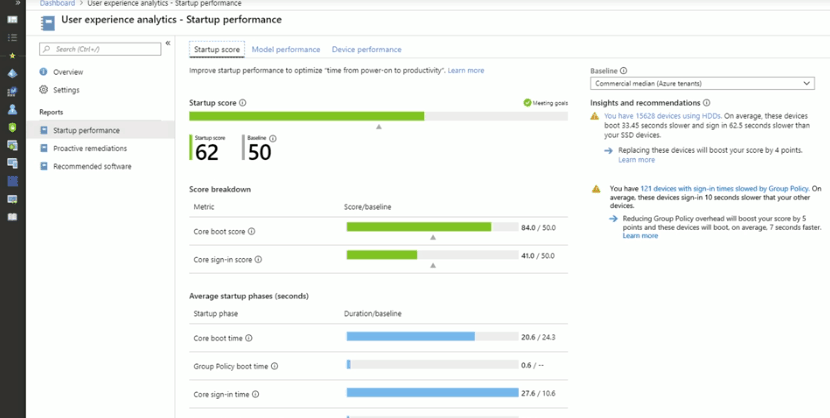
User Experience Analytics
As per Jason, user experience analytics has the following components: You can learn more about these topics by listening to the recorded video of this session.
- Startup Performance
- Remediation Scripting
- Recommended Software
- Experience Score
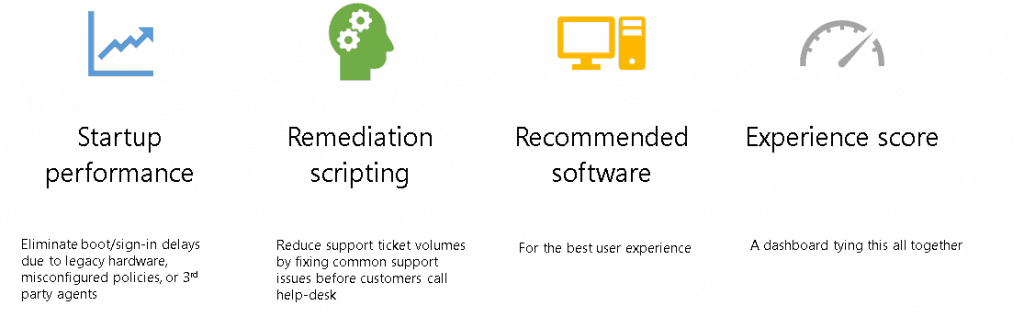
I hope these new options will help customers achieve their organizational goals, as Jason explained in the presentation.
- Employee Experience
- Employee Retention
- Attracting New Talent
- Change Control Dashboard (Change Control with User Experience in a data-driven way)
What is User Experience Analytics?
What is SCCM Cloud Attach Tenant Attach Client Attach Vs. Co-Management?
As per Rob (check out the recorded session below), the cloud attach is an option for leveraging the combined power of Microsoft Endpoint Manager by connecting SCCM to Intune.
Cloud Attach has two parts, which are explained in the slide deck below. The sub-sections below provide more details.
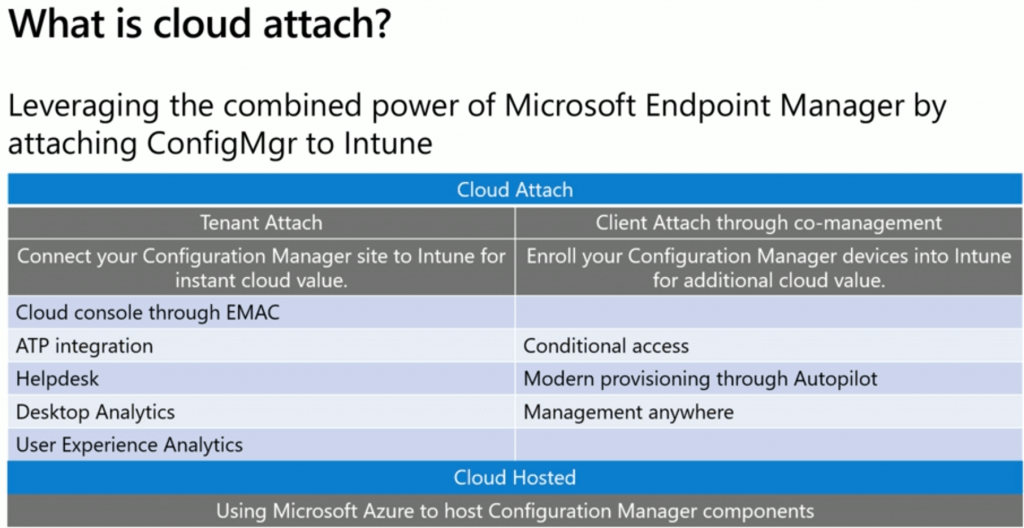
Tenant Attach: Connect your Configuration Manager site to Intune for instant cloud value. However, Microsoft recently removed the conditional access features from the Client Attach scenario.
| Tenant Attach | Client Attach |
|---|---|
| Cloud console through EMAC | |
| ATP integration | Conditional access |
| Helpdesk | Modern provisioning through Autopilot |
| Desktop Analytics | Management anywhere |
| User Experience Analytics |
Tenant Attach through Co-Management
Tenant Attach – Connect your SCCM site to Microsoft Intune for instant cloud console and troubleshooting power. The “tenant attach” is an on-demand connected architecture. No, Microsoft is not replicating the entire SCCM DB to Intune!!
The tenant architecture is an on-demand connection when you click on an item in the Microsoft Endpoint Manager portal. This information will also improve the experience of help desk teams.
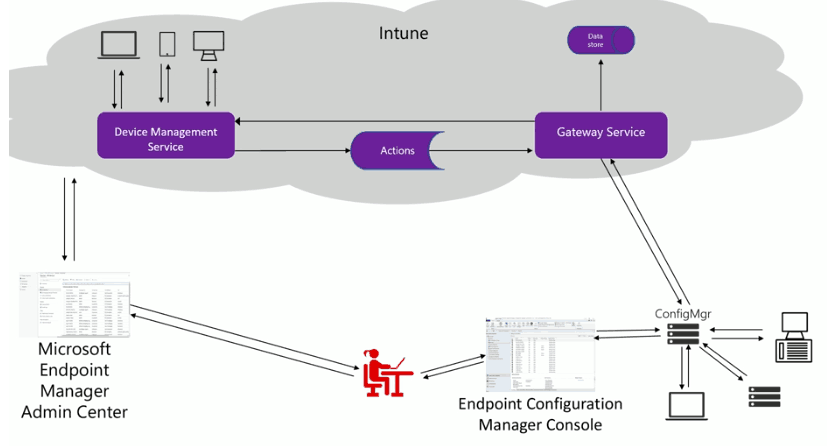
The following are the features you will be able to enable with the SCCM tenant attached:
- Cloud Console through Microsoft Endpoint Admin Console (EMAC)
- ATP Integration
- Helpdesk
- Desktop Analytics
- User Experience Analytics
- Web front-end CMPivot
Client Attach through Co-Management
SCCM Client attaches nothing but co-management. We have many guides about SCCM co-management. I recommend reviewing the latest one, “SCCM CMG Schema Workflow Scenarios.”
Client Attach Features!
- Conditional Access
- Modern Provisioning through Autopilot
- Management from Anywhere
How to Attach SCCM to Cloud Tenant?
As per Rob, this tenant attaches option will be coming to future SCCM versions. I shall presume in the 2002 version of SCCM or later!
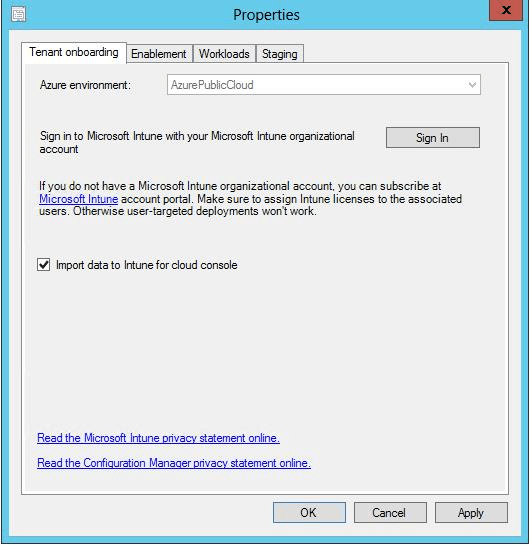
How do you prepare for the SCCM cloud attach? Start preparing for co-management options.
- Enable the option “Import data to Intune for cloud console.”
Session – SCCM Cloud Attach
Device Management:
Attach Configuration Manager to Microsoft Intune and the Microsoft 365 cloud – https://myignite.techcommunity.microsoft.com/sessions/81674
Resources
- Advantages of Using Cloud Attached SCCM and Intune
- SCCM CMG Schema Workflow Scenarios – Part 1
- Latest SCCM CMG Implementation Guide with EHTTP Certificate
We are on WhatsApp. To get the latest step-by-step guides and news updates, Join our Channel. Click here –HTMD WhatsApp.
Author
Anoop C Nair is Microsoft MVP! He is a Device Management Admin with more than 20 years of experience (calculation done in 2021) in IT. He is a Blogger, Speaker, and Local User Group HTMD Community leader. His main focus is on Device Management technologies like SCCM 2012, Current Branch, and Intune. He writes about ConfigMgr, Windows 11, Windows 10, Azure AD, Microsoft Intune, Windows 365, AVD, etc.




Discussion