






Windows 10 21H1 OS Version Appears Wrong 10.0.19041.928 in SCCM Console Operating Systems Node | ConfigMgr
Let’s understand why Windows 10 21H1 OS Version 10.0.19041.928 appears wrong in the SCCM Console Operating Systems Node.
Jitesh highlighted this known issue in his post “Deploy Windows 10 21H1 Using SCCM Task Sequence | ConfigMgr | Step By Step Guide.
Microsoft released Windows 10 21H1, also known as the May 2021 Update, including all features and fixes from previous updates to Windows 10, version 20H2.
Windows 10, version 21H1, is available for users with devices running Windows 10, versions 2004 and higher, who manually seek to check for updates via Windows Update.

Table of Contents
Windows 10 21H1 OS Version 10.0.19041.928 Appears Wrong
This is a known issue that might occur when importing a Windows 10 21H1 OS image to SCCM. The Windows 10 21H1 OS Version is 19043.985. For more details about the latest Windows 10 Build Numbers, Click Here.
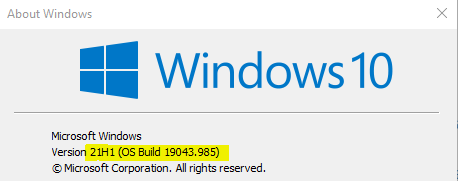
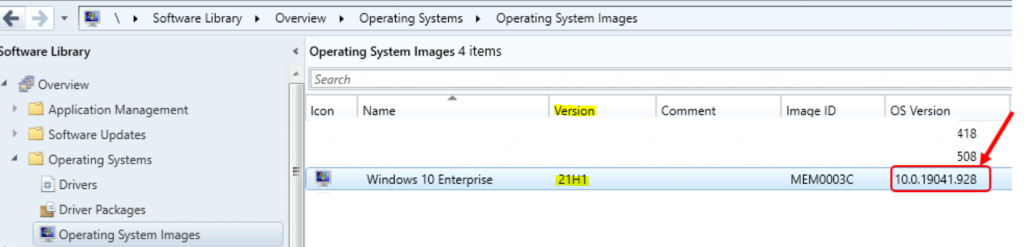
However, it displays 10.0.19041.928 as the Windows 10 21H1 version in the Operating Systems node within the Configuration Manager console. This is a bug or known issue.
- Deploy Windows 10 21H1 Using SCCM Task Sequence | ConfigMgr | Step By Step Guide
- ClickOnce App Installation Prompts and Windows 10 Update KB5028244 | Issues and Solutions
- Upgrade Windows 10/11 Edition using Intune Policy
Windows 10 21H1 OS Version Appears Wrong 10.0.19041.928 Issue?
There is a thread on Twitter about the issue with Windows 10 21H1 version confusion. Microsoft Engineering Manager Gabe Frost explains that Windows ReleaseID was deprecated. It’s not documented, not exposed by any API, and only exists in the registry. To support 21H1, Microsoft created a new key and left the old key alone. The new key is called DisplayVersion.
Windows Version Registry Path – Computer\HKEY_LOCAL_MACHINE\SOFTWARE\Microsoft\Windows NT\CurrentVersion
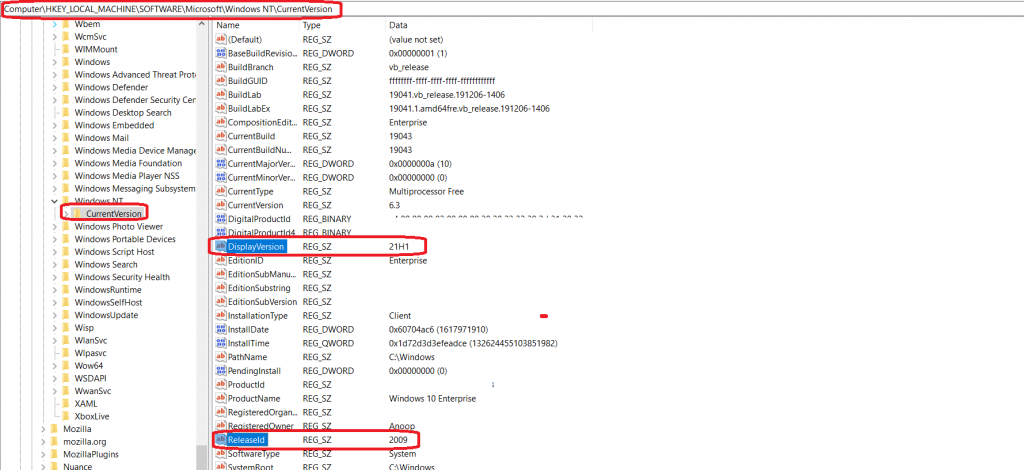
Gabe Frost also doesn’t recommend relying on DisplayVersion because it is not a documented, well-defined contract and is, therefore, subject to change.
Gabe Frost added that the documented/supported way to know Windows 10 version is to use AnalyticsInfo. More details are available AnalyticsInfo Class (Windows.System.Profile) – Windows UWP applications | Microsoft Docs.
Fix Windows 10 21H1 OS Version Appears Wrong 10.0.19041.928 in SCCM Console?
Microsoft Engineer Sudhagar Thirumoolan suggested a manual workaround to fix the versioning issue of Windows 21H1.
As per Sudhagar Thirumoolan, you can mount the WIM on a fully patched 20hx or 21h1 host machine (without the ADK installed) and unmount the commit. Now, you will see that the offline metadata has been updated to the correct version of Windows 10 21H1.
As per Sudhagar, the permanent fix to these issues comes with the upcoming versions of Windows 10 ADK. Do you want to try it now? You can try the insider ADK release for now. Download the insider version of ADK from Download Windows Insider Preview ADK (microsoft.com).
Resources
- Windows 10 Build Numbers Version Numbers (anoopcnair.com)
- Deploy Windows 10 21H1 Using SCCM Task Sequence | ConfigMgr | Step By Step Guide HTMD Blog (anoopcnair.com)
We are on WhatsApp. To get the latest step-by-step guides and news updates, Join our Channel. Click here –HTMD WhatsApp.
Author
Anoop C Nair has been Microsoft MVP for 10 consecutive years from 2015 onwards. He is a Workplace Solution Architect with more than 22+ years of experience in Workplace technologies. He is a Blogger, Speaker, and Local User Group Community leader. His primary focus is on Device Management technologies like SCCM and Intune. He writes about technologies like Intune, SCCM, Windows, Cloud PC, Windows, Entra, Microsoft Security, Career, etc.



19041.928 <– this version of 10 is HORRIFIC. No Updates will complete successfully and they cannot be stopped from trying, the machine is constantly being interrupted by long and ridiculous involuntary update attempts that end with a unsuccessful notice that is then followed by an even longer " we are changing everything back because the update was unsuccessful procedure" It's too late to revert back to windows 7 and I have found no resolution to this problem.