






Windows 10 KB5012599 Windows 11 KB5012592 LCU with Recovery Disk Known Issue April Patch
Microsoft released Windows 10 KB5012599 and Windows 11 KB5012592 as part of the April 2022 Patch Tuesday with a known recovery disk issue. The recovery disk issue is impacting both Windows 11 and Windows 10 PCs.
These patches are made available through different deployment channels such as Microsoft Update Catalog, ConfigMgr (aka WSUS), and Intune (WUfB).
Three known issues are not fixed in the latest cumulative update patch KB5012599 for Windows 10 20H2, 21H1, and 21H2 versions. All four of them were also documented with the previous LCU patch.
The recovery disk issue highlighted below impacts both Windows 10 and Windows 11 21H2 devices with KB5012592 (Apr 2022 LCU).

Microsoft is still working to fix the recovery disk known issue after installing the Windows updates released on January 11, 2022, or later Windows versions on an affected version of Windows. The recovery discs (CD or DVD) created by using the Backup and Restore app in the Control Panel might be unable to start.
The two known issues only impact Windows 10 versions, and these known issues are not the new ones. I have already mentioned these issues in the previous posts.
- Microsoft Edge Legacy was removed by this update but not automatically replaced by the new Microsoft Edge
- PSFX_E_MATCHING_BINARY_MISSING Error for Windows 10 PCs cannot Install new updates
Known Issue Fixed with KB5012599
The issue that causes a Denial of Service vulnerability on Cluster Shared Volumes (CSV) is fixed with April 2022 LCU KB5012599. For more information, see CVE-2020-26784.
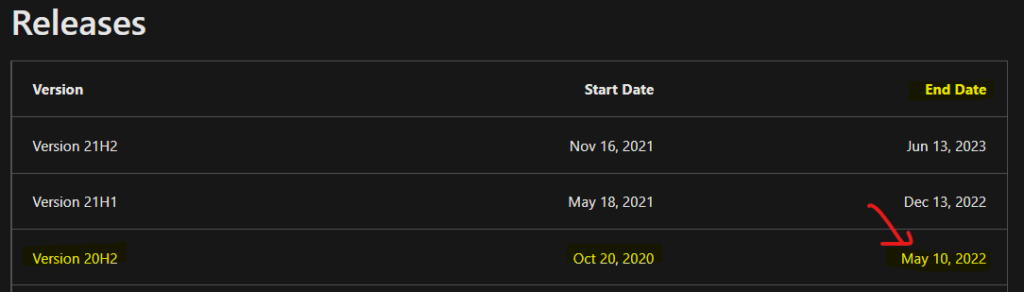
Windows 10 version 20H2 is Out of Support by May 10, 2022
Windows 10, version 20H2, will reach the end of service on May 10, 2022, for devices running the Home, Pro, Pro Education, and Pro for Workstations editions.
After May 10, 2022, Windows 10 20H2 devices will no longer receive monthly security and quality updates that contain protection from the latest security threats.
Deploy Windows 10 KB5012599 using SCCM
You can deploy Windows 10 April 2022 CU KB5012599 using Intune or SCCM. You can create a monthly patch package for April 2022 using the following methods.
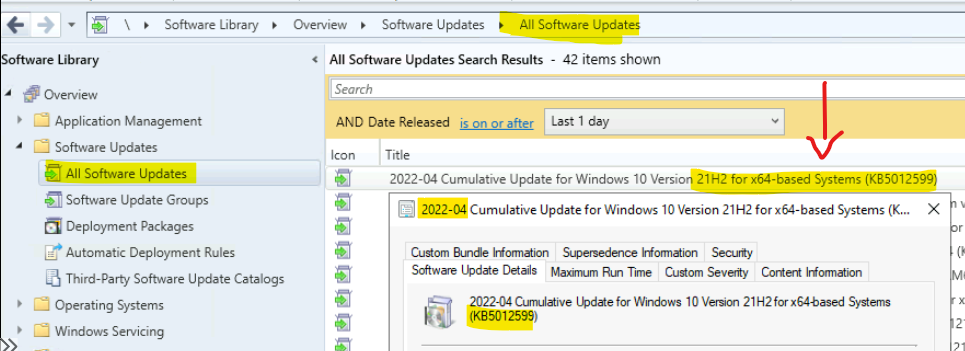
The easiest way is to check from the SCCM admin console \Software Library\Overview\Software Updates\All Software Updates and search with KB5012599. You can verify the Windows 10 versions (19042.1645, 19043.1645, and 19044.1645) after installing April 2022 LCU.
22-04 Cumulative Update for Windows 10 Version 21H2 for x86-based Systems (KB5012599)
22-04 Cumulative Update for Windows 10 Version 21H1 for x86-based Systems (KB5012599)
22-04 Cumulative Update for Windows 10 Version 20H2 for x86-based Systems (KB5012599)
22-04 Cumulative Update for Windows 10 Version 21H2 for x64-based Systems (KB5012599)
22-04 Cumulative Update for Windows 10 Version 21H1 for x64-based Systems (KB5012599)
22-04 Cumulative Update for Windows 10 Version 20H2 for x64-based Systems (KB5012599)
- How to Create Deploy New Software Update Patch Package Using SCCM | ConfigMgr
- SCCM ADR Automatic Deployment Rule Creation Process
- ConfigMgr Software Updates Troubleshooting Tips | Fix Installation Issues
Description: Install this update to resolve issues in Windows. For a complete listing of the issues included in this update, see the associated Microsoft Knowledge Base article for more information. After you install this item, you may have to restart your computer.
April 2022 Cumulative Update Patch Deployment using Intune
Let’s check how to deploy April 2022 Cumulative Update (LCU) Patch Deployment using Intune. Intune April 2022 Cumulative Update Patch Deployment is an automated process for Windows 10 and Windows 11 devices.
You don’t have to create any new Software update ring policies in Intune every month. The existing patch deployment policy will deliver the patches using WUfB (Windows Update for Business).
Read More – Software Update Patching Options With Intune Setup Guide (anoopcnair.com)
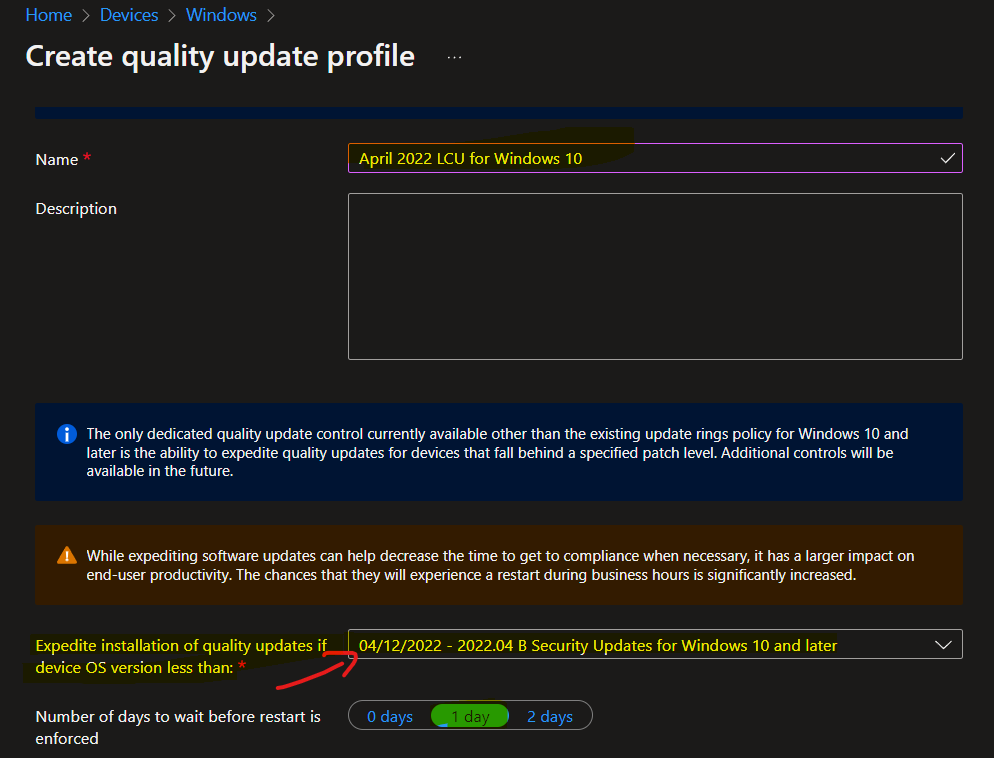
You have an option to expedite the Installation of April 2022 quality updates if the device OS version is less than the 2022.04. Create expedite update profiles for Quality updates using the following steps.
- Open https://endpoint.microsoft.com/
- Navigate Device -> Windows 10 quality Updates (preview).
- Click on + Create Profile.
The following are the Settings for Intune quality update profile.
- Name – April 2022 LCU for Windows 10
- Description—
- Expedite installation of quality updates if device OS version less than 04/12/2022 – 2022.04 B Security Updates for Windows 10 and later
- Number of days to wait before the restart is enforced – 1 Day
More Details on Zero Day Out Of Band Patch Deployment Using Intune MEM Expedite Best Option and Intune Reporting Issue: Expedite Windows Security Patch Deployment.
Windows 11 April 2022 Cumulative Update KB5012592
Let’s check Windows 11 April 2022 Cumulative Update KB5012592 deployment options. Like Windows 10, you can deploy Windows 11 patches (LCUs) using SCCM and Intune.
Windows 11 patching is also important for the organization. Microsoft has released the latest Cumulative Update, KB5012592, for March 2022. Windows 11 will change its build number to 22000.613 after the cumulative update KB5012592.
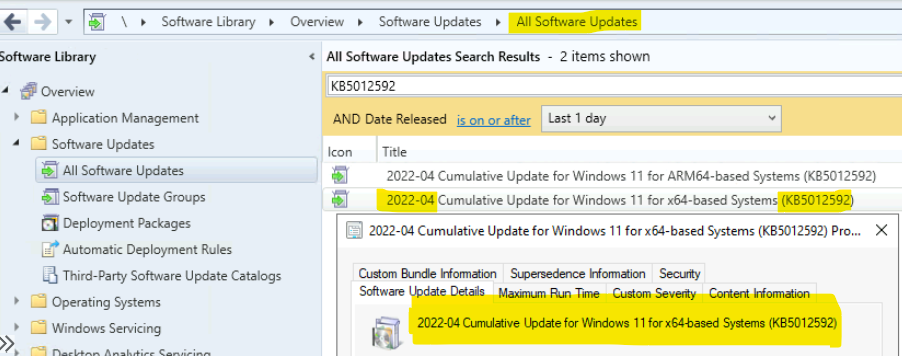
- 2022-04 Cumulative Update for Windows 11 for x64-based Systems (KB5012592)
- Article ID: 5012592
- Date revised: Tuesday, April 12, 2022
- Maximum Severity Rating: Critical
Direct Download Links of April Cumulative Updates
Let’s manually download the April Cumulative update for Windows 10, Windows 11, and Server 2022 from the Microsoft Update Catalog website.
The following tables contain the direct links to download the April 2022 Cumulative Updates for Windows 10, Windows 11, and Windows Server operating systems.
| Title | Products | Size | Direct Download |
|---|---|---|---|
| 2022-04 Cumulative Update for Windows 10 Version 21H1 for x86-based Systems (KB5012599) | Windows 10, version 1903 and later | 312.4 MB | Download |
| 2022-04 Cumulative Update for Windows 10 Version 21H1 for x64-based Systems (KB5012599) | Windows 10, version 1903 and later | 661.4 MB | Download |
| 2022-04 Cumulative Update for Windows 10 Version 21H1 for ARM64-based Systems (KB5012599) | Windows 10, version 1903 and later | 692.6 MB | Download |
| 2022-04 Cumulative Update for Windows 10 Version 20H2 for ARM64-based Systems (KB5012599) | Windows 10, version 1903 and later | 692.6 MB | Download |
| 2022-04 Cumulative Update for Windows 10 Version 20H2 for x86-based Systems (KB5012599) | Windows 10, version 1903 and later | 312.4 MB | Download |
| 2022-04 Cumulative Update for Windows 10 Version 20H2 for x64-based Systems (KB5012599) | Windows 10, version 1903 and later | 661.4 MB | Download |
| 2022-04 Cumulative Update for Windows Server, version 20H2 for ARM64-based Systems (KB5012599) | Windows Server, version 1903 and later | 692.6 MB | Download |
| 2022-04 Cumulative Update for Windows Server, version 20H2 for x64-based Systems (KB5012599) | Windows Server, version 1903 and later | 661.4 MB | Download |
| 2022-04 Cumulative Update for Windows 10 Version 21H2 for ARM64-based Systems (KB5012599) | Windows 10 LTSB, Windows 10, version 1903 and later | 692.6 MB | Download |
| 2022-04 Cumulative Update for Windows 10 Version 21H2 for x64-based Systems (KB5012599) | Windows 10 LTSB, Windows 10, version 1903 and later | 661.4 MB | Download |
| 2022-04 Cumulative Update for Windows 10 Version 21H2 for x86-based Systems (KB5012599) | Windows 10 LTSB, Windows 10, version 1903 and later | 312.4 MB | Download |
| 2022-04 Cumulative Update for Windows 10 Version 1909 for ARM64-based Systems (KB5012591) | Windows 10, version 1903 and later | 669.0 MB | Download |
| 2022-04 Cumulative Update for Windows 10 Version 1909 for x64-based Systems (KB5012591) | Windows 10, version 1903 and later | 591.0 MB | Download |
| 2022-04 Cumulative Update for Windows 10 Version 1909 for x86-based Systems (KB5012591) | Windows 10, version 1903 and later | 364.3 MB | Download |
| 2022-04 Cumulative Update for Windows 11 for x64-based Systems (KB5012592) | Windows 11 | 248.6 MB | Download |
| 2022-04 Cumulative Update for Windows 11 for ARM64-based Systems (KB5012592) | Windows 11 | 304.4 MB | Download |
Improvements with Windows 10 April 2022 CU KB5012599
Let’s check the list of improvements for Windows 10 April CU KB5012599.
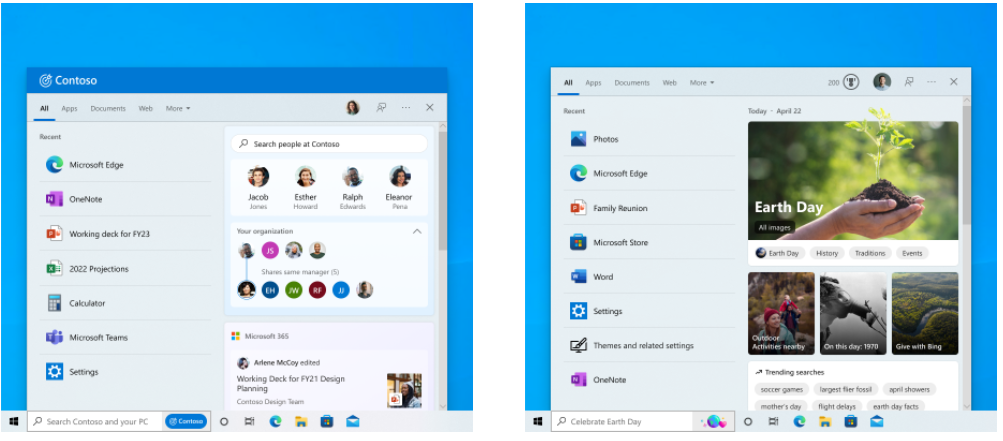
- New Search highlights for enterprise and consumer customers.
- For consumer customers – Search highlights will present notable and interesting moments of what’s special about each day.
- For enterprise customers, search highlights will feature your organization’s latest updates and suggest people, files, and more.
- Updates an issue that prevents Android device users from signing in to some Microsoft applications, such as Microsoft Outlook or Microsoft Teams.
- Updates an issue that causes the Back button of the credentials window, where you sign in, to become invisible in high contrast black mode.
Improvements with Windows 11 April 2022 CU KB5012592
Let’s check the list of improvements for Windows 11 April CU KB5012592. There are 3 new feature additions and many enhancements or fixes to the existing Windows 11 features. The security fixes are not listed below.
- New! This update provides the ability to shares cookies between Microsoft Edge Internet Explorer mode and Microsoft Edge.
- New! This Update adds the clock and date to the taskbars of other monitors when you connect other monitors to your device.
- New! This Windows 11 update adds weather content to the left side of the taskbar if the taskbar is aligned in the center. When you hover over the weather, the Widgets panel will appear on the left side of the screen and will disappear when you stop hovering over the area.
- It fixes an issue that affects dialog boxes in Microsoft Edge Internet Explorer mode.
- It fixes an issue that causes Microsoft Edge Internet Explorer mode to stop working when pressing the F1 key.
- It fixes an issue that displays right-to-left (RTL) language text as left-justified on File Explorer command menus and File Explorer context menus.
- It fixes an issue that might cause the time zone list in Settings to appear blank for users who are not administrators.
- It fixes an issue that displays right-to-left (RTL) language text as left-justified on File Explorer command menus and context menus.
- It fixes an issue that causes incorrect tooltips to appear in an empty area on the taskbar after hovering over icons like battery, volume, or Wi-Fi.
Resources
The TwitterTwitter user WZorNET provides very useful links and information for LCUs.
- Windows 11 21H2 https://support.microsoft.com/help/5012592 – Version 22000.613
- Server 2022 21H2 https://support.microsoft.com/help/5012604 – Version 20348.643
- Windows 10 20H2|21H1|21H2 https://support.microsoft.com/help/5012599 – 19042.1645, 19043.1645, and 19044.1645
- Windows 10 1909 https://support.microsoft.com/help/5012591 – Version 18363.2212
- Windows 10 1809 https://support.microsoft.com/help/5012647 – Version 17763.2803
- Windows 10 1607 https://support.microsoft.com/help/5012596 – Version 14393.5066
- Windows 101507 https://support.microsoft.com/help/5012653 – Version 10240.19265




We can not install the Update KB5012599…it fails with error code 0x800f080f and in the ReportingEvents.log we can see Update error 0x8024200b. SFC /scannow had no issues.
Does anyone else have the same issue?
Staff0x8024200b Translates to The installer failed to install (uninstall) one or more updates. Source: Windows Update Agent
There could be various reasons for this issue. Might be worth checking Windowsupdateagent.log using Get-WindowsUpdateLog
Thanks for the detailed update on the April patches! It’s frustrating to see known issues with the recovery disk, but I appreciate the transparency. Looking forward to any fixes you might share in the future!