






Windows 10 KB5015807 Windows 11 KB5015814 July 2022 Patch Tuesday | 1 Zero-Day vulnerability
July patch Tuesday comes with 1 Zero-Day vulnerability. Microsoft released Windows 10 KB5015807 & Windows 11 KB5015814 on July 2022 Patch Tuesday. Let’s check the details of the July 2022 Patch Tuesday.
The two biggest fixes with the July 2022 patch Tuesday for Windows 10/11 are WiFi Hotspot and Snip & Sketch app issues with keyboard shortcut Windows logo key+Shift+S. This July Cumulative Update fixes an issue that causes the LocalUsersAndGroups configuration service provider (CSP) policy to fail when you modify the built-in Administrators group.
Windows 11 gets an update to fix the issue with the Start menu to display Windows PowerShell when you right-click (Win + X) the Start button after uninstalling Windows Terminal. The July patch also fixes the AD LDS password reset errors for userProxy objects.
There are a couple of known issues with July Cumulative Updates. Framework 3.5 issue – Applications Fail to Open on Windows 11 after the July CU update. The other issue is IE Mode tabs not Responding. Microsoft already provided workarounds to both of these known issues.

1 Zero-Day Vulnerability Details
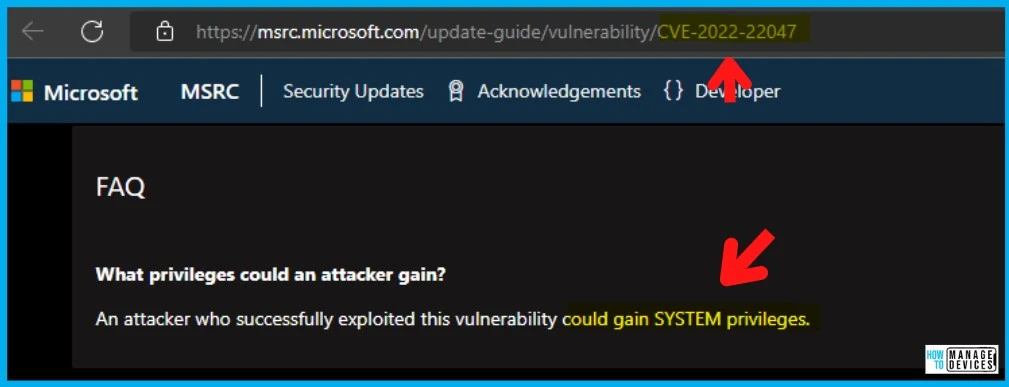
As per Microsoft, An attacker who successfully exploited this vulnerability could gain SYSTEM privileges. The CVE-2022-22047 impacts all the operating systems, including Windows 10, 11, Server 2022, etc.
Microsoft has not released any fix for this vulnerability yet. Watch this space for more updates on this. More Details on CVE-2022-22047 (details on fixes available there).
Improvements and Fixes with July CU KB5015807 and KB5015814
The following is the list of fixes and improvements documented only for Windows 11 operating systems with July 2022 Cumulative Update KB5015807 and KB5015814.
Now you could use CMPivot or security tools for auditing using IP addresses for incoming Windows Remote Management (WinRM) connections in security event 4262 and WinRM event 91.
With the July CU patch, you can use PowerShell to configure the SMB client and SMB server cipher suite order. The other improvement with SMB protocol is that in SMB redirector (RDR) specific public File System Control (FSCTL) code FSCTL_LMR_QUERY_INFO.
New Printer and Scanner Support -> Internet Print Protocol (IPP) support is for USB printers. PIN-protected printing for IPP and Universal Print is coming as a new feature. Windows now support the eSCL Mopria Scan protocol.
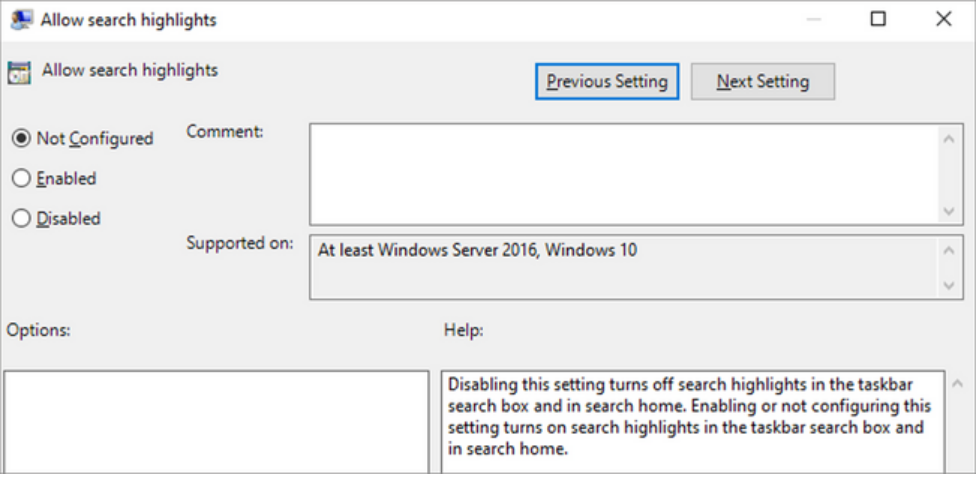
Another Windows 11 improvement is the introduction of Search Highlights. Windows 11 Search highlights will also feature the latest updates from your organization and suggest people, files, and more.
Fixes with July 2022 Cumulative Update KB5015807 and KB5015814
Most of the items in this list apply to Windows 10 (KB5015807) and Windows 11 (KB5015814) because Windows 11 uses the same code base as Windows 10. Some fixes only apply to Windows 11 because new features are only available for Windows 11.
Fixes an issue that affects some certificate chains to Root CAs that are members of the Microsoft Root Certification Program -> “This certificate was revoked by its certification authority.”
- Fixes an issue that leads to a false negative when you run scripts while Windows Defender Application Control (WDAC) is turned on. This might generate AppLocker events 8029, 8028, or 8037 to appear in the log when they should not.
- Fixes an issue that prevents the use of Encrypted File System (EFS) files over a Web-based Distributed Authoring and Versioning (WebDAV) connection.
Fixes an issue that causes a domain controller to incorrectly write Key Distribution Center (KDC) event 21 in the System event log. This occurs when the KDC successfully processes a Kerberos Public Key Cryptography for Initial Authentication (PKINIT) authentication request with a self-signed certificate for key trust scenarios (Windows Hello for Business and Device Authentication).
Enables the InternetExplorerModeEnableSavePageAs Group Policy. For more information, see Microsoft Edge Browser Policy Documentation. This Jully patch changes the name of the Your Phone app to the Phone Link on the Settings page.
- Fixes an issue in which malformed XML inputs might cause an error in DeviceEnroller.exe. This prevents CSPs from being delivered to the device until you restart the device or correct the XML.

Fixes an issue that causes Microsoft NTLM authentication using an external trust to fail. This issue occurs when a domain controller that contains the authentication request on January 11, 2022, or later Windows update services is not in a root domain and does not hold the Global Catalog role.
Deploy Windows 10 KB5015807 July Cumulative Updates using SCCM and WSUS
Let’s check how to Deploy Windows 10 KB5015807 and Windows 11 KB5015814 July Cumulative Updates using SCCM/WSUS. You can deploy Windows 10/11 July 2022 CU KBs using Intune or SCCM.
You can create a monthly patch package for July 2022 using the following methods. You can also search with Windows 11 LCU for July 2022 KB. The easiest way is to check from the SCCM admin console.
NOTE! – You can verify the Windows 10 versions (19042.1826, 19043.18261826, and 19044.1826) and Windows 11 version 20348.795 after installing July 2022 Latest Cumulative Updates.
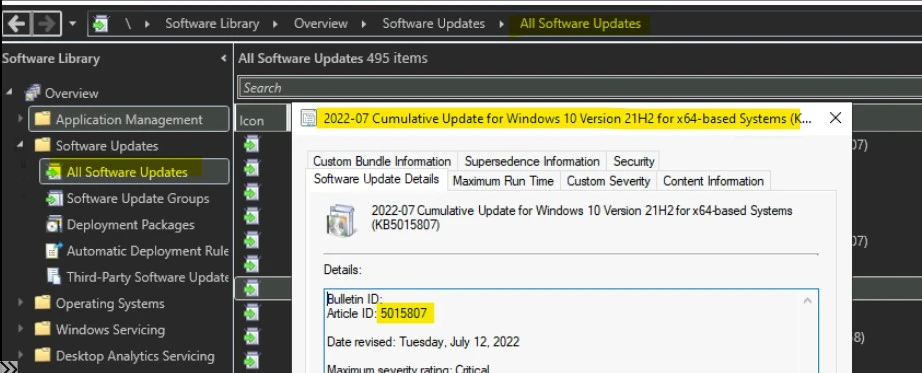
- Navigate to \Software Library\Overview\Software Updates\All Software Updates.
- You will need to initiate a WSUS Sync from the All Software Updates node (Right-click on the node and initiate the sync).
- Search with the following KB Numbers.
- Or you can search with 22-07 Cumulative Update for Windows 10 and Windows 11, as shown in the below screenshot.
- How to Create Deploy New Software Update Patch Package Using SCCM | ConfigMgr
- SCCM ADR Automatic Deployment Rule Creation Process
- ConfigMgr Software Updates Troubleshooting Tips | Fix Installation Issues
The following table gives details of all the KB articles released on 12th July 2022.
| 2022-07 Cumulative Update for Windows 10 Version 21H1 for ARM64-based Systems (KB5015807) |
| 2022-07 Cumulative Update for Windows 11 for ARM64-based Systems (KB5015814) |
| 2022-07 Cumulative Update for Windows 10 Version 21H2 for ARM64-based Systems (KB5015807) |
| 2022-07 Cumulative Update for Windows 10 Version 21H2 for x86-based Systems (KB5015807) |
| 2022-07 Cumulative Update for Windows 10 Version 21H2 for x64-based Systems (KB5015807) |
| 2022-07 Cumulative Update for Windows 10 Version 1607 for x86-based Systems (KB5015808) |
| 2022-07 Servicing Stack Update for Windows 10 Version 1607 for x64-based Systems (KB5016058) |
| 2022-07 Cumulative Update for Windows 10 Version 1607 for x64-based Systems (KB5015808) |
| 2022-07 Cumulative Update for Windows 11 for x64-based Systems (KB5015814) |
| 2022-07 Servicing Stack Update for Windows 10 Version 1607 for x86-based Systems (KB5016058) |
| 2022-07 Cumulative Update for Windows Server, version 20H2 for x64-based Systems (KB5015807) |
| 2022-07 Cumulative Update for Windows 10 Version 21H1 for x64-based Systems (KB5015807) |
| 2022-07 Cumulative Update for Windows 10 Version 20H2 for x64-based Systems (KB5015807) |
| 2022-07 Cumulative Update for Microsoft server operating system version 21H2 for x64-based Systems (KB5015827) |
| 2022-07 Cumulative Update for Windows 10 Version 20H2 for ARM64-based Systems (KB5015807) |
| 2022-07 Cumulative Update for Windows 10 Version 21H1 for x86-based Systems (KB5015807) |
| 2022-07 Cumulative Update for Windows 10 Version 20H2 for x86-based Systems (KB5015807) |
| 2022-07 Cumulative Update for Windows Server, version 20H2 for ARM64-based Systems (KB5015807) |
July 2022 Latest Cumulative Update Patch Deployment using Intune
Let’s check how to deploy July 2022 Latest Cumulative Update Patch Deployment using Intune. You can deploy Windows 10/11 CUs using the Microsoft Endpoint Manager Intune. The patch deployment process in Intune is different from that of SCCM.
I don’t think creating a new patch deployment policy to cater to monthly CU deployments is required. The existing patch deployment policy will deliver the patches using WUfB (Windows Update for Business).
Read More – Software Update Patching Options with Intune Setup Guide (anoopcnair.com)
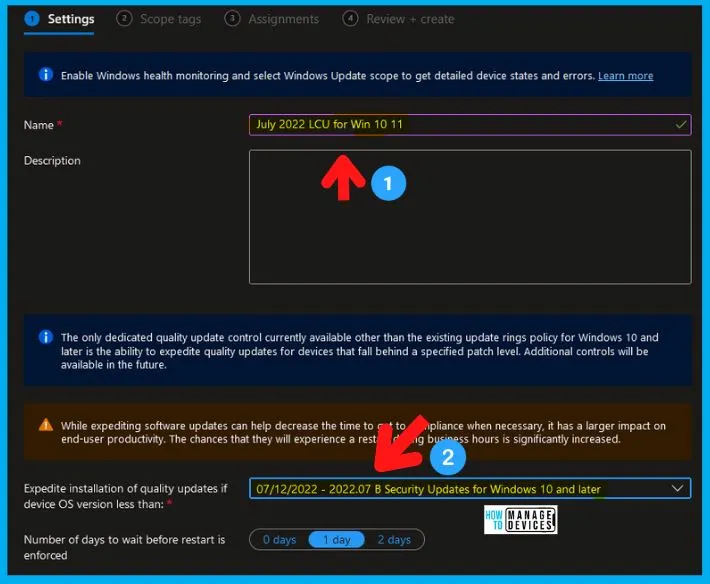
You have an option to expedite the Installation of July 2022 quality updates if the device OS version is less than 2022.07. Create expedited update profiles for Quality updates using the following steps.
- Open https://endpoint.microsoft.com/
- Navigate Device -> Windows 10 quality Updates (preview).
- Click on + Create Profile.
The following are the Settings for Intune quality update profile.
- Name – July 2022 LCU for Windows 10 KB5015807 and Windows 11 KB5015814
- Description—
- Expedite installation of quality updates if device OS version less than 07/12/2022 – 2022.07 B Security Updates for Windows 10 and later
- Number of days to wait before the restart is enforced – 1 Day
More Details on Zero Day Out Of Band Patch Deployment Using Intune MEM Expedite Best Option and Intune Reporting Issue: Expedite Windows Security Patch Deployment.
Windows 11 July 2022 Cumulative Update KB5015814
Let’s check Windows 11 July 2022 Cumulative Update KB5015814 deployment options. Like Windows 10, you can deploy Windows 11 patches (LCUs) using SCCM and Intune.
Windows 11 patching is also important for the organization. Microsoft has released the latest Cumulative Update, KB5015814, for June 2022. Windows 11 will change its build number to 22000.795 after the cumulative update KB5015814.
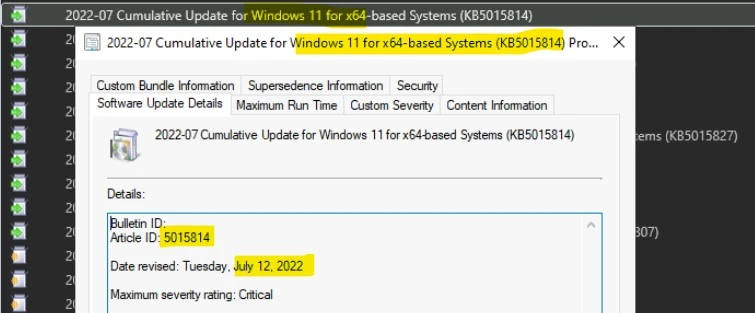
- 2022-07 Cumulative Update for Windows 11 for x64-based Systems (KB5015814)
- Article ID:5014697 Date revised: Tuesday, July 12, 2022.
- Maximum Severity Rating: Critical
Direct Download Links of July 2022 Cumulative Updates
Let’s manually download the 2022 July Cumulative Update for Windows 10 (KB5015807), Windows 11 (KB5015814), and Server 2022 (KB5015827) from Microsoft Update Catalog website.
The following tables contain the direct links to download the July 2022 Cumulative Updates for Windows 10, Windows 11, and Windows Server operating systems.
| Title | Products | Size | Direct Download |
|---|---|---|---|
| 2022-07 Cumulative Update for Windows 10 Version 20H2 for x64-based Systems (KB5015807) | Windows 10, version 1903 and later | 677.5 MB | Download |
| 2022-07 Cumulative Update for Windows 10 Version 21H1 for x64-based Systems (KB5015807) | Windows 10, version 1903 and later | 677.5 MB | Download |
| 2022-07 Cumulative Update for Windows 10 Version 21H2 for x64-based Systems (KB5015807) | Windows 10, version 1903 and later | 677.5 MB | Download |
| 2022-07 Cumulative Update for Microsoft server operating system version 21H2 for x64-based Systems (KB5015827) | Windows Server version 21H2 | 244.1 MB | Download |
| 2022-07 Cumulative Update for Windows 11 for x64-based Systems (KB5015814) | Windows 11 | 274.4 MB | Download |
You can check the Microsoft Update Catalog portal to get the direct download links to the hotfixes for July 2022 LCU. Check this out Microsoft Update Catalog – https://www.catalog.update.microsoft.com/
Author
Anoop C Nair is Microsoft MVP! He is a Device Management Admin with more than 20 years of experience (calculation done in 2021) in IT. He is Blogger, Speaker, and Local User Group HTMD Community leader. His main focus is on Device Management technologies like SCCM 2012, Current Branch, and Intune. He writes about ConfigMgr, Windows 11, Windows 10, Azure AD, Microsoft Intune, Windows 365, AVD, etc.




Discussion