






Windows 10 KB5022282 Patch Tuesday January 2023
Microsoft has released the Windows 10 KB5022282 cumulative updates to fix known issues, security vulnerabilities, and performance issues.
The latest Windows 10 KB5022282 update addresses security issues for your Windows operating system, a known issue that affects blue screen and apps that use Microsoft Open Database Connectivity (ODBC) SQL Server Driver (sqlsrv32.dll) to connect to databases.
Windows monthly quality updates help you to stay productive and protected. That provides users and IT administrators with the security fixes they need and protects devices so that unpatched vulnerabilities can’t be exploited.
Windows 10, version 21H1 has reached end of servicing. Devices running this version will no longer receive monthly security and preview updates containing protections from the latest security threats.

To manually check for the latest recommended updates, You can go to Windows 10 Settings > Update & Security > Windows Update. Sometimes you have to seek updates using the Check for Updates button. You will find the link to download and install the update.
Microsoft schedules the release of security updates on “Patch Tuesday,” the second Tuesday of each month at 10:00 AM PST. Depending on the time zone(s), IT pros should plan their deployment schedules accordingly.
Known Issues from Windows 10 KB5022282
Here you can check the current status of known issues after the last patch update on January 2023 CU. This table offers a summary of current active issues and those issues that have been resolved in the last 30 days.
Latest Known issue – Latest Defender Update KB2267602 Bug Deletes Shortcut. More details on Latest Defender Update KB2267602 Bug Deletes Shortcuts.
- ASR rule Block Win32 API Calls from Office Macro
- Try the ASR rule from Block to Audit as a workaround.
- Microsoft has just published MO497128
| Summary | Originating update | Status | Last updated |
|---|---|---|---|
| Database connections using Microsoft ODBC SQL Server driver might fail. Apps using ODBC connections might fail to connect to databases. | OS Build 19045.2251 KB5019959 2022-11-08 | Resolved KB5022282 | 2023-01-10 10:00 PT |
| You might receive an error (0xc000021a) with a blue screen Some Windows devices might start up to an error. | OS Build 19045.2364 KB5021233 2022-12-13 | Resolved KB5022282 | 2023-01-10 10:00 PT |
| Direct Access might be unable to reconnect after your device has connectivity issues This issue might happen after losing network connectivity or transitioning between Wi-Fi networks. | OS Build 19045.2193 KB5018482 2022-10-25 | Resolved KB5021233 | 2022-12-13 10:00 PT |
| Taskbar elements might flicker and causes device instability This issue is resolved using Known Issue Rollback (KIR) | OS Build 19045.2130 KB5018410 2022-10-11 | Investigating | 2022-12-16 10:38 PT |
| KB5012170 might fail to install and you might receive a 0x800f0922 error Security update for Secure Boot DBX might fail to install. | OS Build 19045.1880 KB5012170 2022-12-13 | Confirmed | 2022-12-14 16:12 PT |
| Domain join processes may fail with error “0xaac (2732)” This might be encountered when an account was created by a different identity than the one used to join the domain | N/A | Confirmed | 2022-10-27 16:57 PT |
Important: For Windows Recovery Environment (WinRE) devices, see the Special instructions for Windows Recovery Environment (WinRE) devices in the How to get this update section to address security vulnerabilities in CVE-2022-41099.
SCCM Windows 10 KB5022282 Deployment
Learn how to Deploy Windows 10 KB5022282 January 2023 Cumulative Updates using SCCM/WSUS. You can deploy Windows 10 January 2023 CU KBs using Intune or SCCM.
Using the following methods, you can create a monthly patch package for January 2023. You can also search with Windows 10 LCU for January 2023 KB5022282. The easiest way is to check from the SCCM admin console.
NOTE! You can verify the Windows 10 versions (OS Builds 19042.2486, 19044.2486, and 19045.2486) by installing January 2023 Latest Cumulative Updates.
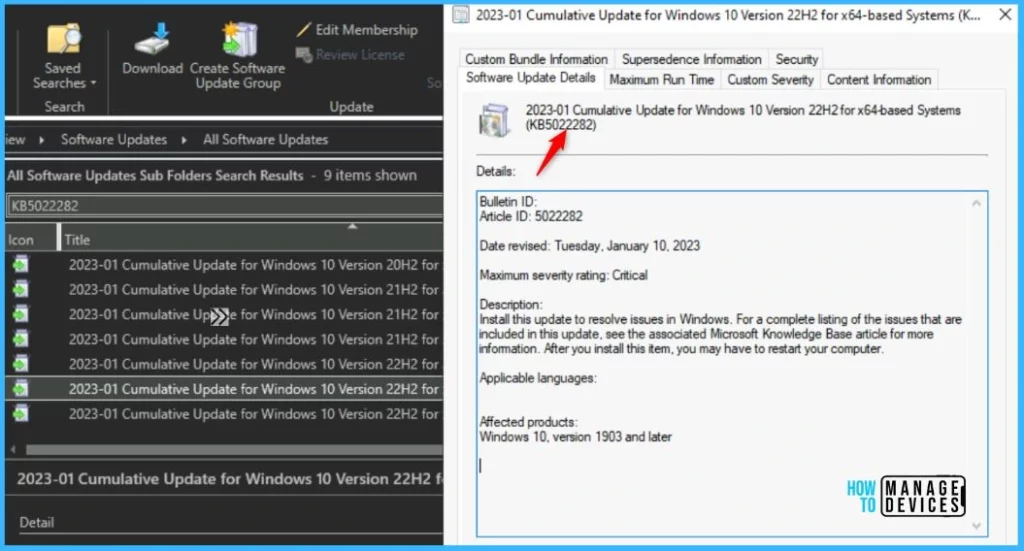
- In SCCM Console, Navigate to Software Library\Overview\Software Updates\All Software Updates.
- You will need to initiate a WSUS Sync from the All Software Updates node (Right-click on the node and initiate the sync).
- Search with the following KB5022282 Number.
- Or you can search with 23-01 Cumulative Update for Windows 10, as shown in the below screenshot.
- How to Create Deploy New Software Update Patch Package Using SCCM | ConfigMgr
- SCCM ADR Automatic Deployment Rule Creation Process
Intune Windows 10 KB5022282 Deployment
Let’s check how to deploy the January 2023 Patch Tuesday (LCU) Deployment using Intune. You can deploy Windows 10 January CU using Microsoft Intune. The patch deployment process in Microsoft Intune is different from that of SCCM.
I don’t think creating a new patch deployment policy to cater to monthly CU deployments is mandatory, but you can use the following method to expedite. The existing patch deployment policy will deliver the patches using WUfB (Windows Update for Business).
You have the option to expedite the Installation of January 2023 quality updates. Create expedited update profiles for Quality updates using the following steps.
- Sign in to the Microsoft Intune admin center https://endpoint.microsoft.com/
- Navigate Device -> Windows 10 quality Updates.
- Click on + Create Profile.
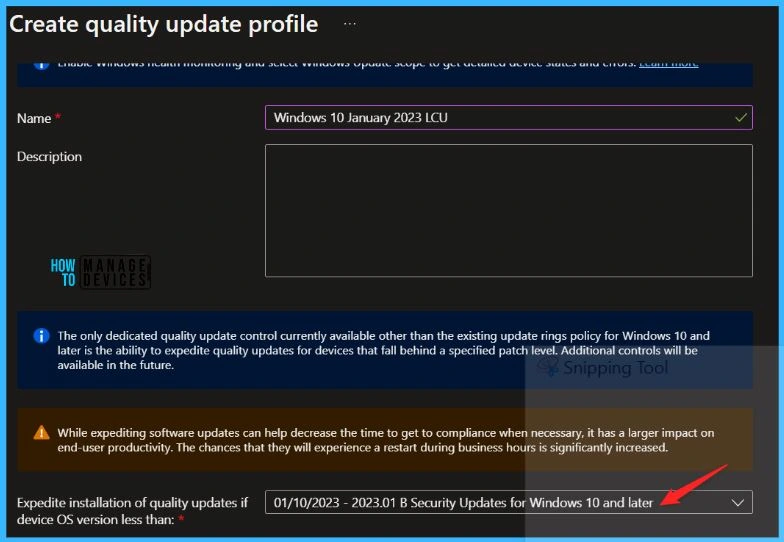
The following are the Settings for Intune quality update profile for the monthly patching process if you want to expedite the deployment of patches. Otherwise, you can use the standard quality updates policy from Intune.
- Name – Windows 10 January 2023 LCU.
- Description – Recommend adding a detailed description.
- Expedite installation of quality updates if the device OS version is less than 10th January 2023 – 2023.01 B Security Updates for Windows 10 and later
- Number of days to wait before the restart is enforced – 1 Day
More Details on Zero Day Out Of Band Patch Deployment Using Intune MEM Expedite Best Option and Intune Reporting Issue: Expedite Windows Security Patch Deployment.
Windows 10 KB5022282 Direct Download Links
Let’s manually download the 2023 January Cumulative Update for Windows 10 (KB5022282) from the Microsoft Update Catalog website. The following tables provide the direct links to download the January 2023 Cumulative Updates for Windows 10.
You can check the Microsoft Update Catalog portal to get the direct download links to the hotfixes for January 2023 LCU. Check this out Microsoft Update Catalog – https://www.catalog.update.microsoft.com/
| Title | Products | Size | Direct Download |
|---|---|---|---|
2023-01 Cumulative Update for Windows 10 Version 22H2 for x64-based Systems (KB5022282) | Windows 10 22H2 | 693.7 MB | Download |
Author
About Author – Jitesh, Microsoft MVP, has over five years of working experience in the IT Industry. He writes and shares his experiences related to Microsoft device management technologies and IT Infrastructure management. His primary focus is Windows 10/11 Deployment solution with Configuration Manager, Microsoft Deployment Toolkit (MDT), and Microsoft Intune.



Windows 10 KB5022282 broke my fonts in telegram and taskbar!!! They are too small. I uninstalled this broken update.
Quick launch icons were too small too after this update!
My windows icons got corrupted after this update. Fixed after deleting icon cache
when installing this update for our VDI environment it adds an extra 4 minutes before we can see our desktop. Anyone else? We had the same issue with the December MS patch. 20H2 and 21H2 both were effected.
My wi-fi will no longer hold any of my wireless networks. Everytime I try to manually turn on my wireless it connects briefly to my network and after 10 seconds it just turns off my wireless completely. So my wireless won’t stay on anymore.