






Windows 10 KB5022834 February 2023 Patch Tuesday
Let’s check the details of the February 2023 Patch Tuesday. Windows 10 KB5022834 updates were released by Microsoft to fix known issues, and security vulnerabilities, and improve performance.
The latest Windows 10 KB5022834 update addresses security issues for your Windows operating system, a known issue, and security updates fix three actively exploited zero-day vulnerabilities. Windows 11 February patches are explained in Windows 11 KB5022836 KB5022845 Patch Tuesday, February 2023 post.
Monthly quality updates for Windows are designed to enhance productivity and security by providing essential security fixes to users and IT administrators. These updates protect devices from potential threats by addressing vulnerabilities and preventing them from exploitation.
Windows 10, version 21H1, has reached the end of servicing, and devices running this version will no longer receive monthly security and preview updates that provide protection against the latest security threats. It is recommended to update to a newer version of Windows 10 to continue receiving security updates.

Windows 10 allows you to choose when and how to receive the latest updates to ensure your device runs efficiently and securely. To manage your update preferences and view available updates, simply select “Check for Windows updates”. Alternatively, you can access the update settings by selecting Start > Settings > Windows Update.
Microsoft releases security updates on “Patch Tuesday,” the second Tuesday of each month at 10:00 AM PST. IT professionals should plan their deployment schedules according to their time zone(s).
When was the IE11 desktop application permanently disabled?
This IE 11 Desktop app is NOT disabled with Windows Update. Note, this update will be rolled out over the span of a few days up to a week, as is standard for Microsoft Edge updates.
Video Review of Feb 2023 Windows 10 Patches
This video is there to give an overview of February 2023 Patches | 3 Zero Day Vulnerabilities | Windows 10 & 11 Patches – KB5022834 | KB5019274 | KB5022845 | February
Known Issues from Windows 10 KB5022834
Here you can check the current status of known issues after the last patch update on February 2023 CU. This table offers a summary of current active issues and those issues that have been resolved in the last 30 days.
| Summary | Originating update | Status | Last updated |
|---|---|---|---|
| You might receive an error with apphelp.dll from apps using DirectX Outdated Intel Graphics drivers might cause issues with certain apps. | OS Build 19045.2251 KB5019959 2022-11-08 | Mitigated | 2023-02-08 16:19 PT |
| Start menu, Windows Search and UWP apps might have issues opening Affected devices have apps installed which integrate with Windows, Microsoft Office, or Microsoft Outlook. | N/A | Investigating | 2023-01-24 09:58 PT |
| Application shortcuts might not work from the Start menu or other locations Errors might be observed when trying to run exe files. Changes to Microsoft Defender can help. | N/A | Resolved | 2023-01-18 19:28 PT |
As of February 14, 2023, the Microsoft Edge update will disable the IE desktop app permanently on certain versions of Windows 10.
SCCM Windows 10 KB5022834 Deployment
Learn how to Deploy Windows 10 KB5022834 February 2023 Cumulative Updates using SCCM/WSUS. You can deploy Windows 10 February 2023 CU KBs using Intune or SCCM.
Using the following methods, you can create a monthly patch package for February 2023. You can also search with Windows 10 LCU for February 2023 KB5022834. The easiest way is to check from the SCCM admin console.
NOTE! You can verify the Windows 10 versions (OS Builds 19042.2604, 19044.2604, and 19045.2604) by installing February 2023 Latest Cumulative Updates.
- In SCCM Console, Navigate to Software Library\Overview\Software Updates\All Software Updates.
- You will need to initiate a WSUS Sync from the All Software Updates node (Right-click on the node and initiate the sync).
- Search with the following KB5022834 Number.
- Or you can search with 23-02 Cumulative Update for Windows 10, as shown in the below screenshot.
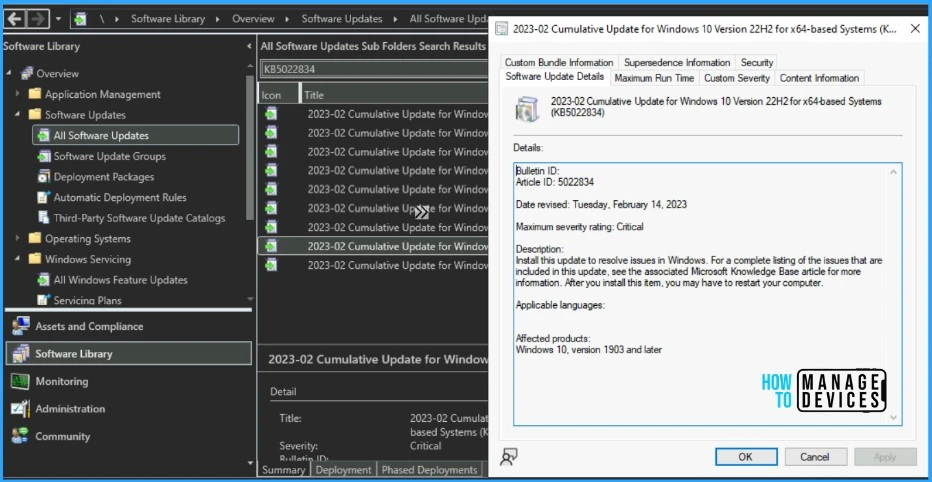
- How to Create Deploy New Software Update Patch Package Using SCCM | ConfigMgr
- SCCM ADR Automatic Deployment Rule Creation Process
Intune Windows 10 KB5022834 Deployment
Let’s check how to deploy the February 2023 Patch Tuesday (LCU) Deployment using Intune. You can deploy Windows 10 February CU using Microsoft Intune. The patch deployment process in Microsoft Intune is different from that of SCCM.
I don’t think creating a new patch deployment policy to cater to monthly CU deployments is mandatory, but you can use the following method to expedite. The existing patch deployment policy will deliver the patches using WUfB (Windows Update for Business).
You have the option to expedite the Installation of February 2023 quality updates. Create expedited update profiles for Quality updates using the following steps.
- Sign in to the Microsoft Intune admin center https://endpoint.microsoft.com/
- Navigate Device -> Windows 10 quality Updates.
- Click on + Create Profile.
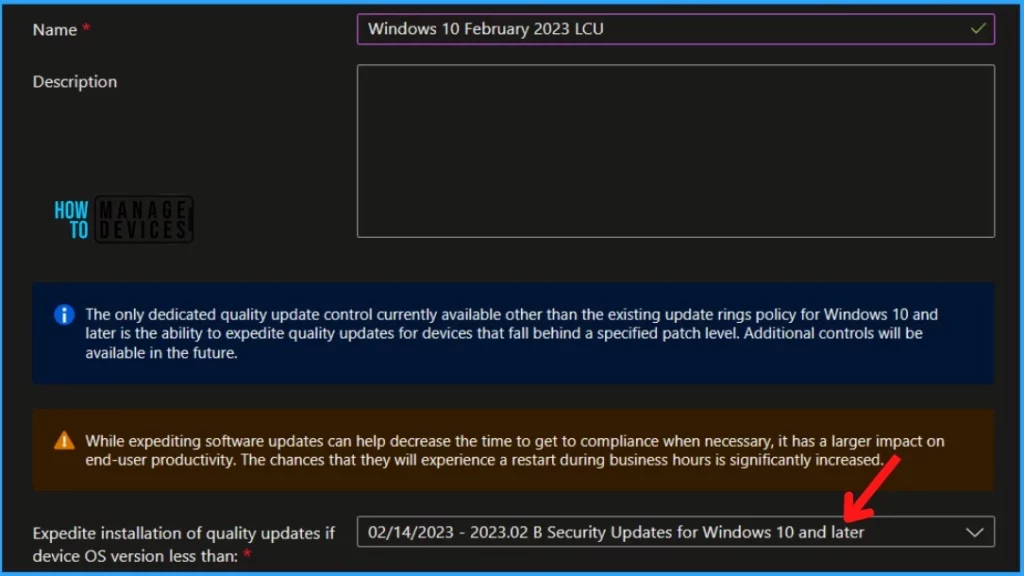
The following are the Settings for Intune quality update profile for the monthly patching process if you want to expedite the deployment of patches. Otherwise, you can use the standard quality updates policy from Intune.
- Name – Windows 10 February 2023 LCU.
- Description – Recommend adding a detailed description.
- Expedite installation of quality updates if the device OS version is less than 14th February 2023 – 2023.02 B Security Updates for Windows 10 and later
- Number of days to wait before the restart is enforced – 1 Day
More Details on Zero Day Out Of Band Patch Deployment Using Intune MEM Expedite Best Option and Intune Reporting Issue: Expedite Windows Security Patch Deployment.
Windows 10 KB5022834 Direct Download Links
Let’s manually download the 2023 February Cumulative Update for Windows 10 (KB5022834) from the Microsoft Update Catalog website. The following tables provide the direct links to download the February 2023 Cumulative Updates for Windows 10.
You can check the Microsoft Update Catalog portal to get the direct download links to the hotfixes for February 2023 LCU. Check this out Microsoft Update Catalog – https://www.catalog.update.microsoft.com/
| Title | Products | Size | Direct Download |
|---|---|---|---|
2023-02 Cumulative Update for Windows 10 Version 22H2 for x64-based Systems (KB5022834) | Windows 10 22H2 | 700.3 MB | Download |
Author
About Author – Jitesh, Microsoft MVP, has over five years of working experience in the IT Industry. He writes and shares his experiences related to Microsoft device management technologies and IT Infrastructure management. His primary focus is Windows 10/11 Deployment solution with Configuration Manager, Microsoft Deployment Toolkit (MDT), and Microsoft Intune.



Discussion