






Windows 10 Security Enhancements and Security Survey
Let’s understand more about Windows 10 Security Enhancements and Security Survey. Last week Microsoft released Windows 10 1809 (and paused).
This post will give you an overview of Windows 10 1809 security enhancements.
Also, you would be able to learn more details about security surveys and the need for automation efforts in the security operations world.
I think the security survey results will give you more details on what the industry is thinking about modern security threats and how they are planning to handle them for their environment.

Table of Contents
- Intune Security Baselines Policies for Windows 10 or Windows 11 Deployment Guide
- New Security Features For Windows 11
- Windows 11 Checkpoint Cumulative Updates
- How to Fix Windows 11 System Components Issues using Repair Terminate and Reset options
Pillars of Microsoft Threat Protection – Windows 10 Security Enhancements
Microsoft has a threat protection architecture explained in many Ignite sessions this year. Microsoft threat protection includes Identities, Endpoints, User Data, Cloud Apps, and Infrastructure. We have to cover all these entry points to protect and be safe.
As per Microsoft, the following are the practices you want to implement to secure your environment end to end.
- Attack surface Reduction – Resist Attacks and exploitations
- Next-Generation Protection – Protect against all types of engineering threats.
- Endpoint Detection & Response – Detect, investigate, and respond to advanced attacks.
- Auto Investigation & Remediation – From alerts to remediation in minutes at a scale
- Security Posture – Track and improve your organization security posture
- Hunting – Active hunting for breach activity

Windows 10 1809 Security Enhancements
There are essential security investments that Microsoft puts in for Windows 10 1809. Some of those security enhancements are explained in the below section.
- When you click Virus & threat protection screen, all display in one window, and you don’t have to go through different windows to analyze. You can quickly take action on threats from this screen.
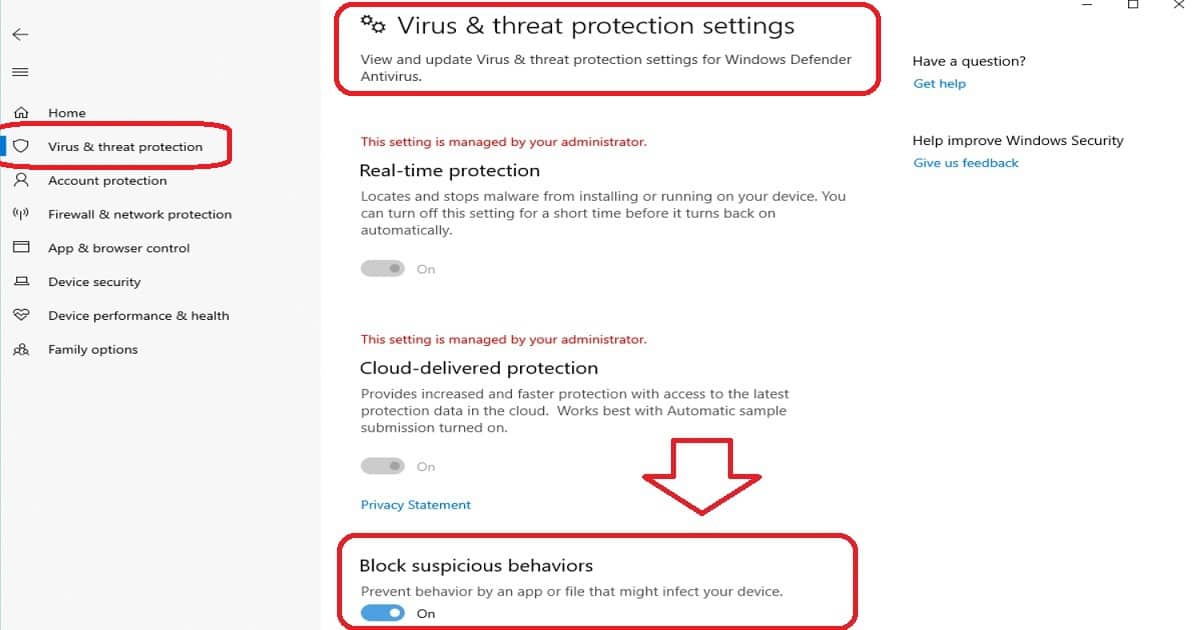
- Now you can enable a new protection setting, Block suspicious behaviors from Virus & threat protection section and click Manage settings. More details about Windows 10 1809 Security Enhancements are below.
- Microsoft added a new assessment for the Windows time service to the Device performance & health section.
- You can see all your Security apps installed in the Windows Security app – Security providers.
- You can see all the firewall apps running on your device under each firewall type (domain, private, and public networks) under the Firewall & network protection section.
- Standard AAD joined users can enable automatic BitLocker encryption via the MDM policy. This will be for modern (that passed the Hardware Security Test Interface (HSTI)) and old hardware.
I recommend reading Microsoft documentation to get more details about Windows 10 1809 Security Enhancements.
Challenges – Windows 10 Security Survey
Most IT Pros like me want to Secure Endpoints, but we don’t have enough bandwidth and time. In some cases, we may not have access to the right tools.
Adaptiva conducted an industry-wide security survey to learn more about the security operations challenges within the industry. Windows 10 Security Enhancements.
Following are some of the questions answered in the security survey conducted by Adpativa. I think this survey results will give you an overview of the industry’s thinking about modern security threats and how they are planning to remediate them.
- How important is maintaining a current, compliant security configuration across all endpoints in your organization?
- Which aspects of security configuration management are the most difficult to maintain across all endpoints?
- Which endpoint security configuration management task takes the most of your time?
- How often should every endpoint be inspected to see if all software is updated?
- Do you have enough security operation teams to handle all security threats?
- What are the preventing factors from completely automating the detection and remediation of health issues?
Microsoft has put in loads of efforts concerning Windows 10 1809 Security Enhancements. It’s now our time as IT Pro to get into the act and close the gaps if there are any.
Download the Security Survey Report
Download the full security survey reports from here.
We are on WhatsApp. To get the latest step-by-step guides and news updates, Join our Channel. Click here –HTMD WhatsApp.
Author
Anoop C Nair is Microsoft MVP! He is a Device Management Admin with more than 20 years of experience (calculation done in 2021) in IT. He is a Blogger, Speaker, and Local User Group HTMD Community leader. His primary focus is Device Management technologies like SCCM 2012, Current Branch, and Intune. He writes about ConfigMgr, Windows 11, Windows 10, Azure AD, Microsoft Intune, Windows 365, AVD, etc.



Discussion