Skip to content
Integrate Windows 10 Upgrade Readiness with SCCM – Part 2

Integrate Windows 10 Upgrade Readiness with SCCM – Part 2

Written By Vimal Das
Last Updated August 7, 2024
Posted In SCCM
SHARE

Let’s discuss Integrating Windows 10 Upgrade Readiness with SCCM—Part 2. This post will show a step-by-step configuration for integrating Upgrade readiness with SCCM. Finally, we will verify the result in the SCCM console.

This post assumes that you have a valid Azure Subscription, SCCM CB 1610+ with service connection point role, and OMS workspace (Log Analytics).

The following 3 high levels steps are required for SCCM Upgrade Analytics and Upgrade Readiness integration. We will cover each one in detail.

Create an application in Azure AD that SCCM can use to access the OMS workspace. Grant permission to the Resource Group, which contains the Azure AD application that the OMS workspace uses. Finally, configure Upgrade Analytics in the SCCM console.

Patch My PC

    How to Create an Application in Azure AD for SCCM to Access Upgrade Readiness

    Let’s discuss creating an Application in Azure AD for SCCM to Access Upgrade Readiness. The table and screenshot below provide more details.

    How to Create an Application in Azure AD for SCCM to Access Upgrade Readiness
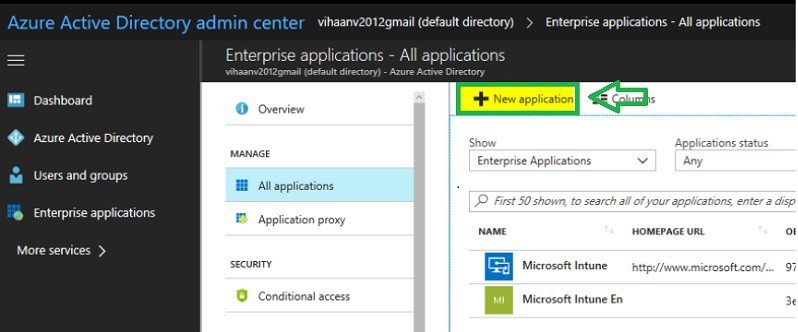
    Navigate to your Azure Active Directory-> Enterprise applications – All applications.
    Select “New Application”.
    Integrate Windows 10 Upgrade Readiness with SCCM – Part 2 – Table 1
    Integrate Windows 10 Upgrade Readiness with SCCM - Part 2 - Fig.1
    Integrate Windows 10 Upgrade Readiness with SCCM – Part 2 – Fig.1
    1. Define Windows 10 Upgrade Readiness Architecture with SCCM – Part 1
    2. How to integrate Windows 10 Upgrade Readiness with SCCM – Part 2
    3. Configure Telemetry for Upgrade Analytics/Readiness with Intune & SCCM – Part 3

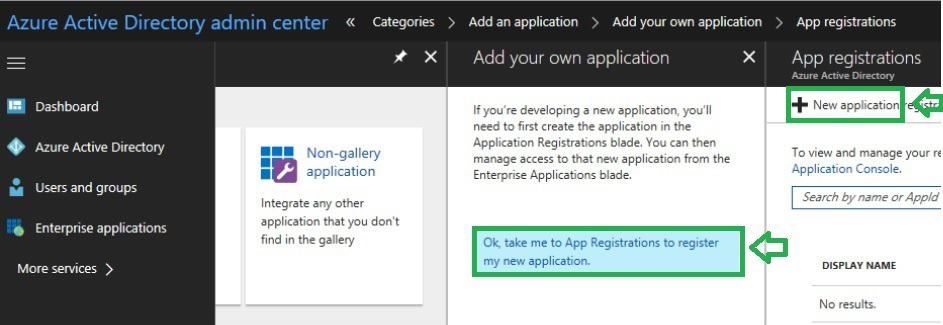
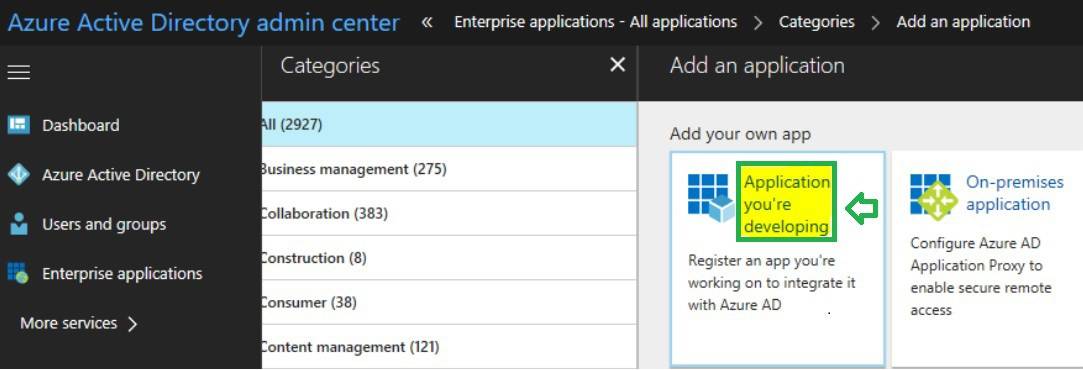
    Select “Application you’re developing”
    Integrate Windows 10 Upgrade Readiness with SCCM - Part 2 - Fig.2
    Integrate Windows 10 Upgrade Readiness with SCCM – Part 2 – Fig.2

    Click on “New application.”

    Integrate Windows 10 Upgrade Readiness with SCCM - Part 2 - Fig.3
    Integrate Windows 10 Upgrade Readiness with SCCM – Part 2 – Fig.3

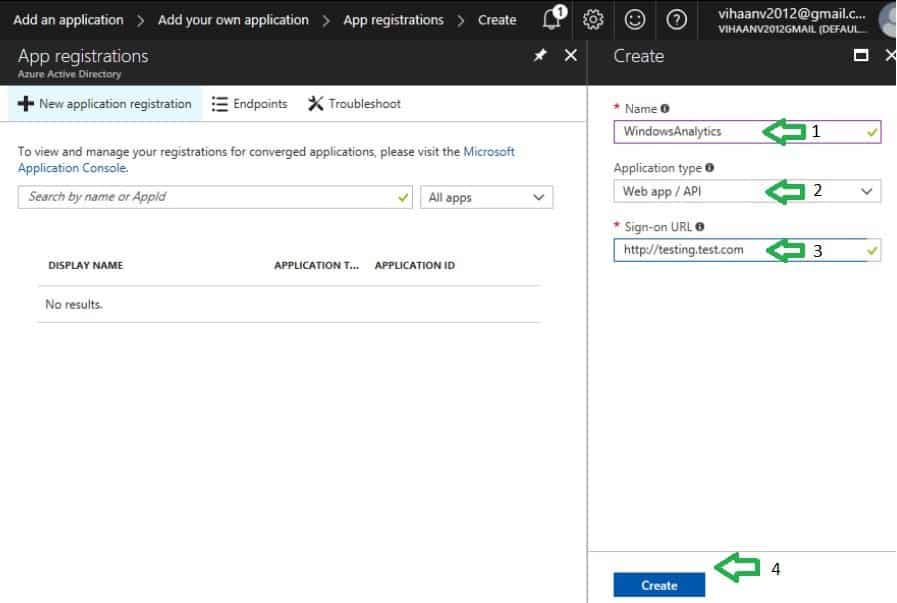
    Type the web application name. Select Web app /API. Type Sign-on URL (you can enter any URL because this URL doesn’t need to be resolvable).

    • Click on “Create” at the bottom to create the application
    Integrate Windows 10 Upgrade Readiness with SCCM - Part 2 - Fig.4
    Integrate Windows 10 Upgrade Readiness with SCCM – Part 2 – Fig.4

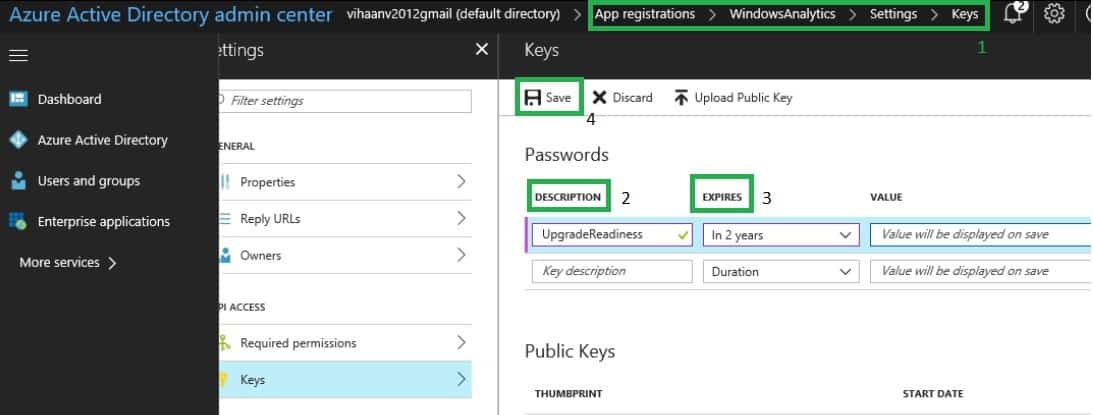
    Select the application that we started. Click on “Settings->Keys.” Type a Key name Description.

    • Select a Duration
    • Click on Save. The key gets created after clicking Save. We can retrieve this key only from this page.
    Integrate Windows 10 Upgrade Readiness with SCCM - Part 2 - Fig.5
    Integrate Windows 10 Upgrade Readiness with SCCM – Part 2 – Fig.5

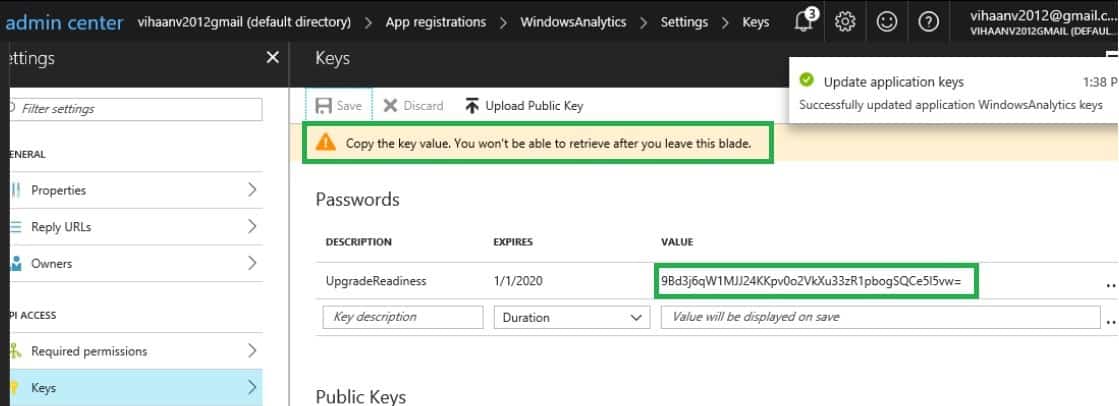
    Copy the Key value and keep it with you. It will be needed while configuring the connector in the SCCM console.
    Integrate Windows 10 Upgrade Readiness with SCCM - Part 2 - Fig.6
    Integrate Windows 10 Upgrade Readiness with SCCM – Part 2 – Fig.6

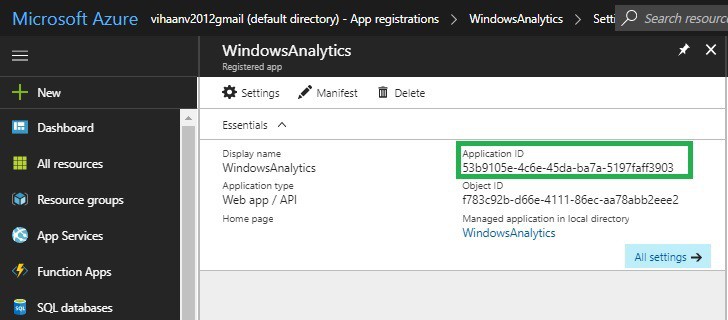
    Also copy the Application ID and keep it with you. With this, we completed Step 1.
    Integrate Windows 10 Upgrade Readiness with SCCM - Part 2 - Fig.7
    Integrate Windows 10 Upgrade Readiness with SCCM – Part 2 – Fig.7

    How to Configure Azure Application Permission for SCCM to Connect Log Analytics

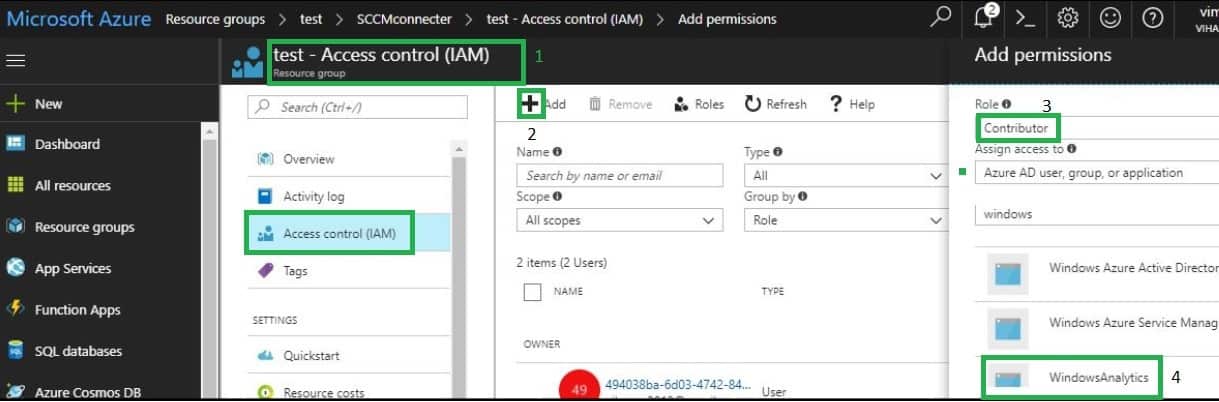
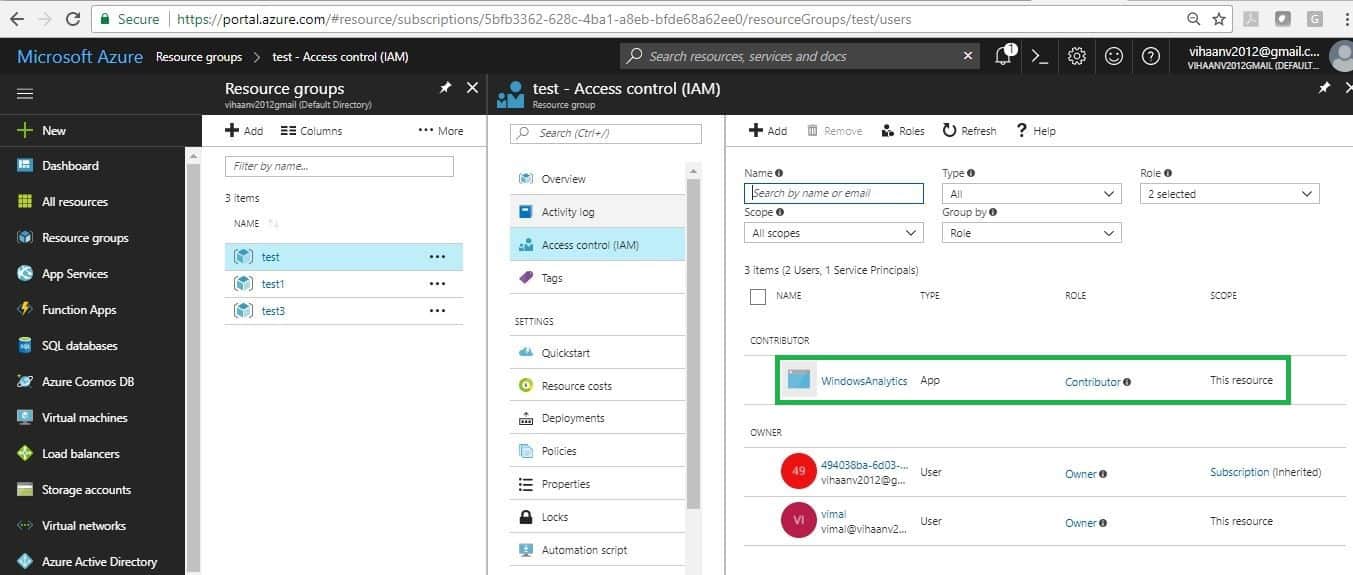
    In Azure Portal, we must configure permission for the custom application we created in Step 1. Navigate to the resource group.  Select the Resource Group that contains your OMS workspace. For example, “test” is the name of my resource group with my custom application.

    • Select Access Control (IAM) and Click Add
    • Select the Contributor Role and select the custom application that we created earlier. Click Save

    Note: By default, the Azure console does not display custom applications in the drop-down menu. Only user objects are displayed. I typed the first few characters of the application, and then the custom application name was revealed.
    Integrate Windows 10 Upgrade Readiness with SCCM - Part 2 - Fig.8
    Integrate Windows 10 Upgrade Readiness with SCCM – Part 2 – Fig.8

    As shown below, ensure “Contributor” permission is set for the resource group (Test).

    Note: If you configure permissions on your custom application directly, I have seen issues.
    Integrate Windows 10 Upgrade Readiness with SCCM - Part 2 - Fig.9
    Integrate Windows 10 Upgrade Readiness with SCCM – Part 2 – Fig.9

    Configuration of Upgrade Readiness in the SCCM Console

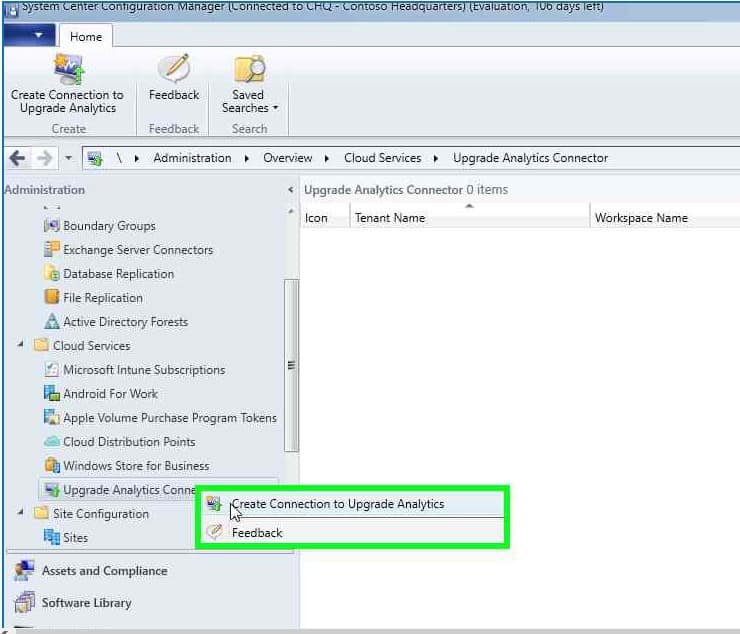
    Launch the SCCM console. Navigate to Administration workspace -> Cloud Services. Right-click on the “Upgrade Analytics Connector” node.

    • Select “Create connection to Upgrade Analytics“.
    Integrate Windows 10 Upgrade Readiness with SCCM - Part 2 - Fig.10
    Integrate Windows 10 Upgrade Readiness with SCCM – Part 2 – Fig.10

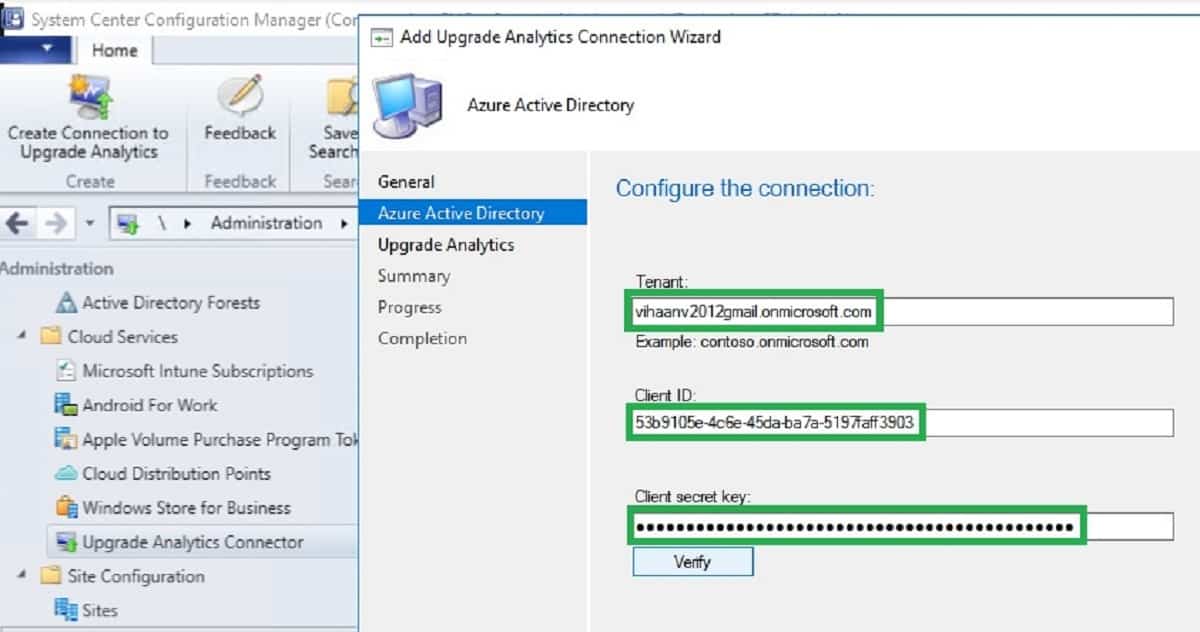
    Update Azure Tenant name, Client ID (application ID), and key. We have already noted these details from step 2.
    Integrate Windows 10 Upgrade Readiness with SCCM - Part 2 - Fig.11
    Integrate Windows 10 Upgrade Readiness with SCCM – Part 2 – Fig.11

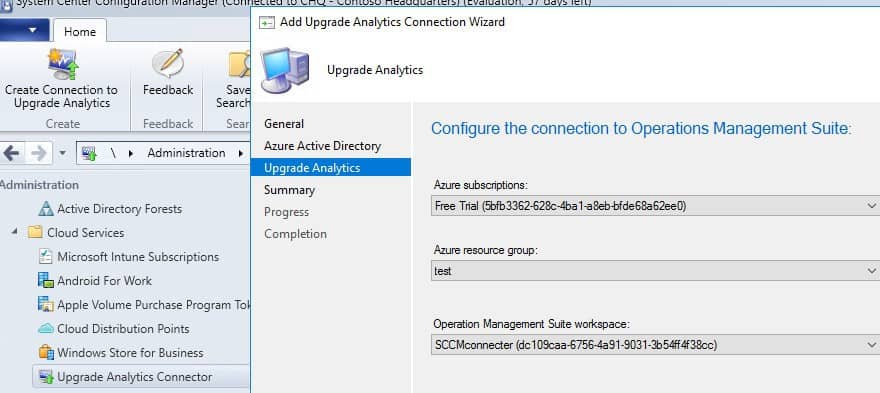
    Azure subscription, Azure resource group, and OMS workspace details will populate. If details are not populated automatically, then re-check Resource Group permission correctly, as mentioned in Step 2.
      Integrate Windows 10 Upgrade Readiness with SCCM - Part 2 - Fig.12
      Integrate Windows 10 Upgrade Readiness with SCCM – Part 2 – Fig.12

      We completed SCCM and Upgrade Analytics Integration successfully.
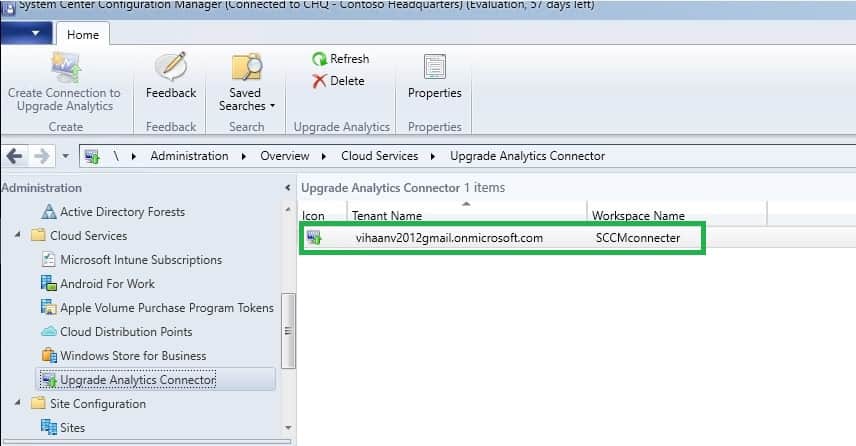
      Integrate Windows 10 Upgrade Readiness with SCCM - Part 2 - Fig.13
      Integrate Windows 10 Upgrade Readiness with SCCM – Part 2 – Fig.13

      End Result for SCCM Administrator

      You can verify the dmpdownloader.log.This log helps us to confirm the integration between SCCM server Upgrade Analytics and OMS Upgrade readiness.
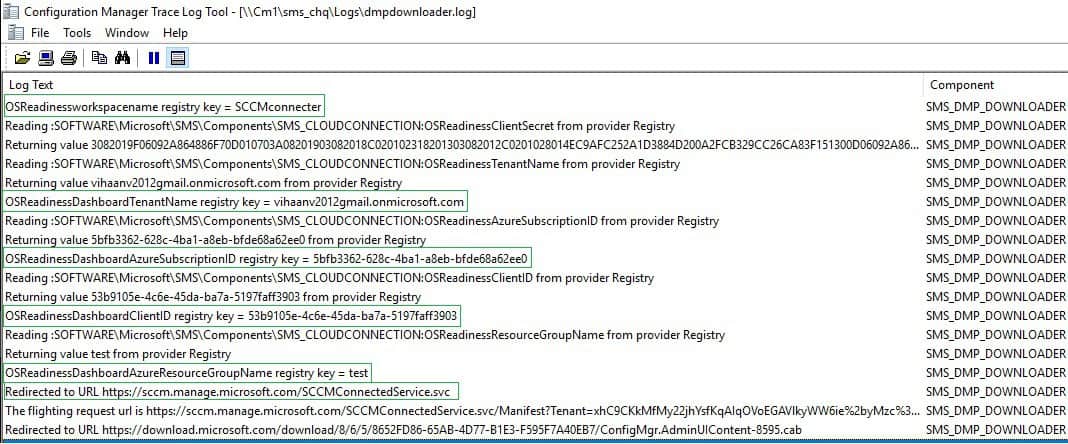
      Integrate Windows 10 Upgrade Readiness with SCCM - Part 2 - Fig.14
      Integrate Windows 10 Upgrade Readiness with SCCM – Part 2 – Fig.14

      You can check the SCCM console after 48 hours and confirm whether the Upgrade Readiness information was updated.
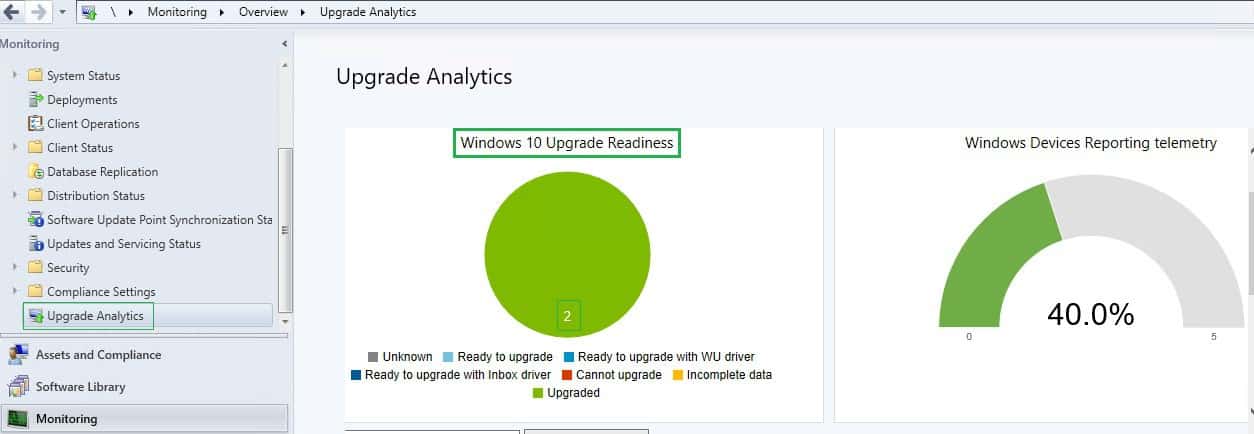
      Integrate Windows 10 Upgrade Readiness with SCCM - Part 2 - Fig.15
      Integrate Windows 10 Upgrade Readiness with SCCM – Part 2 – Fig.15

      References

      1. Integrate Upgrade Readiness with SCCM
      2. Register a new application using the Azure portal
      3. Azure resource group
      4. Manage Windows upgrades with Upgrade Readiness

      We are on WhatsApp now. To get the latest step-by-step guides, news, and updates, Join our Channel. Click here. HTMD WhatsApp.

      Author

      Anoop C Nair is Microsoft MVP from 2015 onwards for consecutive 10 years! He is a Workplace Solution Architect with more than 22+ years of experience in Workplace technologies. He is a Blogger, Speaker, and Local User Group Community leader. His main focus is on Device Management technologies like SCCM and Intune. He writes about technologies like Intune, SCCM, Windows, Cloud PC, Windows, Entra, Microsoft Security, Career etc…

      Written by

      Vimal has more than 10 years of experience in SCCM device management solution. His main focus is on Device Management technologies like Microsoft Intune, ConfigMgr (SCCM), OS Deployment,Patch Management. He writes about the technologies like SCCM, Windows 10, Microsoft Intune and MDT.

      Discussion · 2 comments

      1. Hi – Just one question – Is this going to cost money in Azure? I am already spending close to $125 per month in Azure. Don’t have any more budget within home lab to spare.

        Thanks

        Ra,

        1. StaffHi Ram – Do you have OMS workspace already?. As per MS, Upgrade readiness/Windows Analytics solution is not metered and billed by OMS workspace.I suggest to open free support request with MS to get confirmed for your subscription model.

      Join the discussion

      Your email address will not be published. Required fields are marked *

      Related guides

      Intune

      Windows 11 KB5101650 KB5099414 July 2026 Patch and 3 Zero Day Vulnerabilities and 570 Flaws

      Key Takeaways Windows 11 KB5101650 KB5099414 July 2026 Patch and 3 Zero Day Vulnerabilities and 570 Flaws! In the July 2026 Patch, Microsoft introduced new features designed to improve the overall Windows experience. The update adds enhancements to Windows Update for more flexible update management and introduces Point-in-Time Restore, providing an additional recovery option for […]

      AC Anoop C Nair 9 min read
      Intune

      2026 June KB5094126 KB5093998 Windows 11 Patch | 3 Zero Day Vulnerabilities and 200 Flaws

      Key Takeaways 2026 June KB5094126 KB5093998 Windows 11 Patch | 3 Zero Day Vulnerabilities and 200 Flaws! The June 2026 Windows 11 Patch Tuesday update brings several improvements to File Explorer. It adds support for additional archive formats, including UU, CPIO, XAR, and NuGet Packages (NUPKG). The update also preserves View and Sort preferences in […]

      AC Anoop C Nair 10 min read
      Intune

      2026 May KB5089549 KB5087420 Windows 11 Patch | 0 Zero Day Vulnerabilities and 120 Flaws

      Key Takeaways The Windows 11 May 2026 Patch KB5089549 KB5087420 Update brings important security fixes, performance improvements, and reliability enhancements across the operating system. The update introduces new features such as Xbox Mode for gaming, File Explorer improvements, enhanced input and sharing experiences, better taskbar and Windows Hello reliability, and additional enterprise management capabilities for […]

      AC Anoop C Nair 8 min read
      SCCM

      ConfigMgr 2603 Introduces New Early Update Enrollment Process

      Key Takeaways In this post we are discussing the ConfigMgr 2603 Introduces New Early Update Enrollment Process. Microsoft has officially released Configuration Manager version 2603 to the Early Update Ring, giving organizations an opportunity to test upcoming improvements before the global production rollout. The release is targeted at enterprises running ConfigMgr version 2409 or later […]

      AC Anoop C Nair 3 min read