






Unified Update Platform Windows 10 UUP Content Streamline Post 2
This post, the second in a series about Windows 10 updates, shows investments in the Windows 10 Unified Update Platform (Windows 10 UUP).
In the first part of this series, we discussed the Windows 10 Update Investments Numbers Scale Post 1. Windows 10 updates are enormous; all these numbers are in Millions. As per Microsoft, this data is from July 2015.
The Unified Update Platform (UUP) has been developed as a comprehensive solution for publishing, hosting, scanning, and downloading all operating system updates.
It streamlines the process for client devices using Windows-based operating systems and encompasses a wide range of updates, from monthly quality improvements to exciting new features.

Suma SaganeGowda and Steve Diacetis shared this information in the MS Ignite session. More details about the Ignite session are below.
Related Posts
- Windows Updates Ramblings SSU WUA UUP CU WaaS SCCM Many More
- Windows 10 1909 Deployment Enhancement Enablement Package
- Windows 10 Update Investments Numbers Scale Post 1
- Unified Update Platform Windows 10 UUP Content Streamline Post 2 (this post)
Unified Update Platform Windows 10 UUP
Microsoft is aware that IT Pros are confused about Windows 10 update content sources, so it is trying to streamline the mechanism.
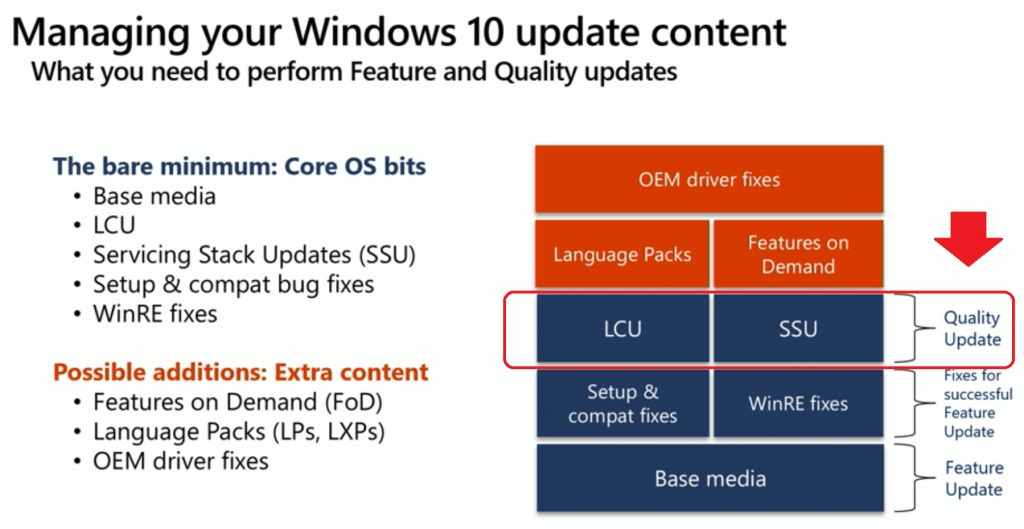
Following are the different types of content in the Windows 10 update.
Core Windows 10 OS content is divided into three(3) parts, as you can see below:
- Core OS Bits
- Feature Updates
- Base Media
- Fixes for Successful Feature Updates
- Setup & Compact bug fixes
- WinRE fixes
- Quality Updates
- LCU (Cumulative Update)
- SSU (Service Stack Updates)
- Feature Updates
Windows 10 Extra Content is explained below:
- Features on Demand (FoD)
- Language Packs
- Language packs (LPs)
- Local Experience Packs (LXPs)
- OEM Driver Updates/Fixes
NOTE! – I have a post to explain the difference between Windows 10 terminologies like SSU, WUA, UUP, and LCU.

What is the Unified update platform (UUP)
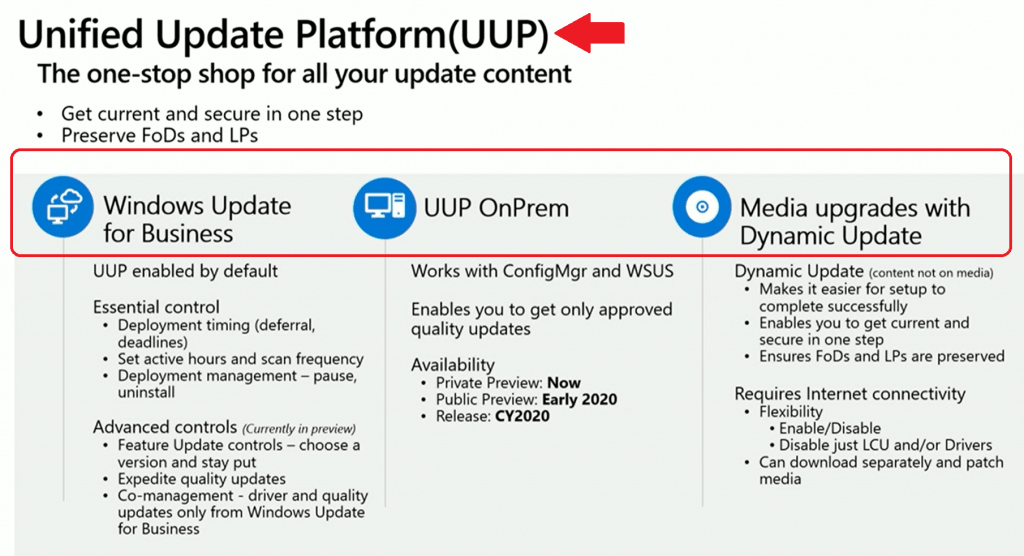
The Unified Update Platform (UUP) is a one-stop shop for all your Windows 10 Update content. It is available for Windows Business for Update (Intune) and soon for SCCM and WSUS (On-prem).
- Windows Updates – UUP Enabled by default
- Windows Update for Business (Intune) – UUP Enabled by default in a controlled manner
- WSUS/SCCM – Enables you to get Only Approved Quality Updates (Coming Soon)
Feature Enhancements with Unified Update Platform
- Unified update platform (UUP)—This UUP is Microsoft’s answer to streamlining Windows 10 Update content. It is a one-stop shop for all your Windows Update content.
- Feature update
- Quality update (LCU)
- Preserve language packs & Features on Demand (FoD)
- Available for Windows 10 1809 or later
UUP with Intune (Windows Update for Business)
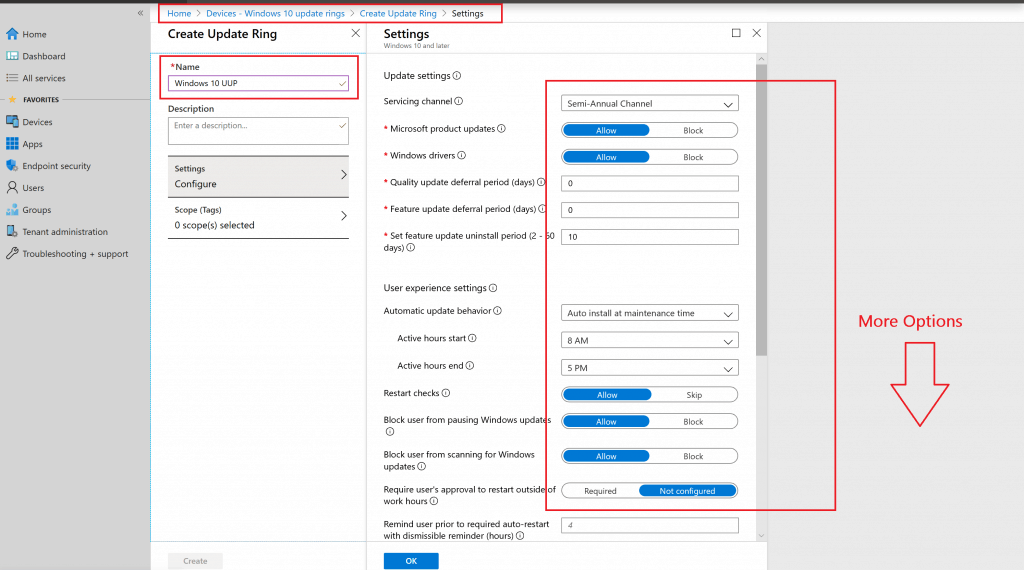
As I mentioned above, UUP is already enabled for Intune as part of the Windows Update for Business feature. You can leverage the following capabilities within Intune (Microsoft Endpoint Manager Intune).
- Available – UUP Controls for Intune (Windows Update for Business)
- Deployment timing (Deferral, deadlines)
- Set active hours and scan Frequency
- Deployment Management – Pause, Uninstall
- Coming Soon (Preview Capabilities)
- Feature Update Controls – Choose a version and stay put.
- Expedite Quality Updates
- Co-management – Driver and quality updates only from Windows Update for Business
UUP for SCCM & WSUS
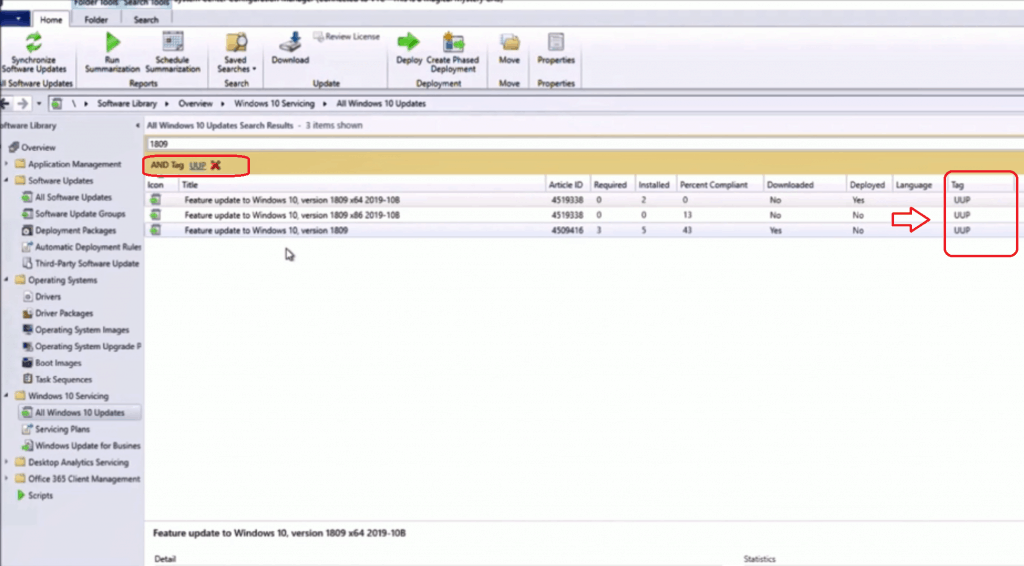
UUP support for SCCM and WSUS is in private preview. Public preview and GA details are given below.
- UUP On-Prem
- works with SCCM and WSUS
- Enables you to get only approved quality updates
- Availability of UUP on-Prem SCCM/WSUS
- Private Preview: NOW
- Public Preview: Early 2020
- Release: Sometime in the year 2020 (CY- Calendar year)
Media Upgrades IPU (Task Sequence – Dynamic Updates)
Media update content is another type of Windows 10 update content that Microsoft wants to produce for some scenarios like
- Bare metal
- Break-fix
NOTE! I explained more about the Windows 10 dynamic update in my previous post, “Basics of Windows Dynamic Update Explained Update Management.”
- Media Upgrades with Task Sequence – Dynamic Updates
- Dynamic Updates (content not on the media)
- It makes it easier for setup to be completed successfully
- It enables you to get current and secure in one step
- Ensures foods and LPs are preserved
- Requires Internet Connectivity
- Flexibility
- Enable/Disable
- Disable just LCU and Drivers
- You can download it separately and patch media. I have a post that explains more details about Windows 10 Dynamic Updates.
Session – Windows 10 UUP
Make the Windows update experience smooth and seamless for your IT team and end-users. More details https://myignite.techcommunity.microsoft.com/sessions/81684
Resources
- Windows 10 Bandwidth Management DO Delivery Optimization with LEDBAT in LAN?
- SCCM and Microsoft Connected Cache Integration to Help with Bandwidth Issues
- Microsoft Connected Cache Container Instances in Azure
- Basics of Windows Dynamic Update Explained Update Management
We are on WhatsApp. To get the latest step-by-step guides and news updates, Join our Channel. Click here –HTMD WhatsApp.
Author
Anoop C Nair is Microsoft MVP! He is a Device Management Admin with more than 20 years of experience (calculation done in 2021) in IT. He is a Blogger, Speaker, and Local User Group HTMD Community leader. His main focus is on Device Management technologies like SCCM 2012, Current Branch, and Intune. He writes about ConfigMgr, Windows 11, Windows 10, Azure AD, Microsoft Intune, Windows 365, AVD, etc.




Discussion