






Windows 10 WaaS Deployment Rings with Sign Wave SCCM Collections
Let’s understand how Windows 10 WaaS Deployment Rings with Sign Wave SCCM Collections. In this post, we will learn one of the exciting ways to handle the WaaS Deployment Rings strategy with SCCM.
In recent days, we (SCCM Admins) have become more focused on designing the deployment rings predominantly used in Windows as a service: Windows 10 deployment rings. Windows 10 deployment rings are similar to the deployment groups created for version upgrades. Deployment Rings are how devices are separated into a specific timeline.
I know the customers using this method to deploy Windows 10 WaaS for their production environment. With Windows 10, deployment rings are constructed differently in each servicing tool, but the concepts remain the same.
In this blog, I am focusing on reducing the complexity, risk, and control options and mainly on the possibility of reusing the segment of rings (Especially the Production Ring) for Windows 10 update deployments and large-sized applications.

NOTE! – Desktop Analytics integration with SCCM will help automate most of these tasks in the future.
What are the Key Features of SCCM Deployment Rings?
Following are the features of SCCM Deployment Rings.
> Gradual Rollout
> Early Adopters (Champions):
> Ring Structure (Preview, Limited and Broad)
> Benefits (Improved Stability, Enhanced Security and Increased Productivity)
Windows 10 WaaS Deployment Rings with SCCM Sign Wave

An Idea that may help !!!!
Generally, Microsoft Deployment Ring representation is as below, followed as a best practice and tweaking the ring structure based on the organization’s needs.
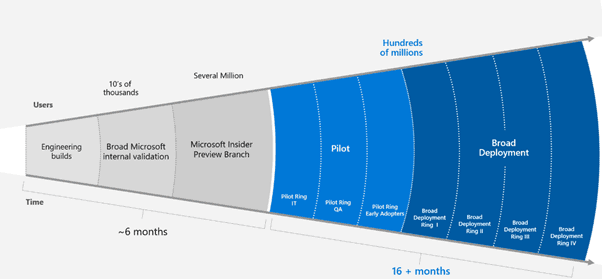
Designing non-production rings in an organization may be straightforward and comfortable, as the set of devices (mostly based on personas/departments, etc.) is already defined.
However, for the production ring, which has a vast audience, is there a way we can explore more and make it dynamic and automated as a one-time activity?
I want to introduce Sign Wave SCCM Collections at the production deployment ring strategy. The following sections provide more details about the collection.
Sign Wave Use Case
I interacted with one of the use cases (Green Field Environment ) with specific requirements to have a dynamic way of designing these SCCM collections, which can address the below critical elements.
- New Machine inclusions
- One-time activity
- It can be re-used as BAU for application and software update deployments as well (Especially Large Sized apps to control the bandwidth)
- Impact Control
To address this, I created a Sign wave design for SCCM collections, which will be part of the Production Ring.
SCCM Collection Structure
Check out the following example for more details about the SCCM sign wave collection structure.

Example
Assuming there are 1000 machines onboarded to SCCM and these 1000 machines are from different countries, there would be 100 engines from each country for ten (10) countries.
Note: By this logically, we will have 10 Wave collections
Sign Wave: This collection structure is similar to the ring approach (generally referred to as Sign wave collections) and additionally provides certain advantages.
How to Populate Sign Wave SCCM Collections?
Typically, these hundred (100) machines are expected to be a mixture of all ten (10) countries. We can explore the possibilities using their unique attributes and bring them to the respective collection using queries.
Example: W10 – Coll: Query criteria can be Computers Ending with 1 – Were Name like “%1”. These query criteria will bring the machines satisfying this condition from all ten (10) countries. We can find similar rules and try to build all the Wave collections.
Additionally, if some combinations are considered, we can increase the number of Waves to meet the criteria.
Benefits of Sign Wave Collection WaaS Deployment Rings
One-time Activity: All mass / global deployments, including software updates, can be targeted to these Wave collections. No need to create another set of collections for the mass / global deployments.
Bandwidth Control: Since each Wave collection consists of machines from a different country, the devices would receive the deployments accordingly at their local time based on the schedule. This will avoid all machines simultaneously hitting DP for content and MP for Policy from one geographical region.
A deployment scheduled at 10:00 AM Local Time is targeted for W10 collection. In this case, the machine from India would receive this deployment when it is 10:00 AM in India, and similarly, the device from Singapore would receive the deployment when it is 10:00 AM in Singapore.
This creates a sign wave that requests hitting and avoids the simultaneous hits.
Number of Waves (Collections): Additionally, we can increase the number of Waves to fill the criteria if some combinations are incorporated.
New Machine Inclusion: New machines introduced to the environment will automatically be part of any Wave collection depending upon which criteria it satisfies.
Deployment Numbers: The number of deployments to be created each time is limited.
Huge-Size Deployments: Since the deployments will be very controlled, this would additionally help release the bigger packages phase-wise.
Impact Control: If any impact is identified due to the deployment in the first W10 target at 10:00 AM roll-out, other implementations can be stopped or controlled to avoid the other effects.
Note: This design has strong, strongly dependent naming conventions followed.
Resources
- Walkthrough of SCCM Console
- How to Promote Pre-Production SCCM Client to Production
- What is Collection? How to Create SCCM Static Collections
- How to create dynamic SCCM collections?
- Create AD Group Based SCCM Collections
We are on WhatsApp. To get the latest step-by-step guides and news updates, Join our Channel. Click here –HTMD WhatsApp.
Author
Guru Vaidya
Gurudatt is a Technical Architect with 15 years of experience in the End-User Computing space. His main area of interest is the design and implementation of ConfigMgr Infrastructure. He has a vast knowledge of ConfigMgr infrastructure and client-side troubleshooting.




Discussion