






How to Create Configure Deploy Windows 10 WIP Policies Using SCCM Intune Endpoint Protection
Let’s discuss how to Create Configure Deploy Windows 10 WIP Policies Using SCCM Intune Endpoint Protection. Endpoint Protection is the new solution that will replace Windows Information Protection (WIP).
In this post, I’ll overview the Windows Information Protection (WIP)/Enterprise Data Protection (EDP) policy configuration and Windows 10 EDP End User Experience.
WIP/EDP is fully supported in the recently released Windows 10 anniversary edition (1607),y. We can use Intune standalone and SCCM CB 1606 to configure Windows Information Protection policies. Endpoint Protection policies?
Before implementing the WIP in your organization, it’s essential to find out which WIP-enabled applications are available, and we have to define which WIP mode the applications will be in, Allow or Exempt.

Before I go into details, here is a video tutorial explaining the configurations and a Windows 10 end-user experience demo. I used Windows 10 Insider Build 14342 with Microsoft Intune.
Table of Contents
- Intune MAM Benefits Available for Windows 365 and AVD
- Easier Way to Enable Local Security Authority Protection Mode with Intune
- Windows 11 New LSA Local Security Authority Policies
- Quick and Easy way to Turn on PowerShell Audit using Intune Policy
- How to Easily Disable Local Drive Redirection with Intune
- Best Guide to Enable WinSCP Win32 App Supersedence and Auto-Update with Intune
What is WIP/EDP? Endpoint Protection
It is essential to understand that WIP is a Microsoft accidental Data Leakage protection solution. Windows 10 enterprise has loads of security enhancements. I think Microsoft invested heavily mainly in 3 pieces, and those are
1. Secure Identities
2. Information Protection
3. Threat Resistance.
How to Create Configure Deploy Windows 10 WIP Policies Using SCCM Intune Endpoint Protection – Data Protection Options? Endpoint Protection
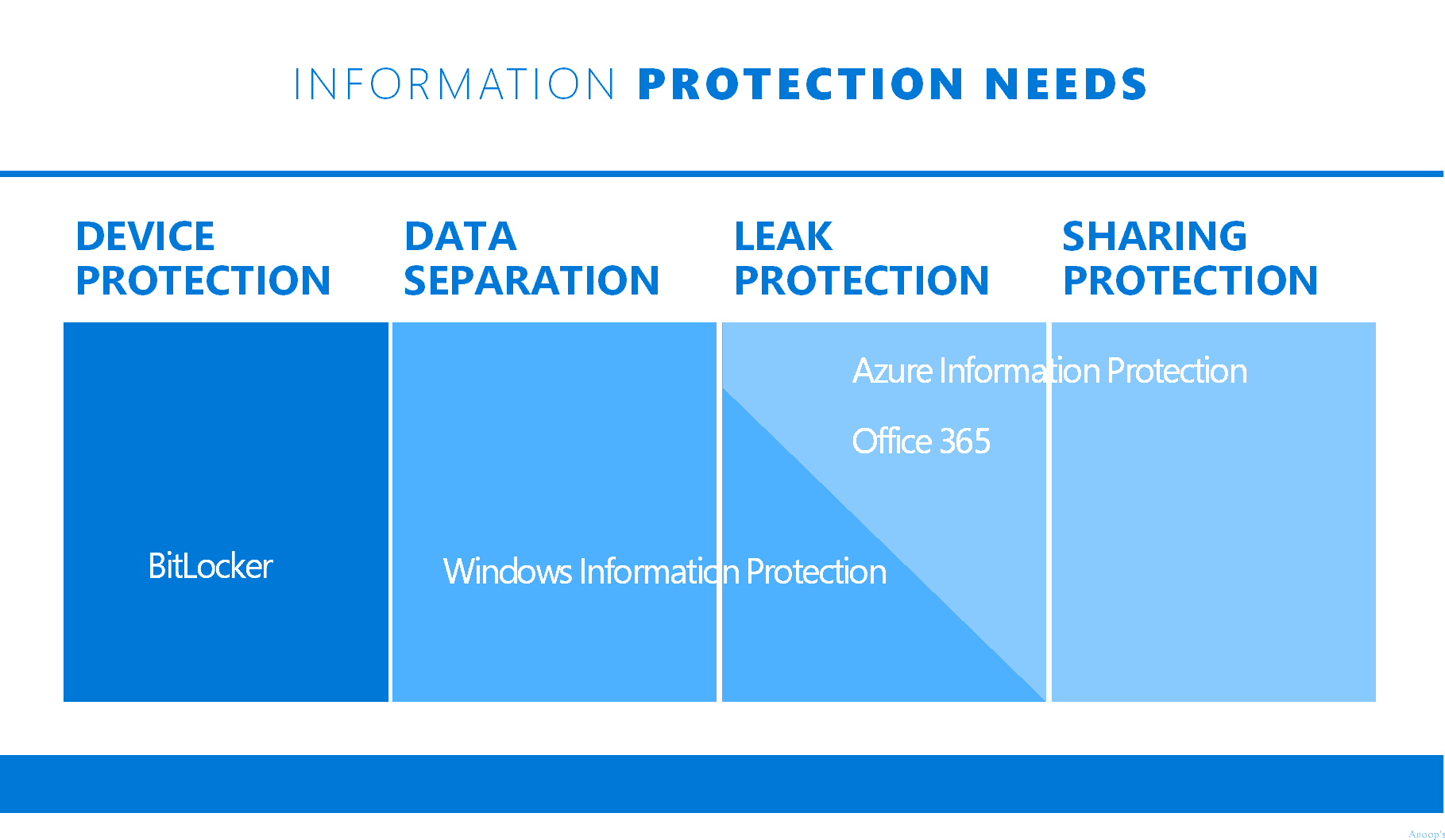
Windows Information Protection/EDP is part of Information Protection. For information protection, Microsoft recommends having the following.
| Data Protection Options? Endpoint Protection |
|---|
| Encryption (Bit locker), |
| WIP/EDP |
| Azure Information Protection (or RMS). |
How to Create – Deploy WIP EDP Using SCCM CB 1606 and End-User Experience of WIP
I’ll give an overview of the Windows Information Protection (WIP)/Enterprise Data Protection (EDP) policy configuration and Windows 10 EDP End User Experience through this video.
Following are the Quick Steps to Configure (Intune Console) the Windows 10 EDP Policies
Configure the list of Windows 10 Apps (Universal/Store or Desktop) that you want to protect through EDP
Select the EDP/WIP Mode of protection, Configure the Network locations/IP Range, and Upload the Data Recovery certificates and EDP settings.
Configure the List of Windows 10 Apps (Universal/Store or Desktop) that You Want to Protect through WIP
There are two types of Apps in the Intune console, which we can configure Universal/Store and Desktop apps. To configure Windows 10 EDP/WIP policies, we must first identify the applications you want to protect via EDP policies.
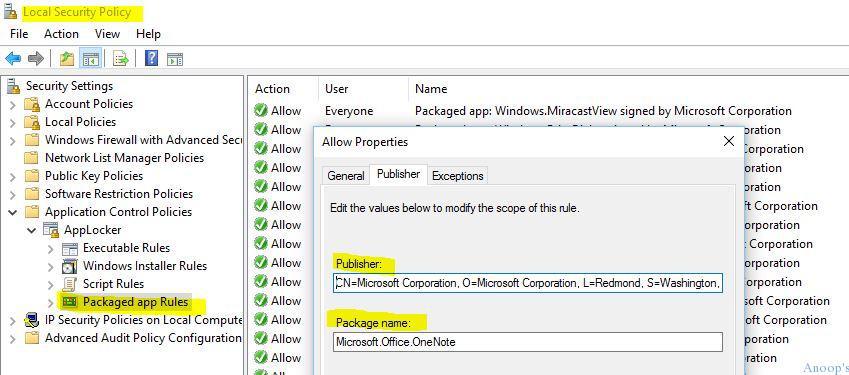
First, we need to obtain the publisher details and app product names. We do this through the Intune Console.
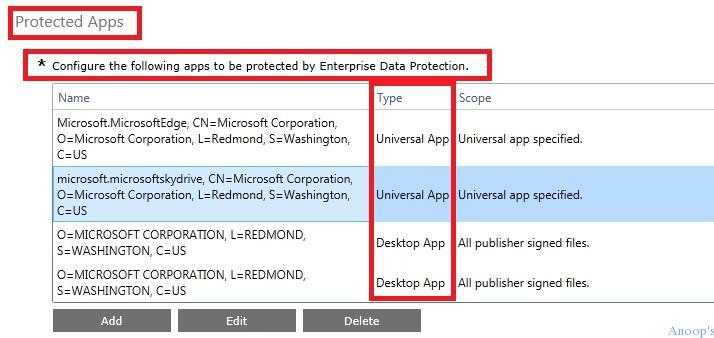
SCCM Console
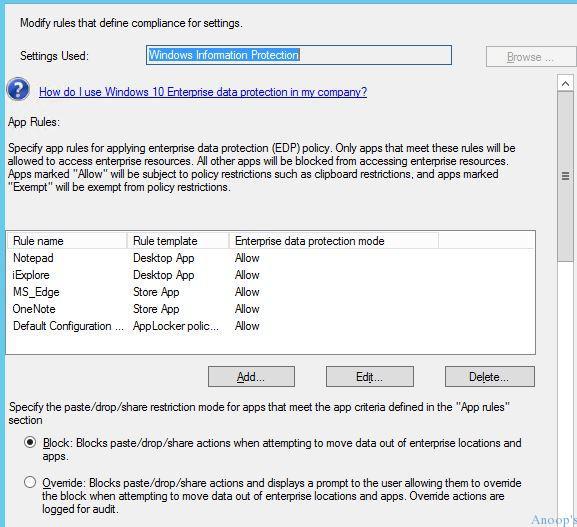
Specify app rules for applying the enterprise data EDP policy. Only apps that meet these rules will be allowed to access enterprise resources, and all other apps will be blocked from doing so.
The store’s publisher, product name, and desktop apps are found using Local Security Policy –> Application Control Policies –> App Locker –> Package app Rules.
Select the WIP/EDP Mode of Protection
Which mode of protection did you want to select for the EDP policy – I selected the block mode !! The protection modes available in the EDP policy are listed in the below table. 1. Block 2. Override 3. Silent 4. Off

Configure the Network Locations through EDP/WIP Policies
Network locations that the apps you configure can access. No other apps can access these locations. These network location settings are critical for EDP/WIP policy to work on Windows 10 machines!! Below 4 network location settings are mandatory settings (I think):-
- Primary Domain (my primary domain is trail tenant)
- PuneITPro.onmicrosoft.com Enterprise Cloud Domain (Exchange Online)
- Outlook.office.com|outlook.office365.com Enterprise Network Domain (The Dummy URL is fine, I think – it worked for me)
blogs.anoopcnair.com Enterprise IPv4 Range (Any IP range is fine, I think – Hyper-V lab IP Range worked for me) Internal IP range 192.0.0.1-192.255.255.254 Intune Console.
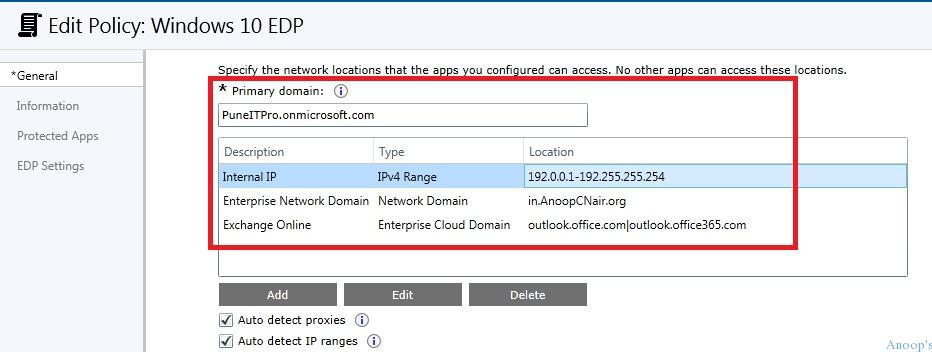
SCCM Console
Define your corporate network boundary to be protected by Enterprise data protection. Access to these network locations will be restricted to only the apps that meet the app criteria defined in the App rules.
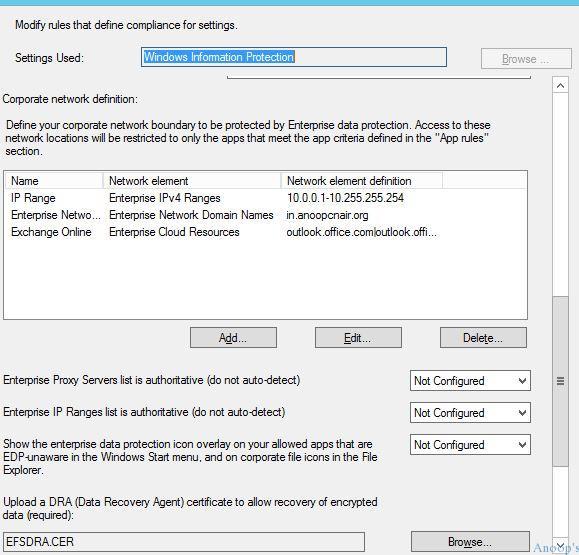
Configure WIP/EDP Data Recovery Agent Cert
Configuring the WIP/EDP Data recovery agent cert is mandatory now !! The recommended way is to re-use the EFS DRA from your domain when you have one. There are some other ways to create a test cert !! I have uploaded one, as you can see in the below picture.

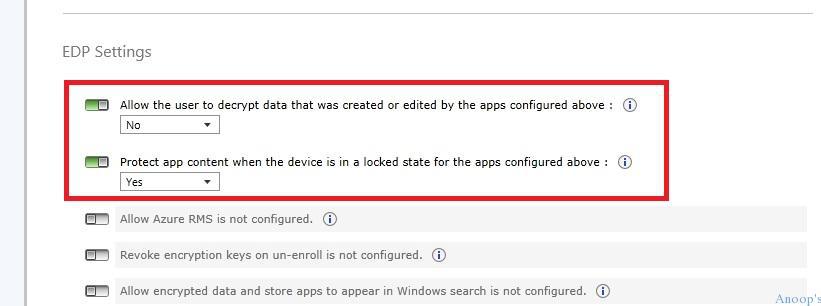
Configure WIP/EDP Policy Settings
WIP/EDP Settings – The last WIP/EDP configuration in Intune. By default, none of these settings are enabled !! Allow user to edit or decrypt data –> NO.
Protect App content when the device is in a locked state –> Yes.
Windows 10 WIP/EDP – End User Experience
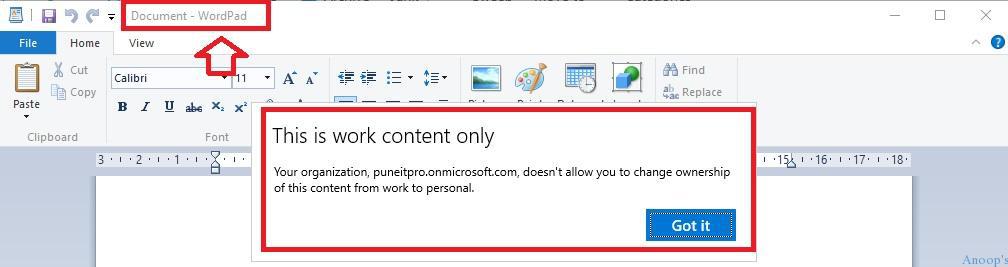
In my example here – WordPad is NOT a protected APP – I tried to copy the enterprise mail content to an unprotected app, and it gave me the following error: “This is work content only – your organization, PuneITPro.onmicrosoft.com, doesn’t allow you to change the ownership of this content from work to Personal”
Notepad is an EDP-protected app. I tried to copy the enterprise mail content to a WIP/EDP-protected app (NOTEPAD), which allowed me to do so. You should notice the EDP lock symbol.

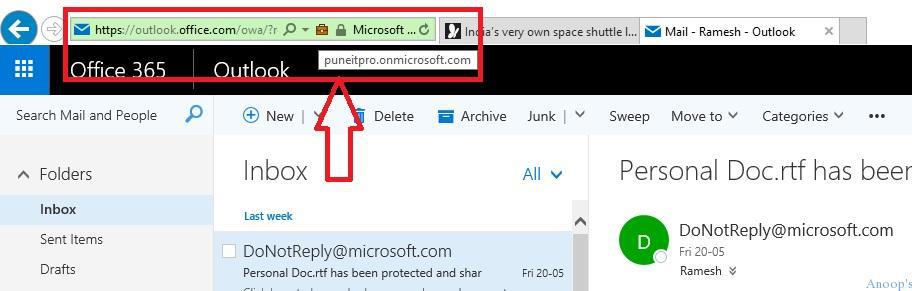
Internet Explorer(IE) provides an EDP Lock Symbol when you browse an Enterprise location.
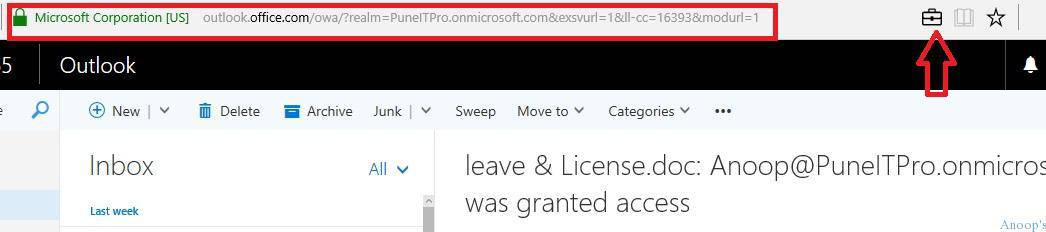
Microsoft Edge provides an EDP Lock Symbol when you browse an Enterprise location.
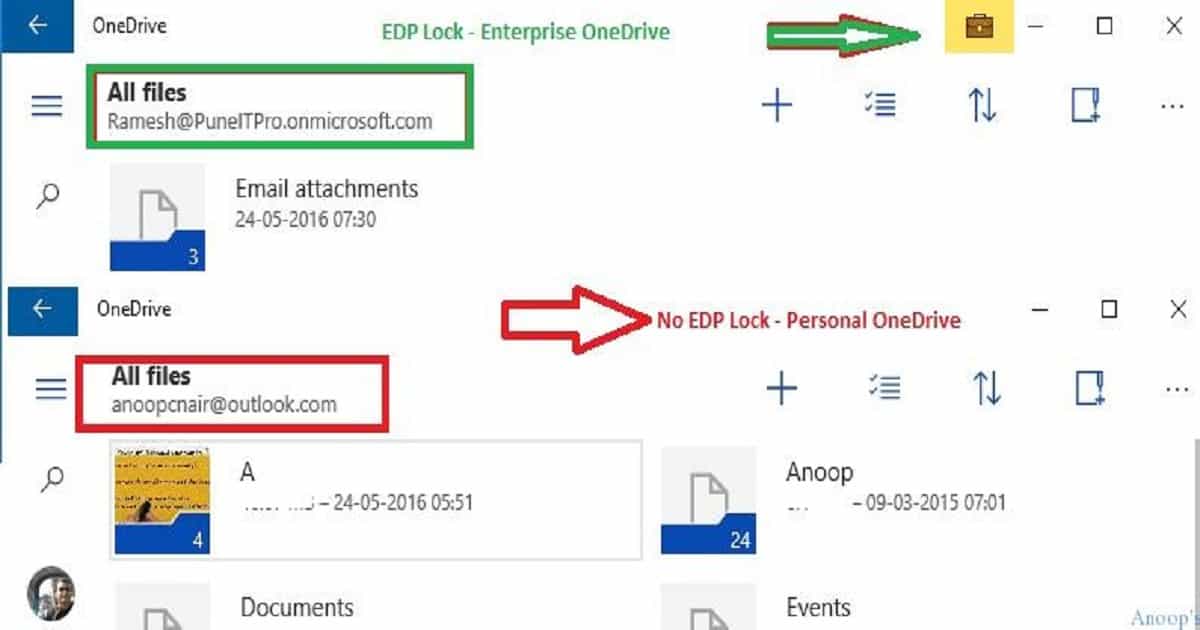
OneDrive universal application provides an EDP Lock Symbol for enterprise OneDrive accounts but not personal OneDrive accounts.
We are on WhatsApp now. To get the latest step-by-step guides, news, and updates, Join our Channel. Click here. HTMD WhatsApp.
Author
Anoop C Nair is Microsoft MVP! He is a Device Management Admin with more than 20 years of experience (calculation done in 2021) in IT. He is a Blogger, Speaker, and Local User Group HTMD Community leader. His main focus is on Device Management technologies like SCCM 2012, Current Branch, and Intune. He writes about ConfigMgr, Windows 11, Windows 10, Azure AD, Microsoft Intune, Windows 365, AVD, etc.




useful post Anoop.
How to create EFSDRA certificate ? Is it a local cert or a public ?
StaffThis is the way to create EFS DRA cert https://github.com/Microsoft/windows-itpro-docs/blob/master/windows/keep-secure/create-and-verify-an-efs-dra-certificate.md
Awesome posting Anoop – very helpful.
I have a couple of quick questions regarding Outlook on Windows 10 Mobile with an On-Premise Exchange – how would you configure the configuration item?
-Is the primary domain in the configuration item all the corporate email domains?
-The Enterprise Network domain: the local active directory domain where the Exchange resides (e.g mx01.domain.local)
-The IP Ranges: the IP range of the Exchange server?
Thank you in advance!
Br,
Mike
do you know if screenshots are also disabled within enlightened apps? That doesn’t seem to work!
Thanks
Hi there, apologies as I don’t think this is the right post for this but I’m trying to upgrade windows mobiles from 8.1 to 10 using SCCM CB hybrid. I’ve got the compliance policy that makes 10 available, however I’m trying to force the upgrade to go in. I don’t really want to get all the phones and click “upgrade”I just want them to do so when enrolled and they get the policy. Is there a way to do that please?
StaffHey! – Are you followed the blog post https://blogs.msdn.microsoft.com/canberrapfe/2016/08/10/upgrading-windows-phone-8-1-to-windows-10-mobile-with-microsoft-intune-and-sccm/ . I’m not sure whether we have a force option available for Windows phone upgrades. I think, personally, that will give a bad experience for end users. Isn’t it ?
KR
Anoop
Is this possible to implement using Applocker using EMS ? Is there any inbuilt policy or we need to use OMA ?
StaffYeah Applocker can be used to import app list to WIP policies https://docs.microsoft.com/en-us/windows/threat-protection/windows-information-protection/create-wip-policy-using-intune
StaffApplocker policies can be deployed through AD GP, PowerShell. But, I can’t find any details about another management interface for APPLOCKER.
Management interfaces
AppLocker can be managed by using a Microsoft Management Console snap-in, Group Policy Management, and Windows PowerShell
https://docs.microsoft.com/en-in/windows/device-security/applocker/applocker-overview
Hello Anup,
i had been asked implement WIP in my Org and i have followed all the steps provided by MS but WIP is not working as expected. Am am using SCCM to deploy WIP policies on 1803 machines and on the client machines i see my WIP baseline and compliant status says “Non-Compliant”. its been quite a long time am working on this project but could not find what’s stopping WIP to work on my test devices. It would be great if you can assist me here. thanks.
StaffHave you checked the event logs to get some clue. It could be similar to Windows 10 MDM troubleshooting here https://www.anoopcnair.com/windows-10-mdm-troubleshooting-guide/#Troubleshoot_with_Windows_10_Event_Logs
Hello Anoop,
i had been asked implement WIP in my Org and i have followed all the steps provided by MS but WIP is not working as expected. Am am using SCCM to deploy WIP policies on 1803 machines and on the client machines i see my WIP baseline and compliant status says “Non-Compliant”. its been quite a long time am working on this project but could not find what’s stopping WIP to work on my test devices. It would be great if you can assist me here. thanks.