






Windows 11 KB5031354 KB5031358 October Patch Tuesday 2023 | 3 Zero Day Vulnerabilities
Microsoft has released the patches for October 2023. The Windows 11 KB5031354 KB5031358 LCUs were released to fix known security and performance issues. Windows 10 KB5031356 October patch was also released. Microsoft has announced the Windows 11 21H2 end of service.
There are three zero-day vulnerabilities announced by Microsoft with the October patch Tuesday, and they are CVE-2023-36563 Microsoft WordPad Information Disclosure Vulnerability, CVE-2023-41763 Skype for Business Elevation of Privilege Vulnerability and CVE-2023-44487 MITRE: CVE-2023-44487 HTTP/2 Rapid Reset Attack.
The Windows 11 October update addresses security issues for your Windows operating system, and also includes improvements that were released at the end of September as part of the Moment 4 update.
Microsoft released new features for the Windows 11 22H2 (KB5031354 ) version and Windows 11 21H2 KB5031358. These new features include Copilot, Taskbar, and Settings app updates. This is coming out as part of a controlled feature rollout or moments on September 26, 2023—Windows configuration update – Microsoft Support.

| Windows 11 22H2 | Windows 11 21H2 |
|---|---|
| KB5031354 | KB5031358 |
Zero Day Security Vulnerability for October 2023
There are three zero-day vulnerabilities announced by Microsoft with the October patch Tuesday, and they are CVE-2023-36563 Microsoft WordPad Information Disclosure Vulnerability, CVE-2023-41763 Skype for Business Elevation of Privilege Vulnerability and CVE-2023-44487 MITRE: CVE-2023-44487 HTTP/2 Rapid Reset Attack.
- More details on October 2023 Patch Tuesday CVE Updates.

| CVE Number | CVE Title | Publicly Disclosed | Exploitability assessment | Exploited |
|---|---|---|---|---|
| CVE-2023-36563 | Microsoft WordPad Information Disclosure Vulnerability | Yes | Exploitation Detecteded | Yes |
| CVE-2023-41763 | Skype for Business Elevation of Privilege Vulnerability | Yes | Exploitation Detected | Yes |
| CVE-2023-44487 | HTTP/2 Rapid Reset Attack | Yes | Exploitation Detected | No |
Video Review of October 2023 Patch Tuesday Windows 11
Let’s have a quick Video Review of October 2023 Patch Tuesday Windows 10 KB5030211. October Patch Tuesday Windows 11 October patches KB5031354 and KB5031358 are also covered in this video.
October 2023 Patch Tuesday Report. Let’s quickly discuss Windows 11 KB5031354 KB5031358 October patches. Windows 10 patches KB5030211. These are the latest cumulative update security patches for the month of October 2023. We have also discussed 3 Zero-Day Vulnerabilities in this video.
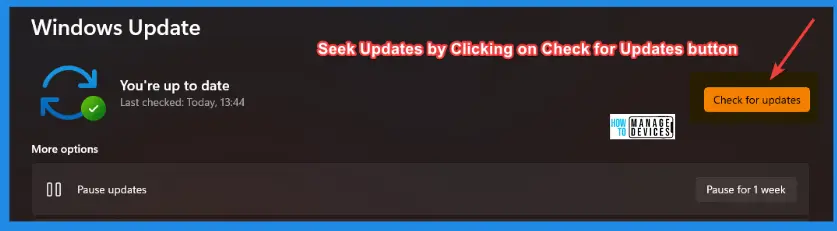
How to Seek Windows Updates?
Windows 11 allows you to choose when and how to receive the latest updates to ensure your device runs efficiently and securely. To manage your update preferences and view available updates, select “Check for Windows updates.”
- Alternatively, you can seek the latest Windows update by selecting Start > Settings > Windows Update by accessing the update settings.
Microsoft releases security updates on “Patch Tuesday,” the second Tuesday of each month at 10:00 AM PST. IT professionals should plan their deployment schedules according to their time zone(s).
Windows 11 22H2 KB5031354 KB5031358 October Patch New Features
The following table gives a quick overview of New Features introduced with the Windows 11 22H2 October Patch Tuesday update KB5031354 KB5031358.
Interesting to see that most of these features are introduced as part of the Controlled Feature Rollout (moment) feature as per the September 26, 2023—Windows configuration update document.
NOTE! – There are no significant feature updates as part of the moment (Controlled Feature Rollout). The recent feature updates are documented by Microsoft – What’s new in recent Windows updates.
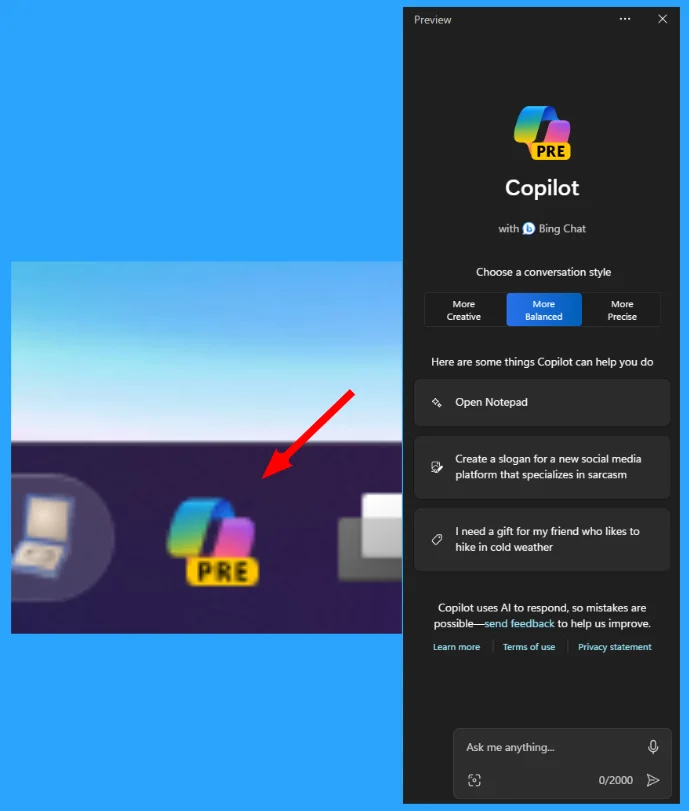
This update adds a preview of centralized AI assistance, called Copilot in Windows. This makes Windows 11 the first PC platform to add centralized AI assistance to help you get things done. This first preview focuses on the integrated UI.
There are several other updates coming to the 22H2 version of Windows 11 using controlled feature rollout. More details are available in the list below.
Copilot in Windows preview
Start menu
Taskbar, system tray, and notifications
File Explorer
Windows Share
Backup and restore
Emoji
Windows Spotlight
Narrator
Voice Access
Security
Graphics
Settings
Windows 365 Switch
List of Windows 11 Improvements with October Patches
Most of the improvements are coming only to Windows 11. The HTMD community has covered all the new features or improvements of the Windows 11 release in the following table. Here are the improvements for Windows 11 latest versions.
| New Improvements October patch Tuesday | Details |
|---|---|
| Oct 2023 patches Introduce websites to the Recommended section of the Start menu | These websites will be personalized for you and come from your browsing history. |
| Mobile device management (MDM) providers (like Intune) can use offline templates to fill in the user SID | KDC now reads the user SID from a certificate’s Subject Alternative Name (SAN). To learn more, see KB5014754. |
| DST Changes for Greenland | Spelling update from Kiev to Kyiv |
Issues Fixed with Windows 11 October Patches
Let’s look at the issues fixed with the Windows 11 October patch Tuesday KBs (KB5031354 KB5031358). The following table covers both Windows 11 22H2 and 21H2 fixes. The following are the fixes that are added with October’s Latest Cumulative Update (LCU).
| Fixes with Windows 11 October Patches | Details |
|---|---|
| This Cotober update addresses an issue that affects the MDE | This update addresses an issue that affects application compatibility related to Microsoft Defender for Endpoint |
| Issues that affect LDAP queries and authentication are fixed with Oct patch Tuesday updates | An issue that affects external binding. It fails. This occurs after you install Windows updates dated May 2023 or later. |
| Microsoft OneDrive makes Windows stop responding issue is fixed | This update addresses an issue that might occur if you use Microsoft OneDrive files that are compressed by NTFS. |
| This Oct update addresses an issue related to account lockout event 4625 | This issue occurs when an account name is in the user principal name (UPN) format. |
| October update checks on an issue that affects some USB printers | Microsoft Defender stops USB printers from printing. |
| Microsoft fixed AppV related issues with Oct 2023 patches | Application Virtualization (App-V) environment copy operations stopped working after the April 23 updates. |
| Current update addresses an issue that might cause a user-mode memory leak. | This issue may arise when invoking the CopyFile() or MoveFile() functions. |
| The current update addresses an issue that affects IMEPad. | IMEPad stops functioning when you input end-user-defined characters (EUDC). |
Known Issues from October Windows 11 Patches KB5031354 KB5031358
Let’s look at the issues fixed with the Windows 11 October patch Tuesday KBs (KB5031354 KB5031358). The following table covers both Windows 11 22H2 and 21H2 fixes.
Workaround for BitLocker might incorrectly receive a 65000 error: To mitigate this issue in Microsoft Intune, you can set the “Enforce drive encryption type on operating system drives” or “Enforce drive encryption on fixed drives” policies to not configured.
| Summary | Originating update | Status |
|---|---|---|
| BitLocker might incorrectly receive a 65000 error in MDMs. “Requires Device Encryption” might incorrectly report. | N/A | Workaround provided – working on a resolution. |
| Compatibility issues with Intel Smart Sound Technology drivers and Windows 11 | N/A | Mitigated External- Vendor to update the drivers |
| Devices with a locale set to Croatia might not utilize the expected currency | N/A | Workaround provided – Manually change |
SCCM Windows 11 KB5031354 KB5031358 Deployment
Learn how to Deploy Windows 11 KB5031354 KB5031358 October 2023 Cumulative Updates using SCCM/WSUS. You can deploy Windows 11 October 2023 CU KBs using SCCM.
You can create a monthly patch package for October 2023 using the following methods. You can also search with Windows 11 LCU for October 2023 KB5031354 KB5031358. The easiest way is to check from the SCCM admin console.
NOTE! You can verify the Windows 11 (OS Builds 22000.2538, 22621.2428) by installing the October 2023 Latest Cumulative Updates.
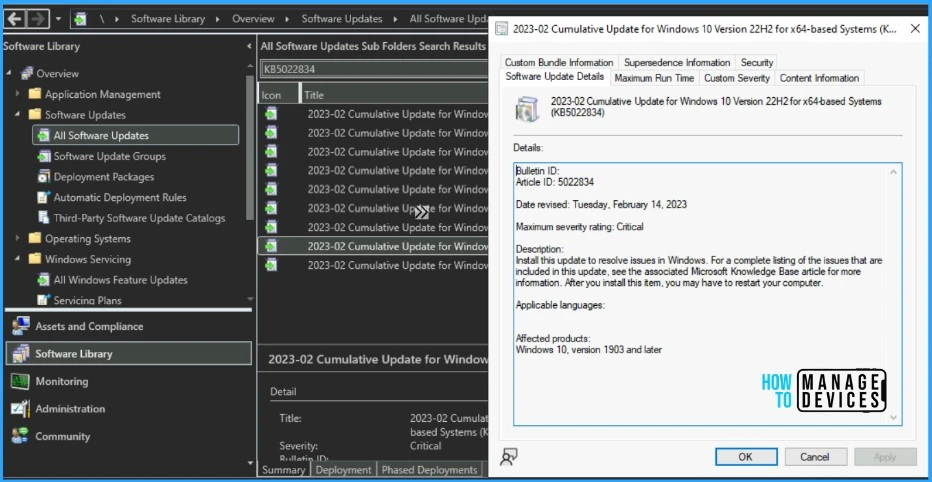
- In SCCM Console, Navigate to Software Library\Overview\Software Updates\All Software Updates.
- You must initiate a WSUS Sync from the All Software Updates node (Right-click on the node and initiate the sync).
- Search with the following KB5031354 KB5031358 Number.
- Or you can search with 23-10 Cumulative Update for Windows 11, as shown in the below screenshot.
| Name of Windows 11 patches for October 2023 | Release Date |
|---|---|
| 2023-10 Cumulative Update for Windows 11 Version 22H2 for ARM64-based Systems (KB5031354) | 10/10/2023 5:00:00 PM |
| 2023-10 Cumulative Update for Windows 11 Version 22H2 for x64-based Systems (KB5031354) | 10/10/2023 5:00:00 PM |
| 2023-10 Cumulative Update for Windows 11 for ARM64-based Systems (KB5031358) | 10/10/2023 5:00:00 PM |
| 2023-10 Cumulative Update for Windows 11 for x64-based Systems (KB5031358) | 10/10/2023 5:00:00 PM |
- How to Create Deploy New Software Update Patch Package Using SCCM | ConfigMgr
- SCCM ADR Automatic Deployment Rule Creation Process
Intune Windows 11 KB5031354 KB5031358 Deployment
Using Intune, let’s check how to deploy the October 2023 Patch Tuesday (LCU) Deployment. You can deploy Windows 11 October CU using Microsoft Intune. The patch deployment process in Microsoft Intune is different from that of SCCM.
I don’t think creating a new patch deployment policy to cater to monthly CU deployments is mandatory, but you can use the following method to expedite. The existing patch deployment policy will deliver the patches using WUfB (Windows Update for Business).
You have the option to expedite the Installation of October 2023 quality updates. Create expedited update profiles for Quality updates using the following steps. Learn more about Intune patching from the video below.
- Sign in to the Microsoft Intune admin center https://intune.microsoft.com/
- Navigate Device -> Quality updates for Windows 10 and later.
- Click on +Create Profile.
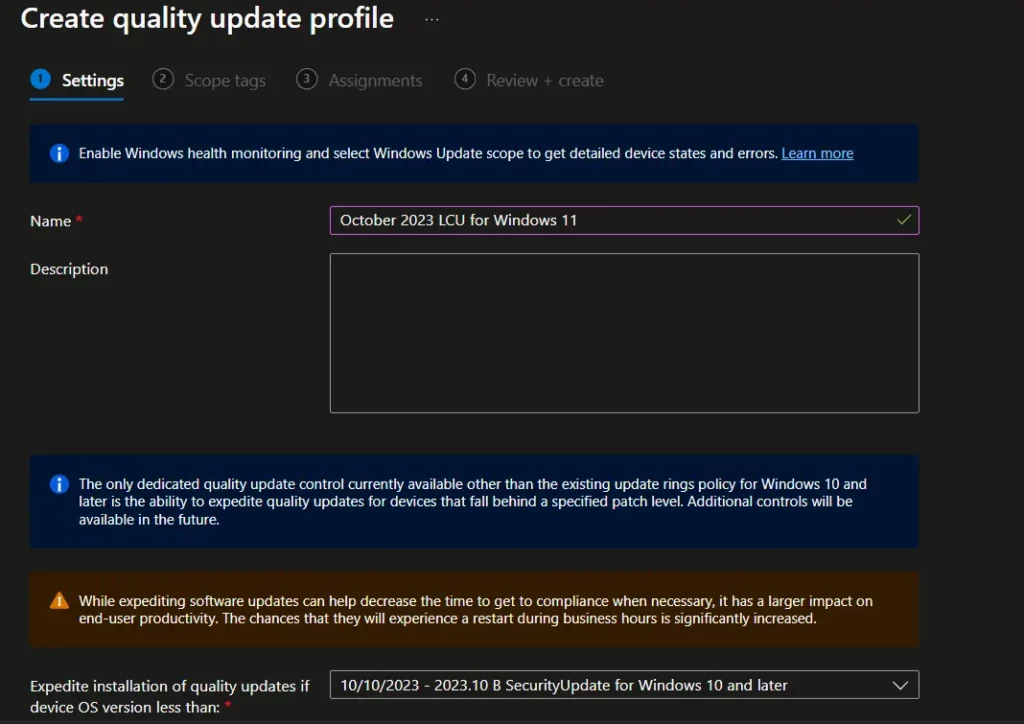
The following are the Settings for the Intune quality update profile for the monthly patching process if you want to expedite the deployment of patches. Otherwise, you can use the standard quality updates policy from Intune.
- Name – Windows 11 October 2023 LCU
- Description – Recommend adding a detailed description
- Expedite installation of quality updates if the device OS version is less than 10th October 2023 – 2023.10 B SecurityUpdate for Windows 10 and later
- Number of days to wait before the restart is enforced – 1 Day
More Details on Zero Day Out Of Band Patch Deployment Using Intune MEM Expedite Best Option and Intune Reporting Issue: Expedite Windows Security Patch Deployment.
Windows 11 KB5031354 KB5031358 Direct Download Links
Let’s manually download the 2023 October Cumulative Update for Windows 11 KB5031354 KB5031358 from the Microsoft Update Catalog website. The following tables provide the direct links to download the October 2023 Cumulative Updates for Windows 11.
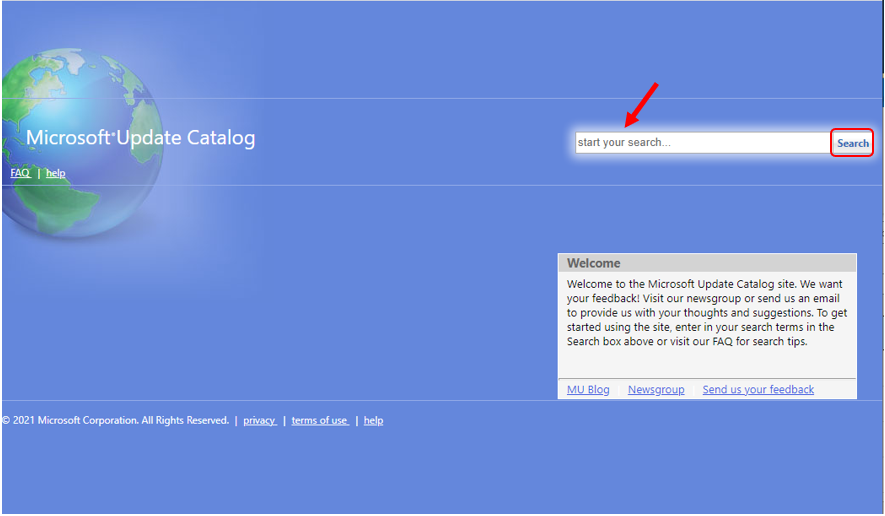
You can check the Microsoft Update Catalog portal to get the Windows 11 LCUs direct download links for October 2023 LCU. Check out the Microsoft Update Catalog, https://www.catalog.update.microsoft.com/
Search for updates from the Windows Update Catalog – To download the latest cumulative update (LCU) for your operating system that you want to apply manually.
- Enter the KB article number
- Click the Search icon
- Search Keyword 2023-10
| Title | Products | Size | Direct Download |
|---|---|---|---|
| 2023-10 Cumulative Update for Windows 11 for x64-based Systems (KB5031358) | Windows 11 21H2 | 350.5 MB | Download |
| 2023-10 Cumulative Update for Windows 11 Version 22H2 for x64-based Systems (KB5031354) | Windows 11 22H2 | 605.1 MB | Download |
Automated Patch Management with Windows Autopatch
Autopatch helps streamline updating operations and create new opportunities for IT pros. The Windows Autopatch Release Management provides you with more clarity on the Quality, Feature updates, and install schedules in the Intune portal, Here, you can get more information Windows Autopatch Implementation Setup Guide.
In Intune Portal, Navigate to Devices, Under Windows Autopatch. Select Release Management, which displays the updates and releases scheduled.
Resources
October 10, 2023—KB5031354 (OS Build 22621.2428) – Microsoft Support
October 10, 2023—KB5031358 (OS Build 22000.2538) – Microsoft Support
Author
Anoop C Nair is Microsoft MVP! He is a Device Management Admin with more than 20 years of experience (calculation done in 2021) in IT. He is a Blogger, Speaker, and Local User Group HTMD Community leader. His main focus is on Device Management technologies like SCCM 2012, Current Branch, and Intune. He writes about ConfigMgr, Windows 11, Windows 10, Azure AD, Microsoft Intune, Windows 365, AVD, etc.




Discussion