





Windows 11 Settings About Page Update with GPU and Storage Specifications
Key Takeaways
- About page now restores top cards showing processor, memory, graphics, and storage.
- Graphics and storage information are now visible directly under the Device info section.
- The changes make hardware specs easier to access and improve Home page loading.
- This section will show your GPU name and storage details.
Hey, let’s discuss about Windows 11 Settings About Page Update with GPU and Storage Specificatios. The About page in Settings now shows some interesting changes, including the return of the top cards that highlight key hardware specifications such as processor, memory, graphics, and storage. It seems like the company is reverting some of its previous improvements by bringing these elements back. Another notable update is the addition of graphics and storage details under the“Device info” section. This information feels like it should have been available from the start, making it surprising that it took so long to include it here.
Table of Contents
Windows 11 Settings About Page Update with GPU and Storage Specifications
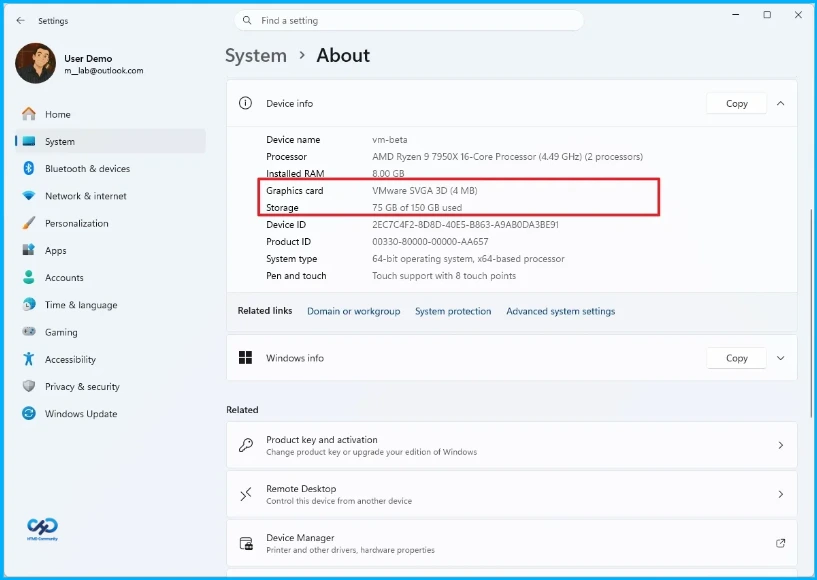
The April 2026 Security Update for Windows 11 brings some handy tweaks to the Settings app’s About page. Now, the top hardware specification cards for processor, memory, graphics, and storage are back, and graphics and storage details are also listed directly under the Device info section. These updates make it much easier to see important hardware information without digging through menus, while also improving Home page loading times.
When you open the About section in the Settings app, it currently displays basic system specifications, such as the CPU name, core count, RAM, touch support, and more. With the April 2026 update, this section will also show your GPU name and storage details.
| Path |
|---|
| Settings>System>About |
- New Windows 11 25H2 Security Baseline Released in Microsoft Intune
- Windows 11 Narrator Expands AI-Powered Image Descriptions Beyond Copilot+ PCs
- Windows 11 April 2026 Update Introduces Smart App Control Without Reinstallation
- Configure Windows Sandbox vGPU Policy using Intune for Better Graphics Performance or Reduced Attack Surface
Key Features
The About page now shows your processor,RAM, storage (size and type), and GPU (name and memory) in easy-to-read cards. Existing information is still available but shifted down for better visibility. These cards help you quickly check your hardware for upgrades or performance, with some previews including plain-language explanations for clarity.

Need Further Assistance or Have Technical Questions?
Join the LinkedIn Page and Telegram group to get the latest step-by-step guides and news updates. Join our Meetup Page to participate in User group meetings. Also, join the WhatsApp Community and the Whatsapp channel to get the latest news on Microsoft Technologies. We are there on Reddit as well.
Author
Anoop C Nair is a Workplace Technology solution architect with 25+ years of experience. Microsoft Certified Trainer. Microsoft MVP from 2015 onwards for consecutive 11+ years! He is a blogger, Speaker, and Founder of HTMD Community and HTMD Conference. His main focus is on Device Management technologies like Intune, Windows, and Cloud PC. He writes about technologies like Intune, SCCM, Windows, Cloud PC, Entra, and Microsoft Security.




Discussion