






Windows 11 Upgrade Requirements PC Health Check App
Let’s quickly check Windows 11 upgrade requirements PC Health Check App Updates. We will check Windows 11 Minimum System Requirements to get a free upgrade to Windows 11. Microsoft will allow enthusiasts to install Windows 11 using ISO (even with some unsupported hardware components). You can download Windows 11 insider version ISO.
Microsoft is nearing the release of Windows 11 into the production ring, so they are ramping up all the insider build versions. Microsoft also shared the updated requirements for the Windows 11 upgrade. You can download the insider version of the PC health check tool.
While running this tool, I saw an issue when Microsoft Intune managed the Windows 10 PC. It won’t give you the support details; instead, the following message will be displayed: “Your Organization Managed Updates on this PC.” You can read more about Windows 11 Minimum System Requirements.
Windows 11 Upgrade Support is announced for the following processors. These processors were not included in the initial list of supported processors for Windows 11. The PC Health tool has not been updated with the latest list of supported processors. As per Microsoft, this tool will be updated soon. I see there are a couple of welcoming updates.

- 7th Generation Intel processors
- AMD Zen 1 (First Generation)
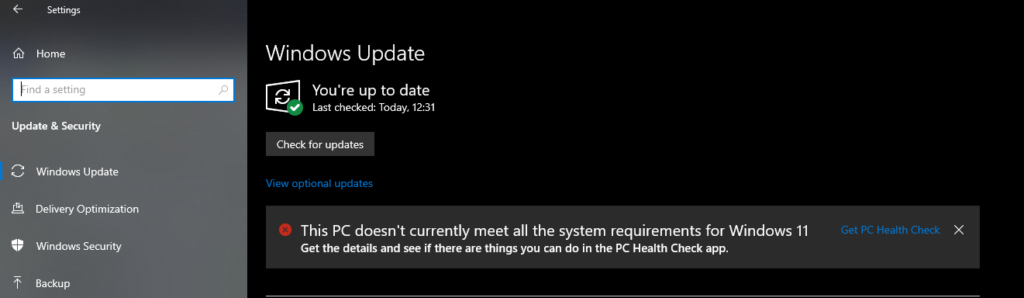
Table of Contents
Video Tutorial – Primary Windows 11 Upgrade PC Health Check App Requirements
Again, I received the message that this PC doesn’t meet Windows 11 System Requirements. You can check to see if there are things you can do, and if not, you will keep getting Windows 10 updates. I have included a detailed analysis video below.
Windows 11 Free Upgrade Requirements | Why are you not getting Free Windows 11 Upgrade? – YouTube
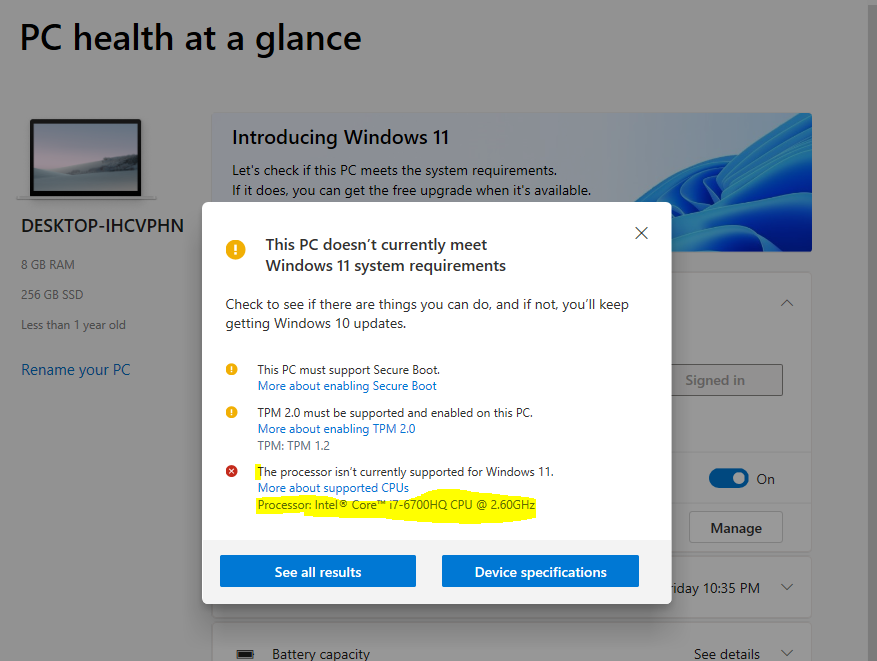
- This PC must support secure boot – Yellow – OK to upgrade
- TPM 2.0 must be supported and enabled on this PC – Yellow – OK to upgrade
- The processor isn’t currently supported for Windows 11 – Red (but this is temp issue).
- Processor: Intel Core i7-6700HQ CPU @ 2.60GHz
NOTE: This PC health check tool will soon be updated to allow 7th-generation processors to proceed. Microsoft has already announced support for 7th-generation Intel processors.
Additional Windows 11 Upgrade Requirements
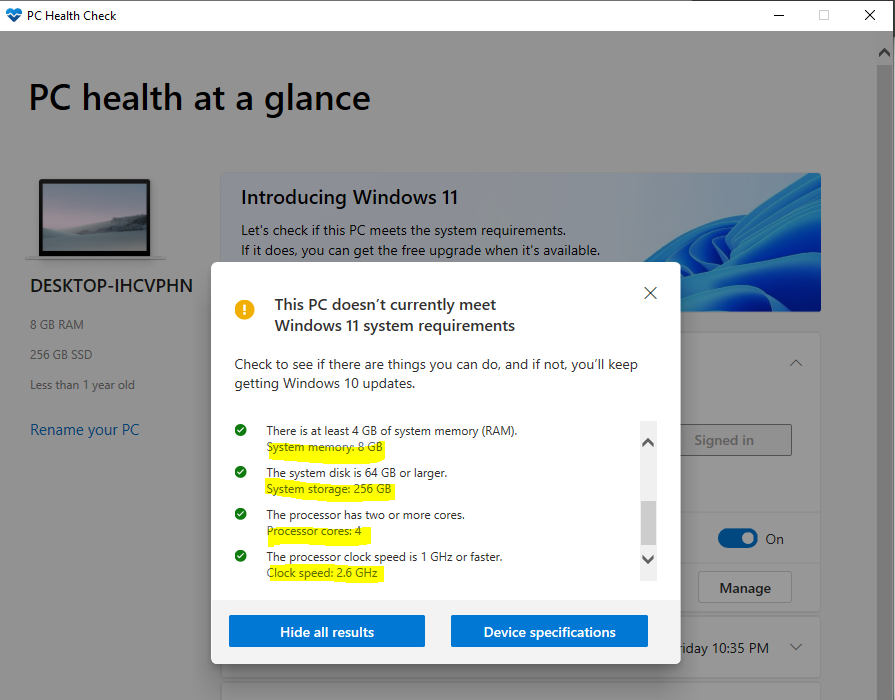
You can click on the See All Results button from the Windows 11 upgrade PC health check tool to get more details about all the requirements.
- There is at least 4 GB of System Memory (RAM) – Green – Good to proceed with Windows 11 Upgrade.
- I have System memory: 8GB
- The System Disk is 64 GB or Later – Green – Good to proceed with Windows 11 Upgrade.
- I have a System Storage of 256 GB
- The processor has two or more cores – Green – Good to proceed with Windows 11 Upgrade.
- I have processor Core 4
- The processor clock speed is 1 GHz or Faster – Green – Good to proceed with Windows 11 Upgrade.
- I have a Clock Speed of 2.6 GHz
We are on WhatsApp. To get the latest step-by-step guides and news updates, Join our Channel. Click here –HTMD WhatsApp.
Anoop C Nair has been Microsoft MVP for 10 consecutive years from 2015 onwards. He is a Workplace Solution Architect with more than 22+ years of experience in Workplace technologies. He is a Blogger, Speaker, and Local User Group Community leader. His primary focus is on Device Management technologies like SCCM and Intune. He writes about technologies like Intune, SCCM, Windows, Cloud PC, Windows, Entra, Microsoft Security, Career, etc.




Discussion