






Windows 365 Cloud PC Deployment Expands to Japan West
Let’s discuss Windows 365 Cloud PC Deployment Expands to Japan West. As of February 6, 2025, Microsoft extended the availability to the West regions in Japan. You can now choose the Japan East and Japan West regions for deployment.
Before this update, Windows 365 Cloud PC was only supported in Japan’s East regions. Due to this update, you can now deploy your Cloud PCs into the Japan West Azure region and the existing Japan East region.
With this update, you can select Japan West if you select the Japan geography for a provisioning policy. Selecting the “Automatic” region option in Japan increases the number of regions available for Windows 365 service.
In this blog post, I will share more information about the Availability of Windows 365 Cloud PCs in the Second Region of Japan and the advantages of the Availability of Windows 365 Cloud in the West region of Japan.

Table of Contents
Windows 365 Cloud PC Deployment Expands to Japan West
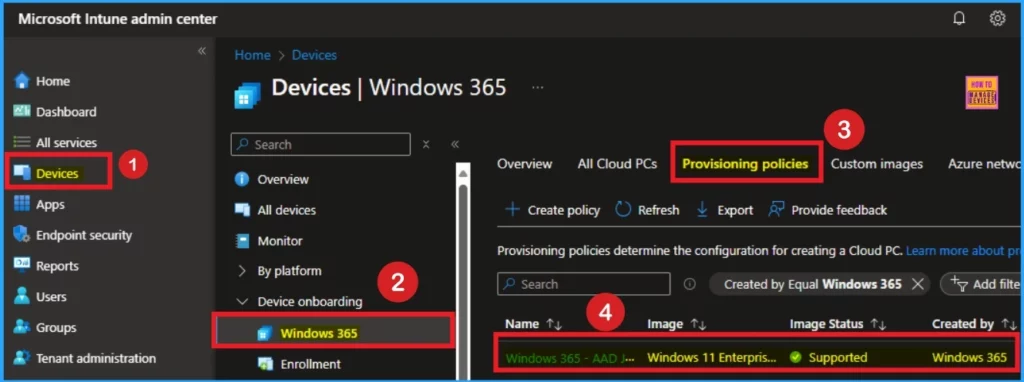
As mentioned above, when you select the “Automatic” region option of Japan, it will increase the availability number. Microsoft recommends you use the Automatic region option when using the Microsoft Hosted Network type. Follow the list and screenshot to access Japan region on Provisioning policy.
- Open Microsoft Intune admin center
- Go to Devices > Windows 365 > Provisioning Policies
- Select the Azure AD Join policy from the lists you want to modify to configure for moving the Cloud PC region.
- Moving Cloud PCs Across Regions Granular Move Enhanced Tracking and Reporting Windows 365 Frontline Support
- Intune Exam MD 102 Study Guide Starter Kit – Microsoft Intune Certification
- Most Asked 54 Windows 365 Cloud PC Interview Questions and Answers
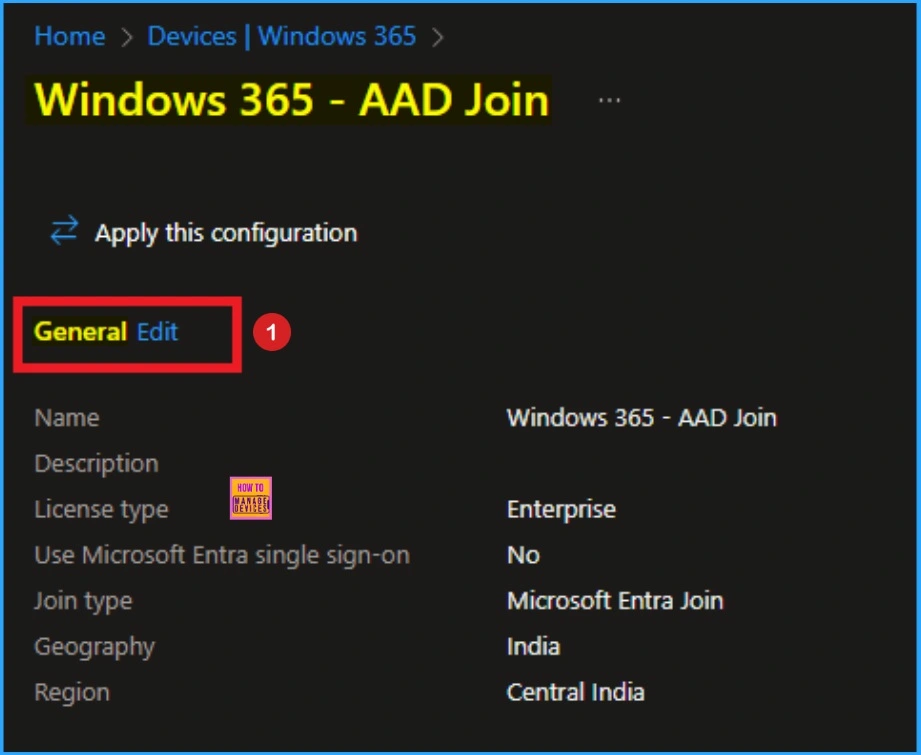
After selecting the Provisioning ploicy from the above window you can see the Edit option on Different tabs like General, Image, Configuration etc. Click on the edit button near General tab.
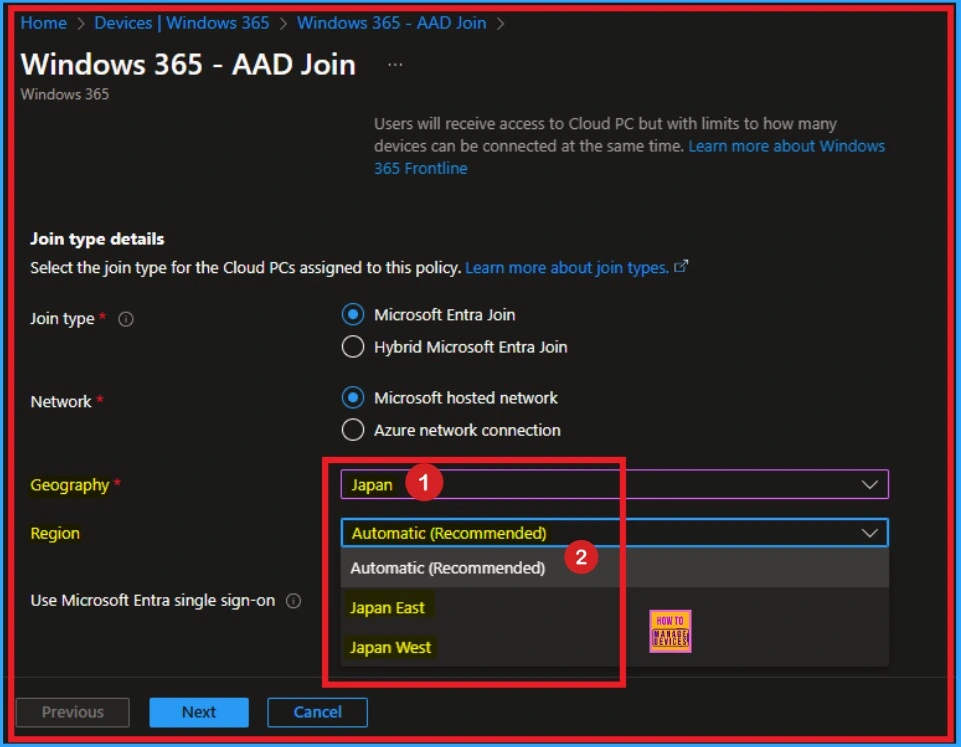
On the General tab we want to check if the Japan West region available or not. To check this Scroll down this page and you can see Join type details. Click on the Drop down arrow near Geography field. Select Japan as Geography.
- Under region, you can see Automatic (Recommend), Japan East, Japan West options
Advantages of Windows 365 Cloud PC in Japan West Region
There are many advantages have Windows 365 Cloud PC in Japan West region. The expansion increases the number of Azure geographies that Windows 365 supports, giving you more choices for locating your Cloud PCs.
| Advantages | Details |
|---|---|
| Reduced Lentacy | Latenacy is minimized due to this expansion |
| Increased Flexibility | Flexibility increased |
| Enhanced Reliability | Improved redundancy and reliability, |
| Global Expansion | Global Expansion of Windows 365 Cloud PC |
| Improved User Experience | Improved Experience |
Upcomming Improvements on Windows 365 Cloud PC
Over the coming year, Microsoft will enable new Azure regions to provide more choice and flexibility for your Cloud PCs. These expansions reveal Microsoft’s dedication to users. By growing into existing and new Azure geographies, Microsoft is evolving the service into a truly global service, ensuring you can provide the best service to your organization.
Need Further Assistance or Have Technical Questions?
Join the LinkedIn Page and Telegram group to get the latest step-by-step guides and news updates. Join our Meetup Page to participate in User group meetings. Also, Join the WhatsApp Community to get the latest news on Microsoft Technologies. We are there on Reddit as well.
Resource
Windows 365 now supported in Japan West
Author
Anoop C Nair has been Microsoft MVP for 10 consecutive years from 2015 onwards. He is a Workplace Solution Architect with more than 22+ years of experience in Workplace technologies. He is a Blogger, Speaker, and Local User Group Community leader. His primary focus is on Device Management technologies like SCCM and Intune. He writes about technologies like Intune, SCCM, Windows, Cloud PC, Windows, Entra, Microsoft Security, Career, etc.




Discussion