






How to Enable Windows 10 and Windows 8 Patching Support for SCCM 2007
How do I enable Windows 10 and Windows 8 Patching support for SCCM 2007? First, SCCM 2007 SP2 and above official support for Windows 10 is available only for the Windows 10 Enterprise 2015 long-term servicing branch (LTSB) edition. (Microsoft does not support Other editions of Windows 10).
This doesn’t mean other versions of Windows 10 patching won’t work with SCCM 2007 SP2; it does mean that Microsoft has not tested different versions of Windows 10. Windows 8.1 patching can also be accomplished via SCCM 2007 SP2.
We must update the WSUS server to support Windows 10 Enterprise 2015 LTSB and Windows 8.1 patching via SCCM 2007 SP2. To enable these patches, the Windows Server Update Services (WSUS) 3.0 SP2 – KB2734608 update needs to be installed on your WSUS 3.0 SP2 server.
Enabling Windows 10 and Windows 8 patching support for SCCM 2007 involves several steps to ensure compatibility and functionality. This post provides all the details.

Table of Contents
- SCCM 2007 2012 Support for Windows 10 Versions Current Branch Configuration Manager 2012
- Thank You SCCM 2007 Time to Say Goodbye
- Upgrading from SCCM 2007 to SCCM 2012 with Adaptiva Onesite
- SCCM 2007 End Of Extended Support 7 July 2019 ConfigMgr
- SCCM 2012 to CB Current Branch Upgrade | Migration | Possible Issues | ConfigMgr

Follow the steps below to enable Windows 10 Enterprise 2015 LTSB and Windows 8.1 patching support in your environment. As usual, all these patches should be applied in a top-to-bottom approach, which means that the Tier 1 server should be patched first and followed by the hierarchy. Also, we need to monitor Sitecomp.log to understand whether all the SCCM component reinstall processes are going well.
- Install the patch KB 2734608 on Tier 1/ 2/3 WSUS servers SP2 servers.
- Install patch KB 2750782 to enable Windows 8.1 patching support on Tier 1/2/3 SCCM 2007 SP2 and above servers.
- Install patch kb 3044077 to enable Windows 10 enterprise 2015 LTSB patching support on Tier 1/2/3 SCCM 2007 SP2 and above servers.
- Install KB2750782 and kb3044077 on SCCM 2007 SP2 Secondary Server/s.
- Install KB2750782 and kb3044077 on the SCCM 2007 SP2 remote admin console.
- Install KB2750782 and kb3044077 on SCCM 2007 SP2 Clients.
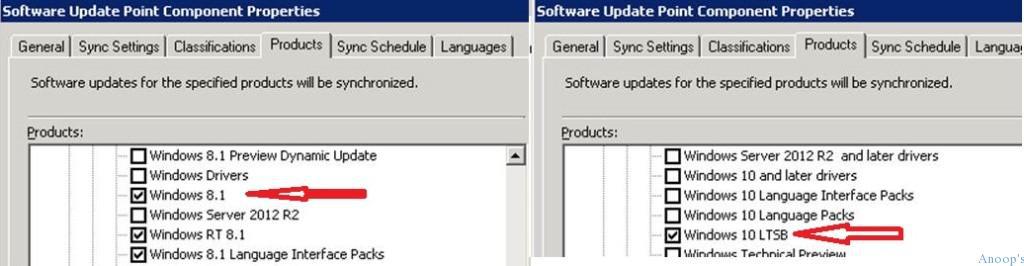
After installing patches on the WSUS and Tier 1 SCCM 2007 server, Windows 10 LTSB and Windows 8.1 options appear on SCCM 2007 Software Update Point component properties under the products listing.
How to Enable Windows 10 and Windows 8 Patching Support for SCCM
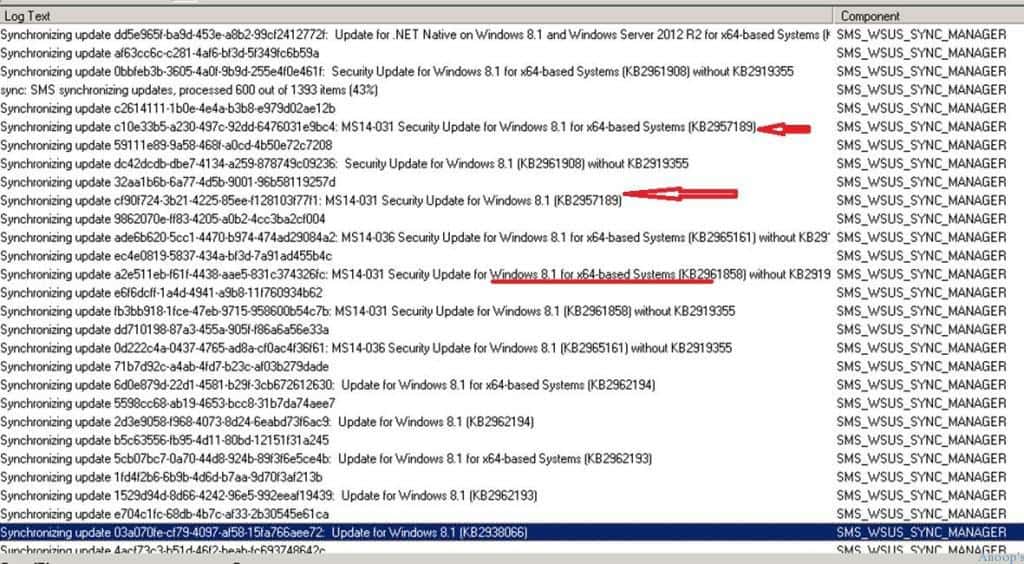
Once these patches are installed on the central SCCM 2007 server, manually initiate WSUS sync via Run Synchronization from the Update Repository in the SCCM 2007 SP2 console. We can analyze details from WsyncMgr.log regarding Windows 10 and Windows 8.1 patch updates.
| How to Enable Windows 10 and Windows 8 Patching Support for SCCM |
|---|
| Sync: SMS synchronizing updates, processed 0 out of 40 items (0%) |
| Synchronizing update a8db29ac-2343-43f6-9045-45eb9a6cd582 |
| Synchronizing update dc226d92-7c02-40c4-94a9-63c7696b18c5: Update for Windows 10 for x64-based Systems(KB3106932) |
| Updated 12 items in SMS database, new update source content version is 323 |
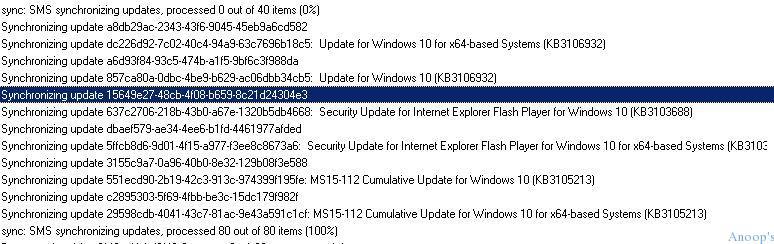
Synchronizing update f31549fb-f5d1-44b7-a2a0-c38a1f22f7d5 Synchronizing update b0e64138-94a4-4c66-b22c-275b76a42469: Update for Windows 8.1 (KB3112336) Synchronizing update 46df5f6c-4c03-4441-8d46-1362519777ba Synchronizing update 0887c665-7c86-41e9-b603-6bb9aa220cb2: Update for Windows 8.1 for x64-based Systems (KB3112336).
Resources
SCCM Related Posts Real World Experiences Of SCCM Admins (anoopcnair.com)
We are on WhatsApp now. To get the latest step-by-step guides, news, and updates, Join our Channel. Click here. HTMD WhatsApp.
Author
Anoop C Nair is Microsoft MVP! He is a Device Management Admin with more than 20 years of experience (calculation done in 2021) in IT. He is a Blogger, Speaker, and Local User Group HTMD Community leader. His main focus is on Device Management technologies like SCCM 2012, Current Branch, and Intune. He writes about ConfigMgr, Windows 11, Windows 10, Azure AD, Microsoft Intune, Windows 365, AVD, etc.




Discussion