






How Windows Autopatch Adds Reader and Administrator RBAC Roles in Intune
Let’s discuss How Windows Autopatch Adds Reader and Administrator RBAC Roles in Intune. Microsoft improved the ability of Windows Autopatch in Intune by expanding the Role Based Access Control. As per the huge requests and feedbacks of Windows Autopatch community members, Microsoft finally bring this new improvement.
As you know that, Role-based access control (RBAC), a permissions capability that provides granular control over update management. The arrival of RBAC role in Autopatch will bring a tremendous change in Intune Users Experience.
Windows Device managements and enrollment is simply with Windows Autopilot. By providing Granular control over permissions ensures that only authorized personnel manage updates, supporting compliance with organizational policies.
Role Based Access Control in Windows Autopatch is Now generally available. In this blog post I would like to provide more informations about Windows Autopatch Adds Reader and Administrator RBAC Roles in Intune.

Table of Contents
How Windows Autopatch Adds Reader and Administrator RBAC Roles in Intune
As mentioned above, Role Based Access Control in Windows Autopatch generally available. But rollout is expected to be complete by the end of June 2025. Users can be access the update management and increase read-only access features with in Intune.
- New Windows Autopatch Report In Intune Enhances Patch Visibility And Risk Management
- Microsoft Introduces Platform Level Device Cleanup Rules in Intune with Scoped RBAC Permissions
- Create Custom Roles RBAC in Intune
- New Intune RBAC Permission for Android Device Enrollment Profiles
Benefits of Windows Autopatch Adds Reader
Update Management in Windows Autopatch is improved by more granular control. So RBAC helps to strengthen your organization’s security. The targeting and Distribution of update management to specific people or groups easy with RBAC in Autopatch.
The new capabilities of RBAC in Autopatch is especially useful to organizations with geographically distributed models. The following table shows the benefits.
| Benefits |
|---|
| Helps to Authorize roles and assign permissions to specific people. |
| Expand or narrow read-only privileges. |
| Enforce least privilege access by aligning to user responsibilities. |
| Delegate update management to local or functional teams. |
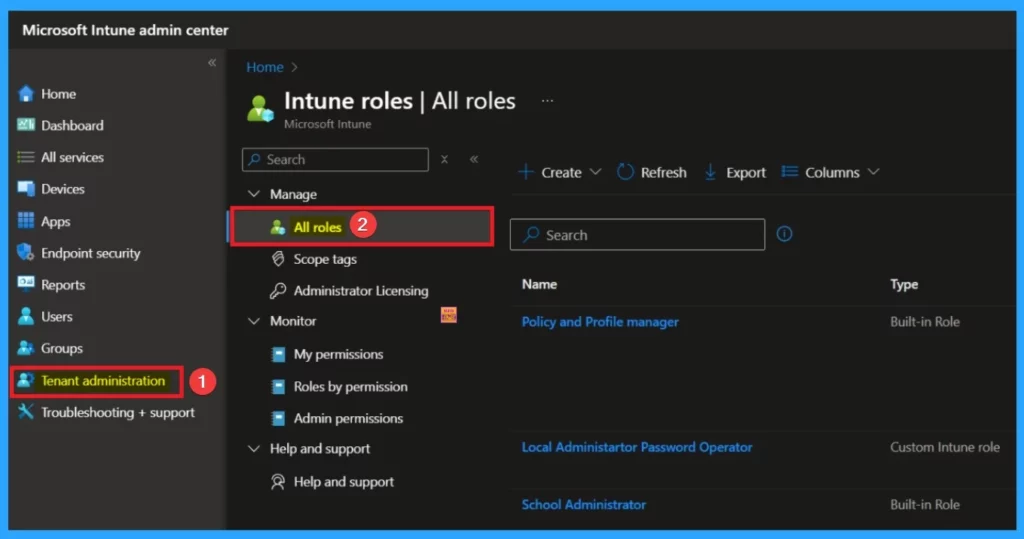
2 Rules Available on Windows Autopatch
By introducing RBAC in Autopilot, 2 roles have been added. It enables least privileged access for Windows Autopatch features that include groups, reports, support requests and messages. These roles helps Intune users to either read or act based on their level of permission for all Windows Autopatch features. The following are the 2 Roles.
- Windows Autopatch reader provides read-only access to the features listed above.
- Windows Autopatch administrator provides the necessary permissions to operate the features listed above.
To manage Windows update policies, Intune device configuration permissions are still needed. For update management, You can use the 2 Roles in addition to the policy and profile administrator Intune role that you are already using. This gives you the permissions needed to manage update policies.
After Effects of Existing Intune Scope Tags
To assign a role, you select which users and devices those permissions apply to using Intune scope tags. Once that role and scope are applied, that administrator can only see or act on devices in that scope.
As you know, Intune scope tags will be respected for reports and management to prevent oversharing information. You will also be able to assign Intune scope tags to Windows Autopatch groups and filter reports based on scope tags. Existing scope tags in Microsoft Intune will not be affected.
Need Further Assistance or Have Technical Questions?
Join the LinkedIn Page and Telegram group to get the latest step-by-step guides and news updates. Join our Meetup Page to participate in User group meetings. Also, Join the WhatsApp Community to get the latest news on Microsoft Technologies. We are there on Reddit as well.
Resource
Improved role-based access controls in Windows Autopatch
Author
Anoop C Nair has been Microsoft MVP for 10 consecutive years from 2015 onwards. He is a Workplace Solution Architect with more than 22+ years of experience in Workplace technologies. He is a Blogger, Speaker, and Local User Group Community leader. His primary focus is on Device Management technologies like SCCM and Intune. He writes about technologies like Intune, SCCM, Windows, Cloud PC, Windows, Entra, Microsoft Security, Career, etc.


Discussion