






Windows Device Configuration Policies Migrating to Unified Settings Platform in Intune
Exciting News! Windows Device Configuration Policies Migrating to Unified Settings Platform in Intune. Microsoft Intune is a powerful tool for managing and securing devices and applications in Mobile device management.
You all know that Microsoft Intune releases the latest features and updates monthly. This month (July 2024), one of the significant updates in Intune is migrating Windows device configuration policies to a unified settings platform. This change is meant to make managing device settings easier, smoother, and more user-friendly.
Recently, Microsoft Intune made some changes in the settings, and now Microsoft is planning to Migrate policies and settings to a new, unified platform. These changes are to be based on the settings catalog. You all know that setting up a catalogue is an Intune feature. With this, all the settings you can configure for your devices are in one place.
As you know, Migrating policies and settings to a new, unified platform will make creating, managing, and applying policies across different devices easier. So, in this post, we can discuss the changes and importance of this migration.

- Create Intune App Configuration Policies for MAM for Windows
- How to Create Application Configuration Policies for Managed Apps in Intune
- Easy Guide to Set Feature Updates for Windows 11 as Optional with Intune
- macOS Devices Migration Framework to Intune from Jamf Kandji JumpCloud Platforms
| Index |
|---|
| Windows Device Configuration Policies Migrating to Unified Settings Platform in Intune |
What Windows Device Configuration Policies
Windows Device Configuration Policies Migrating to Unified Settings Platform in Intune
Above, we discussed the new update about Migration; Microsoft previously migrated endpoint security policies and baselines to the unified settings platform. The next step is migrating migrate device configuration templates.
- The unified settings platform serves as the foundation for the settings catalog.
- On July 15, Microsoft Intune will begin migrating device configuration templates to the new unified settings platform.
- It provides quick access to policy and settings, ensuring consistency across naming, tooltips, and available values.
- Mainly the “not configured” value for policy settings, regardless of where you interact with the policy.
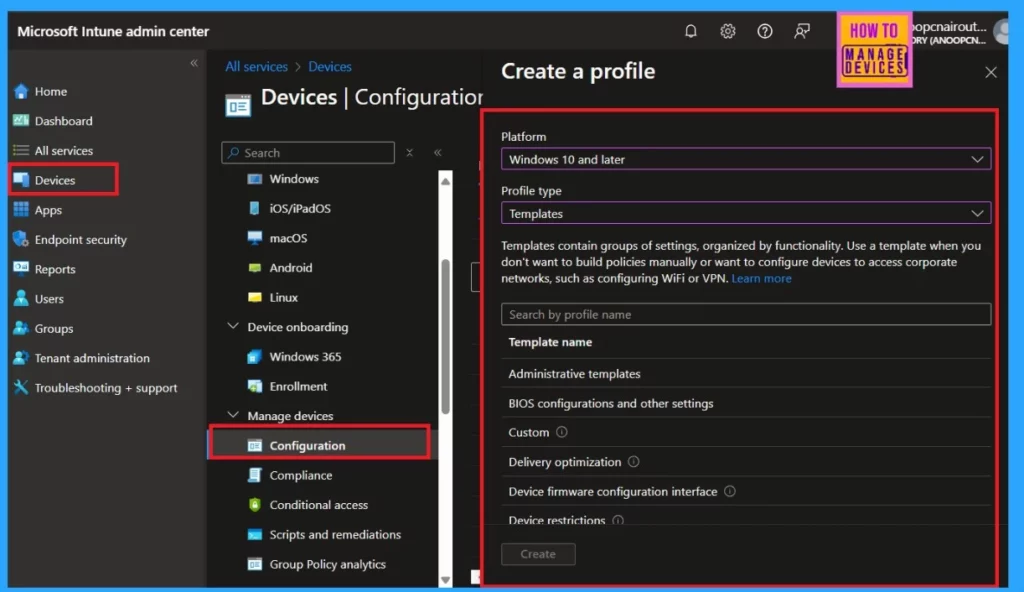
- These profiles are created by going to Devices > Configuration > Create new policy > Windows 10 and later > Templates in the Microsoft Intune admin centre.
- Microsoft Introduces New Windows Enrollment Attestation Feature in Intune
- 2406 Microsoft Intune New Features June Update
- Remove the Apps and Config From Mobile for Troubleshooting
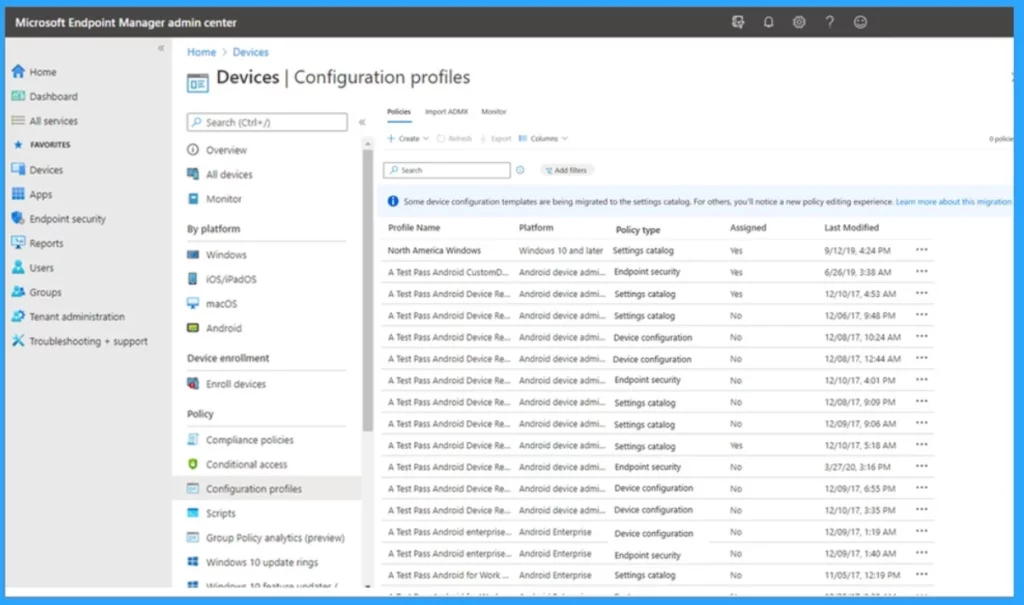
When the migration occurs, you may receive a message informing you that specific device configuration templates created before July 15 will be moved to the new system. Creating new Windows device configuration templates will no longer be available for particular templates. All settings will still be accessible for configuration in the settings catalog.
- This migration won’t affect existing profiles; their configured settings and values will remain unchanged.
- After the migration, specific templates will be exclusively configured within the settings catalog, and you’ll notice an improved policy editing experience for other templates.
- With the migration efforts in Microsoft Intune, device configuration templates are being moved to a unified settings platform.
- So below, we can look into the migration experience for specific templates
| Migration Experience for Specific Templates | Info |
|---|---|
| Delivery optimization | This template can still be configured in the same location |
| Identity protection (Account protection) | This template will be moving to the Endpoint security blade. |
| Microsoft Defender for Endpoint (EDR) | This template can still be configured in the same location. |
| Device restrictions (Windows 10 Team) | This template is no longer accessible. You can configure settings for this template exclusively through the settings catalog. Migrated policies will display ‘Settings catalog’ as their policy type.” |
| Network boundary | “This template is no longer accessible. You can configure settings for this template exclusively through the settings catalog. Migrated policies will display ‘Settings catalog’ as their policy type.” |
| Device restrictions | This template will no longer be available. Settings in this template can be configured via the settings catalog only. Migrated policies will show ‘Settings catalog’ as the policy type. |
| Administrative templates | You can configure settings for this template exclusively through the settings catalog. Migrated policies will display ‘Settings catalog’ as their policy type.” |
| Kiosk | This template can still be configured in the same location. |
| Domain join | To be determined. |
| Edition upgrade and mode switch | To be determined. |
We are on WhatsApp. To get the latest step-by-step guides and news updates, Join our Channel. Click here for HTMD WhatsApp.
Author
Anoop C Nair is Microsoft MVP! He is a Device Management Admin with more than 20 years of experience (calculation done in 2021) in IT. He is a Blogger, Speaker, and Local User Group HTMD Community leader. His primary focus is on Device Management technologies like SCCM 2012, Current Branch, and Intune. He writes about ConfigMgr, Windows 11, Windows 10, Azure AD, Microsoft Intune, Windows 365, AVD, etc.


Discussion