






How to Get Latest Windows Quality Updates using Intune Security Copilot
Let’s discuss how to Get the Latest Windows Quality Update using Intune. You can easily deploy the latest quality update in your environment using Microsoft Intune to ensure devices remain secure and up to date. Quality updates include security patches, bug fixes, and performance improvements released by Microsoft every month.
With Intune, IT admins can schedule, control, and monitor the rollout of these updates across Windows devices. It reduces vulnerabilities and maintains compliance. This centralised approach helps simplify update management while giving visibility into update status and ensuring minimal disruption for end users.
With Intune Explorer integrated with Security Copilot, you can easily access detailed insights about devices, users, apps, compliance, and update status within your tenant. This powerful combination allows IT admins to quickly query and retrieve information and track update deployments without navigating multiple portals.
In this post, you will get all the details on how to deploy the latest quality update through Microsoft Intune. Quality updates are critical as they deliver the most recent security patches, reliability fixes, and performance improvements for Windows devices.

Table of Contents
How to Get Latest Windows Quality Updates using Intune Security Copilot
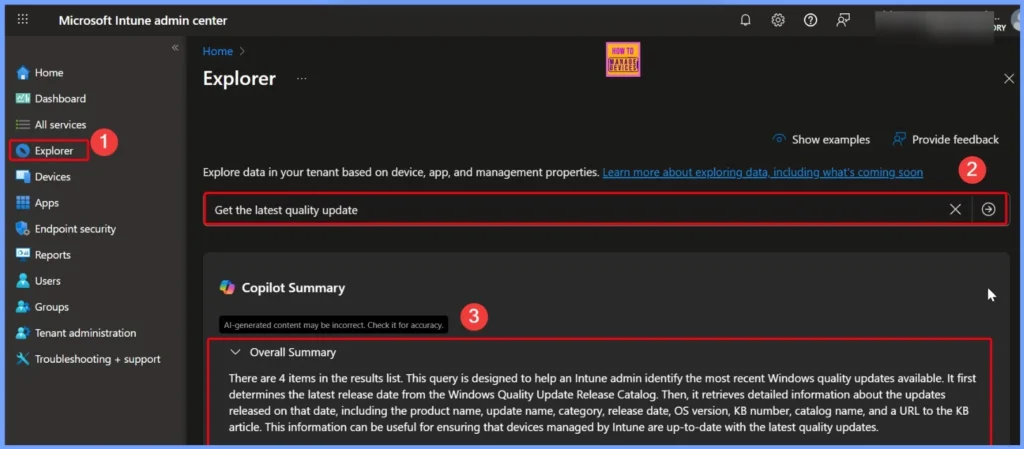
You can easily get the latest Windows quality updates using Intune security copilot. First go to the Microsoft Intune admin center and select the Explorer tab on the left side and just type the query that the “Get the latest quality update” and click the arrow next to the query.
- Copilot checks the query and shows that there are 4 items in the results list.
- This query helps Intune admins find the most recent Windows quality updates.
- It first looks at the Windows Quality Update Release Catalog to identify the latest release date.
- Then, it collects key details about the updates released on that date, such as product name, update name, category, release date, OS version, KB number, catalog name, and a link to the KB article.
- This makes it easier for admins to confirm that all devices managed through Intune are running the latest quality updates.
- How to View Managed App Types Details with Intune Explorer and Security Copilot
- How to Get All Managed App Installation Results for User using Intune Explorer with Security Copilot
- How to Get Device Enrollment Details by User in Intune Explorer with Security Copilot
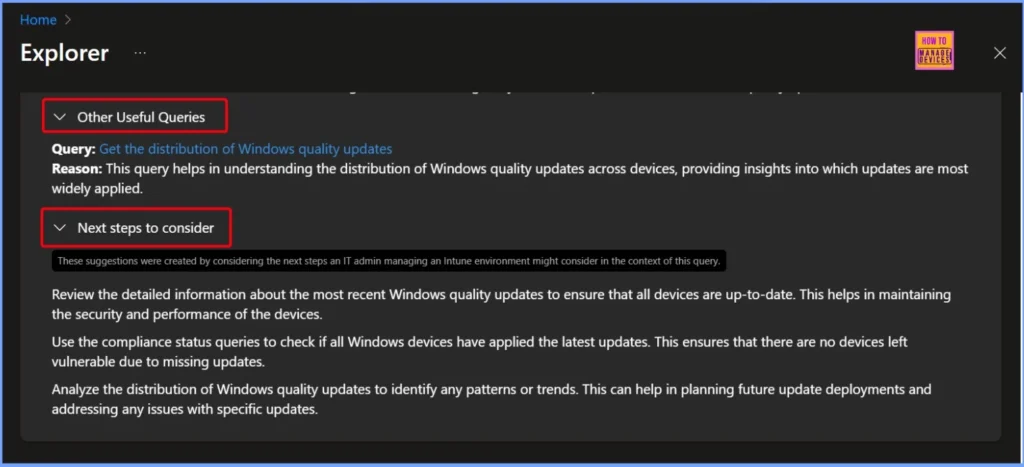
Other Useful Queries and Next Steps to Consider
Another useful query is “Get the distribution of Windows quality updates.” This query helps Intune admins see how Windows quality updates are spread across devices. It shows which updates are installed on most devices and which ones are less common. This information gives a clear picture of update adoption and helps in identifying devices that may be missing the latest updates.
| Other Useful Queries | Next steps to consider |
|---|---|
| Query: Get the distribution of Windows quality updates Reason: This query helps in understanding the distribution of Windows quality updates across devices, providing insights into which updates are most widely applied. | Review the detailed information about the most recent Windows quality updates to ensure that all devices are up-to-date. This helps in maintaining the security and performance of the devices. Use the compliance status queries to check if all Windows devices have applied the latest updates. This ensures that there are no devices left vulnerable due to missing updates. Analyze the distribution of Windows quality updates to identify any patterns or trends. This can help in planning future update deployments and addressing any issues with specific updat |
- How to use Intune Explorer with Security Copilot to Find Windows and MacOS Device Data across your Tenant
- How to use Intune Explorer with Security Copilot to Access Devices Users Apps Compliance and Update Details
End Results
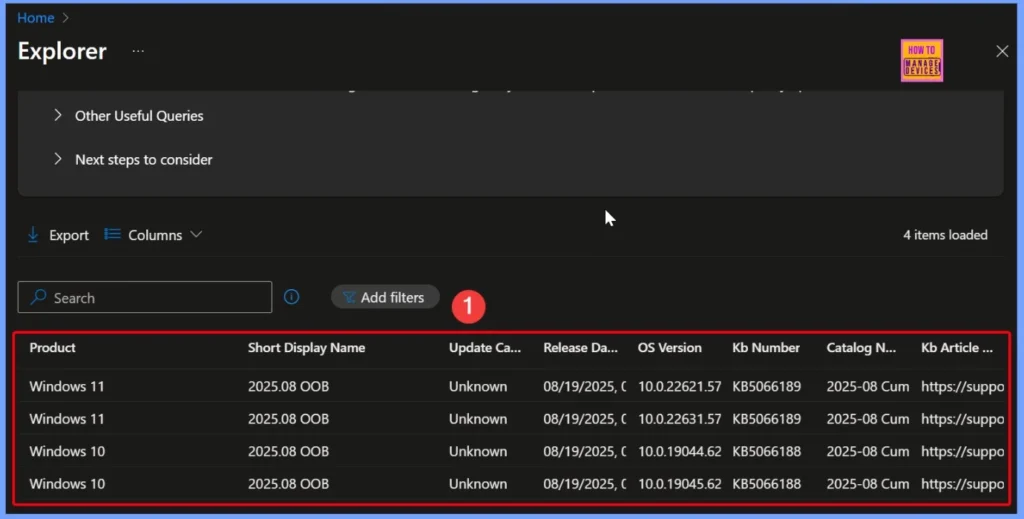
The query results show four Windows quality updates released on August 19, 2025. These updates apply to both Windows 10 and Windows 11 devices with different OS versions, such as 10.0.22631.5771, 10.0.22621.5771, 10.0.19045.6218, and 10.0.19044.6218. The below table and screenshots helps you to show more details.
| Product | Short Display Name | Update Category | Release Date | OS Version | KB Number | Catalog Name | KB Article URL |
|---|---|---|---|---|---|---|---|
| Windows 11 | 2025.08 OOB | Unknow | 08/19/2025, 05:30 AM | 10.0.22621.5771 | KB5066189 | 2025-08 Cumulative Update for Windows 10 and later | https://support.microsoft.com/help/5066189 |
| Windows 11 | 2025.08 OOB | Unknow | 08/19/2025, 05:30 AM | 10.0.22631.5771 | KB5066189 | 2025-08 Cumulative Update for Windows 10 and later | https://support.microsoft.com/help/5066189 |
| Windows 10 | 2025.08 OOB | Unknow | 08/19/2025, 05:30 AM | 10.0.19044.6218 | KB5066188 | 2025-08 Cumulative Update for Windows 10 and later | https://support.microsoft.com/help/5066189 |
| Windows 10 | 2025.08 OOB | Unknow | 08/19/2025, 05:30 AM | 10.0.19045.6218 | KB5066188 | 2025-08 Cumulative Update for Windows 10 and later | https://support.microsoft.com/help/5066189 |
Need Further Assistance or Have Technical Questions?
Join the LinkedIn Page and Telegram group to get the latest step-by-step guides and news updates. Join our Meetup Page to participate in User group meetings. Also, join the WhatsApp Community to get the latest news on Microsoft Technologies. We are there on Reddit as well.
Author
Anoop C Nair has been Microsoft MVP for 10 consecutive years from 2015 onwards. He is a Workplace Solution Architect with more than 22+ years of experience in Workplace technologies. He is a Blogger, Speaker, and Local User Group Community leader. His primary focus is on Device Management technologies like SCCM and Intune. He writes about technologies like Intune, SCCM, Windows, Cloud PC, Windows, Entra, Microsoft Security, Career, etc.


Discussion