






Windows WMI Command Line WMIC Reaching End of Life
Exciting News for Windows 11 users! Windows WMI Command Line WMIC Reaching End of Life. At the end of last month, exactly January 29, 2024, Microsoft discovered that the Windows Management Instrumentation Command-line (WMIC) feature was “disabled by default” on the insider build of Windows 11.
The WMI command line (WMIC) utility provides a command-line interface for Windows Management Instrumentation (WMI). It’s compatible with existing shells and utility commands. It is Microsoft’s implementation of Web-Based Enterprise Management (WBEM).
Microsoft confirmed that Windows WMI Command Line WMIC is Reaching the End of its Life. Users must migrate their applications from the WMI Command Line if they depend on Windows WMI Command Line WMIC.
Windows WMI Command Line WMIC capability will typically continue to work and is fully supported until it’s officially removed. The depreciation of WMIC’s notification can span a few months or years. This blog post will help you to learn more about Windows WMI Command Line WMIC Reaching End of Life.

- Best Usage of Windows Memory Diagnostic Tool in Windows 11
- Windows 11 AI Based Automatic Super Resolution Settings Reveal
Windows WMI Command Line WMIC Reaching End of Life
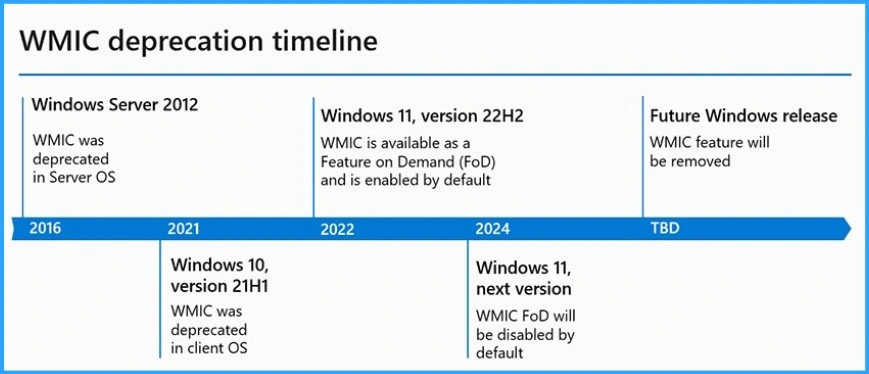
WMIC was converted into a Feature on Demand (FoD) as part of Windows 11, version 22H2. WMIC has been enabled by default in Windows 11 version 22H2 and later versions. WMIC FoD will be disabled by default in the next OS release of Windows 11.
Timeline of WMIC Deprecation
WMIC’s depreciation happened on a different timeline. The Windows Management Instrumentation Command-line (WMIC) was deprecated in 2016. 2016’s depreciation of WMIC in server OS. The below table shows the details.
| WMIC Deprecation Year and version | Details |
|---|---|
| WMIC Server 2012 | WMIC was depreciated in Server OS |
| Windows 10 version 21H1 in 2021 | WMIC was depreciated in client OS |
| Windows 11 version 22H2 in 2022 | WMIC is available as a Feature on Demand (FoD) and is enabled by default |
| Windows 11 next version in 2024 | WMIC FoD will be disabled by default |
| TBD Future Windows release | The WMIC feature will be removed |
Reason for WMIC Deprecation
Windows PowerShell replaces the WMIC tool for WMI. Windows PowerShell ships by default with cmdlets for working with other technologies, such as Windows Management Instrumentation (WMI). The new tool is efficient in querying WMI.
Support of PowerShell
You can easily use PowerShell or programmatically query WMI for WMIC workarounds. PowerShell includes cmdlets for working with other technologies, such as Windows Management Instrumentation (WMI). Several native WMI cmdlets are available in PowerShell without installing additional software or modules.
- WMIC – Wmic /namespace:\>namespace< PATH >Class< Get >Attribute1, Attribute2, … Attribute n<
- PowerShell – Get-CIMInstance -namespace ‘ >namespace< ‘ -query ‘select * from >Class<‘ | ft >Attribute1, Attribute2, … Attribute n<
C:\Windows\System32> powershell -c "Get_CIMInstance -query 'select * from <Class>' | ft <Attribute1, Attribute 2, … Attribute n>"
Programmatic Ways of Using WMI
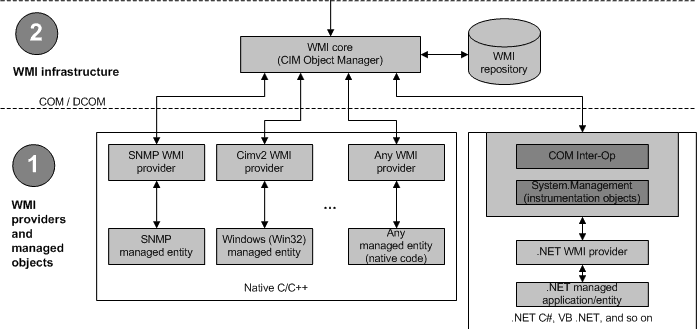
Apart from PowerShell and other tools like wbemtool.exe, you can use COM APIs to interact with WMI. Specifically, you can write scripts and programs in supported languages like C++, .Net, VBScript, etc.
- Exciting Features Coming Soon to Latest Windows 11 Moment Drop Release
- Windows WMI Explorer Details for SCCM Configuration Manager
Reference
WMI command line (WMIC) utility deprecation: Next steps | Windows IT Pro blog (microsoft.com)
We are on WhatsApp. To get the latest step-by-step guides and news updates, Join our Channel. Click here –HTMD WhatsApp.
Author
Gopika S Nair is a computer enthusiast. She loves writing on Windows 11 and related technologies. She is here to share quick tips and tricks with Windows 11 or Windows 10 users. She is Post Graduate Diploma Holder in Computer Science.




Discussion