





Zero Trust Workshop 3.0 Updated with AI Pillar 700 Security Controls Across 116 Groups and 33 Functional Swim Lanes
Key Takeaways
- Introduces a dedicated AI pillar to strengthen Zero Trust strategy
- Covers 700 security controls across 116 logical groups and 33 functional swim lanes
- Scenario-based and prescriptive approach for faster execution
- Helps align security, IT, and business teams on common goals
- Extends Zero Trust principles across all pillars, including AI
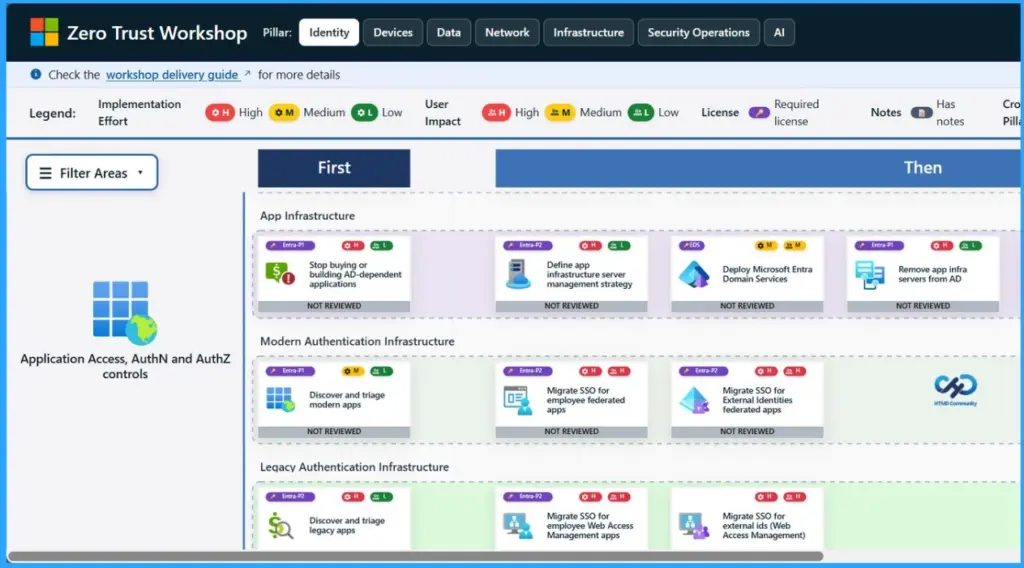
Zero Trust Workshop 3.0 has been enhanced with a dedicated AI pillar, significantly expanding its scope and relevance. It now includes 700 security controls organized across 116 logical groups and 33 functional swim lanes, offering a more structured and comprehensive approach to modern security challenges.
Table of Content
Zero Trust Workshop 3.0 Updated with AI Pillar 700 Security Controls Across 116 Groups and 33 Functional Swim Lanes
The workshop follows a scenario-based and prescriptive model, enabling organizations to move efficiently from assessment to execution. The workshop gives you real-life situations instead of just theory. For each situation, it also tells you exactly what steps to take. So instead of just checking your current security, it helps you quickly move to actually fixing and improving things.
| Area | Details |
|---|---|
| Stakeholder Alignment | Brings security, IT, and business teams together on shared goals |
| Zero Trust Coverage | Applies Zero Trust principles across all pillars, including AI |
| Security Consistency | Ensures a unified and consistent security posture across environments |
| AI Scenario Exploration | Helps teams understand real-world AI use cases and associated risks |
| Cross-Product Integration | Connects multiple tools to reduce silos |
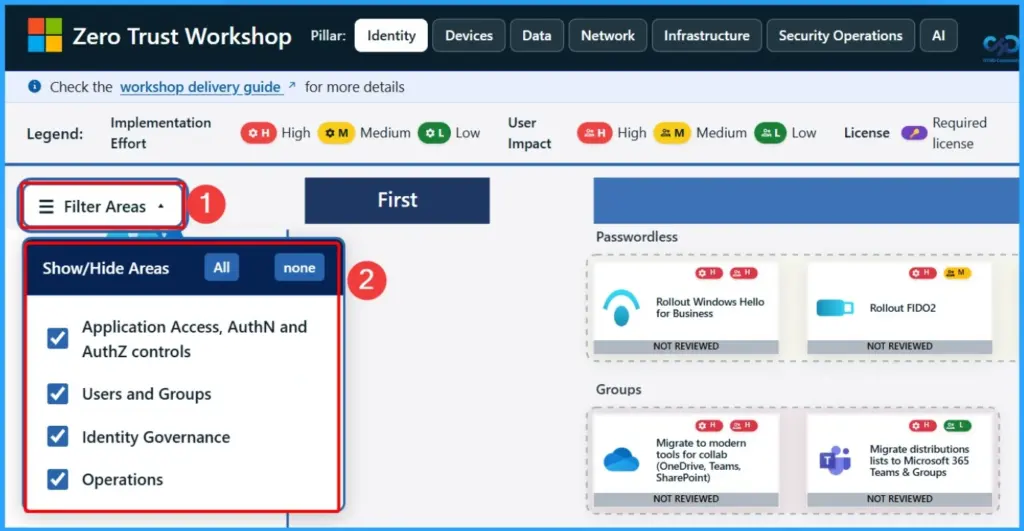
Filter Areas in Zero Trust Workshop
In the Zero Trust Workshop, you can use filters to focus on key security areas. Application Access and AuthN/AuthZ controls make sure the right users access the right resources. Users and Groups help manage identities, Identity Governance oversees policies and compliance, and Operations shows ongoing activities to keep your environment secure and well-managed.
| Show or Hide Areas |
|---|
| Application Access, AuthN/AuthZ controls |
| Users and Groups |
| Identity Governance |
| Identity Governance |
- Reducing Latency With Fast Lane Notification Architecture In Intune
- 7 Effective Ways to Secure Data in Zero Trust with Microsoft Intune
- 7 Stages of Windows Zero Trust Lifecycle Management Helps Organizations Secure Update and Retire Devices Efficiently
- 6 Core Security Pillars of Windows 11 Chip-to-Cloud Protection
- Protecting Endpoints with Zero Trust Principles and Microsoft Intune Capabilities
- Easy Method to Deploy Windows Cloud Input Protection Driver Setup using Intune
Need Further Assistance or Have Technical Questions?
Join the LinkedIn Page and Telegram group to get the latest step-by-step guides and news updates. Join our Meetup Page to participate in User group meetings. Also, join the WhatsApp Community and the Whatsapp channel to get the latest news on Microsoft Technologies. We are there on Reddit as well.

Author
Anoop C Nair is a Workplace Technology solution architect with 25+ years of experience. Microsoft Certified Trainer. Microsoft MVP from 2015 onwards for consecutive 11+ years! He is a blogger, Speaker, and Founder of HTMD Community and HTMD Conference. His main focus is on Device Management technologies like Intune, Windows, and Cloud PC. He writes about technologies like Intune, SCCM, Windows, Cloud PC, Entra, and Microsoft Security.


Discussion