






Two Known Issues with June Patches for Windows 10 and 11
Let’s discuss two Known Issues with June patches for Windows 10 and 11. One issue is being unable to connect to the internet when using the Wi-Fi hotspot feature. Another issue is more impactful and related to Microsoft 365 apps login using Azure AD.
Microsoft released June 2022 Cumulative Update patches, KB5014697 and KB5014699, on 14th June 2022. More details -> Windows 10 KB5014699 Windows 11 KB5014697. Microsoft already published two known issues with June patches.
Update – AAD and Microsoft 365 services login issue for ARM-based Windows 10 or 11 devices is already resolved or fixed with the Out-of-Band patch.
The second known issue with June patches is related to Azure Active Directory, and Microsoft 365 services might be unable to sign in on Windows ARM devices. While writing this post, Microsoft has not provided any solution or workaround for these issues.

Update – Windows 11 Mobile Hotspot Issue is fixed with KB5014668 (preview hotfix only for Windows 11). Windows 10 issue is still under investigation.
There are different options to uninstall patches from Windows 10 or 11 devices. These two known issues with June 2022 patches are one of the reasons to uninstall Windows 11 or 10 LCU or patches.
NOTE! – I don’t think you should directly go ahead and uninstall patches from all the Windows devices. There should be a collective decision to uninstall the patches if you are considering the Windows ARM devices issue.
Microsoft also fixed a Zero-Day vulnerability with the June 2022 latest cumulative update (LCU) -> Microsoft Windows Support Diagnostic Tool (MSDT) Remote Code Execution Vulnerability – CVE-2022-30190. This and other critical vulnerabilities are reasons for me not to support the uninstall of patches.
There are other issues with the June CU patch and fixes released in June to fix old issues with April CU -> FIX IE Mode tabs not Responding Issue After Installing June CU and Error 0xC002001B Microsoft Store Apps might fail to Install.
Two Known Issues with June Patches
Let’s check the details on 2 known issues with June patches for Windows 10 and Windows 11 devices. One of the patch issues applies only to Windows 10/11 ARM devices. More details -> Two Known Issues With June Patches For Windows 10 And 11.
After installing Windows 10 KB5014699 and Windows 11 KB5014697 patches, the devices (including ARM and non-ARM Processor Based) seem to have:
- Internet connectivity issues when you enable Mobile Hotspot. More Details -> New Hotfix Released KB5014666 To Fix Unable To Connect To Internet Using WiFi Hotspot Feature
The second issue applies only to Windows ARM devices. So if you don’t have ARM-based Windows devices, you don’t need to worry at all about this bug!
- Azure Active Directory (AAD) and Microsoft 365 services might be unable to sign in.
Windows 10 and Windows 11 Mobile Hotspot Issue
Are you using the Mobile Hotspot feature on your personal Windows devices? I don’t think most enterprises will allow using their PCs to enable mobile hotspot. Hence, this issue with the June patch impacts mostly personal PC scenarios.
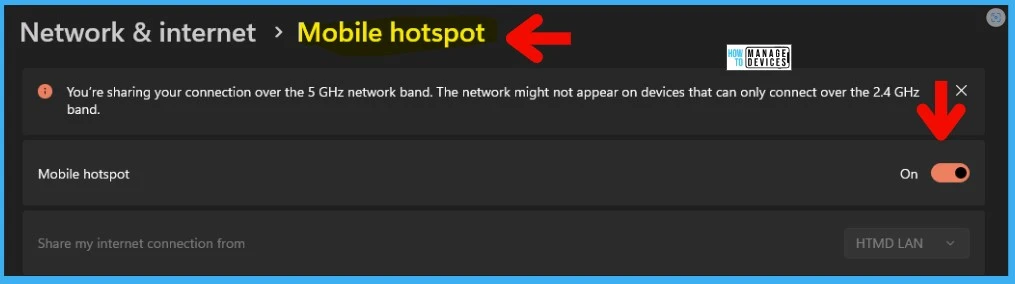
Windows 10 and Windows Mobile Hotspot Issue is one of the known issues with June patches. This issue comes into effect if you enable a mobile hotspot from Settings or use any other method.
After installing the KB5014699 or KB5014697 patch, when you enable Mobile Hotspot, the host device (any impacted Windows operating systems) might lose the connection to the internet after a client device connects.
Disable Internet Sharing using Mobile Hotspot
In this section, you see three options to disable Mobile Hotspot from Windows 11 or Windows 10 devices.
- Registry
- Group Policy
- Intune MEM CSP Policy – Settings Catalog
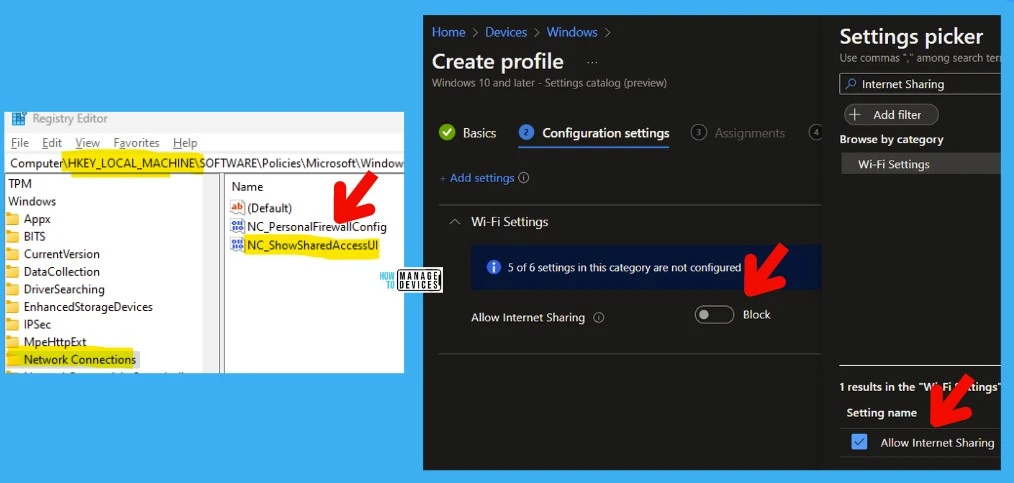
Registry Method: You can create the following entry in Windows 11 or Windows 10 devices to disable the Mobile Hotspot from Settings GUI.
- NC_ShowSharedAccessUI -dword (32 bit) = 0
Windows Registry Editor Version 5.00

[HKEY_LOCAL_MACHINE\SOFTWARE\Policies\Microsoft\Windows\Network Connections]
"NC_PersonalFirewallConfig"=dword:00000000
"NC_ShowSharedAccessUI"=dword:00000000
Group Policy Method – Computer configuration > (Policies) > Administrative templates > Network > Network Connections -> Prohibit use of Internet Connection Sharing on your DNS domain network -> Enabled.
Intune MEM Method to block Internet Sharing using Mobile Hotspot – You can use the WiFi Settings category – Allow Internet Sharing settings to disallow the mobile hotspot.
Azure AD Microsoft 365 Services Login Issue
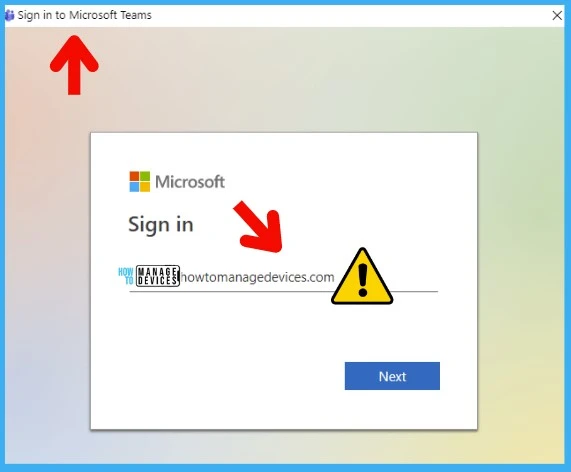
Azure Active Directory and Microsoft 365 services might be unable to sign in. Windows ARM processor-based devices might have issues signing into some services after installing updates released on June 14, 2022.
There is no FIX at the moment to fix the sign-in issue that Microsoft is sharing publically. However, you can raise a ticket with MS support to get any workaround for the issue until Microsoft fixes the issue.
You can try to fix the issue by uninstalling or removing the June LCU patch from Windows 10 or 11 devices. But I mentioned it before, and removing the patches is not recommended.
Resources
Author
Anoop C Nair is Microsoft MVP! He is a Device Management Admin with more than 20 years of experience (calculation done in 2021) in IT. He is Blogger, Speaker, and Local User Group HTMD Community leader. His main focus is on Device Management technologies like SCCM 2012, Current Branch, and Intune. He writes about ConfigMgr, Windows 11, Windows 10, Azure AD, Microsoft Intune, Windows 365, AVD, etc.




Everything is messed up with the last cumulative update of Windows 10 – June 14, 2022—KB5014699!
After installing KB5014699, we get access denied when trying to connect WMI from a server to a PC. Removing the KB and no more access denied.