






Enable Suspicious Activities Report in Azure AD
Let’s learn how to enable Suspicious Activities Report in Azure AD. A preview of Report Suspicious Activity, the updated MFA Fraud Alert feature, is now available. Enabling suspicious activity reporting in Azure AD can help organizations detect and respond to potential security threats.
Suspicious activity reports provide detailed information about unusual or suspicious sign-in activity so that administrators can investigate and take appropriate action.
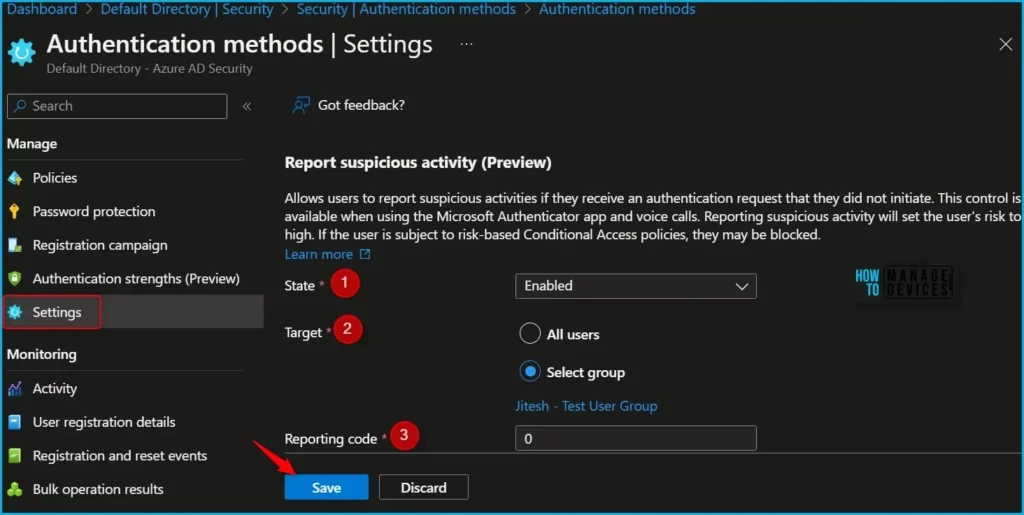
Allows users to report suspicious activities if they receive an authentication request that they did not initiate. This control is available when using the Microsoft Authenticator app and voice calls. Reporting suspicious activity will set the user’s risk high. If the user is subject to risk-based Conditional Access policies, they may be blocked.
Users who report an MFA prompt as suspicious are set to High User Risk. Administrators can use risk-based policies to limit access for these users or enable self-service password reset (SSPR) for users to remediate problems on their own.

In case you have utilized the automatic blocking feature for Fraud Alert in the past and do not currently possess an Azure AD P2 license for risk-based policies, you have the option to leverage risk detection events.
- Assign Azure AD Roles To Azure AD Groups For Effective Role Based Access Control
- Assign Azure AD Roles Using Privileged Identity Management PIM
Enable Suspicious Activities Report in Azure AD
Let’s follow the steps below to enable Suspicious Activities Report in Azure AD. To access report suspicious activity, you must have proper privileges.
- Sign in to the Azure portal or Azure AD admin center.
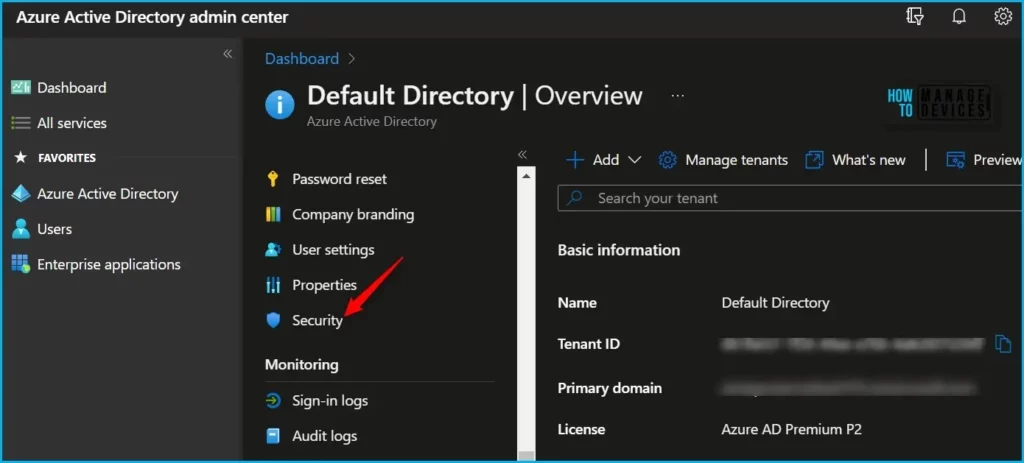
- Navigate to Security > Authentication Methods.
Here, under Authentication methods click on Settings. Set Report Suspicious Activity to Enabled and Select All users or a specific group. Once you have configured the settings, click on the “Save” button to save your changes.
A notification will appear automatically in the top right-hand corner with a message. Here you can see, the changes were saved successfully.

Once you have enabled suspicious activity reporting, you will receive notifications and alerts when suspicious activity is detected. You can then review the activity logs to investigate further and take action as needed to secure your organization’s data and resources.
By regularly monitoring and analyzing suspicious activity reports, you can proactively identify and respond to potential security threats.
View Suspicious Activity Events
When a user reports a MFA prompt as suspicious, the event shows up in the Sign-ins report (as a sign-in that was rejected by the user), in the Audit logs, and in the Risk detections report.
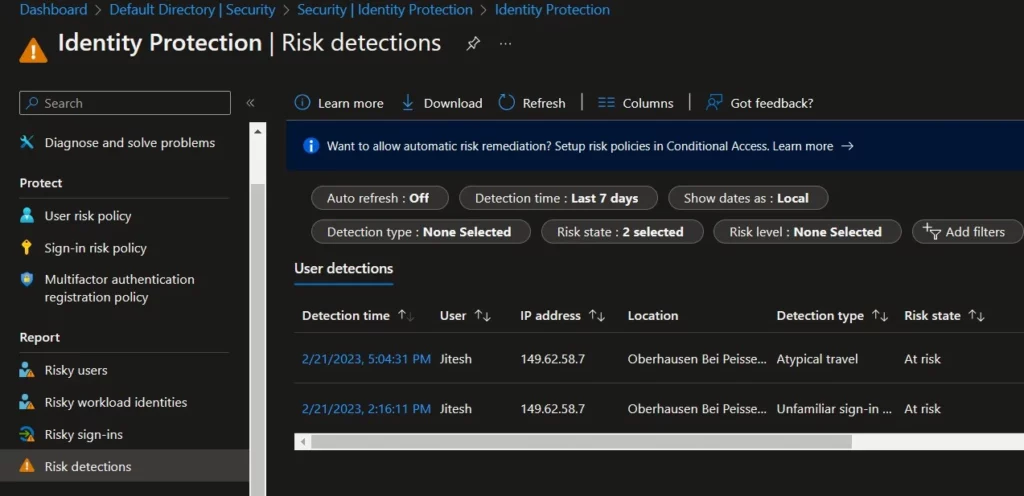
- Select Azure Active Directory > Security > Identity Protection > Risk detection to view the risk detection report.
- The risk event is part of the standard Risk Detections report and will appear as Detection Type User Reported Suspicious Activity, Risk level High, Source End user reported.
To view fraud reports in the Sign-ins report, select Azure Active Directory > Sign-in logs > Authentication Details. The fraud report is part of the standard Azure AD Sign-ins report and appears in the Result Detail as MFA denied, Fraud Code Entered.
Author
About Author – Jitesh, Microsoft MVP, has over six years of working experience in the IT Industry. He writes and shares his experiences related to Microsoft device management technologies and IT Infrastructure management. His primary focus is Windows 10/11 Deployment solution with Configuration Manager, Microsoft Deployment Toolkit (MDT), and Microsoft Intune.


Discussion