






How New TURN Relay IP Range Enhances RDP Shortpath for AVD and Windows 365
Let’s discuss How New TURN Relay IP Range Enhances RDP Shortpath for AVD and Windows 365. Microsoft is going to launch a new improvement on Windows 365 and Azure Virtual Desktop called TURN relay. This is a dedicated IP range across the Microsoft Azure public cloud.
TURN Relays new range 51.5.0.0/16 enhances RDP Shortpath connectivity and delivers faster. It improve the reliable performance of Azure Virtual Desktop and Windows 365 users in 40 regions worldwide. Microsoft will launch this feature on 15 June 2025.
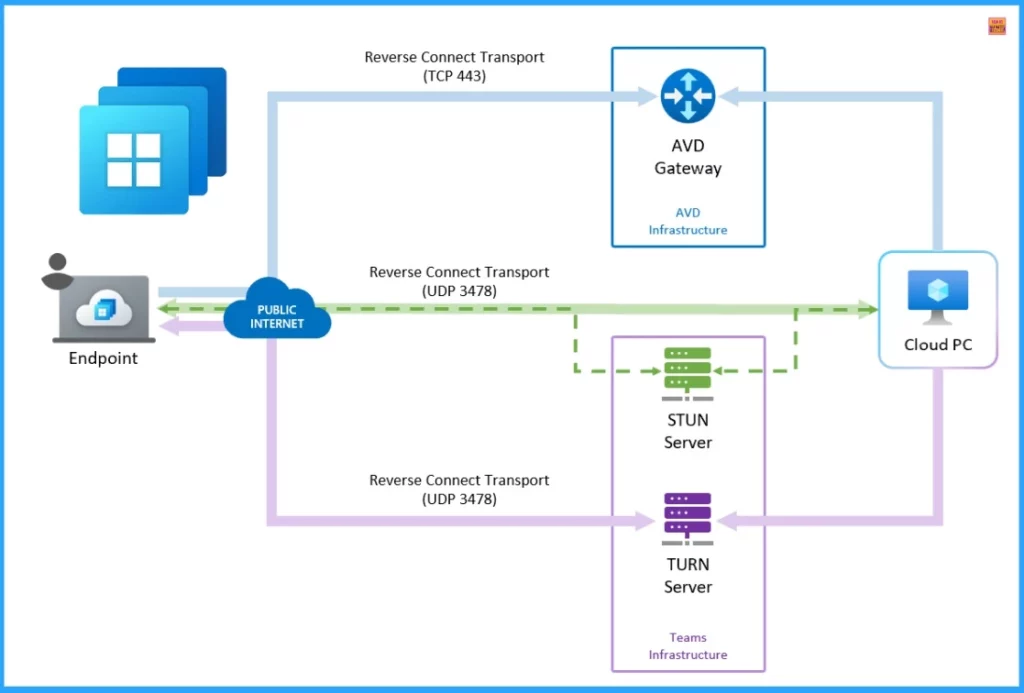
Have you heard about Traversal Using Relays Around NAT (TURN). TURN is a protocol that acts as a firewall behind devices or NAT (Network Address Translation). This is designed to provide a reliable UDP connection. When direct UDP-based Connections are not possible, TURN acts as a fallback with RDP shortpath for Public networks.
TURN relay ensures low-latency, high-reliability remote desktop sessions. When this transition happens, connections will gradually move away from the existing ACS TURN Relay range (20.202.0.0/16). In this blog, I will help you to know more about the TURN Relay Expansion for AVD and Windows 365.

Table of Contents
How New TURN Relay IP Range Enhances RDP Shortpath for AVD and Windows 365
As mentioned above, with this transition, connections will gradually move away from the existing ACS TURN Relay range (20.202.0.0/16). These changes can’t be seen because they will occur behind the scenes. You can proactively bypass the new TURN relay range (51.5.0.0/16) to avoid uninterrupted service.
- HEVC Video Coding and Symmetric NAT with RDP Shortpath Support with Windows 365 Cloud PC 2409
- RDP Port 3389 is Disabled by Default for All Newly Provisioned Windows 365 Cloud PCs
- Latest RDP Connectivity Requirements for Windows 365 and AVD
Benefits of the New TURN Relay
TURN relay initiative offers you more control, optimised routing, and a higher success rate for UDP-based communications by combining a dedicated IP range for Azure Virtual Desktop and Windows 365 traffic. The following are the benefits of a dedicated IP range for Azure Virtual Desktop and Windows 365 traffic.
| Expanding Regional Coverage | Dedicated IP Range for Azure Virtual Desktop and Windows 365 Traffic |
|---|---|
| Data travels shorter distances, resulting in faster connections and reduced lag. So latency will lower | Optimized traffic flow for Azure Virtual Desktop and Windows 365. |
| Fewer dropped connections and more stable sessions, especially for real-time applications. | Improved control over network security configurations. |
| Higher UDP success rates: Better performance for voice, video, and real-time data even under variable network conditions. | Customers can navigate restrictive security setups without compromising performance. |
| Enhanced quality and speed for traffic, free from generic filtering |
Preparations for TURN Relay for Windows 365 and Azure Virtual Desktop
The new IP subnet will form a critical part of the resilient and performant connectivity provided for Windows 365 and Azure Virtual Desktop. Microsoft will progressively redirect from the current Azure Communication Service (ACS) TURN relay range (20.202.0.0/16) to a newly designated subnet (51.5.0.0/16). Users must ensure that traffic is both accessible and optimised.
- Accessible
- For Windows 365 or Azure Virtual Desktop connectivity, your environment can access this subset and will be accessible from all networks
- For Microsoft Hosted Network deployments in Windows 365, this underlying connectivity is already in place.
- For Azure Virtual Desktop and Windows 365 – Azure network connection ANC deployments, the ‘WindowsVirtualDesktop’ service tag contains this subnet, so connectivity may already be in place.
- Optimized
- Ensure the new IP range is bypassed by VPNs, proxies, and Secure Web Gateways (SWGs)
- Confirm the subnet is accessible from your network to maintain seamless service
- No TLS inspection required traffic is already encrypted and optimised for performance
Need Further Assistance or Have Technical Questions?
Join the LinkedIn Page and Telegram group to get the latest step-by-step guides and news updates. Join our Meetup Page to participate in User group meetings. Also, Join the WhatsApp Community to get the latest news on Microsoft Technologies. We are there on Reddit as well.
Author
Anoop C Nair has been Microsoft MVP for 10 consecutive years from 2015 onwards. He is a Workplace Solution Architect with more than 22+ years of experience in Workplace technologies. He is a Blogger, Speaker, and Local User Group Community leader. His primary focus is on Device Management technologies like SCCM and Intune. He writes about technologies like Intune, SCCM, Windows, Cloud PC, Windows, Entra, Microsoft Security, Career, etc.


Discussion