






Fix SCCM Updates Stuck in Downloading State | ConfigMgr
Let’s discuss how to Fix SCCM Updates Stuck in Downloading State. Have you seen Configuration Manager | SCCM Update is stuck in the Downloading state issues? How did you try to solve this issue? Let’s see the options for Fix SCCM Updates Stuck in Downloading State.
Update – 29th Nov 2019 – MECM 1910 Update Download Issues https://howtomanagedevices.com/sccm/1406/sccm-1910-update-step-by-step/. Related Post – Fix SCCM Updates and Servicing Redist Download Issue & CMUpdateReset is the tool you should use to try to fix this issue.
ConfigMgr’s New Update or service model is similar to other Microsoft products, such as Windows 10. SCCM Service update is downloaded using a new site system role called the new site system role called Service Connection Point.
If you’re dealing with SCCM updates stuck in a downloading state, here’s what you can do to fix it. Sometimes, updates can get stuck due to network issues or server problems.

| Index |
|---|
| Is the SCCM Update Stuck in a Downloading State? |
| Solution – Fix SCCM Updates Stuck in Downloading State | ConfigMgr |
- New Key Features of SCCM 2309 | Top Improvements
- Is SCCM Dying?
- Download SCCM 2309 Early Ring Version Using PowerShell Script
- Download Latest SCCM Installation Media | Baseline Version
- SCCM Slow Ring Vs Fast Ring Details | Opt-in Vs Generally Available | Early Update Ring
Is the SCCM Update Stuck in a Downloading State?
We must ensure the service connection point mode is online to get the latest SCCM/ConfigMgr updates. The screenshot below shows more details.
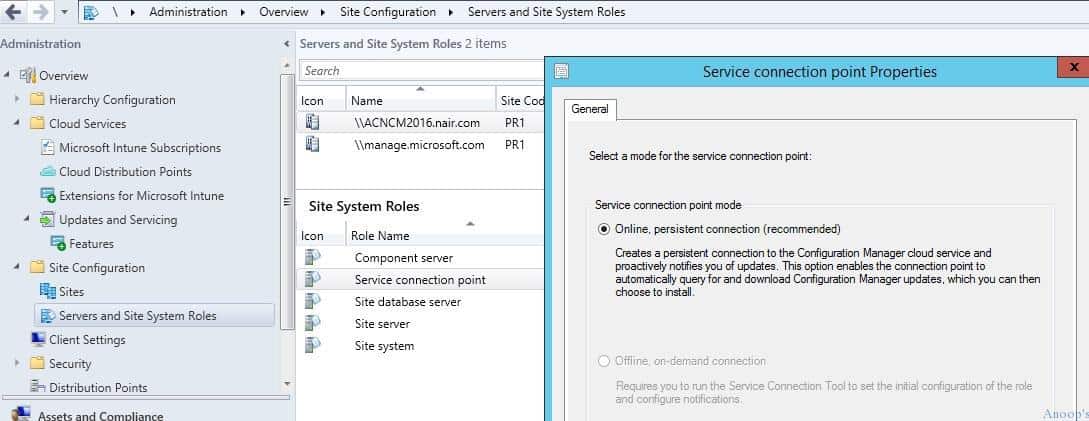
This service connection role creates a persistent connection to the ConfigMgr cloud services and proactively notifies users of updates’ availability. It will also automatically query SCCM cloud services to download updates.
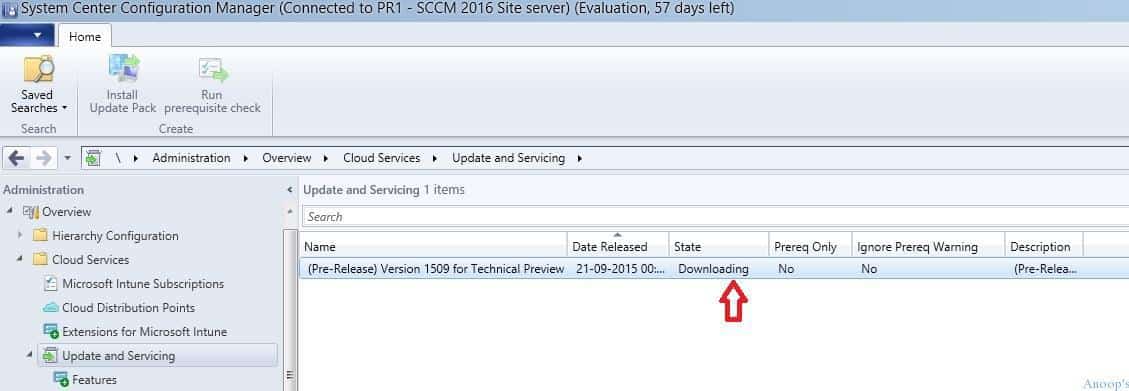
In my scenario, the updates were downloaded, and New updates got stuck in DOWNLOADING state (console Administration > Cloud Services > Updates and Services).
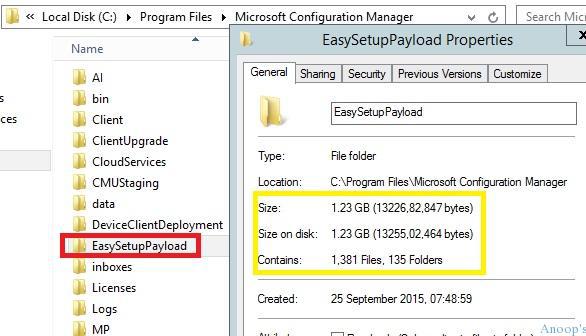
However, I could see that the folder EasySetupPayload already downloaded 1.23 GB of content, including 1,381 files and 135 folders. The DMPDownloader.log file didn’t give me any specific error, either.
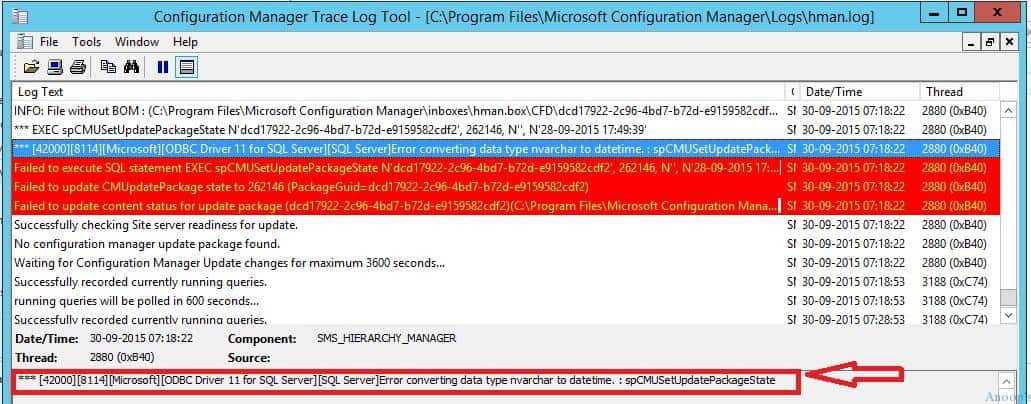
Later, with the help of the product group, I learned that this is a known issue documented in TechNet here. The error in hman.log was the same as that reported in TechNet. However, it was not stuck in the Installing state (as documented) for me but in the Downloading state.
*** [42000][8114][Microsoft][ODBC Driver 11 for SQL Server][SQL Server]Error converting data type nvarchar to datetime. : spCMUSetUpdatePackageState.
Solution – Fix SCCM Updates Stuck in Downloading State | ConfigMgr
The solution to SCCM Updates and Servicing updates are getting stuck in the Downloading state problem is the same as documented in the TechNet article. We must run an SQL query/script to fix this date issue.
- Is the SCCM Update stuck in a Downloading state? CMUpdateReset is the tool you should try out.
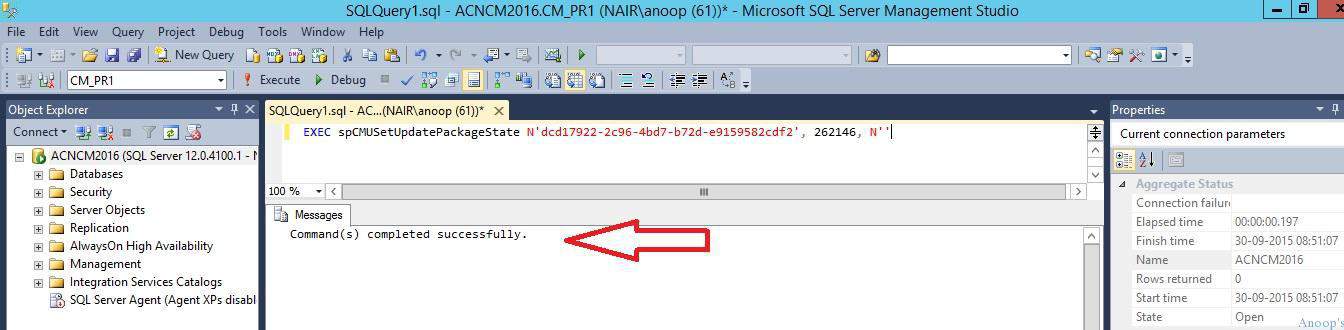
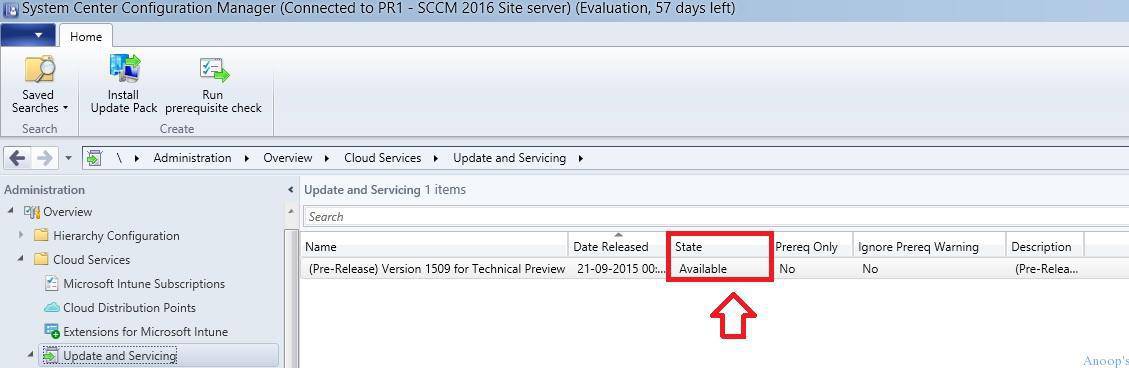
After running the above query, SCCM console Administration > Cloud Services > Updates and Services, the state changed from Downloading to Available.
| Name | State | Date Released |
|---|---|---|
| Pre-Release Version 1509 for Technical Preview | 21-09-2015 | Available |
Right-click on the available SCCM vNext (2016 ?) service update from the console and select to run a prerequisite check. This will run the prerequisites for the update (the latest SCCM service update), and you can find the status of the console’s monitoring workspace, as shown in the screen dumps below.
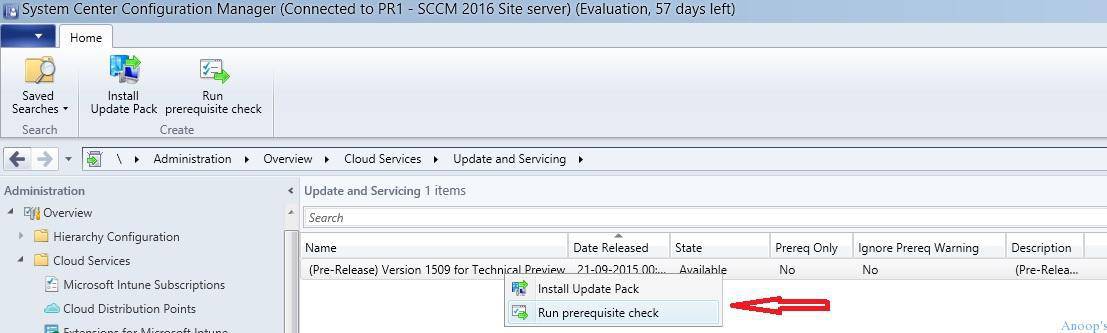
If you select the Install Update Pack option, you must go through the Wizard to upgrade the SCCM site server. However, If you run to choose the “Run prerequisite check” option, then everything happens in the background.
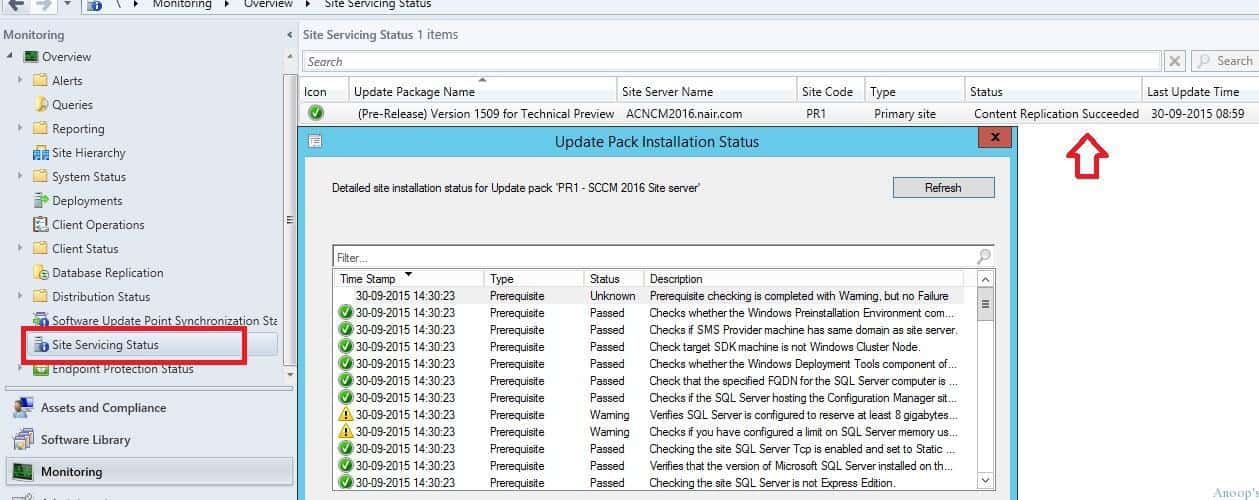
As mentioned above, you can check the status of the prerequisites from the SCCM console, Monitoring -> Overview -> Site Servicing Status. You can ignore the warnings related to SQL memory. Also, make sure there are no errors.
The prerequisite check has one known issue (when you didn’t install Windows 10 ADK), documented in the TechNet link here. Is the SCCM Update stuck in the Downloading state? CMUpdateReset is the tool you should try out.
- The SCCM vNext update will automatically install once the prerequisite check is completed successfully.
- When you try to view the status of this update from the SCCM console, it may give you the following screen.
- This is to update the existing SCCM console to the new SCCM console. Click OK to continue.
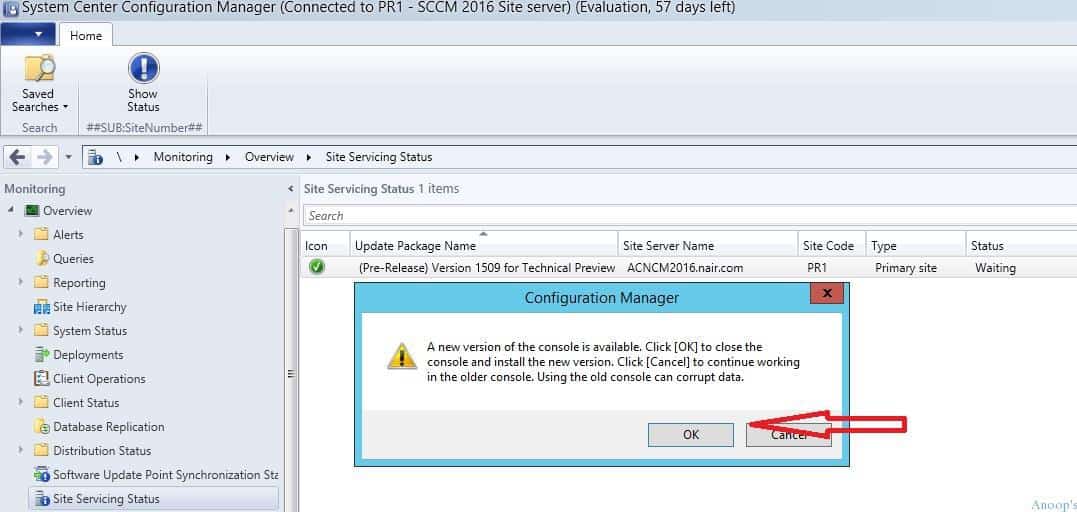
It took 5 minutes to update the SCCM console, and my old shortcuts stopped working. The new console appeared similar to the “new version of the SCCM console.”
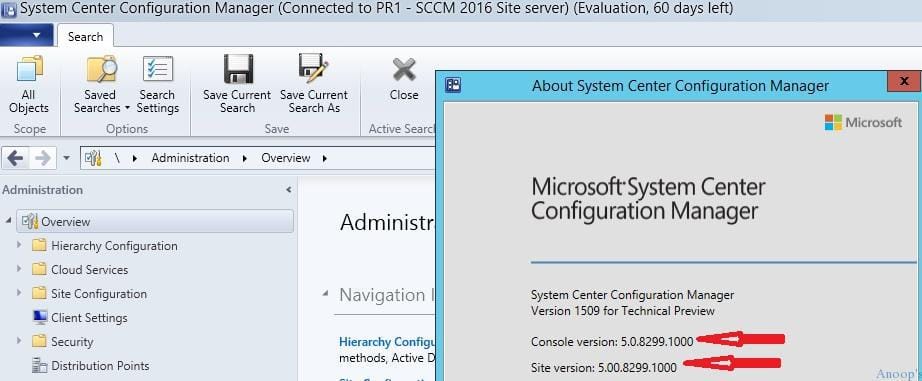
The SCCM console and site version are updated to 5.0.8299.1000. The SCCM Evaluation date was also reset to 60 days. Before this update, it was 57 days since the SCCM Update was stuck in the Downloading state. CMUpdateReset is the tool you should try out.
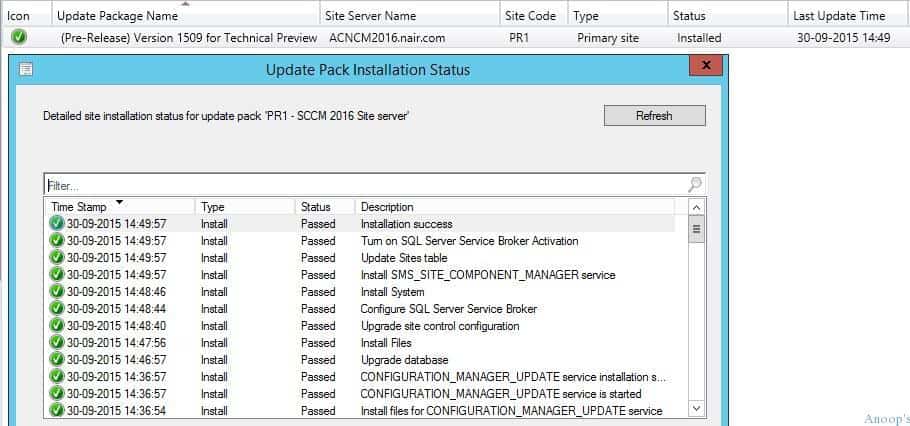
You can check the update status from the SCCM console monitoring workspace Monitoring -> Overview -> Site Servicing Status. Is the SCCM Update stuck in a Downloading state? CMUpdateReset is the tool you should try out.
We are on WhatsApp now. To get the latest step-by-step guides, news, and updates, Join our Channel. Click here. HTMD WhatsApp.
Author
Anoop C Nair is Microsoft MVP! He is a Device Management Admin with more than 20 years of experience (calculation done in 2021) in IT. He is a Blogger, Speaker, and Local User Group HTMD Community leader. His main focus is on Device Management technologies like SCCM 2012, Current Branch, and Intune. He writes about ConfigMgr, Windows 11, Windows 10, Azure AD, Microsoft Intune, Windows 365, AVD, etc.




Hello,
I had the same issue updating 1610 to 1702, the installation was tuck in pre-req check or installation, a new program named CMUpdateReset.exe has been released in the new CB 1706 and it is applicable from CB1606, so you can use this new program to solve the update issues (downolading, pre-checking or installation) http://blog.coretech.dk/kea/configuration-manager-current-branch-upgrade-stuck-in-downloading/#comment-647162
I tried to find this new program through internet but no way, so I created a Virtual Machine with fresh installation of SCCM and I was able to install 1706 on it only for retrieving CMUpdateReset.exe, after that I copied CMUpdateReset.exe in the production SCCM and run it with -FDELETE parameter and finally the program cleaned up my SCCM and successfully download and done the update.
I shared for you the program so you can solve your issue. enjoy!
Yazid Mahour