






Best Way to Check Verify the Status of SCCM Predefined Maintenance Tasks ConfigMgr Configuration Manager
How do you verify the status of SCCM predefined maintenance tasks in ConfigMgr Configuration Manager? SCCM CB also uses the SQLTaskStatus table to store predefined maintenance task results. I created a custom RDL file report to check the status of SCCM predefined maintenance tasks.
I know it’s not a best practice to use SQL tables in the reports; instead, we should use views. However, this custom report or RDL file is based on the table.
Let’s SCCM how to find out the status of Predefined Maintenance Tasks. As part of troubleshooting, we often need to know the status of maintenance tasks running on SCCM primary servers. Maintenance tasks are critical to maintaining a healthy SCCM environment. SCCM Maintenance Tasks results are available via PS or SQL.
Completion Status 0 means the task has finished successfully. A table called SQLTaskStatus holds this data. We can also add a column to find a task’s time to run. The query for the same would be Latest Posts—SCCM Secondary Site Maintenance Tasks | List | ConfigMgr | SQL Query HTMD Blog.

| Index |
|---|
| Verify the Status of SCCM Predefined Maintenance Tasks |
- Check SCCM Predefined Maintenance Tasks Status
- 40+ New SCCM Predefined Site Maintenance Tasks with ConfigMgr Endpoint Manager
- SCCM Secondary Site Maintenance Tasks | List | ConfigMgr | SQL Query HTMD Blog
- SCCM Custom Report to check the Status of Predefined Site Maintenance Tasks ConfigMgr Endpoint Manager
Verify the Status of SCCM Predefined Maintenance Tasks
Let’s discuss the best way to Check and Verify the Status of SCCM Predefined Maintenance Tasks ConfigMgr Configuration Manager. More details are explained below.
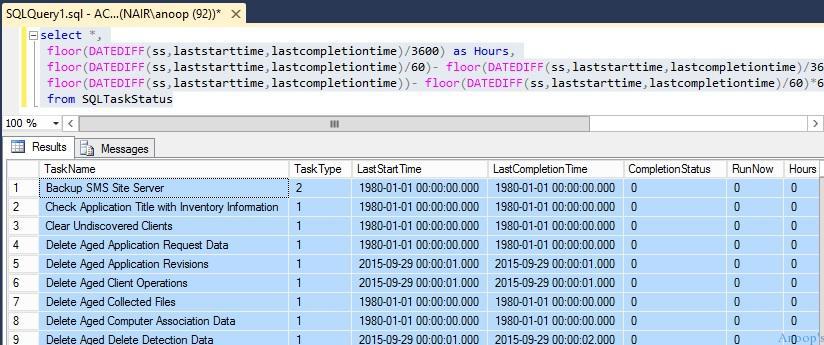
The following SQL query will also help you get more details about the status of SCCM vNext / SQL maintenance tasks, such as the Last Start time, Last End time, completion status, etc.
select *,
 floor(DATEDIFF(ss,laststarttime,lastcompletiontime)/3600) as Hours,
 floor(DATEDIFF(ss,laststarttime,lastcompletiontime)/60)- floor(DATEDIFF(ss,laststarttime,lastcompletiontime)/3600)*60 as Minutes,
 floor(DATEDIFF(ss,laststarttime,lastcompletiontime))- floor(DATEDIFF(ss,laststarttime,lastcompletiontime)/60)*60 as TotalSeconds
 from SQLTaskStatus
The list of predefined SQL maintenance tasks in the SCCM ConfigMgr vNext version! When you run the following query from the management studio, you will get the details of SCCM + SQL maintenance tasks. Verify the Status of SCCM Predefined Maintenance Tasks.
select * from SQLTaskStatus
- Backup SMS Site Server
- Check the Application Title with Inventory Information
- Clear Undiscovered Clients
- Delete Aged Application Request Data
- Delete Aged Application Revisions
- Delete Aged Client Operations
- Delete Aged Collected Files
- Delete Aged Computer Association Data
- Delete Aged Delete Detection Data
- Delete Aged Device Wipe Record
- Delete Aged Discovery Data
- Delete Aged Distribution Point Usage Stats
- Delete Aged Enrolled Devices
- Delete Aged EP Health Status History Data
- Delete Aged Exchange Partnership
- Delete Aged Inventory History
- Delete Aged Log Data
- Delete Aged Metering Data
- Delete Aged Metering Summary Data
- Delete Aged Notification Server History
- Delete Aged Notification Task History
- Delete Aged Passcode Records
- Delete Aged Replication Data
- Delete Aged Replication Summary Data
- Delete Aged Status Messages
- Delete Aged Threat Data
- Delete Aged Unknown Computers
- Delete Aged User Device Affinity Data
- Delete Expired MDM Bulk Enroll Package Records
- Delete Inactive Client Discovery Data
- Delete Obsolete Alerts
- Delete Obsolete Client Discovery Data
- Delete Obsolete Forest Discovery Sites And Subnets
- Evaluate Provisioned AMT Computer Certificates
- Monitor Keys
- Rebuild Indexes
- Summarize File Usage Metering Data
- Summarize Installed Software Data
- Summarize Monthly Usage Metering Data
- Update Application Available Targeting
Resources
SCCM Related Posts Real World Experiences Of SCCM Admins (anoopcnair.com)
SCCM Video Tutorials For IT Pros – HTMD Blog #2 (howtomanagedevices.com)
We are on WhatsApp now. To get the latest step-by-step guides, news, and updates, Join our Channel. Click here. HTMD WhatsApp.
Author
Anoop C Nair is Microsoft MVP! He is a Device Management Admin with more than 20 years of experience (calculation done in 2021) in IT. He is a Blogger, Speaker, and Local User Group HTMD Community leader. His main focus is on Device Management technologies like SCCM 2012, Current Branch, and Intune. He writes about ConfigMgr, Windows 11, Windows 10, Azure AD, Microsoft Intune, Windows 365, AVD, etc.




How do we interpret the CompletionStatus column values (0,1)? Is zero a success or one?
Interpreting the Results:
Success (Status = 0): The task completed successfully during its last run.
Failed (Status = 1): The task encountered an error during its last run.
In Progress (Status = 2): The task is currently running.