






Fix Intune Sync Error 0x80072f0c Issue
Let’s discuss the Fix Intune Sync Error 0x80072f0c Issue. A greenfield environment with all new trail versions of SCCM, AD, Intune, AAD Premium, and EMS.
SCCM’s current branch is connected to a trail Intune subscription, and on-premises AD is synced with Azure AD Premium using AD Connect. I can see on-premises AD users in the Azure AD and Intune consoles.
We have also enabled the Azure AD + MDM auto-enrolment feature in the Azure AD tenant. As I explained here, this setting helps users get an out-of-the-box experience (OOBE).
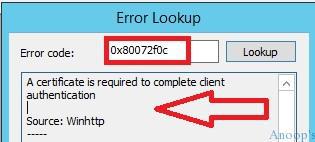
SCCM Intune Sync Issue with Error 0x80072f0c—In this scenario, the Windows 10 device was able to auto-enrol to Azure AD and MDM; however, the Intune MDM agent (not full Intune Agent) could not sync with Intune. When we tried to sync, it gave the following error: “The sync could not be initiated (0x80072f0c).” The error translates to “A certificate is required to complete client authentication. Source: Winhttp.”

Table of Contents
- SCCM Logs Show IsDomainUser IsCloudUser
- FIX Intune Error 0x80180013
- How to Start Troubleshooting Intune Issues | Fix Intune Issues with Easy Steps MEM
- How to Collect Intune Error Details using SCCM CMPivot Best Option
Fix Intune Sync Error 0x80072f0c Issue
Basic troubleshooting didn’t help us much. We checked the Azure AD Premium licenses; licenses have been assigned to users correctly. In SCCM 2012, there is an Intune connector role for a hybrid scenario; however, in SCCM CB, that site system role is deprecated, and there is a default role called “Service Connection Point“. Everything between Intune and SCCM looks okay with the log files.
NOTE! – Methods to Translate SCCM Error Codes to Error Messages
| Error Code |
|---|
| 0x80072f0c |
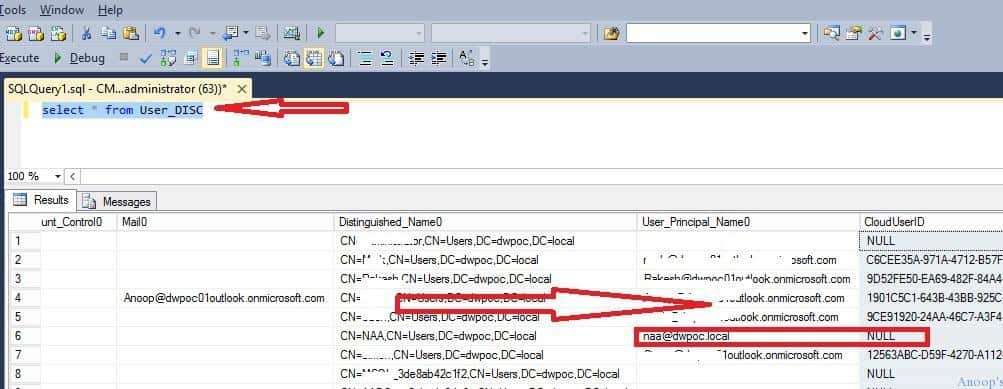
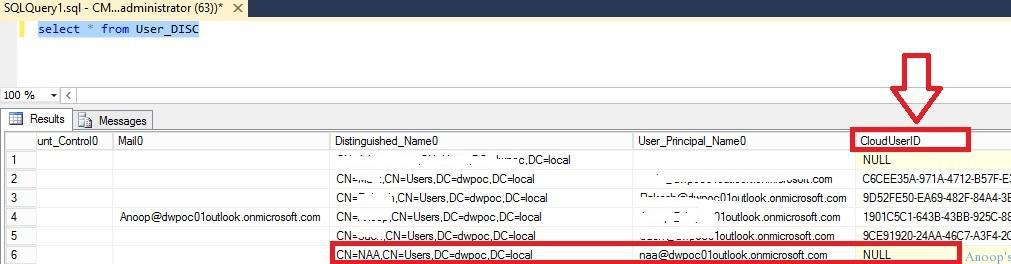
The on-premise AD and Azure AD syncs are also working fine. When we checked the SCCM SQL DB for the User Discovery table, we found that some of the values, like the UPN suffix name (User_Principal_Name0) and Cloud User IDs (CloudUserID), are not getting populated correctly. The following SQL query can be used to find user discovery data from SCCM SQL DB: “select * from User_DISC.”
For example, in the screenshot below, you can see some users with UPN, like “@dwpoc01outlook.onmicrosoft.com” and some with “dwpoc.local“. Also, Cloud ID is not allocated to some of the users like “NAA” CloudUserID = NULL.
Intune Error 0x80072f0c
Now, we have identified that the UPN suffixes of some of the on-premise AD users are incorrect, which could create problems in MDM enrolment and SCCM + MDM sync on Windows 10 devices.
So, we need to think about how to fix this issue. How do we change users’ UPN values? There are two ways to edit the User_Disc table and update the correct UPNs, but that is NOT recommended.
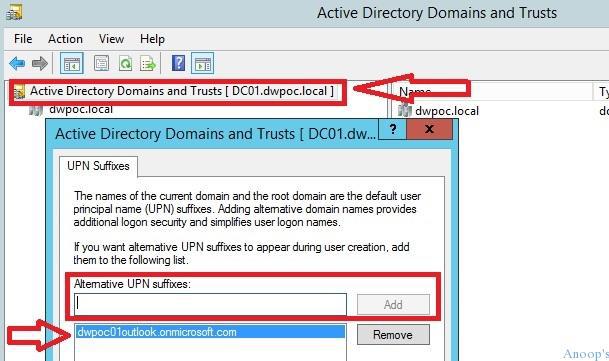
The next option is to go on-premises AD and create a new alternate UPN suffix, as you can see in the following screen capture. How to Add a UPN Suffix to a Forest.
| How to Add a UPN Suffix to a Forest |
|---|
| Open Active Directory Domains and Trusts. |
| Right-click Active Directory Domains and Trusts in the Tree window pane, and then click Properties. |
| On the UPN Suffixes tab, type the new UPN suffix you would like to add to the forest. |
| Click Add, and then click OK. |
- Open Active Directory Domains and Trusts.
- Right-click Active Directory Domains and Trusts in the Tree window pane, and then click Properties.
- On the UPN Suffixes tab, type the new UPN suffix you would like to add to the forest.
- Click Add, and then click OK.
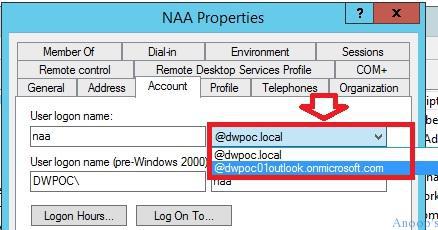
Once the Alternate UPN Suffix is added to the forest, we can return to Active Directory Users and Computers (DSA.MSC) and change the user (NAA) from the UPN drop-down menu. In this case, it was set to @DWPOC.local, and now I changed it to @dwpoc01outlook.onmicrosoft.com.
SCCM CB User discovery component detected the changes in the AD user and ran the SCCM delta user discovery. You can see that User_Principal_Name0 is populated correctly in the SCCM CB database.
However, the cloud ID value is not populated for the user NAA. It’s still set to NULL. Now, how do I get the CloudSerID in SCCM CB DB? Read on 🙂
We need to bounce back / restart the SMS executive thread called “SMS_CLOUD_USERSYNC.” How do we restart the SCCM Executive thread SMS_CLOUD_USERSYNC? This process has been explained in the post here.
Once I bounced back SMS_CLOUD_USERSYNC using the registry key, the following entries appeared in the cloudusersync.log file.
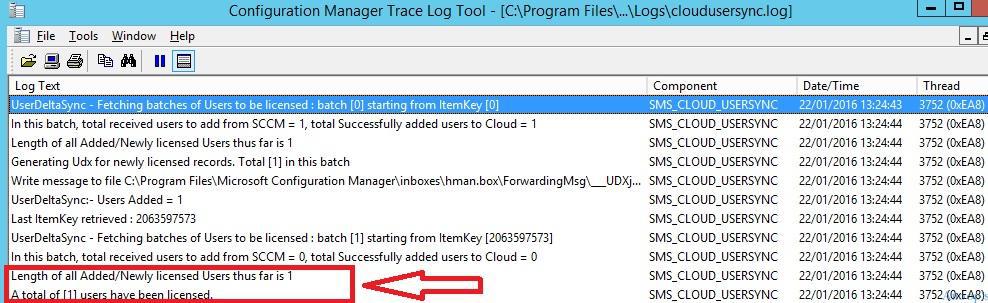
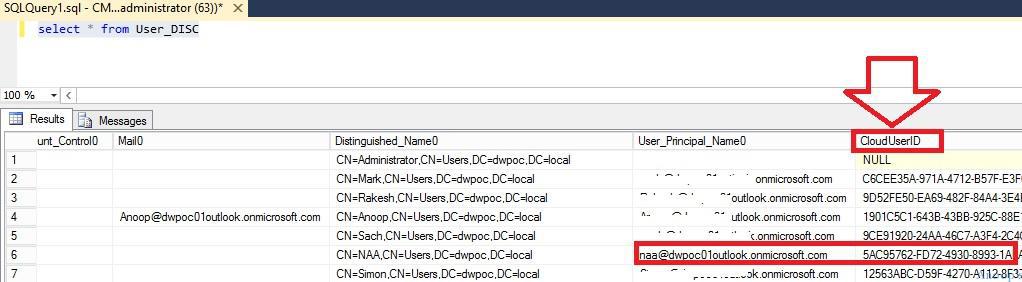
When you check the SCCM CB SQL DB, you can see that the cloud ID against the user NAA has been generated. See the screen capture below. The AAD and MDM enrolment worked well after the cloud ID and User Principal Name were correctly populated into SCCM DB.
Here are some more sample log files on success sync! cloudusersync.log file.
Length of all Added/Newly licensed Users thus far is 2~~ $<SMS_CLOUD_USERSYNC><07-07-2016 10:55:38.068-330><thread=2476 (0x9AC)>
In batch [0], Generating Udx for total [2] newly licensed records. [2] UPNs sent to intune for licensing.~~ $<SMS_CLOUD_USERSYNC><07-07-2016 10:55:38.068-330><thread=2476 (0x9AC)>
Write message to file C:\Program Files\Microsoft Configuration Manager\inboxes\hman.box\ForwardingMsg\___UDXugfk4buq.MCM~~ $<SMS_CLOUD_USERSYNC><07-07-2016 10:55:38.068-330><thread=2476 (0x9AC)>
Write message to file C:\Program Files\Microsoft Configuration Manager\inboxes\hman.box\ForwardingMsg\___UDX1phsq0ud.MCM~~ $<SMS_CLOUD_USERSYNC><07-07-2016 10:55:38.069-330><thread=2476 (0x9AC)>
UserDeltaSync:- Users Added = 2~~ $<SMS_CLOUD_USERSYNC><07-07-2016 10:55:38.069-330><thread=2476 (0x9AC)>
Last ItemKey retrieved : 2063597572~~ $<SMS_CLOUD_USERSYNC><07-07-2016 10:55:38.069-330><thread=2476 (0x9AC)>
UserDeltaSync - Fetching batches of Users to be licensed : batch [1] starting from ItemKey [2063597572]~~ $<SMS_CLOUD_USERSYNC><07-07-2016 10:55:38.069-330><thread=2476 (0x9AC)>
In this batch, total received users to add from SCCM = 0, total Successfully added users to Cloud = 0~~ $<SMS_CLOUD_USERSYNC><07-07-2016 10:55:38.071-330><thread=2476 (0x9AC)>
Length of all Added/Newly licensed Users thus far is 2~~ $<SMS_CLOUD_USERSYNC><07-07-2016 10:55:38.071-330><thread=2476 (0x9AC)>
In batch [1], no Udx messages generated for newly licensed users, however [0] UPNs sent to intune for licensing.~~ $<SMS_CLOUD_USERSYNC><07-07-2016 10:55:38.072-330><thread=2476 (0x9AC)>
A total of [2] users have been licensed.~~ $<SMS_CLOUD_USERSYNC><07-07-2016 10:55:38.072-330><thread=2476 (0x9AC)>
STATMSG: ID=10007 SEV=W LEV=M SOURCE="SMS Server" COMP="SMS_CLOUD_USERSYNC" SYS=CMCBTP.acn.local SITE=Z00 PID=1544 TID=2476 GMTDATE=Thu Jul 07 05:25:38.073 2016 ISTR0="" ISTR1="" ISTR2="" ISTR3="" ISTR4="" ISTR5="" ISTR6="" ISTR7="" ISTR8="" ISTR9="" NUMATTRS=0 $<SMS_CLOUD_USERSYNC><07-07-2016 10:55:38.073-330><thread=2476 (0x9AC)>
Reading SOFTWARE\Microsoft\SMS\Components\SMS_CLOUD_USERSYNC\:SQL Server Name from provider Registry~~ $<SMS_CLOUD_USERSYNC><07-07-2016 11:00:38.090-330><thread=2476 (0x9AC)>
Returning value CMCBTP.acn.local from provider Registry~~ $<SMS_CLOUD_USERSYNC><07-07-2016 11:00:38.090-330><thread=2476 (0x9AC)>
Reading SOFTWARE\Microsoft\SMS\Components\SMS_CLOUD_USERSYNC\:Database Name from provider Registry~~ $<SMS_CLOUD_USERSYNC><07-07-2016 11:00:38.090-330><thread=2476 (0x9AC)>
Returning value CM_Z00 from provider Registry~~ $<SMS_CLOUD_USERSYNC><07-07-2016 11:00:38.091-330><thread=2476 (0x9AC)>
Reading SOFTWARE\Microsoft\SMS\Identification:Server from provider Registry~~ $<SMS_CLOUD_USERSYNC><07-07-2016 11:00:38.091-330><thread=2476 (0x9AC)>
Returning value CMCBTP.acn.local from provider Registry~~ $<SMS_CLOUD_USERSYNC><07-07-2016 11:00:38.091-330><thread=2476 (0x9AC)>
HasIntuneSubscription: Site has valid Intune subscription.~~ $<SMS_CLOUD_USERSYNC><07-07-2016 11:00:38.091-330><thread=2476 (0x9AC)>
Reading SOFTWARE\Microsoft\SMS\Components\SMS_CLOUD_USERSYNC\:SQL Server Name from provider Registry~~ $<SMS_CLOUD_USERSYNC><07-07-2016 11:00:38.092-330><thread=2476 (0x9AC)>
Returning value CMCBTP.acn.local from provider Registry~~ $<SMS_CLOUD_USERSYNC><07-07-2016 11:00:38.092-330><thread=2476 (0x9AC)>
Reading SOFTWARE\Microsoft\SMS\Components\SMS_CLOUD_USERSYNC\:Database Name from provider Registry~~ $<SMS_CLOUD_USERSYNC><07-07-2016 11:00:38.092-330><thread=2476 (0x9AC)>
Resources
SCCM Related Posts Real World Experiences Of SCCM Admins (anoopcnair.com)
SCCM Video Tutorials For IT Pros – HTMD Blog #2 (howtomanagedevices.com)
We are on WhatsApp now. To get the latest step-by-step guides, news, and updates, Join our Channel. Click here. HTMD WhatsApp.
Author
Anoop C Nair is Microsoft MVP! He is a Device Management Admin with more than 20 years of experience (calculation done in 2021) in IT. He is a Blogger, Speaker, and Local User Group HTMD Community leader. His main focus is on Device Management technologies like SCCM 2012, Current Branch, and Intune. He writes about ConfigMgr, Windows 11, Windows 10, Azure AD, Microsoft Intune, Windows 365, AVD, etc.




Great post. I am having an issue similar to this, but everything is setup properly. The user are added to the appropriate InTune user collection, the UPN is correct as I verified that in the Office 365 Admin Portal (I use Exchange Online), licenses are assigned properly, the entries in the DB shows the appropriate UPN. I am running out of things to try. Any suggestions?
StaffIs this issue only for Windows devices? Are you able to enroll and manage the Android or iOS devices?
Currently I am only deploying Apple devices. As of now, the project that I am working on only involves iPads.
StaffIs there any specific error you are getting? I hope, you are not getting The sync could not be initiated (0x80072f0c) error?
Hi Anoop,
I am getting error in cloudusersync.log as Certmgr has not installed certificate yet,Sleep for 1 miniute.
Request your help to resolve the issue.