Skip to content
How to Monitor IBM PowerHA Servers with SCOM OpsMgr

How to Monitor IBM PowerHA Servers with SCOM OpsMgr

Written By Anoop C Nair
Last Updated August 7, 2024
Posted In SCOM
SHARE

How can I monitor IBM PowerHA Servers with SCOM OpsMgr? PowerHA is an IBM Power Systems data center solution that helps protect critical business applications from planned and unplanned outages.

In today’s complex environment, it’s critical to provide continuous service for application components, and High Availability (HA) is one component that gives continuous service to application clients.

Monitor IBM PowerHAPowerHA’s primary objective is to offer uninterrupted business services by providing redundancy. So, the question is, how can you monitor your PowerHA servers with SCOM?

Monitoring PowerHA servers is critical. Most organizations want to use their existing monitoring solution, like SCOM/OpsMgr, to monitor PowerHA.

Patch My PC

How to Monitor IBM PowerHA Servers with SCOM OpsMgr

This will help get a single pane of glass solution for all the monitoring activities within the organization. NiCE PowerHA MP allows you to monitor PowerHA services with SCOM infrastructure.
How to Monitor IBM PowerHA Servers with SCOM OpsMgr - Fig.1
How to Monitor IBM PowerHA Servers with SCOM OpsMgr – Fig.1

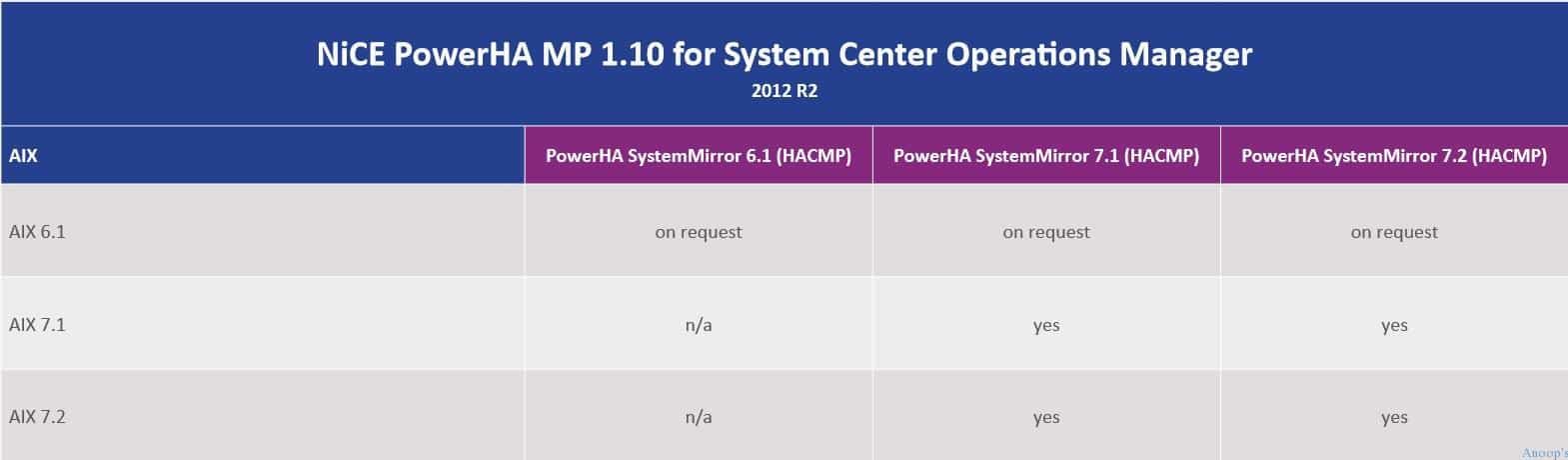
NiCE PowerHA Management Pack has Comprehensive PowerHA discovery, IBM PowerHA Alerting, Failover Cluster Detection, Resource Group Monitoring, Native SCOM integration, and more exciting features. More details about NiCE PowerHA MP support details are given below.

Read more about the NiCE PowerHA Management Pack here.

NiCE PowerHA MP 1.10 for System Center Operations Manager
PowerHA SystemMirror 6.1(HACMP)
PowerHA SystemMirror 7.1(HACMP)
PowerHA SystemMirror 7.2(HACMP)
How to Monitor IBM PowerHA Servers with SCOM OpsMgr – Table 1
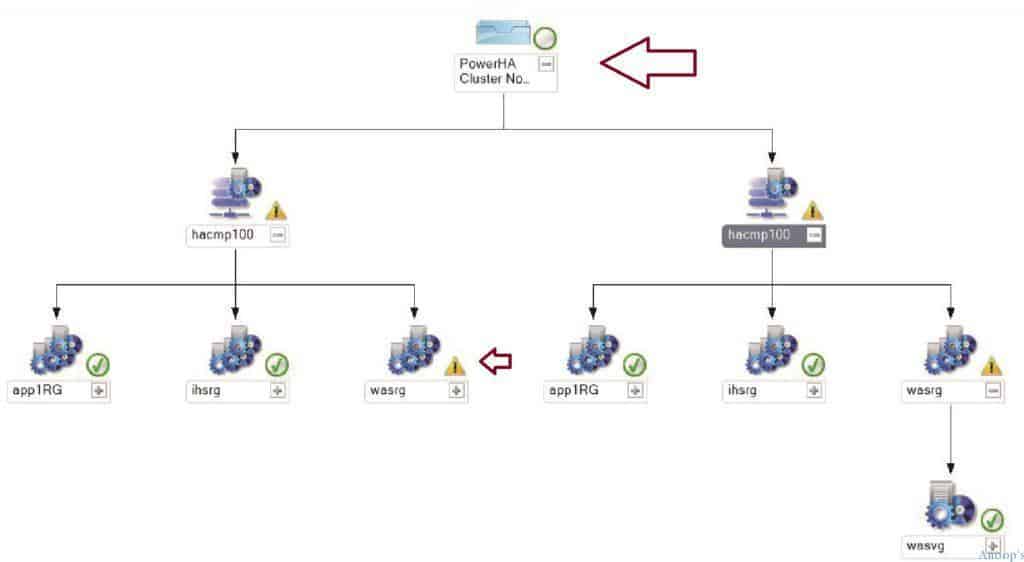
How to Monitor IBM PowerHA Servers with SCOM OpsMgr - Fig.2
How to Monitor IBM PowerHA Servers with SCOM OpsMgr – Fig.2

Monitor IBM PowerHA

Some other key benefits of NiCE PowerHA MP are a Full overview of the PowerHA landscape, quick identification of issues impacting service availability, High ROI, and Visualization of capacity shortages and trends.

We are on WhatsApp now. To get the latest step-by-step guides, news, and updates, Join our Channel. Click here. HTMD WhatsApp.

Author

Anoop C Nair is Microsoft MVP! He is a Device Management Admin with more than 20 years of experience (calculation done in 2021) in IT. He is a Blogger, Speaker, and Local User Group HTMD Community leader. His main focus is on Device Management technologies like SCCM 2012, Current Branch, and Intune. He writes about ConfigMgr, Windows 11, Windows 10, Azure AD, Microsoft Intune, Windows 365, AVD, etc.

Written by

Anoop C Nair is Workplace Technology solution architect with 25+ years of experience in global enterprise organizations such as JP Morgan, Capgemini, etc. Microsoft Certified Trainer. Microsoft MVP from 2015 onwards for consecutive 11+ years! He also conducts Intune and modern workplace tech training for enterprise organizations. He is Blogger, Speaker, and Founder of HTMD Community and HTMD Conference. His main focus is on Device Management technologies like Intune, Windows, Cloud PC. He writes about technologies like Intune, SCCM, Windows, Cloud PC, Windows, Entra, Microsoft Security.

Discussion

Join the discussion

Your email address will not be published. Required fields are marked *

Related guides

SCOM

SCOM 2025 is here with the Latest System Center

Exciting News! SCOM 2025 is here with the Latest System Center. Recently, Microsoft introduced the latest System Center 2025. Microsoft System center in 2025 is th newest release coming into the fall of 2024. You know, Data centres are significant and complex, too. In this case, System Center 2025 will make massive changes. Microsoft system […]

KR Krishna R 4 min read
SCOM

Monitor Office 365 with SCOM NiCE Management Pack

Are you interested in learning more about Monitor Office 365 using the SCOM NiCE Management Pack? This management pack provides a comprehensive solution for monitoring and analyzing your Office 365 environment, helping you identify issues and take proactive steps to ensure smooth operations. Are you monitoring Office 365 services with SCOM infrastructure? With the SCOM […]

AC Anoop C Nair 4 min read
Savision

Monitoring Folders Files with SCOM OpsMgr

Let us learn about Monitoring Folders Files with SCOM OpsMgr. As an SCCM admin, I would love to monitor the Inbox folders of SCCM servers. SCCM CB inbox folders are not as critical as SCCM 2007. However, those folders are significant in identifying issues. Monitoring Folders and Files is also essential for other applications. I […]

VM Vidya M A 3 min read
SCCM

System Center Products Moved to Semi-Annual Channel But NOT SCCM

System Center Products moved to the semi-annual channel but not the SCCM configuration manager configuration manager configuration. Microsoft also moved another suite of products into the semi-annual release channel. A few months back, Windows 10 also moved to Semi-Annual channel releases. It seems that Microsoft is trying to streamline the release management channel for all […]

AC Anoop C Nair 4 min read