






Monitor Office 365 with SCOM NiCE Management Pack
Are you interested in learning more about Monitor Office 365 using the SCOM NiCE Management Pack? This management pack provides a comprehensive solution for monitoring and analyzing your Office 365 environment, helping you identify issues and take proactive steps to ensure smooth operations.
Are you monitoring Office 365 services with SCOM infrastructure? With the SCOM NiCE Management Pack, you can easily monitor the health, performance, and availability of your Office 365 applications and services, all within the familiar SCOM interface. Let’s explore this further and determine how it can benefit your organization.
This post will see tips about connecting the Office 365 service with SCOM infrastructure. Monitor Office 365 using NiCE Management Pack. An Office 365 service monitor is a great option. However, service monitoring from Azure or Office portals could present some challenges.
Another option to monitor Office 365 is to use a Twitter account: https://twitter.com/MSFT365Status. I don’t recommend using this type of Twitter monitoring for a critical service like Office 365.

- Deploy Office 365 ProPlus Microsoft 365 Apps using SCCM
- ConfigMgr CMPivot Query for Out of Support Office 365 ProPlus
- How to Install Office 365 ProPlus Client Package
- SCCM Out of Support Versions of Office 365 Semi-Annual Channel
| Index |
|---|
| Monitor Office 365 with SCOM NiCE Management Pack |
| What is New in NiCE O365 Management Pack? |
| Monitor Office 365 with the SCOM NiCE Management Pack – Video Guide |
What are the Challenges Associated with Default SCOM Monitoring?
The default SCOM monitoring poses several challenges. When you have many Office 365 tenants to manage, it is difficult to do so from a web portal. You don’t get an overall view of all your tenants in one place.
It’s not possible to identify service status from a single point. Additionally, multiple hybrid connectors and disconnected services must be monitored. Some are on-premise SharePoint and separated Office 365 tenants for external clients and partners.
Managing multiple Office 365 tenants can be a hassle, especially regarding monitoring messages, alerts, and notifications. Constantly switching between monitoring system pages for each tenant can be time-consuming and frustrating.
It would be great to have a solution that allows you to monitor everything in one place without needing multiple logins and interfaces.
Monitor Office 365 with SCOM NiCE Management Pack
The NiCE Log File Monitor Management Pack is a powerful tool designed to assist IT data analysts in detecting performance and security issues that may arise due to errors that cause transactions and queries to take longer than usual or not run.
This tool uses cutting-edge technology to access and analyze the vast amount of information in log files, providing valuable insights to help improve system performance and ensure the security of your data.
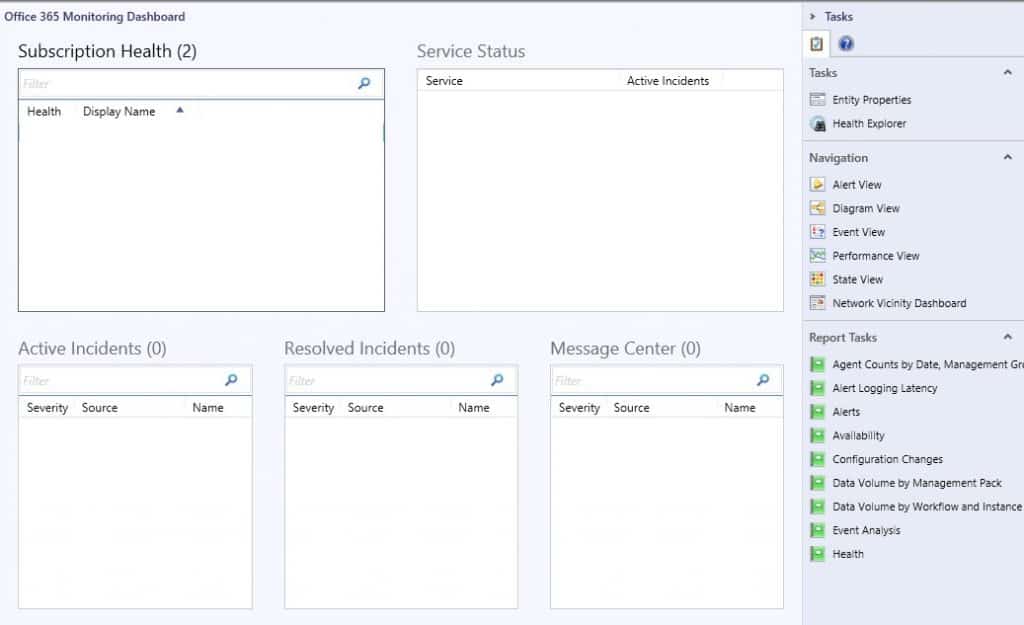
The Office 365 pack helps you use the administrative section of SCOM to add Office 365 Subscriptions. This option is essential since you would enter all the tenants you need to monitor, and it is instrumental in the dashboard.
You can download the trial version NiCE O365 Management Pack 2.00
Nice Management pack for Office 365 has built a fantastic outside-in that integrates monitoring of Office 365. This NiCE MP can integrate with existing Exchange and ADFS MPs to provide end-to-end health information for your mail, SharePoint, and Onedrive systems.
The NiCE O365 MP (Monitor Office 365) includes many user-facing metrics and availability tests such as login times, download times, and mail send times, allowing you to provide service health dashboards to your business using metrics that matter to them.
What is New in NiCE O365 Management Pack?
The following list details “What´s in this NiCE Active O365 MP 2.00 release.” Monitor Office 365 components using the latest version of Office 365 MP 2.00.
- SharePoint and OneDrive End-User Monitoring
- Improved Support for Cloud-Only Tenants
- Improved Support for Exchange Server Farms
- Scalability Improvements for Large Tenants (>10k Mailboxes)
- Support for Multiple Office 365 Tenants
- Multi-Threaded & Multi-Process Metric Calculation
- Process Scalability Improvements
Monitor Office 365 with the SCOM NiCE Management Pack – Video Guide
If you want to enhance your knowledge of managing Office 365 with the SCOM NiCE Management Pack, I highly recommend watching the video below. It’s an excellent resource that can provide you with valuable insights and best practices.
Resources
We are on WhatsApp. To get the latest step-by-step guides and news updates, Join our Channel. Click here –HTMD WhatsApp.
Author
Anoop C Nair is Microsoft MVP! He is a Device Management Admin with more than 20 years of experience (calculation done in 2021) in IT. He is a Blogger, Speaker, and Local User Group HTMD Community leader. His primary focus is Device Management technologies like SCCM 2012, Current Branch, and Intune. He writes about ConfigMgr, Windows 11, Windows 10, Azure AD, Microsoft Intune, Windows 365, AVD, etc.


Discussion