






Apple Emergency Patch Released to Fix WebKit Security Vulnerabilities
Apple Emergency Patch Updates Address new Zero-Day Vulnerability targeting iPhones, iPads, and Macs. The Rapid Security Response Updates addresses CVE-2023-37450 WebKit confusion exploit leading to OS Crashes. Apple has fixed a number of other zero-day flaws overall in the past few months.
WebKit is the web browser engine developed by Apple and used by many other apps on macOS, and iOS. WebKit has been a common target for threat actors as many previously exploited vulnerabilities have been reported in this component,
Apple Releases Rapid Security Response Updates for iOS, iPadOS, macOS, and Safari web browser to address a zero-day, specifically for iOS 16.5.1 and macOS 13.4.1 to fix actively Exploited Vulnerability.
Rapid Security Responses deliver important security improvements between software updates and are available only for the latest versions of iOS, iPadOS, and macOS. It is important to keep the setting turned On to receive the software release updates, otherwise, your device will get updates in future release part of software updates.

The best way is always to keep Apple devices updated with the latest patches. Also, IT Admins can force critical macOS, and iOS Patches and enable Compliance policy if they manage the devices with Intune to ensure all the devices are compliant and secure to be attacked by any remote attacker, More about Force Safari Patch Updates On MacOS.
- How To Schedule IOS Automatic Updates Using Intune Policies
- Easy Method To Force Safari Patch Updates On MacOS Using Intune
Apple Emergency Patch Update to Fix WebKit Security Vulnerabilities
Rapid Security Responses are a new type of software release for iPhone, iPad, and Mac. They deliver important security improvements between software updates—for example, improvements to the Safari web browser, the WebKit framework stack, or other critical system libraries.
Rapid Security Responses (RSR) also be used to mitigate some security issues more quickly, such as issues that might have been exploited or reported to exist “in the wild.”
A Critical flaw discovered in the Apple WebKit browser engine enables attackers to execute arbitrary code on Apple devices via ingeniously crafted malicious web content.
| Platform | Impact | Descriptions | CVE-ID |
|---|---|---|---|
| macOS Ventura 13.4.1 | Processing web content may lead to arbitrary code execution. Apple is aware of a report that this issue may have been actively exploited. | The issue was addressed with improved checks. | CVE-2023-37450 |
| iOS 16.5.1 and iPadOS 16.5.1 | Processing web content may lead to arbitrary code execution. Apple is aware of a report that this issue may have been actively exploited. | The issue was addressed with improved checks. | CVE-2023-37450 |
Keep your Mac and iOS Devices Up to Date
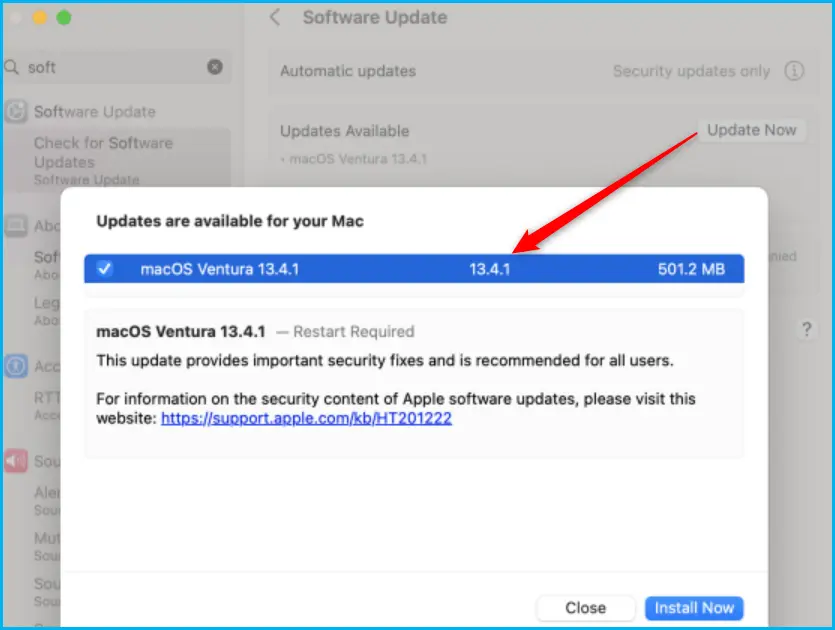
To download macOS software updates, choose Apple menu > System Settings, click General in the sidebar (you may need to scroll down), then click Software Update on the right.
Clicking on the Update Now, You can get Windows appearing with the Information, Updates that are available for your Mac with Version, Size details. You can click on the Install Now button to start installing the updates.
Note – New Rapid Security Responses are delivered only for the latest versions of iOS, iPadOS, and macOS, starting with iOS 16.4.1, iPadOS 16.4.1, and macOS 13.3.1.
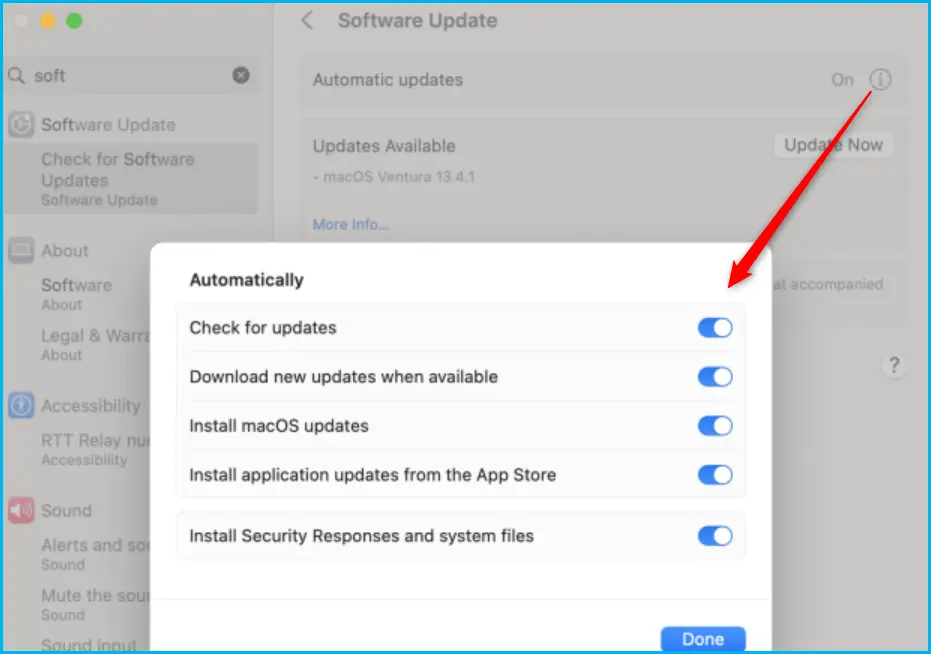
By default, your device automatically applies Rapid Security Responses. If necessary, you will be prompted to restart your device. To check your device settings, follow the steps below.
If you want to enable the automatic updates for your device, You can simply click on the Automatic Updates (i) button to get the offered options for you, then make sure that “Install Security Responses and system files” is turned On. Here you can set it up the following option to offer automatic update
- Check for updates
- Download new updates when available
- Install macOS updates
- Install application updates from the App Store
- Install Security Response and system files
Manage macOS Software Updates using Intune
Intune policy for macOS software updates allows you to remotely manage how downloads, installations, and notifications should occur when the updates are available for macOS, You can manage macOS Updates Using Intune Policy.
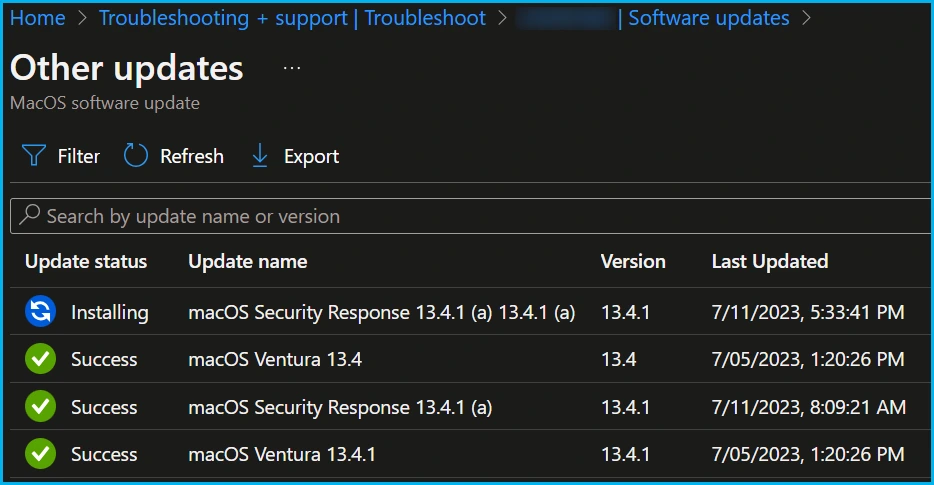
You can check Software Update Status for macOS Devices with the following steps help you to monitor and troubleshoot issues with software updates installation on macOS. Here’s how to get the details status specific to the device in Intune, Monitor MacOS Update Installation Status.
Once you click on the update, you will get a detailed report of the updates. For example, The device is installing macOS Security Response 13.4.1 (a) 13.4.1 (a). The Update status, update name, Version, and Last updated getting displayed here.
The question comes here, what will happen if the selected option for installing security response and system files decides not to apply Rapid Security Responses when they are available, your device will receive relevant fixes or mitigations when they are included in a subsequent software update.
Author
About Author – Jitesh, Microsoft MVP, has over six years of working experience in the IT Industry. He writes and shares his experiences related to Microsoft device management technologies and IT Infrastructure management. His primary focus is Windows 10/11 Deployment solution with Configuration Manager, Microsoft Deployment Toolkit (MDT), and Microsoft Intune.

Discussion