






SCCM ConfigMgr LTSB Long Term Servicing Branch Option Configuration Manager Intune
Let’s discuss the SCCM ConfigMgr LTSB Long Term Servicing Branch Option Configuration Manager Intune.
Do you know what the SCCM ConfigMgr Long Term Servicing Branch (LTSB) is? The LTSB version of SCCM ConfigMgr provides a 5×5 support cycle. Please don’t assume that SCCM ConfigMgr LTSB support is similar to SCCM 2012 and 2007.
It’s not. Microsoft is promising only security updates for the SCCM LTSB version. I have a separate post here that discusses support details for the SCCM CB version(s).
SCCM ConfigMgr LTSB Long Term Servicing Branch Option? So the big question is: In which scenario should you install SCCM LTSB? The answer is that you should not install SCCM LTSB at all.

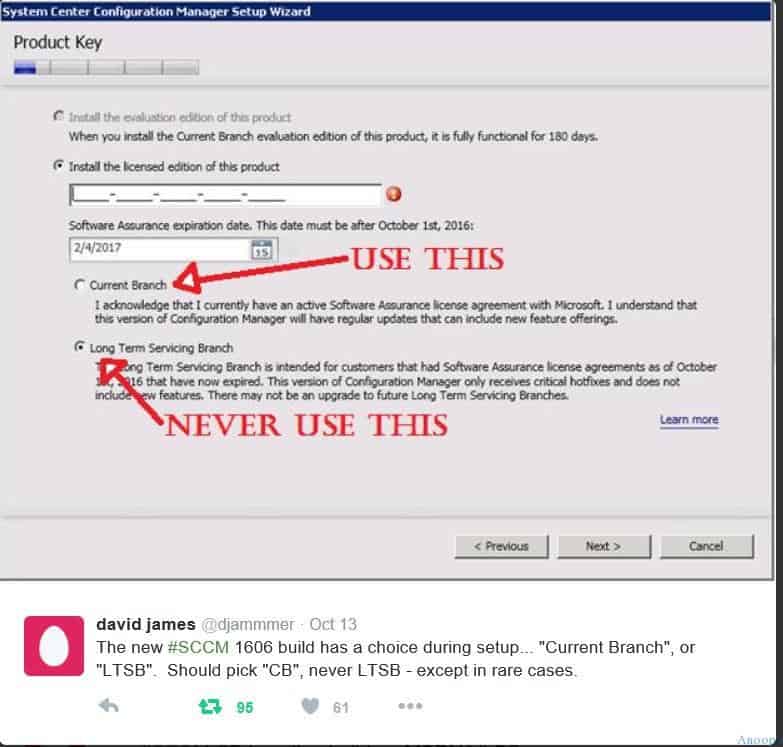
You should not select the “Long Term Servicing Branch” option, which you can see in the SCCM 1606 setup wizard. Then why did Microsoft release SCCM LTSB? The answer is in the Microsoft blog post (read here), and I quote it below in a slightly modified way.
“LTSB of ConfigMgr/SCCM is intended for customers who allowed their Software Assurance or equivalent subscription rights (most normally from Intune or EMS) to expire after October 1st, 2016.”
Table of Contents

- SCCM 2405 New Features
- SCCM 2403 New Key Features and Improvements
- 2404 Microsoft Intune New Features April Update
- Microsoft Intune Extends Support To Android 10 And Later From October 2024
- Use Power Automate To Import Autopilot Devices Hash Via Email For Intune Engineers
- New Key Features of SCCM 2309 | Top Improvements
- Download SCCM 2309 Early Ring Version using PowerShell Script
- SCCM 2307 Technical Preview New Features
Don’t Use the SCCM LTSB Version? SCCM ConfigMgr LTSB Long Term Servicing Branch Option Configuration Manager Intune
Above is David James’s confirmation. In the installation wizard itself, it’s mentioned that SCCM LTSB is ONLY for SA customers whose license agreements have expired as of October 1st, 2016.
Don’t use SCCM LTSB at all !! Intune integration and loads of features are not available in SCCM LTSB. More details here.
| SCCM Setup Wizard |
|---|
| Use the Current Branch Option |
| Never use the Long-Term Servicing Branch Option |
We are on WhatsApp now. To get the latest step-by-step guides, news, and updates, Join our Channel. Click here. HTMD WhatsApp.
Author
Anoop C Nair is Microsoft MVP! He is a Device Management Admin with more than 20 years of experience (calculation done in 2021) in IT. He is a Blogger, Speaker, and Local User Group HTMD Community leader. His main focus is on Device Management technologies like SCCM 2012, Current Branch, and Intune. He writes about ConfigMgr, Windows 11, Windows 10, Azure AD, Microsoft Intune, Windows 365, AVD, etc.




Thanks for your efforts about your article about LTSB Long Term Servicing Branch Option. I have a question, how I can extend SCCM 2016 Evaluation version after 180 days, I am running this project only in virtual labs not real, the Evaluation Period is close to expired. Is there anyway to extend the Evaluation Period for SCCM 2016, thx for your help in advance